
dsh-web
zhu1090093659/dsh-webDeepSeek Harness(DSH)Web 插件聚合生态包 · 一切皆插件,创意工坊分发(dsh-market.com)

Operate DeepSeek Harness (dsh) over MCP: expose sessions, task execution, and workspace management to any MCP client.

English | 中文
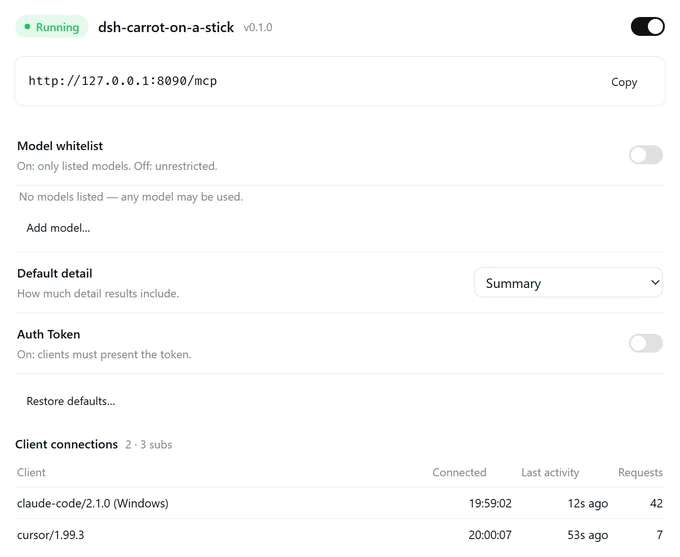
Operate a running DeepSeek Harness (dsh) from any MCP client: the plugin exposes dsh's session center, model/preset catalog, workspaces, and live activity as an MCP server, so Claude Code, Cursor, Cline, or your own agent can create and steer real dsh sessions — the same sessions the dsh UI shows. The same tool surface is also registered as native tools in this instance, so dsh's own sessions can operate themselves.
Claude Code / Cursor / Cline / your agent
                │  Streamable HTTP · 127.0.0.1:8090/mcp
                ▼
       dsh-carrot-on-a-stick
                │  sessionController · agents · tools · workspaces
                ▼
   dsh host — the same sessions the UI shows
session_submit / session_poll / session_result; a client timeout only stops the wait, never the dsh turn; stopping work goes through session_cancel.approval_list / approval_answer / approval_policy, opt-in via approvalControl: fallback | exclusive.carrot_ tools inside this instance; http: false gives a self-use-only deployment.127.0.0.1, optional Bearer auth, Host/Origin allowlists, idle transport-session reaping.The exact tool and resource surfaces are defined in src/mcp/tools/ and src/mcp/resources.ts; agents should call dsh_get_started first — it carries the dsh crash course, recipes, and error recovery.
>= 0.2.1-rc.2 (declared as engines.dsh). A web/desktop profile is needed for the settings panel and the full session surface; minimal/headless profiles can still run the MCP server. stdio-only clients need a Streamable HTTP bridge.The package is not published on npm; install from a built checkout:
git clone https://github.com/Leawind/dsh-carrot-on-a-stick.git
cd dsh-carrot-on-a-stick
npm install
npm run build
dsh plugin --profile web add link:"$(pwd)"
Restart dsh web, then open Settings → MCP Service. To remove: dsh plugin --profile web remove dsh-carrot-on-a-stick.
Default endpoint http://127.0.0.1:8090/mcp. Auth is off until a token is configured; when on, send the token from Settings → MCP Service as a Bearer credential:
{
  "mcpServers": {
    "dsh": {
      "type": "http",
      "url": "http://127.0.0.1:8090/mcp",
      "headers": { "Authorization": "Bearer <token>" }
    }
  }
}
Typical loop:
{ "name": "model_list", "arguments": {} }
{ "name": "session_create", "arguments": { "cwd": "/path/to/project", "provider": "…", "model": "…", "preset": "standard" } }
{ "name": "session_submit", "arguments": { "sessionId": "…", "task": "…" } }
{ "name": "session_poll", "arguments": { "sessionIds": ["…"], "waitMs": 20000 } }
{ "name": "session_result", "arguments": { "sessionId": "…", "requestId": "…" } }
New sessions require explicit provider + model + preset from model_list — the plugin never backfills defaults. Resuming a sessionId reuses that session's model and preset.
Fields and defaults live in src/core/config.ts — the single source of truth. Common fields are editable in the settings panel (volatile: saved in place without reloading, MCP connections stay up); the listen address and port are structural and reload the plugin via Apply. Transport overrides go into the profile's cordis.patch.yml:
- id: dsh-carrot-on-a-stick
  config:
    http: true
    port: 8090
    host: 127.0.0.1 # localhost only by default; add auth before exposing
    # authToken: 'your-secret-token'
[!WARNING] This plugin exposes local code execution. It binds
127.0.0.1only by default, but with auth off any local process that can reach the port can drive dsh.
authToken; never bind 0.0.0.0 or expose to LAN/WAN without a reverse proxy + TLS + auth.cwd the caller specifies.carrot_ tools bypass HTTP/auth — every session in this instance can call them; turn off the registration switch if that is unwanted.npm install
npm run build # compile src/ to lib/ and src/client/ to client/
npm run dev # watch both TypeScript projects
npm test # build + smoke
npm run typecheck # type-check src/, src/client/, test/ and scripts/
npm run smoke:ui # browser harness for the settings panel
Layout: src/ host half (MCP server, tools, resources, engine) and src/client/ settings-panel source; client/ is the generated panel bundle (build output), cordis.yml bundle patch, test/ smoke + e2e + UI harness, docs/ architecture notes. Design constraints that are not obvious from code: docs/architecture.zh.md (Chinese). test/e2e.ts is a separate real-host check, not part of npm test.
Started as a copy of chushixixin/dsh-harness-mcp-server (MIT, thanks @chushixixin), now an independent project.
DeepSeek Harness(DSH)Web 插件聚合生态包 · 一切皆插件,创意工坊分发(dsh-market.com)
把回答做成一页可视化 HTML:模型只写简短的 Markdown 草稿,随包附带的 `am` 命令行生成页面,支持流程图、时序图、树、时间线、ER 图、表格和提示框。
在 dsh 里装上这个插件即可,无需登录、注册或填 API Key,就能使用包括 Muse Spark 1.3、MiMo V2.6 在内的前沿模型——完全免费,不限量。 All you do is install this plugin in dsh: no login, no sign-up, no API key — the frontier models are just there, Muse Spark 1.3 and MiMo V2.6 among them. Completely free, with no usage cap.

