
dsh-web
zhu1090093659/dsh-webDeepSeek Harness(DSH)Web 插件聚合生态包 · 一切皆插件,创意工坊分发(dsh-market.com)

Provide notebook‑style workbench and local shell for DeepSeek Harness Web GUI
English | 中文
A Jupyter notebook (.ipynb) plugin for dsh: open, edit and run notebooks in the Web/Desktop GUI's right sidebar. Rebuilt for the dsh 0.2.x plugin model — plain JavaScript plus one Python script, with no native dependencies and no terminal.
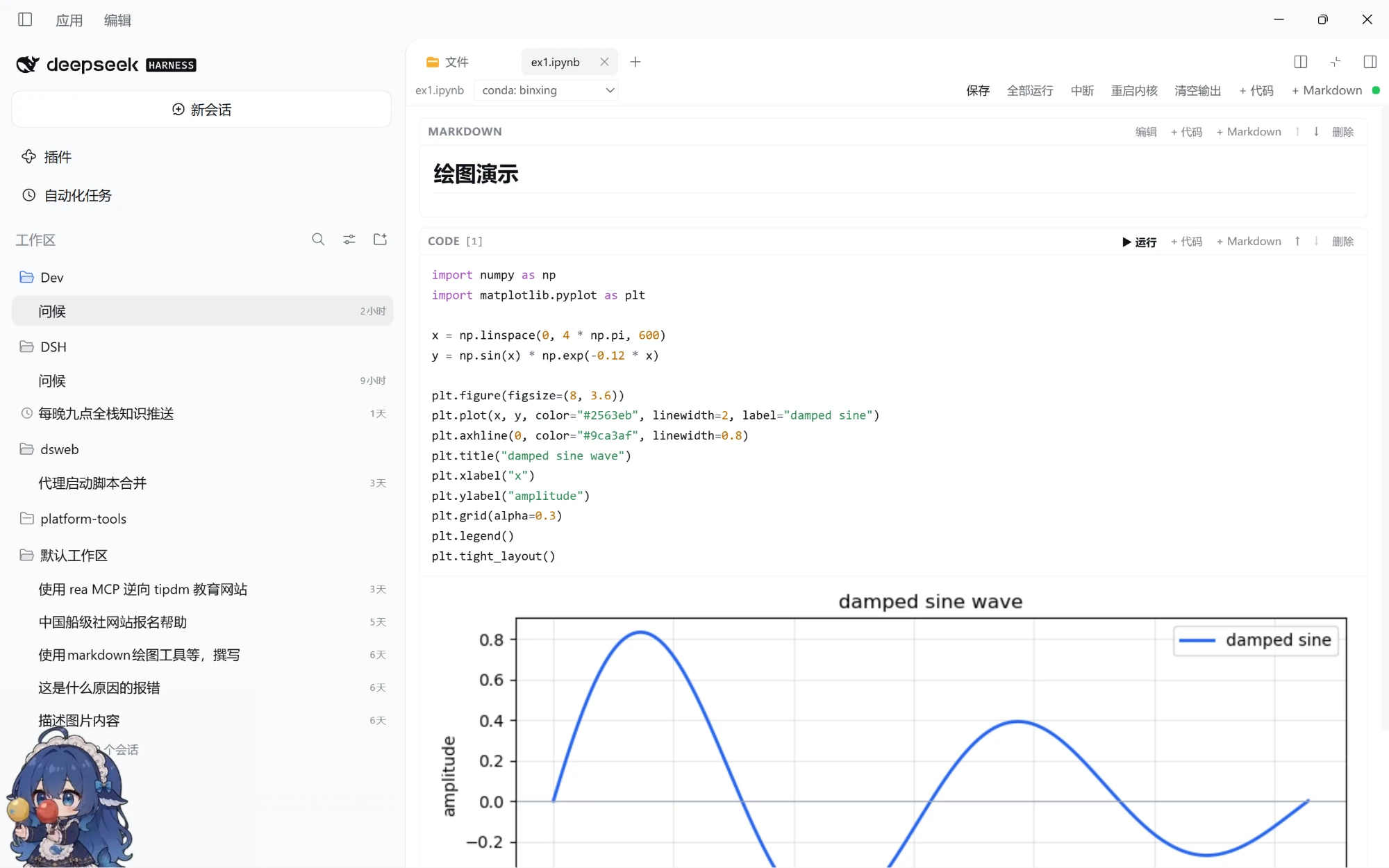
.ipynb in the file tree opens it in the same tab system as the text preview. The tab strip, dragging, split view, fullscreen, layout persistence and theme all come from dsh; the plugin only contributes tab types..py, .js, .ts, .json, .yaml, .toml, .sh, .sql, .md, .txt, .css, and more) are also handled by this plugin, with editing and saving in the right-sidebar tab. HTML, CSV, images, PDF and Office documents stay with the official preview so their richer read-only views are preserved.! magic lines); Tab / Shift+Tab to indent and dedent; Enter keeps the current indentation and adds a level after :..ipynb opens as a new notebook; a file that is not valid notebook JSON shows an error with Reload / Open as empty notebook actions.~/.conda/environments.txt from the notebook toolbar. Switching restarts the kernel on that interpreter, and the choice is stored in the notebook metadata.DataFrame uses _repr_html_; PIL images and _repr_png_ / _repr_svg_ / _repr_json_ / _repr_markdown_ are rendered. matplotlib figures (when installed in that Python environment) are emitted as inline PNGs after the cell.From npm:
dsh plugin --profile web add @kikulmj/dsh-jupyter
The Desktop app uses the desktop profile:
dsh plugin --profile desktop add @kikulmj/dsh-jupyter
From GitHub (alternative):
dsh plugin --profile web add github:kikulmj/dsh-jupyter
Local development (edit code → pnpm build → restart dsh):
dsh plugin --profile web add link:/path/to/dsh-jupyter
engines.dsh (this plugin declares >=0.2.0-0) and accepts 0.2.x runtimes.allowBuilds and no node-gyp are needed: the plugin has no native modules such as node-pty.dsh plugin --profile web remove @kikulmj/dsh-jupyter.Mod+P) and click any .ipynb.Shift+Enter to run a code cell and Ctrl/Cmd+S to save.!command (for example !pip list; pip / python resolve to the current kernel interpreter), %pip, %cd, %pwd..py, .json or .txt opens an editable tab; Ctrl/Cmd+S saves, with a version-conflict check.conda: binxing). !conda activate inside a cell only affects that shell subprocess and cannot change the kernel; the picker restarts the kernel on the chosen interpreter and stores the choice in the notebook metadata.examples/plot-demo.ipynb for a matplotlib demo and a dependency-free SVG fallback.$DSH_PRIMARY_RUNTIME/dependencies/python/… → $DSH_HOME/dsh-runtimes/dsh-primary-runtime/dependencies/python/… → python3 / python on PATH.~/.conda/environments.txt (and ~/.anaconda/environments.txt) appear in the picker. Selecting one runs its python directly and sets PATH / CONDA_PREFIX / CONDA_DEFAULT_ENV to approximate conda activate.jupyter_client or ipykernel.! commands whose first token is a common POSIX tool (ls, cat, grep, …) run through Git Bash when it is installed; other commands (dir, conda) keep cmd.exe.src/
index.ts Host half: /dsh-jupyter/* routes + agent announcement
core/types.ts Wire types
host/scope.ts Session workspace resolution + filesystem boundary checks
host/notebook-service.ts nbformat 4 parse/serialize, reads and writes through ctx.fs (version guard)
host/routes.ts read / write / raw / text-read / text-write / execute / interrupt / restart
host/python.ts Locate dsh's bundled Python and list conda environments
host/kernel.ts One persistent Python kernel process per notebook (JSONL stdio)
host/kernel_bridge.py Stdlib-only Python kernel bridge (persistent namespace, streaming, interrupt)
client/index.ts Register the `.ipynb` and text-file tab types and body slots
client/panel.tsx Notebook editor (native slot component)
client/text-editor.tsx Text/code file editor
client/code-editor.tsx Transparent textarea + highlight overlay
client/highlight.ts Python / JS / C / Shell / SQL tokenizer
client/api.ts /dsh-jupyter client
client/styles.ts Cell/output/editor styles over dsh's `--dsw-*` theme tokens
The browser half only requires react; the host half imports Node built-ins only. Every dsh service is declared as a peer dependency and provided by the profile at runtime.
ctx.fs.resolve + ctx.fs.contains, and written through dsh's sandboxed filesystem policy — the workspace limit is never bypassed.input() / stdin interaction is not supported.!conda activate only changes that one shell subprocess; it does not change the kernel. Use the toolbar's Kernel environment picker instead.!, %pip, %cd and %pwd are supported; %% cell magics and other IPython magics (%time, %run, …) are not.! commands run with the host user's privileges; output written directly to file descriptors by C extensions or subprocesses is shown once the cell finishes, not streamed live.lib/ is committed, so remote installs need no local build.pnpm install
pnpm build # tsc → tsdown → copy kernel_bridge.py
DeepSeek Harness(DSH)Web 插件聚合生态包 · 一切皆插件,创意工坊分发(dsh-market.com)
把回答做成一页可视化 HTML:模型只写简短的 Markdown 草稿,随包附带的 `am` 命令行生成页面,支持流程图、时序图、树、时间线、ER 图、表格和提示框。
在 dsh 里装上这个插件即可,无需登录、注册或填 API Key,就能使用包括 Muse Spark 1.3、MiMo V2.6 在内的前沿模型——完全免费,不限量。 All you do is install this plugin in dsh: no login, no sign-up, no API key — the frontier models are just there, Muse Spark 1.3 and MiMo V2.6 among them. Completely free, with no usage cap.

