

liangmianya/dsh-synapse
liangmianya/dsh-synapseDeepSeek Harness 的可视化非线性对话工作区:把会话、追问与分支变成可浏览、可拖拽的对话地图。

A DeepSeek Harness Web plugin for quickly and thoroughly deleting sessions.
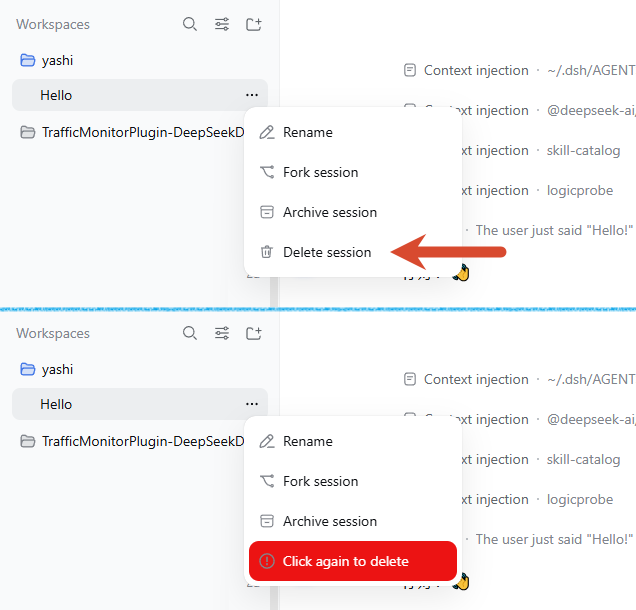
The plugin adds a Delete session item to a session row's … menu in the left sidebar of the DeepSeek Harness Web UI.
With the default confirmation mode:
So an unwanted session can be deleted conveniently with a double-click.
The confirmation mode itself is configurable: the plugin registers its own card into the official plugins.bundle.config slot, which is rendered on the plugin's own page under the sidebar's Plugins page (open the @kagurazakayashi/dsh-delete-session entry; the config section sits between its description and its rows). There you can choose click again to delete (default), confirm in a dialog, or delete immediately (dangerous). The saved choice takes effect right away and is persisted as the config: entry of the id: delete-session row in the profile's cordis.patch.yml (for example $DSH_HOME/profiles/web/cordis.patch.yml).
It is a minimal DeepSeek Harness Web out-of-tree plugin. It neither modifies the DSH core installation nor patches any core file: its host row comes from its own cordis.patch.yml bundle patch, and the Delete session menu item is contributed through the official sidebar.workspaces.session.menu.item slot rather than by injecting into the DOM.
Run these two commands in your terminal to install and start:
dsh plugin --profile web add @kagurazakayashi/dsh-delete-session
dsh web
After the restart, refresh the page and open any session row's … menu — Delete session appears below Archive session.
index.js) registers POST /delete-session/delete.client.js) registers a Delete session item into the official sidebar.workspaces.session.menu.item slot (registration id delete-session, order 450), so it lands immediately below the built-in Archive session row (order 400) (zh / en bilingual).click-again (default) uses the in-place warning state, dialog opens a confirmation dialog, and instant deletes on the first click with no confirmation.click-again mode.dialog mode's confirmation can be dismissed with Cancel, Escape, or a click outside; only its danger-coloured confirm button deletes, and the initial focus sits on Cancel to reduce mis-clicks.idle (i.e. running a task) are rejected, to avoid corrupting a log that is still being written. Idle sessions that were merely opened and then switched away (still resident in memory) can be deleted normally.plugins.bundle.config slot (keyed by the npm package name @kagurazakayashi/dsh-delete-session, provided by @deepseek-ai/dsh-client-ui-plugin-manager), rendered on the plugin's own page under the sidebar's Plugins page, and offering the delete confirmation mode (click again / confirm in a dialog / delete immediately). The card uses a draft-then-save model and writes the config: entry of the id: delete-session row in the profile's cordis.patch.yml; it shows a "Customized" badge and offers "Reset to default". The saved value decides how the next deletion is confirmed, immediately; the card's unsaved draft does not affect deletion.After clicking the … button on a session row, the opened menu looks like this (Delete session is added by this plugin). The screenshot below contrasts the menu before and after the first click — the second click is what actually deletes:
Session row menu

├─ Rename session     (core)
├─ Fork session       (core)
├─ Archive session    (core)
└─ Delete session     ← added by this plugin (zh / en)
The confirmation mode comes from the plugin's settings card; click-again is the default.
click-again — two-step confirmation with no dialog:
First click "Delete session"
        │
        ▼
The item turns into a red warning state "Click again to delete"
        │
        ├─ not clicked again within 8s ──▶ reverts to normal "Delete session"
        │
        └─ clicked again within 8s ──▶ calls POST /delete-session/delete
                                            │
                                            ├─ session is running ──▶ 409 refused, error notice
                                            │
                                            └─ idle session ──▶ archive → rm session directory
                                                                   │
                                                                   ▼
                                                              200 OK, refresh lists
dialog — the menu closes and a confirmation dialog appears; only its confirm button deletes:
Click "Delete session"
        │
        ▼
Dialog: Permanently delete the session "…"?   [Cancel] [Delete]
        │
        ├─ Cancel / Escape / click outside ──▶ nothing is deleted
        │
        └─ Delete ──▶ calls POST /delete-session/delete (same checks as above)
instant — the first click deletes immediately, with no confirmation at all:
Click "Delete session" ──▶ calls POST /delete-session/delete (same checks as above)
All three modes end in the same route, so the running-session refusal (409) and the auto-archive-then-remove behaviour are identical.
In dsh 0.2.x the plugin's configuration is no longer inside the Settings dialog (that was the 0.1.x location); it lives on the plugin's own page. Four steps to reach it:
1.2.1 the list shows the localized name Delete session, while older versions show the package name @kagurazakayashi/dsh-delete-session; clicking the toggle on the right or the blank area does not open it.Expanding it offers the confirmation mode used when deleting a session:
| Option | Meaning |
|---|---|
| Click again to delete | The first click enters a warning state; the second click deletes (default) |
| Confirm in a dialog | A confirmation dialog appears; the session is deleted after confirming |
| Delete immediately (dangerous) | Deletes immediately with no second confirmation |
Saving follows the same rules as the core plugin cards:
config entry of the id: delete-session row in the profile's cordis.patch.yml (the settings namespace is that profile entry id), so it survives a restart:
- id: delete-session
  config:
    confirmMode: click-again   # click-again | dialog | instant
How it is implemented: the settings namespace is simply the profile entry id declared by this bundle's cordis.patch.yml, delete-session, and the Host half (index.js) declares the schema itself through its own schemastery Config (the confirmMode field, marked .volatile()). There is no settings.installSection / settings.register / settings.get any more. The browser half reads and writes that namespace through ctx.configForms.get("delete-session") (getSnapshot / subscribe / set / unset) and registers its card into the official plugins.bundle.config slot, keyed by the npm package name @kagurazakayashi/dsh-delete-session (provided by @deepseek-ai/dsh-client-ui-plugin-manager). A deployment without the settings service only loses the card; deletion keeps working.
The saved value takes effect immediately: it decides how the next "Delete session" click is confirmed. The card's unsaved draft does not affect deletion until you press Save.
Cannot find the card? Check two things first: click the plugin's name under Installed to open its detail page (not the toggle), and give the list time to load. If a skin with background artwork is active, the page's text is drawn over it and reads poorly (the Plugins page paints no opaque background of its own, while the card keeps its own); temporarily switching or disabling the skin makes it much easier to read.
dsh plugin --profile web add @kagurazakayashi/dsh-delete-session
This pulls the plugin from npm and registers it in the profile's bundle list automatically (no manual config editing).
This plugin is structured like dsh-archive-manager: put it on disk, then add it to an existing web profile.
Place the plugin source somewhere on disk, e.g. on Windows:
C:\Users\<you>\.dsh\plugins\dsh-delete-session
(On macOS / Linux: ~/.dsh/plugins/dsh-delete-session.)
Add it to the web profile with dsh:
# Windows (replace <you> with your username)
dsh plugin --profile web add "C:\Users\<you>\.dsh\plugins\dsh-delete-session"

# macOS / Linux
dsh plugin --profile web add "~/.dsh/plugins/dsh-delete-session"
Make sure the bundle list in $DSH_HOME/profiles/web/package.json includes this plugin. Newer dsh versions append it automatically on add; if not, add it by hand:
{
  "name": "dsh-profile-web",
  "private": true,
  "dependencies": {
    "@kagurazakayashi/dsh-delete-session": "link:../../plugins/dsh-delete-session"
  },
  "dsh": {
    "profile": {
      "bundles": [
        "@deepseek-ai/dsh-base",
        "@deepseek-ai/dsh-web-app",
        "@kagurazakayashi/dsh-delete-session"
      ]
    }
  }
}
The dependencies entry is written by dsh plugin --profile web add; if dsh.profile.bundles is not appended automatically, add it by hand.
The plugin's cordis.patch.yml (declared via dsh.bundle.patch) injects the host row:
- insert:
    - id: delete-session
      name: '@kagurazakayashi/dsh-delete-session'
A running process does not load new bundle rows, so restart the web profile:
dsh web
After refreshing the page, open any session row's … menu; eligible rows show Delete session below Archive session. In the default mode, click once to enter the warning state and click again to delete; in the other modes the matching confirmation flow applies instead.
The plugin's card on the sidebar's Plugins page (this plugin's own page) also appears after the restart (that page only shows entries for namespaces the Host serves).
ctx.agents.get(id)?.status !== 'idle' returns 409, and a second check runs right before deletion. Only idle sessions resident in memory are exempt.rm is preceded by workspaceRegistry.archiveSession(id), which lets the sidebar hide the session immediately via the host/archived-sessions-changed broadcast (and lets the client auto-clear the current selection), so it does not linger in the list until restart. Archiving is idempotent; a failure does not block the main deletion flow.supportsRawArtifacts flag. The plugin first calls the JSONL backend's public API resolveCurrentLog(id) (async, returning the absolute path of the current-format-generation log); for sessions that have not been migrated yet — filenames without a vN marker — it returns undefined (on this machine only 4 of 89 existing sessions were in the new format), so the plugin falls back to the backend's still-present-at-runtime locate(header) (returning { kind, path }). When neither yields a path it returns 501. If the backend throws an error carrying kind: 'jsonl' and path diagnostics (for example a log in a newer version), the plugin reuses that path to complete the deletion.rm(dirname(logPath), { recursive: true, force: false }); an archive marker is written first, but workspace groups, projection caches, and shared attachments are left untouched. Before deleting, the target directory name must be exactly the session id (the backend names it with encodeSegment(id), and session ids only contain [A-Za-z0-9._-]), so the whole project directory can never be recursively removed.rm with no recycle bin; operate with care.click-again mode only): the warning state lives only in browser memory (per session id, 8-second window) and disappears on plugin unmount, page refresh, or timeout; no persistent state is produced. Switching to another mode stops showing it.sidebar.workspaces.session.menu.item list (registration id delete-session, order 450), which the host menu renders as one role="menuitem" button. The slot supplies { sessionId, displayTitle } plus a useMenuOpenState hook, so the plugin receives the exact session id and never captures the row's … button click, runs a MutationObserver over document.body, parses the row's aria-label (会话“{name}”的操作 / Session actions for {name}), re-implements the core's relative-time bucketing, or clones the "Archive session" item. Keyboard traversal, focus return and menu dismissal are handled by the host menu, so no DOM structure and no localized text is depended upon.@deepseek-ai/dsh-client-ui-workspace leaves no trace of it.The DSH versions and runtime environment this plugin targets:
| Item | Version / notes |
|---|---|
| Targeted DSH core | minimum 0.2.0-rc.1 (every @deepseek-ai/dsh* peer is >=0.2.0-rc.1 <0.3.0-0); runtime-verified on 0.2.0-rc.2 |
| Plugin version | 1.2.2 |
| Settings service | @deepseek-ai/dsh-settings (Host) and @deepseek-ai/dsh-client-ui-settings (ctx.configForms); optional: without them the settings card is simply absent |
| Persistence backend | @deepseek-ai/dsh-session-persistence-jsonl (must provide resolveCurrentLog or locate) |
| Client inject deps | @deepseek-ai/dsh-api-session-controller, @deepseek-ai/dsh-client-locale, @deepseek-ai/dsh-client-ui-plugin-manager, @deepseek-ai/dsh-client-ui-settings, @deepseek-ai/dsh-client-ui-workspace |
| Contributed slots | sidebar.workspaces.session.menu.item (registration id delete-session, order 450, declared by @deepseek-ai/dsh-client-ui-workspace); plugins.bundle.config (keyed by the npm package name, declared by @deepseek-ai/dsh-client-ui-plugin-manager) |
Breaking core changes adopted in 1.0.4:
| Core change | Old usage (≤ 1.0.3) | New usage (1.0.4) |
|---|---|---|
| Session list snapshot | top-level id on each list() item | header.id on each list() item |
| Locating the session log | supportsRawArtifacts + locate(meta) | resolveCurrentLog(id) first, locate(header) fallback |
| Workspace snapshot | workspaces.baselinesReady | only workspaces.phase === "ready" |
| Workspace refresh | workspaces.refresh() | removed; refresh sessions only |
Breaking core changes adopted in 1.2.0:
| Core change | Old usage (≤ 1.1.0) | New usage (1.2.0) |
|---|---|---|
| Settings namespace and schema | ctx.settings.installSection on the Host side; the namespace is a settings section | the namespace is the profile entry id delete-session; the Host side declares its own schemastery Config (confirmMode, marked .volatile()) |
| Reading and writing a value | ctx.settingsScope.bind({ namespace: 'delete-session' }) | ctx.configForms.get("delete-session") (getSnapshot / subscribe / set / unset) |
| Settings card slot | settings.plugin.item, keyed by the namespace | plugins.bundle.config, keyed by the npm package name, provided by @deepseek-ai/dsh-client-ui-plugin-manager |
| Session menu item | DOM injection: click capture, a MutationObserver over document.body, aria-label parsing, relative-time bucketing, cloning the archive item | sidebar.workspaces.session.menu.item, registration id delete-session, order 450; the slot supplies { sessionId, displayTitle } and a useMenuOpenState hook |
| Persisted configuration | the delete-session: section of $DSH_HOME/settings.yaml | the config: entry of the id: delete-session row in the profile's cordis.patch.yml |
| Client inject deps | dsh-api-session-controller, dsh-api-workspace-controller, dsh-client-ui-settings, dsh-client-ui-workspace | dropped the now-unused dsh-api-workspace-controller; added dsh-client-locale and dsh-client-ui-plugin-manager |
| Plugin version | Usable core versions | Basis |
|---|---|---|
1.2.2 | >= 0.2.0-rc.1 < 0.3.0-0 | Declares @deepseek-ai/schemastery as a peer dependency, adds screenshots.json for storefront screenshots, and switches the README language bar and icon to native Markdown; behaviour and the settings mechanism are unchanged from 1.2.1 |
1.2.1 | >= 0.2.0-rc.1 < 0.3.0-0 | Adds plugin display metadata: locale/{en,zh}.json supplies the localized plugin name and summary, and icon.svg supplies the Plugins-page artwork; the settings mechanism is unchanged from 1.2.0 |
1.2.0 | >= 0.2.0-rc.1 < 0.3.0-0 | Adapts the plugin to dsh 0.2.x: the |
DeepSeek Harness 的可视化非线性对话工作区:把会话、追问与分支变成可浏览、可拖拽的对话地图。
DSH 会话与工作区管理——工作区:归档与显示。会话:跨工作区移动、预设迁移、删除;收藏、待回看、优先级、标签、备注。批量操作。
把 append-only 会话日志导出为按轨迹来源分组的可读 Markdown 或 HTML。

