
dsh-web
zhu1090093659/dsh-webDeepSeek Harness(DSH)Web 插件聚合生态包 · 一切皆插件,创意工坊分发(dsh-market.com)

Usage statistics for DeepSeek Harness (dsh) — lifetime token dashboard: 52-week activity heatmap (daily/weekly/cumulative), per-model trend + donut, streaks, plus a Codex-style /context lens
English · 简体中文
Usage statistics for DeepSeek Harness (dsh) — a lifetime dashboard of your token usage across every session, plus a context lens for the session you are in.
DeepSeek Harness computes rich token accounting and then shows you none of it. dsh-scope surfaces it in two places.
One of several
dshplugins developed underdsh-plugins/— each an independent repo with its own release cadence.
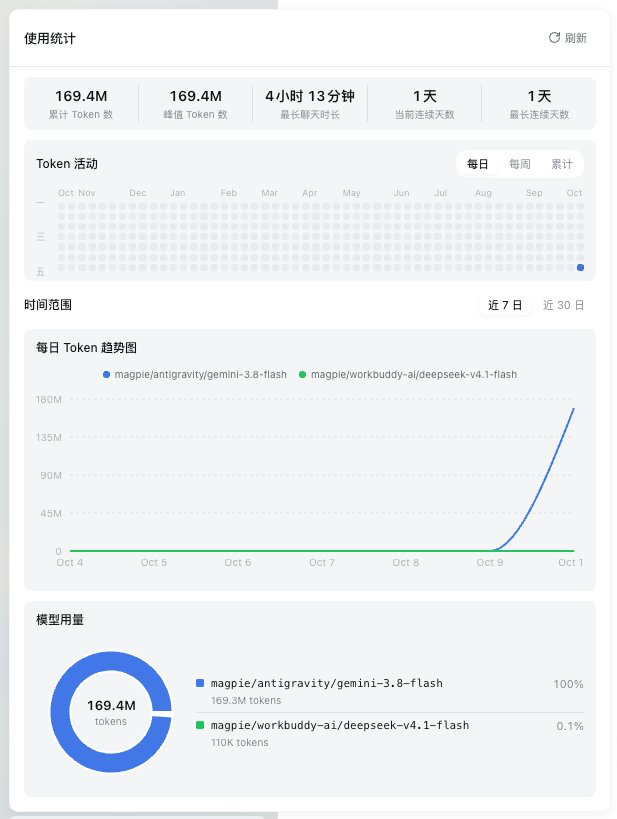
Open from the sidebar foot — a label when the sidebar is wide, an icon on the rail.
The whole panel is one request to the plugin's own loopback-only endpoint.
Window occupancy for the current session: a live occupancy ring in the header that opens into a segmented system / tools / messages composition bar, per-bucket session totals, and KV-cache hit rate. It reads the official token-meter session projections through useProjection — no RPC, no custom wire protocol.
dsh ≥ 0.1.0-rc.6 on your PATH (verified against 0.1.0-rc.6 and 0.2.0-rc.2)dsh plugin --profile <profile> add dsh-scope
dsh web # restart dsh to load the plugin
<profile> is the directory under ~/.dsh/profiles/ that your dsh runs from — the Desktop app uses desktop.
git clone https://github.com/helloxkk/dsh-scope.git
cd dsh-scope
npm install && npm run build
node scripts/install.mjs <profile>   # e.g. desktop, headless, rescue
dsh web                              # restart dsh to load the plugin
The script refuses an unknown profile rather than guessing.
The installer copies lib/, cordis.patch.yml, and package.json into the profile's node_modules and appends the bundle insert to the profile's cordis.patch.yml. It is idempotent — safe to re-run after every rebuild.
rm -rf ~/.dsh/profiles/<profile>/node_modules/dsh-scope
# then remove the "# dsh-scope" block from ~/.dsh/profiles/<profile>/cordis.patch.yml
rm -f ~/.dsh/storages/dsh-scope-cache.json   # optional: drop the fold cache
Host half (lib/index.js) — one read-only, loopback-fenced endpoint, GET /api/dsh-scope/days.
Aggregation is incremental. Per-session fold state is cached in memory and persisted to ~/.dsh/storages/dsh-scope-cache.json, and each request folds only the events added since the last fold. Live sessions fold their in-memory tail; persisted sessions skip work entirely while the backend's opaque revision is unchanged, and otherwise read only the new suffix, with contiguity checks and a full refold when a log was truncated or rewritten. Steady-state cost stays O(new events) no matter how large the logs grow.
Fold semantics mirror dsh-token-meter's tokenUsage projection. A usage sample rides an assistant/chunk (data.chunk.type === "usage") or an assistant/message (data.usage). A repeated sample for the same (turn, step) replaces the earlier value rather than double counting, re-attributed to the later event's day and model. Model attribution follows assistant/message's data.message.source, falling back to the last request/header config.
Beyond token buckets, the fold counts turn/start and tool/call events per day (feeding the weekly and cumulative heatmap tooltips) and tracks each session's first and last event timestamps so the summary can report the longest session. The payload carries every model per day rather than a truncated top-N, so the trend chart and donut always cover all of them.
Client half (lib/client.js, loaded via the package's dsh.client declaration):
sidebar.footer.action renders the usage trigger. The panel fetches /api/dsh-scope/days same-origin and derives every view from that single payload.conversation.session.header.actions (order 30, after the job list) renders the lens trigger. Its popover reads three official projections — tokenUsage (four buckets accumulated over the whole durable log), contextPressure (input-side window pressure plus the route's context window), and contextBreakdown (heuristic system/tools/message composition of the next request).Nothing is sent anywhere. The endpoint refuses non-loopback callers and non-GET methods before doing any work, and no provider credentials are read.
npm install
npm run build                          # tsdown: host ESM + browser ModuleLoader bundle
node scripts/fixture-session.mjs       # optional: write a demo session log with usage events
node scripts/install.mjs <profile>     # then restart dsh
npm run build emits two artifacts:
lib/index.js — the Node host half. @deepseek-ai/* stays external and resolves against the profile's own installation at runtime.lib/client.js — the browser half, wrapped in the harness ModuleLoader factory format. Platform modules (react, @deepseek-ai/dsh-client-*) stay external and resolve through the loader's injected require; everything else, including Recharts, is inlined.Because the harness caches plugin modules at startup, only the client half hot-reloads. After changing anything under src/index.js or src/usage.js, restart dsh.
Built and verified against dsh 0.1.0-rc.6 and 0.2.0-rc.2 (@deepseek-ai/dsh-base / dsh-web-app bundles). The harness is in developer preview and iterates quickly — expect compatibility-breaking changes.
The host half reads persisted logs through whichever API the installed sessionPersistence exposes: open(id, 'read') plus handle.read(offset) on 0.2.x, and the older readFrom(id, fromSeq) elsewhere. list() is normalized to { header, revision } snapshots, so both shapes fold identically.
dsh imports each plugin module once at startup, so a profile config reload cannot replace host-half code: restart dsh after rebuilding.
The usage panel's layout, its three heatmap modes, and the month-ruler alignment are derived from ZCode's 「应用用量」 surface (zai-org/ZCode, Apache-2.0). The rendering, data source and theming are this plugin's own. See NOTICE.md for the required attribution and the list of derived files.
Charts render with Recharts (MIT).
DeepSeek Harness(DSH)Web 插件聚合生态包 · 一切皆插件,创意工坊分发(dsh-market.com)
把回答做成一页可视化 HTML:模型只写简短的 Markdown 草稿,随包附带的 `am` 命令行生成页面,支持流程图、时序图、树、时间线、ER 图、表格和提示框。
在 dsh 里装上这个插件即可,无需登录、注册或填 API Key,就能使用包括 Muse Spark 1.3、MiMo V2.6 在内的前沿模型——完全免费,不限量。 All you do is install this plugin in dsh: no login, no sign-up, no API key — the frontier models are just there, Muse Spark 1.3 and MiMo V2.6 among them. Completely free, with no usage cap.

