
dsh
OpenPetsHQ/openpets将 DeepSeek Harness 的生命周期状态、错误与审批请求,桥接到本地运行的 OpenPets 桌面伙伴。

增强版 ACP 服务器:块级与推理流式、用量遥测、模型/推理强度切换、权限预设、会话恢复/归档、每会话 MCP servers、Zed 文件/终端转发。
An enhanced Agent Client Protocol (ACP) server for
DeepSeek Harness (dsh), built for ACP
editors like Zed. It is a drop-in replacement for the official @deepseek-ai/dsh-acp
bridge: the official bridge only streams plain text, this one exposes the Web GUI's
capabilities — streaming, telemetry, model/permission control, session management, MCP —
over the ACP wire.
agent_message_chunk / agent_thought_chunk,
coalesced on a 75 ms timer). The one cost of sending text before its block commits is
that a mid-block retry cannot take its abandoned partial back: a visible
_[stream interrupted — retrying]_ marker separates it from the retried attempt. Set
streamDeltas: false on the acp-enhanced row (DSH_ACP_STREAM_DELTAS=false) for the
older block-granularity behaviour, where cancelled/retried attempts never leak torn
output at all but nothing renders until the block commitsusage_update._meta carries the full breakdown). The
ring's denominator is the routed model's declared contextWindow, folded from the session
log so a resumed thread keeps it (the harness logs request/context once and does not
re-emit it for an unchanged route). dsh's own dsh-compaction-basic row auto-compacts at
~80% of that window and is mounted by the standard/ptc/cordis presets (never
minimal); /compact forces it manually. A route whose adapter declares no contextWindow has no denominator,
so the ring reports used === size.dsh-attachment-local, mounted by default in dsh-base), promptCapabilities.image
is advertised and pasted/uploaded images are ingested into the harness's durable attachment
store — a vision-capable model (e.g. deepseek-v4-flash-vision-exp) reads them natively,
in wire order with surrounding text. Older stacks (no attachment store) automatically
downgrade: image is not advertised and an image prompt is refused with a clear error.provider/model catalog dropdown (ACP grouped-select wire shape)reasoning_effort dropdown — only when the routed model exposes
selectable efforts; each model remembers the effort it last used (persisted per profile),
so switching back restores it, and a first-time model falls back to its own default — or
its first offered effort — instead of an empty "unknown" selectionstandard is the full coding agent (default),
minimal (极简模式) is a bare persistent shell with no subagent/web/todo/plan
tools — nothing from the host layer leaks into a minimal agent; ptc and cordis
ship alongside. Your own presets are declared in the profile (see
Your own presets) — dsh 0.1.7 no longer discovers
~/.dsh/.agent-presets.
Choose via the agent_preset config option, the /preset command, or the
DSH_ACP_PRESET env var (per-session default); switching is only allowed while the
session is still blank (no turn has run), so history never straddles two tool sets.
A configured preset this roster no longer has does not close the panel: a blank
session composes under the roster default and says so on stderr.Read <path>, the
model's own intent line for shell commands (description, Codex-style — the
exact command stays one click away), Search: <pattern>, Fetch: <url>, etc.
The card body follows the ACP best practice: file edits render as a real
diff, bash/pwsh commands as a real terminal card (codex-acp wire
shape: command line + output + exit pill inside a terminal panel — no more
raw-JSON cards), other executors as a syntax-highlighted code block, and
touched files as clickable locations that open the file — with rawInput
/ rawOutput kept one click away for transparency, plus per-kind icons and a
proper in-progress → completed/failed status lifecyclezed_read_text_file / zed_write_text_file / zed_terminal
put file edits into Zed's "edited files" area (diff + accept/reject) and commands into a
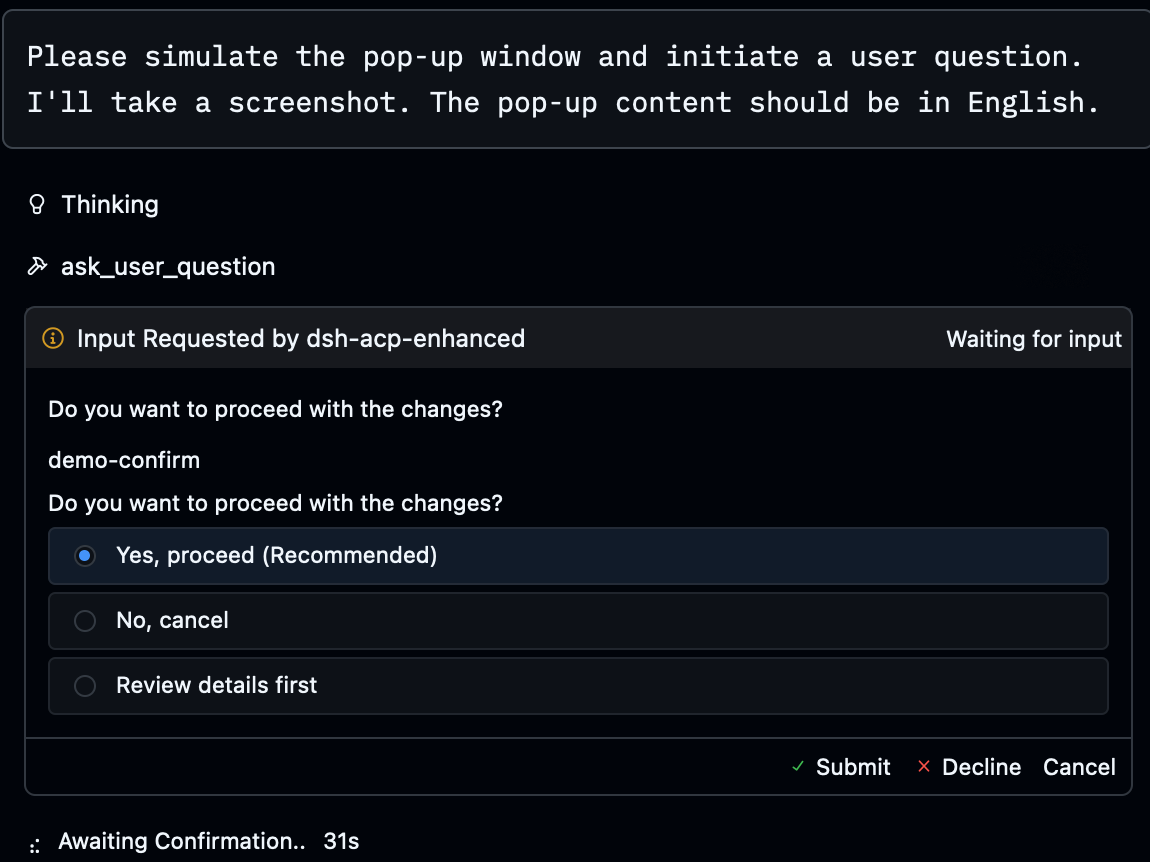
real Zed terminalask_user_question → elicitation/create form, click an
option — or type a custom answer when none of them fit: options render with their
descriptions, each option-backed question gets a free-text "Custom answer" field, and a
custom answer replaces the single selection / accompanies a multi-select (same semantics
as dsh's native question card)session/load restores past threads (full replay); session/list
lists the thread archive (titled, sorted by last activity); session/close drops the
in-memory record so a later session/load resumes from the persisted log; live title
updates. session/delete is deliberately not advertised — the harness declares no
public persistence delete (see Compatibility)sessionCapabilities.additionalDirectories is advertised,
so Zed no longer shows "this agent doesn't currently support multi-root workspaces"
and instead passes every workspace root on session/new / session/load. All roots
are described to the model in the system prompt and reported on session/list; the
sandbox keeps the primary cwd as its single writable root (see Known limitations)/ reveals the command list (available_commands_update):
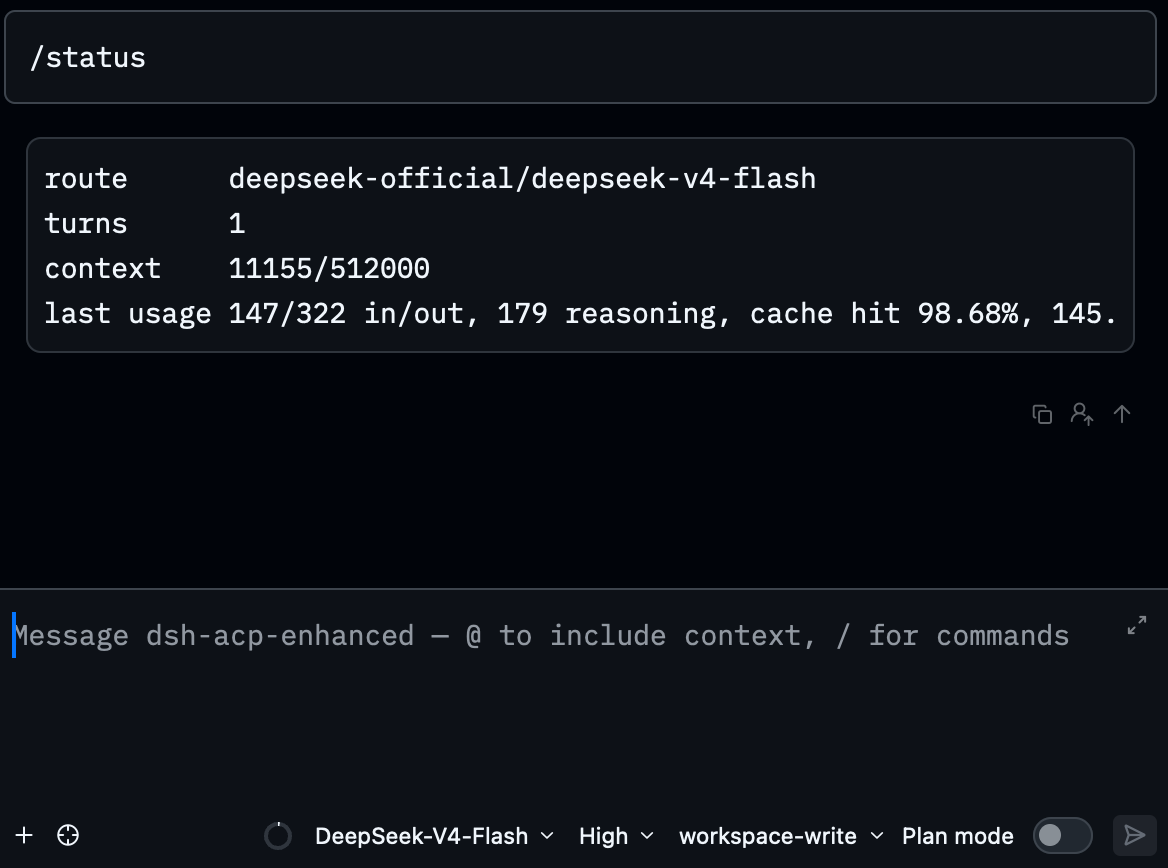
/status shows the route and telemetry, /model lists or switches the model, /preset
lists or switches the agent preset (listings render as monospace code blocks — readable
at a glance), everything else (/compact /goal /permission /plan…) runs straight
through the harness command registry — all executed without a model turn. Every
user-invocable skill is advertised as a command too, so /ask-matt, /code-review,
/tdd, … reach the bridge instead of being rejected by the editor, and the skill's
instructions are injected into the message (the @deepseek-ai/dsh-tool-skill style of
user invocation).
Images pasted next to a slash line ride along as command attachments (e.g. reference
screenshots for a /goal objective), the same way the Web composer submits themsession/new mcpServers mount any MCP server (stdio + streamable
HTTP); tools join as mcp__<server>__<tool>; a failing server never takes the session
downAfter picking dsh-acp-enhanced in Zed's AI Agent panel:
Requires dsh ≥ 0.1.6-alpha.1 (npm install -g @deepseek-ai/dsh@0.2.1-rc.2, or any version
in the peer range below); the bridge consumes one declared harness surface on every supported
line — 0.1.6-alpha.1 through 0.2.1 — and never probes older generations at runtime.
This package follows the official dsh plugin conventions (it declares dsh.bundle), so
installation matches any official bundle: one command — auto-initializes the profile,
installs the package, appends the bundle layer; no profile YAML to write.
Step 1 — install (from the npm registry; no source checkout needed):
dsh plugin --profile acp-enhanced add dsh-acp-enhanced
When hacking on the code, use
link:to a local checkout instead (live edits):dsh plugin --profile acp-enhanced add "link:/absolute/path/to/dsh-acp-enhanced"
Step 2 — register in Zed (under agent_servers in ~/.config/zed/settings.json;
Zed spawns agents with a minimal PATH, so use the shipped launcher
scripts/dsh-acp-zed.sh, which locates node/dsh itself)
The launcher ships with the package. Its absolute path depends on how you installed in Step 1:
- npm install (default):
$HOME/.dsh/profiles/acp-enhanced/node_modules/dsh-acp-enhanced/scripts/dsh-acp-zed.sh— replace$HOMEwith your home directory (e.g./Users/you); Zed does not expand~or env vars, so write the full literal path.link:dev install:<your checkout>/scripts/dsh-acp-zed.sh.
{
  // ...your existing settings...
  "agent_servers": {
    "dsh-acp-enhanced": {
      "type": "custom",
      "command": "/bin/bash",
      "args": ["/absolute/path/to/dsh-acp-enhanced/scripts/dsh-acp-zed.sh"],
      "env": {
        "DSH_ACP_PROVIDER": "deepseek-official",  // the official provider id
        "DSH_ACP_MODEL": "deepseek-v4-flash",     // the official model id
        "DSH_ACP_PRESET": "standard",             // optional: agent preset id (minimal / standard / code / cordis / yours)
        "DSH_ACP_INCLUDE_ALL_PROVIDERS": "true"   // optional: list every registered provider in the model dropdown
      }
    }
  }
}
Both env vars match the shipped patch's defaults, so they can be omitted entirely — writing them out just makes the route explicit.
DSH_ACP_PRESETdefaults tostandardon the roster side; set it when you want every new session to start in a specific mode. The API key does not have to live in Zed: store it in~/.dsh/.credentials.yaml(DEEPSEEK_API_KEY) and the dsh credentials service resolves it; the launcher also falls back to a runningdsh webprocess's key.
DSH_ACP_INCLUDE_ALL_PROVIDERS=trueopts the model dropdown into every provider thellmservice has registered, instead of only the routed one. It is off by default for a reason: a provider without a usable credential still appears, and picking it parks the session on a route that cannot dispatch — the switch fails as an invalid-params error naming the route and the session keeps the one it had. Set it when one profile routes across several providers and you want to pick per session.
Debugging a stalled turn (is it the model request or the tool?):
"env": {
  // ...existing vars...
  "ACP_LOG": "/Users/you/.dsh/dsh-acp-enhanced.trace.jsonl"  // append-only JSONL event trace
}
Each line is one session event with wall-clock time (ms epoch); a turn that appears to
hang is attributable afterwards: a model request stall shows a long gap between
step/start and the first assistant/chunk, while a tool-execution stall shows a
long gap between tool/call and tool/result (the result line carries elapsedMs).
prompt/settled lines cover the full user-message round trip (stopReason + elapsed).
Optional: pin the panel's default config options (all still changeable in the panel):
"dsh-acp-enhanced": {
  // ...the type/command/args/env above...
  "default_config_options": {
    "model": "deepseek-official/deepseek-v4-flash",
    "agent_preset": "standard",
    "plan_mode": false,
    "reasoning_effort": "high"
  },
  "favorite_config_option_values": {
    "model": ["deepseek-official/deepseek-v4-flash", "deepseek-official/deepseek-v4-pro"]
  }
}
Same install path; only the env values change to the provider/model the gateway exposes plus the key env var it requires:
"dsh-acp-enhanced": {
  "type": "custom",
  "command": "/bin/bash",
  "args": ["/absolute/path/to/dsh-acp-enhanced/scripts/dsh-acp-zed.sh"],
  "env": {
    "DSH_ACP_PROVIDER": "<gateway-provider-id>",  // provider id exposed by the gateway
    "DSH_ACP_MODEL": "<gateway-model-id>",         // model id exposed by the gateway
    "<KEY_ENV_NAME>": "<key>"                      // the key env var the gateway reads
  }
}
<KEY_ENV_NAME>can also be omitted and the key stored in~/.dsh/.credentials.yamlinstead.
Zed hot-reloads settings. Open the AI Agent panel (Cmd+Shift+A) → pick
dsh-acp-enhanced in the agent selector → send your first message: replies stream in
real time, the status bar shows context usage, the panel exposes Model / Permission preset
/ Plan mode options plus three modes, and the thread archive lists and resumes past
sessions.
Verify locally (no Zed needed):
node <pkg>/scripts/acp-doctor.mjs              # bundles + versions, the peer range, and one real boot
node scripts/acp-client.mjs                    # dev checkout only: full ACP e2e, expect ALL CHECKS PASSED
DSH_ACP_PROVIDER=... DSH_ACP_MODEL=... node scripts/acp-client.mjs   # only for a custom route
The bridge ships no search provider and takes no position on which one you use: the
model-facing web_search tool rides on the web seam's searchProvider, so mount any
ctx.web provider into the profile — a package with dsh.bundle via
dsh plugin --profile acp-enhanced add <package>, or a plain package via your user-layer
insert rows (see below). Which provider exists in your dsh deployment is a profile
concern, not a bridge one.
Note what that costs: a provider bundle sits on the boot path of every ACP thread, so
if it fails to load, the whole profile dies and Zed shows an opaque hang. Prefer a preset
composition when the plugin only adds model-facing tools (see
Keep the profile minimal); a provider that must configure the
host web row belongs in the host composition (the profile) — mount it deliberately, and
re-run the doctor after changing it.
dsh-acp-enhanced runs in its own profile — acp-enhanced, created at
~/.dsh/profiles/acp-enhanced/ — inside the same dsh home as dsh web. The profile is
what isolates the composition, so plugin changes here never affect your web setup,
while credentials, settings, sessions and presets stay shared.
The profile composes its plugin tree from three sources, each layer patching the ones before it:
dsh.profile.bundles in the profile's package.json: the
template's @deepseek-ai/dsh-base first, then every installed package that declares
dsh.bundle (like dsh-acp-enhanced), in array order.~/.dsh/profiles/acp-enhanced/cordis.patch.yml: id-targeted
row config overrides, disabled: true row disables, and insert lists (how a
package without dsh.bundle — e.g. a hand-mounted custom provider — gets
mounted).dsh --profile acp-enhanced --patch extra.yml.Adjust the set with:
dsh plugin --profile acp-enhanced add <package>     # install; a dsh.bundle package auto-joins the layer stack
dsh plugin --profile acp-enhanced remove <package>  # uninstall; auto-leaves the stack
dsh plugin --profile acp-enhanced update [package]  # update one/all, then reconcile
dsh --profile acp-enhanced --dump-config             # inspect the composed tree (per-layer provenance)
dsh plugin is a thin pnpm forwarder (run inside the profile directory) that
reconciles dsh.profile.bundles against the installed state after every run. Two
consequences worth knowing:
Disabling a bundle by deleting it from bundles does not stick — the package is
still an installed dependency, and the next dsh plugin run appends it right back.
To disable a single row without uninstalling, target it in the user layer by its
row id (not the package name — find ids in the --dump-config output):
- id: example-row
  disabled: true
A package without dsh.bundle loads nothing by itself — it installs as a plain
dependency (with a one-time warning) and needs your own insert entry in the user
layer. To change an existing row's config, override it with - id: <row> + config:
— patch entries replace the whole row config, they do not merge.
Changes take effect in the next process: Zed spawns a fresh
dsh --profile acp-enhanced for every agent thread, so open a new agent thread (or
restart Zed) after editing the profile.
The profile is a single failure domain. cordis-plugin-loader awaits every entry and
rethrows the first rejection, so one unloadable row aborts the whole plugin tree: the
process may even answer the ACP initialize handshake first and die right after, which a
client reports as an opaque hang, not an error.
Keep dsh.profile.bundles at exactly the two rows that cannot mismatch their own boot:
"bundles": ["@deepseek-ai/dsh-base", "dsh-acp-enhanced"]
@deepseek-ai/dsh-base ships with the CLI, so its version always matches the CLI that
boots it; every other bundle is a third party whose dependency closure can drift. Mount
extra plugins where a failure costs one preset instead of the whole editor session:
@deepseek-ai/dsh-agent-preset row in the
profile's user layer (see Your own presets); on the 0.1.6 line it is a
directory under $DSH_HOME/.agent-presets/<id>/ (agent.cordis.yml for the composition,
preset.yml for the picker label). Either way the ACP agent_preset dropdown lists it,
and a preset whose composition fails to load is reported as broken and simply not
offered, instead of killing the process.web row's searchProvider) → it belongs in the host composition, i.e. the profile.
That is a deliberate trade: accept the boot-path risk, and re-run the doctor after any
change.Check the result before trusting it:
node <pkg>/scripts/acp-doctor.mjs          # bundles + versions, the peer range, and one real boot
dsh --profile acp-enhanced --dump-config   # where each row comes from
From 0.1.7 the roster is a registry fed by declaration rows: it scans no user
directory, so $DSH_HOME/.agent-presets/<id>/ stops being discovered and a profile whose
default names one of those presets fails every session/new with
Unknown agent preset: <id>. Author your preset where the registry reads:
# ~/.dsh/profiles/acp-enhanced/cordis.patch.yml
- insert:
    - id: preset-my-agent
      name: '@deepseek-ai/dsh-agent-preset'
      config:
        id: my-agent              # the id DSH_ACP_PRESET / the dropdown uses
        name: My agent            # optional; 0.1.7 only localizes shipped ids
        description: …            # optional
        order: 5                  # optional
        plugins:                  # the composition, in the shipped preset's shape
          - id: persona
            name: '@deepseek-ai/dsh-persona'
Two rules the shipped presets/*.patch.yml layers (and this bridge's inlined copy) follow,
because a preset is data the loader mounts:
config.plugins
list — there is no "patch a child of an existing preset" — so a fork of standard has
to be re-baselined onto the new line's row set (0.1.6 replaced workflow-worker-thread
with the workflow-ptc runtime). Prefer the host plane when your only difference is
configuration
(model routes, approval, sandbox): fork a preset only for a different tool set.agent-preset-registry.config.default on
0.1.7, agent-presets.config.default on ≤ 0.1.6 (or the Settings surface, which writes
selectedDefault). A profile that names a preset it no longer declares still works for a
blank session — it composes under the roster default and logs the substitution on
stderr — and fails to resume a session that already ran it, since composing a different
tool set onto an existing transcript is exactly what the blank-only rule forbids.One bridge binary, one declared harness surface: dsh ≥ 0.1.6-alpha.1 (peer range
^0.1.6-alpha.1 || ^0.1.7-alpha.1 || ^0.2.0-rc.2 || ^0.2.1-rc.2). All four lines in that range
are boot-verified — handshake, profile settle and a real session/new — on every CI run,
plus a cross-generation link check and a scripts/support-claim-test.mjs guard that pins this
paragraph's claim against npm's own semver. The bridge consumes only the harness's declared
surface: services in docs/capability-seams.md, events in
docs/event-producer-consumer.md, published package exports. scripts/api-surface-check.mjs
fails on anything else (a blocking CI step). There is no feature sniffing and no generation
matrix: 0.1.7 needed exactly two adaptations — a member probe
(presets.resolveMountable, private through 0.1.6 and gone in 0.1.7, replaced there by
resolve() plus the row's own broken verdict) and a generation-gated row in
cordis.patch.yml for the repackaged agent-preset roster, which reads the booting
installation's own manifest version (below); 0.2.0 needed none (every package the bridge
imports changed only by version, and its one new export is additive), and 0.2.1 needs none
either — it is the first line whose range alternative narrows nothing (see below). A host
without either
falls back to the older shape; neither path can fail a boot.
The one thing that does fail silently is the host's own peer gate: from 0.1.7
@deepseek-ai/dsh-app-boot checks every bundle's declared @deepseek-ai/dsh* peers against
the running CLI version and, when they do not match, drops that bundle's whole patch layer with
a single stderr line (dsh: skipping profile bundle "…"). A range that stops one line short is
therefore not a warning but a missing bridge — which is why the range above is both declared
and booted per line. The install path is stricter still: from 0.1.7 the plugin manager also
resolves every row name in the bundle's patch files and runs the same gate on each package,
rejecting the whole installation (incompatible-version) when one disagrees — even a row that the
generation gate disables on that very line. That is why this bridge declares a peer only for the
packages it actually links against, and lets the ≤ 0.1.6 roster row resolve from the CLI's own
installation instead.
| Bridge | Supported dsh lines | What changed |
|---|---|---|
| 0.11.1 | ^0.1.6-alpha.1 || ^0.1.7-alpha.1 || ^0.2.0-rc.2 || ^0.2.1-rc.2 | no range change; token-level streaming is the default (streamDeltas: false opts back out); includeAllProviders reachable from the shipped row; an unroutable model pick fails as invalid params naming the route |
| 0.11.0 | ^0.1.6-alpha.1 || ^0.1.7-alpha.1 || ^0.2.0-rc.2 || ^0.2.1-rc.2 | 0.2.1 line named and booted; nothing widened; dsh-invariants dropped; persona {{cwd}} suffix removed (it killed every 0.2.1 turn) |
| 0.10.0 | ^0.1.6-alpha.1 || ^0.1.7-alpha.1 || ^0.2.0-rc.2 | 0.2.0 support; floor raised to 0.1.6-alpha.1; the range/matrix/generation guard added |
| 0.9.1 | ^0.1.5-rc.2 || ^0.1.6-alpha.1 || ^0.1.7-alpha.1 | 0.1.7 roster repackaging absorbed in one patch release |
| 0.9.0 | `^0.1.5-rc.2 |
将 DeepSeek Harness 的生命周期状态、错误与审批请求,桥接到本地运行的 OpenPets 桌面伙伴。
通过二维码或机器人凭据将 IM 机器人接入 DeepSeek Harness(支持飞书、微信、钉钉、企业微信、QQ、Slack、Telegram、Discord 和 WhatsApp 共 9 种渠道)。
通过 WebSocket V2 将 DeepSeek Harness 接入 Avernet Bot 协作网络,支持自动注册、Agent 会话隔离、工具调用事件和多 Bot 路由工具。

