ppy-web/dsh-plugin-xiaomi-mimo-tts
ppy-web/dsh-plugin-xiaomi-mimo-tts为 DSH 提供小米 MiMo、豆包、浏览器本地 TTS 语音朗读;自动播报、自定义音色、UI 音效、桌宠联动、QQBot 联动。

给 DeepSeek Harness 的语音输入加入两个豆包云端识别器,可选再用大模型把口语顺成通顺的书面句子。
English · 中文
A cloud speech recognizer for the DeepSeek Harness voice-input picker, backed by Volcengine's Doubao (豆包) speech service.
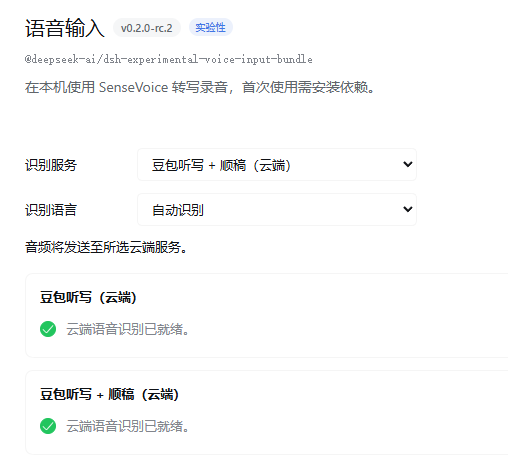
Where they turn up — Settings → Plugins → Voice input → Config. Both entries registered and ready. 它们出现的地方——设置 → 插件 → 语音输入 → 配置。两条都已注册并就绪。
DeepSeek Harness already ships a voice input, and it is good: it bundles a local SenseVoice model that runs offline, puts a microphone next to the composer, and drops the words into the box. It costs nothing and it asks nothing of you.
But I talk the way people actually talk. So I'd hold the button, say something perfectly sensible, and get back a transcript with three "那个" in it and no punctuation anywhere. The words were right. The sentence wasn't.
So this plugin adds entries to the same recognizer picker, pointing at Doubao's cloud models instead. Nothing else about the interface changes.
| In the picker | What it does |
|---|---|
| 豆包听写(云端) | Recognition, plus the service's own filler cleanup — the "嗯 / 那个 / 就是说" leave before you ever see them |
| 豆包听写 + 顺稿(云端) | Hands that transcript to an LLM, which puts the sentence back together: punctuation, homophones, half-finished clauses joined up |
The second entry only appears if you configure a Volcengine Ark key. If you haven't, the plugin does not show it at all — a button that quietly does nothing is worse than no button.
Same nine-second recording, both paths, real output:
raw    :那个就是我想说一下,我们是不是应该把这个语音识别的接口先接上,然后再说后面的事情?
tidied :我想说一下,我们是不是应该把这个语音识别的接口先接上,再说后面的事情?
| Service | Price | Free tier |
|---|---|---|
| 录音文件识别模型 2.0 — the default path | 0.8 元 / hour | 20 h, half a year |
| 豆包流式语音识别模型 2.0 — short clips | 1 元 / hour | 20 h, half a year |
| 火山方舟 — the optional tidy-up | ≈0.06 分 per call | — |
A hundred ten-second sentences ≈ 0.22 元. The free tier is claimed by hand: open the speech console, find the model, click 【试用】. Each recognizer has its own 20 hours.
⚠️ One trap worth knowing in advance: when you activate, choose the hourly / pay-as-you-go option. The concurrency SKU is sold per concurrent stream (¥500 per stream per month, default zero), and your first request will fail with quota exceeded for types: concurrency. That one cost me an evening.
Route A — double-click. Unzip somewhere permanent, then double-click 安装.cmd. It finds the Node that ships with DeepSeek Harness and does the rest.
Route B — command line.
$node = "$env:LOCALAPPDATA\Programs\DeepSeek Harness\resources\runtime\primary-runtime\dependencies\node\bin\node.exe"
& $node install.mjs
Route C — the plugin manager. DSH's plugin manager accepts a local absolute path (there is no drag-and-drop). Paste the unzipped folder path into its install box.
A and B create a directory link and edit the profile manifest — no package manager involved. C goes through pnpm. If pnpm has ever failed on your machine, prefer A or B.
Then: put your API key in %USERPROFILE%\.dsh\voice-doubao.json, restart DeepSeek Harness, and run the doctor:
& $node doctor.mjs
It ends with 15 项正常,全部就绪 when everything is in place, and every line marked ✗ comes with what to do about it.
The unzipped folder must not be moved or deleted afterwards — DSH reaches the plugin through a link into it.
Two services sit behind this plugin, and they behave differently, so it picks per recording — measured against the real API, three runs each, alternating order:
| Recording | Submit + poll | Streaming | Winner |
|---|---|---|---|
| 4.3 s | 1234 ms | 1174 ms | streaming, barely |
| 9.1 s | 2343 ms | 1714 ms | streaming, by 27% |
| 21.0 s | 3187 ms | 3462 ms | submit, barely |
| 43.1 s | 4150 ms | 7619 ms | submit, by 84% |
The crossover is around 15 seconds, so the default transport: "auto" sends short clips to streaming and long ones down the submit path. On the same set of recordings:
| Recording | submit only | auto |
|---|---|---|
| 4.3 s | 1.28 s | 0.87 s |
| 9.1 s | 2.44 s | 1.37 s |
| 43 s | 4.15 s | 4.36 s |
You can force either one with transport: "submit" or "stream".
The part I cannot fix: the Doubao phone app feels instantaneous because it prints words while you speak. DSH's voice-input service exposes exactly one operation — "here is a finished recording, give me the text" — so the text can only appear after you let go. Inside that constraint this plugin waits roughly a second for a short sentence, and about four for a forty-second one.
doctor.mjs answers this directly, from a status file the plugin keeps live:
✓ 当前选中的识别器就是豆包 现在选的是 doubao-polished
· 最近一次识别 2026/10/14 22:20:31 doubao-polished 处理,3.2s 音频 → 17 字,1.9s,顺稿已生效
That second line is a record of your last recording — which recognizer handled it, how long the audio was, and whether the tidy-up pass ran. The transcript text itself is not written to disk unless you set logTranscripts.
package.json in Notepad: the installer tolerates a UTF-8 BOM, because I hit that myself.dsh.bundle declared, cordis.patch.yml present, no private field, .cmd files stored as CRLF (verified byte-for-byte in the git object, so a downloaded ZIP still double-clicks).Details — including the three problems only the live service could reveal (the streaming audio-format declaration, the silence diagnostic that pointed at the wrong thing, and a flagship model that wasn't activated) and how the transport numbers were taken — are in 技术说明.md.
lib/                  the plugin: config, two transports, the tidy-up pass
test/                 offline suite + a mock service + a live check + a benchmark
install.mjs           link the plugin into a profile and register it
doctor.mjs            read-only health check: what's missing and what to do
probe-resources.mjs   which Volcengine speech resources your key can actually use
使用说明.md            step-by-step guide in Chinese
技术说明.md            engineering deep-dive: protocol, pitfalls, measurements
MIT.
DeepSeek Harness 本来就带语音输入,而且做得挺好:内置一个本地 SenseVoice 模型,离线就能跑,输入框旁边放个麦克风,说完字就进框里。不要钱,也不用你配任何东西。
但我说话就是人说话的样子。所以每次按住麦克风、说一段挺正常的话,转出来就是满屏"那个那个"、一个标点都没有。字是对的,句子不是。
所以这个插件往同一个识别器列表里多加了两个选项,指向豆包的云端模型。界面上别的地方都没动。
| 列表里显示 | 它做什么 |
|---|---|
| 豆包听写(云端) | 识别,外加服务端自带的顺滑——"嗯 / 那个 / 就是说"会在你看到之前就被拿走 |
| 豆包听写 + 顺稿(云端) | 再把这段文字交给大模型重新组织:补标点、修同音字、把说了一半又改口的地方接顺 |
第二条只有在配了火山方舟的 Key 之后才会出现。没配就不显示——摆一个点了没反应的按钮,比不摆更糟。
同一段 9 秒录音,两条路的真实输出:
原文  :那个就是我想说一下,我们是不是应该把这个语音识别的接口先接上,然后再说后面的事情?
整理后:我想说一下,我们是不是应该把这个语音识别的接口先接上,再说后面的事情?
| 服务 | 单价 | 免费额度 |
|---|---|---|
| 录音文件识别模型 2.0 —— 默认走这条 | 0.8 元 / 小时 | 20 小时,半年 |
| 豆包流式语音识别模型 2.0 —— 短句走这条 | 1 元 / 小时 | 20 小时,半年 |
| 火山方舟 —— 可选的顺稿 | 约 0.06 分 / 次 | — |
说 100 句、每句 10 秒,大约 0.22 元。 免费额度要手动领:进语音控制台,找到模型,点【试用】。两个识别服务各有自己的 20 小时。
⚠️ 有个坑提前说:开通时选「按量后付费 / 小时版」。那个「并发版」是按并发路数卖的(500 元/路/月,默认 0 路),第一次请求就会报 quota exceeded for types: concurrency。我在这上面花了一个晚上。
路子 A —— 双击。 解压到一个固定目录,双击 安装.cmd。它会自己找到 DSH 自带的 Node 并把剩下的做完。
路子 B —— 命令行。
$node = "$env:LOCALAPPDATA\Programs\DeepSeek Harness\resources\runtime\primary-runtime\dependencies\node\bin\node.exe"
& $node install.mjs
路子 C —— 插件管理界面。 DSH 的插件管理器支持填本地绝对路径(它不支持拖拽)。把解压后的文件夹路径粘进它的安装框。
A 和 B 只是建一个目录链接 + 改 profile 清单,不依赖包管理器;C 走 pnpm。如果你机器上 pnpm 出过问题,优先 A 或 B。
然后把 Key 填进 %USERPROFILE%\.dsh\voice-doubao.json,重启 DeepSeek Harness,跑一次体检:
& $node doctor.mjs
全部就位时会打印 15 项正常,全部就绪;每一条 ✗ 下面都会写清楚该怎么做。
解压出来的目录装完不能移动、不能删除——DSH 是通过链接指向它的。
它背后是两个服务,脾气不一样,所以按录音长度自动挑。下面是打真实接口量出来的(每档 3 轮、交替顺序):
| 录音长度 | 提交+轮询 | 流式 | 谁快 |
|---|---|---|---|
| 4.3 秒 | 1234 ms | 1174 ms | 流式,微弱 |
| 9.1 秒 | 2343 ms | 1714 ms | 流式,快 27% |
| 21.0 秒 | 3187 ms | 3462 ms | 提交,微弱 |
| 43.1 秒 | 4150 ms | 7619 ms | 提交,快 84% |
交叉点在 15 秒附近,所以默认的 transport: "auto" 让短句走流式、长录音走提交。同一批素材的实际效果:
| 录音长度 | 只用提交 | auto |
|---|---|---|
| 4.3 秒 | 1.28 s | 0.87 s |
| 9.1 秒 | 2.44 s | 1.37 s |
| 43 秒 | 4.15 s | 4.36 s |
想强制走某一条,把 transport 设成 "submit" 或 "stream"。
有一件事我修不了:豆包手机 App 感觉"瞬间出字",是因为它边说你边打。而 DSH 的语音输入服务只提供了一个操作——"给你一段录完的音频,还我文字"——所以字只能在你松手之后才出现。在这个限制里,这个插件短句等大约 1 秒,40 秒的录音等大约 4 秒。
doctor.mjs 会直接告诉你,读的是插件维护的实时状态文件:
✓ 当前选中的识别器就是豆包 现在选的是 doubao-polished
· 最近一次识别 2026/10/14 22:20:31 doubao-polished 处理,3.2s 音频 → 17 字,1.9s,顺稿已生效
第二行是你上一次录音的真实记录:谁处理的、音频多长、顺稿有没有生效。
识别出来的原文默认不落盘——除非你把 logTranscripts 打开。
package.json 的 Windows 用户:安装脚本能容忍 UTF-8 BOM——因为我自己就踩过。dsh.bundle、有 cordis.patch.yml、没有 private 字段、.cmd 以 CRLF 存进仓库(从 git 对象里逐字节验证过,所以下载 ZIP 之后照样能双击)。协议细节、只有真实服务才能暴露的三个问题(流式的音频格式声明、把人引错方向的静音提示、以及一个根本没开通的旗舰模型)、还有上面那些数字是怎么量的,都在 技术说明.md。
lib/                  插件本体:配置、两条通道、顺稿那一步
test/                 离线套件 + 假服务 + 真实检查 + 基准脚本
install.mjs           把插件链接进 profile 并登记
doctor.mjs            只读体检:缺什么、下一步做什么
probe-resources.mjs   你这个 Key 到底能用哪些资源
使用说明.md            中文一步步安装手册
技术说明.md            工程向深文档:协议、坑、实测数据
MIT。
为 DSH 提供小米 MiMo、豆包、浏览器本地 TTS 语音朗读;自动播报、自定义音色、UI 音效、桌宠联动、QQBot 联动。
面向 DeepSeek Harness (dsh) 的语音输入插件:输入框的麦克风按钮把语音转成草稿文本,支持多种语音识别后端,可选经 dsh 自有 LLM 路由润色,并带原生设置页。
零外部依赖、事件驱动、无需额外模型、不消耗任何 token的语音播报插件。使用系统自带自然语音进行播报,支持win/mac双平台;最终回复、审批与提问提醒、可选事件播报(回合结束/命令完成/目标变更/工具出错/待办更新)、最终回复可重播、双语言可视化设置。