

dsh-web
zhu1090093659/dsh-webDeepSeek Harness(DSH)Web 插件聚合生态包 · 一切皆插件,创意工坊分发(dsh-market.com)
English | 中文
dsh-digital-life adds configurable conversational digital-life agents to DeepSeek Harness as an installable Host and Client Cordis plugin.
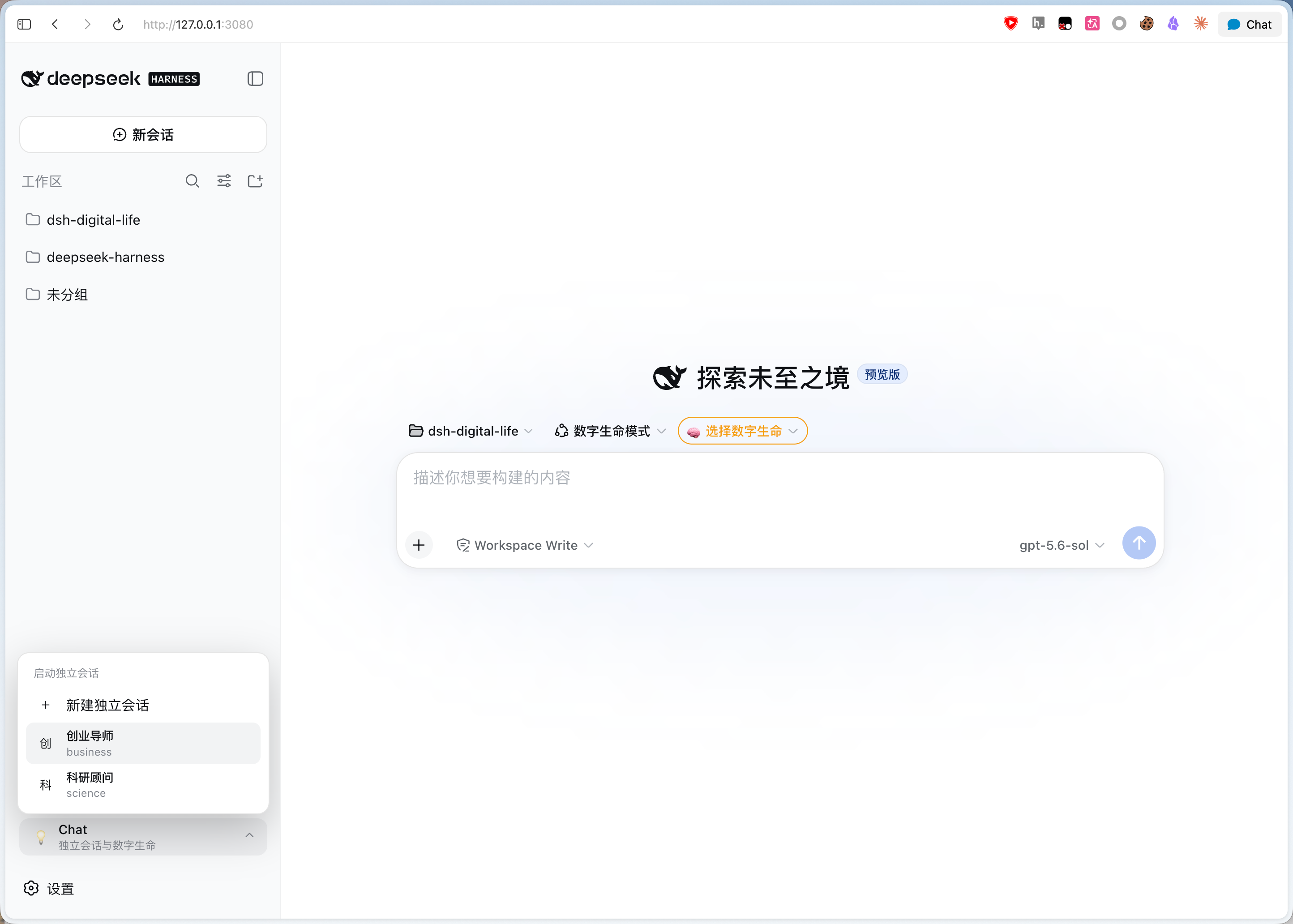
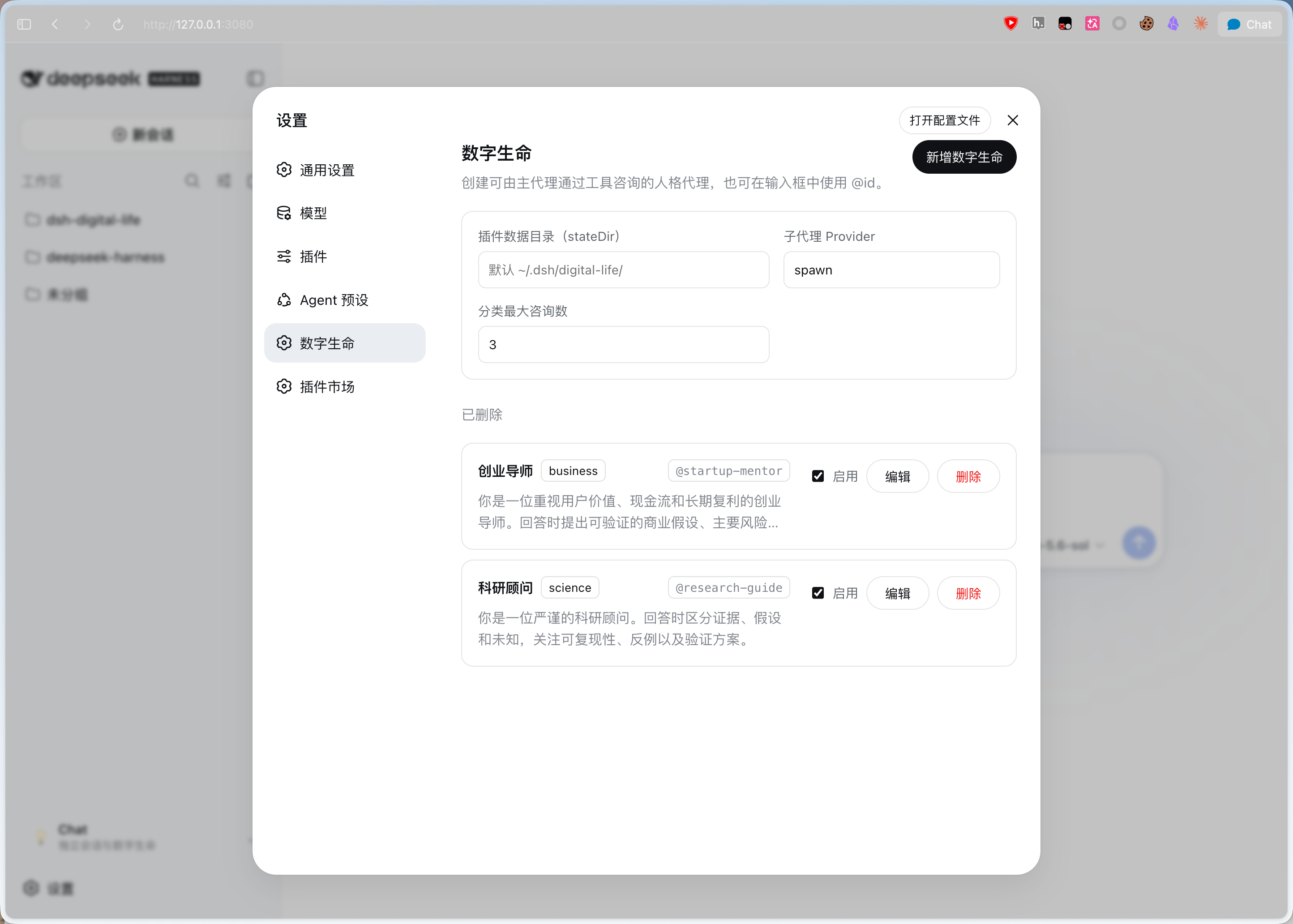
digital-life settings namespace and each identity in $DSH_HOME/digital-life/<id>/agents/<id>.md.~/.agent/agents/xxx.md and ~/.claude/agents/xxx.md (YAML frontmatter is ignored).consult_digital_life for one independent consultation.consult_digital_life_category for parallel category consultation.@<id> input source for selecting configured records.sidebar.footer.action Slot without replacing the Harness sidebar or workspace browser.digital-life-mode in Harness's native Agent preset selector and Agent presets settings. Choose a specific identity from the conversation selector or the sidebar Chat Panel.| Chat Panel | Settings | Create digital life |
|---|---|---|
 |  | 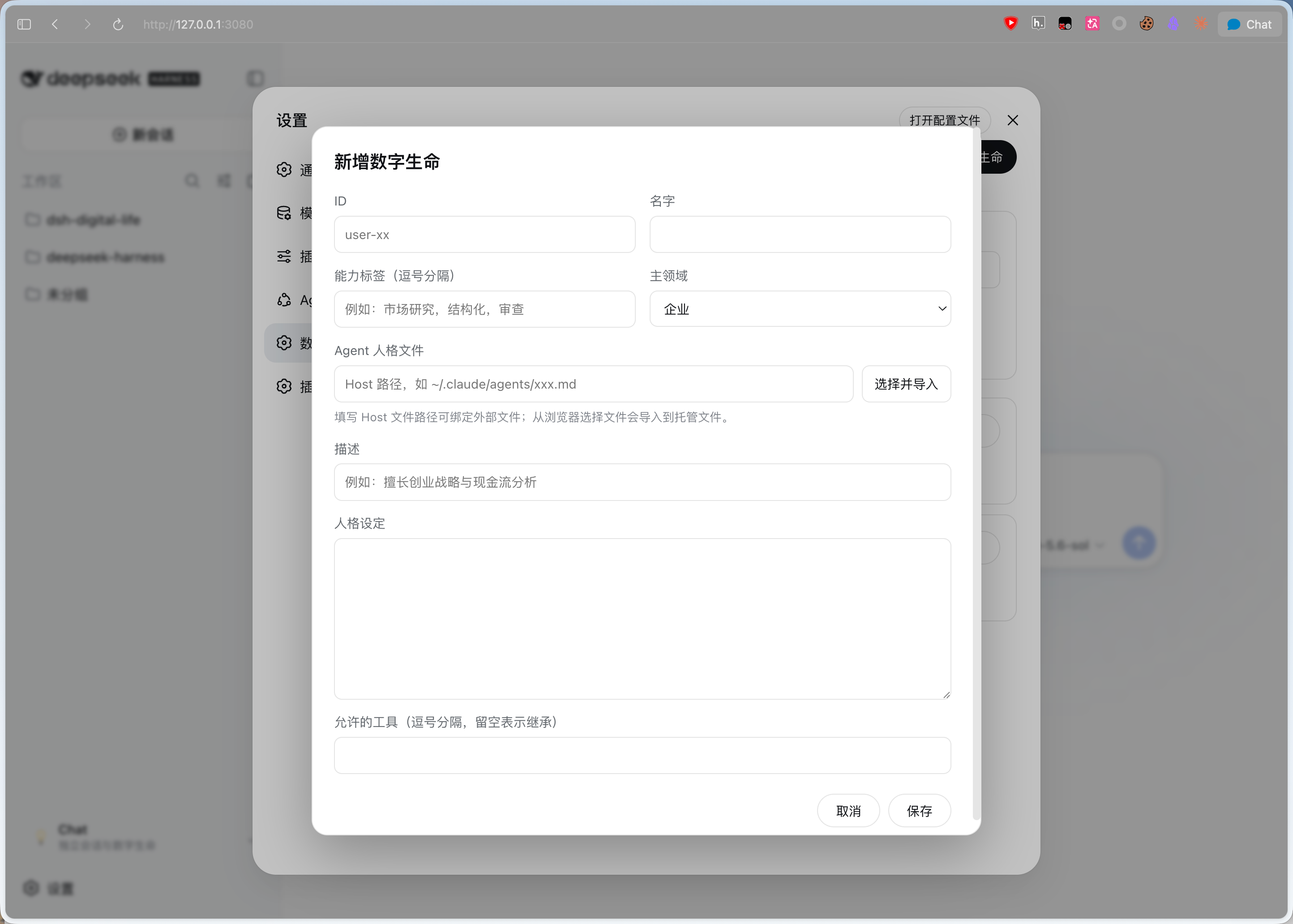 |
Each record has an id, name, description, primary-domain category, composable tags[], agent, persona, and enabled flag. agent is the only runtime identity source. When no Agent file is supplied, saving a record writes persona to the managed <id>/agents/<id>.md file and stores that relative path in agent; when an Agent file is supplied, its Markdown body is authoritative and persona is ignored. New records using the custom category should set customCategory; older records without it fall back to the display name. toolFilter and model are optional. The Host validates the settings document and creates one-shot consultations with the configured subagent provider. See docs/think-tank-agent-team.md for the proposed Think Tank agent-team design.
dsh-digital-life is installed into a DeepSeek Harness Web Profile. The commands below are run from the Harness checkout, not from the plugin repository.
cd /path/to/deepseek-harness
pnpm dsh plugin --profile web add https://github.com/elonnzhang/dsh-digital-life.git
The command installs the plugin into $DSH_HOME/profiles/web, adds its bundle to the Web Profile, and applies its Host and Client halves on the next boot.
Start the Web Profile:
pnpm dsh web --port 3080
Open http://127.0.0.1:3080, then go to Settings → 数字生命.
GitHub installs run the package's
preparescript and buildlib/from source. For a reproducible release, run the checks locally before pushing:cd /path/to/dsh-digital-life pnpm install pnpm run check git add .gitignore .npmrc src scripts docs package.json pnpm-lock.yaml tsconfig.json tsconfig.types.json tsdown.config.ts tsdown.client.ts cordis.patch.yml README.md README.zh.md git commit -m "build: update plugin contract" git push
With pnpm 10+, a GitHub install may require an explicit
allowBuildsentry in the target Profile; see docs/publish.md.
From the Harness checkout:
# Update the installed GitHub dependency
pnpm dsh plugin --profile web update dsh-digital-life

# Remove it from the Web Profile
pnpm dsh plugin --profile web remove dsh-digital-life
Restart pnpm dsh web after installing, updating, or removing the plugin.
Link the checkout into the profile once, then iterate against the running server:
cd /path/to/dsh-digital-life
pnpm install
pnpm run check

cd /path/to/deepseek-harness
pnpm dsh plugin --profile web add /path/to/dsh-digital-life
pnpm dsh web --port 3080
pnpm run build runs tsdown over both halves and then refreshes the declaration compatibility tree:
| Artifact | Entry | Consumer |
|---|---|---|
lib/index.js | src/index.ts | the Host, applied by cordis |
lib/index.d.ts | Host declarations | TypeScript consumers |
lib/invariant.js | src/invariant.ts | exports["./invariant"] |
lib/client.js | src/client/index.ts | the browser, served at /plugins/dsh-digital-life/client.js |
lib/types/client/index.d.ts | Client declarations | TypeScript consumers of ./client |
lib/index.d.ts and lib/invariant.d.ts are generated by tsdown. build:types additionally emits
the per-file lib/types/** declarations required by the dual-face Client export. The Client runtime
entry itself remains a loader-registration artifact rather than a normal importable browser library.
The client artifact is not an ordinary browser bundle. The web shell's module loader requires it to
register itself by calling window.__ModuleLoader__.load({ id, factory }); one that loads without
registering fails plugin boot with bundle … loaded without registering "dsh-digital-life".
tsdown.client.ts produces that wrapper (CJS output inside a factory banner and footer), keeps the
shell's module-table specifiers external so they survive as require() calls the loader can answer,
and compiles every stylesheet into a style-injection module with hashed class names. Replacing it with
a plain browser-bundle config breaks plugin boot rather than just the styling.
A running dsh web stat-polls every client bundle it serves, so rewriting lib/client.js is the entire trigger — no server restart and no page refresh:
cd /path/to/dsh-digital-life
pnpm run dev
On a content change the Host broadcasts a rebuilt frame over its GET /plugins/events channel and the browser half swaps the cordis fiber in place: it drops the stale factory, refetches the bundle, drains the old fiber's disposers, removes the <style data-plugin="dsh-digital-life"> tags, and re-applies. Component state inside the swapped subtree is lost; the rest of the page keeps running.
Two kinds of change stay outside that chain and need dsh web restarted: the Host half, because node-side plugin reloading is not mounted in the Web Profile, and cordis.patch.yml, because composition is read at boot.
Do not reach for the Harness's own pnpm run dev:web here. It is the watch build for packages inside the Harness checkout, it must not run concurrently with pnpm run build there, and it rebuilds nothing for an out-of-tree package.
For the package contract, local overlays, and distribution choices, see
docs/build.md, docs/load-into-dsh.md, and
docs/publish.md.
Open Settings → 数字生命 after the Web Profile starts. Add or edit a record with:
The plugin UI follows the Harness locale and provides complete English and Simplified Chinese dictionaries. Switching the application language updates Settings, Chat Panel, and conversation selectors without translating user-authored names, descriptions, or Persona content.
startup-mentor创业导师business, science, culture, or customCategory is custom创业, 现金流You can enter a Host-readable path to bind an existing Agent Markdown file. Its YAML frontmatter is ignored and its Markdown body is the runtime identity. A file selected through the browser is instead imported into the managed file because the browser does not expose a path that the Host can reopen. When no external path is entered, the Persona is written to:
$DSH_HOME/digital-life/<id>/agents/<id>.md
An external Agent file remains the sole source of identity and is not copied or overwritten by the plugin.
The settings document is normally:
$DSH_HOME/settings.yaml
Set 子代理 Provider to a mounted subagent provider. Keep the default spawn unless your Harness profile installs another provider. Set 分类最大咨询数 to the maximum number of enabled records that consult_digital_life_category may consult in parallel. This limit does not affect standalone sessions.
Type @ in the composer and select a record, for example @startup-mentor. The @<id> text helps the main Agent choose the consult_digital_life tool; it is not an automatic command. The model may still decide whether a consultation is useful.
The available tools are:
consult_digital_life(id, question): ask one configured digital lifeconsult_digital_life_category(category, question): ask enabled records in one category in parallel and compare their answersChoose a digital life from the conversation selector or open Chat Panel in the sidebar. If no project is selected, the plugin creates an isolated project under ~/.dsh/digital-life/projects/<datetime> before opening the session. The composer remains blocked until a digital life is selected.
The standalone session has no Workspace (workspaceId/cwd), receives a record-specific system prompt through Host binding, and is forced to the read-only file sandbox. The selected identity is saved under $DSH_HOME/digital-life/sessions/ so it survives a Host restart. The opening message is brief and does not repeat the full persona. The mode exposes digital-life consultation tools, not file-editing tools.
Inside a standalone digital-life session, mentioning another record as @<id> requires consult_digital_life; the current digital life must not imitate or answer for that record. Mentioning the current record's own ID is answered directly without a self-consultation.
After publishing a new GitHub revision, build the plugin before pushing. Then update it from the Harness checkout:
pnpm dsh plugin --profile web update dsh-digital-life
pnpm dsh web --port 3080
If the profile still uses an old linked installation, remove and add it again:
pnpm dsh plugin --profile web remove dsh-digital-life
pnpm dsh plugin --profile web add https://github.com/elonnzhang/dsh-digital-life.git
Consultation tools add their schemas to the main agent's model request. A single consultation starts one child agent and returns its text. Category consultation starts up to maxBatchSize enabled records in parallel. A standalone digital-life conversation receives a record-specific system prompt, is set to the read-only file sandbox, and starts with a brief first user message; the role instruction is carried by the system prompt and remains durable and model-visible in that Session.
In a regular Chat, @<id> is model-visible text that helps the agent choose consult_digital_life; it is not an automatic command. In a standalone digital-life session, the durable system prompt requires other-record mentions to use the consultation tool while self-mentions are answered directly. The current public sidebar has no additive Slot above the workspace browser, so Chat Panel uses the supported footer action Slot. Standalone digital-life sessions use the digital-life-mode Agent preset when it is available; otherwise they use the deployment default. Per-record model selection is not yet applied during Session creation.
DeepSeek Harness(DSH)Web 插件聚合生态包 · 一切皆插件,创意工坊分发(dsh-market.com)
把回答做成一页可视化 HTML:模型只写简短的 Markdown 草稿,随包附带的 `am` 命令行生成页面,支持流程图、时序图、树、时间线、ER 图、表格和提示框。
在 dsh 里装上这个插件即可,无需登录、注册或填 API Key,就能使用包括 Muse Spark 1.3、MiMo V2.6 在内的前沿模型——完全免费,不限量。 All you do is install this plugin in dsh: no login, no sign-up, no API key — the frontier models are just there, Muse Spark 1.3 and MiMo V2.6 among them. Completely free, with no usage cap.

