dsh-plugin-browserskill
Tencent/BrowserSkillBrowserSkill 的 DeepSeek Harness 浏览器自动化桥接插件,通过原生浏览器工具控制可见的 Chrome 和 Edge Agent Window,支持可访问性与 VOM 页面观察、截图、隔离的多会话控制和 Web UI 实时观察浮层。

打开浏览器扩展侧边栏,就能原地接管你当前正在浏览的网页。在上游基础上补齐了:悬停、坐标点击、拖拽、批量动作链、整页截图、本地文件上传、图片地址列举,并可在多个已连接的浏览器之间切换。页面以带编号的结构化文本交给模型;动作默认需要你批准,敏感字段以掩码呈现。发布的是桥接插件,配套扩展在同一 Release 里。本项目是 omdsh-dev/dsh-browser 的 fork,原仓库:https://github.com/omdsh-dev/dsh-browser
English | 中文
This package is the bridge half of the DightEndless/dsh-browser fork of omdsh-dev/dsh-browser, and is published under its own name so both can coexist in one dsh profile.
The browser-operation bridge for dsh: mounts a token-authenticated WebSocket carrier (/ext/bridge) that the Chrome extension connects to, projects its calls onto dsh 0.2.0 Typert Remotes, follows Session and Remote Event streams per connection, and registers the text-first browser_* tool set that reads and operates the user's active tab through the extension — click elements, fill forms, scroll, and navigate in the real browser, login state preserved. The side panel is the conversation entry; the tools are the product.
Text-first browser tools, multimodal chat passthrough: page snapshots stay structured text (title, main content, numbered interactive inventory, and masked form fields), and every browser action uses stable inventory numbers. browser_screenshot is the one exception, and it keeps the tool surface text-shaped: the capture is written to a local file and the tool returns that path, so no pixels travel in the tool result. The generic RPC carrier also passes dsh 0.2.0 image prompts and durable attachment reads; deferred new sessions expose image limits only when the host actually mounts the attachment service.
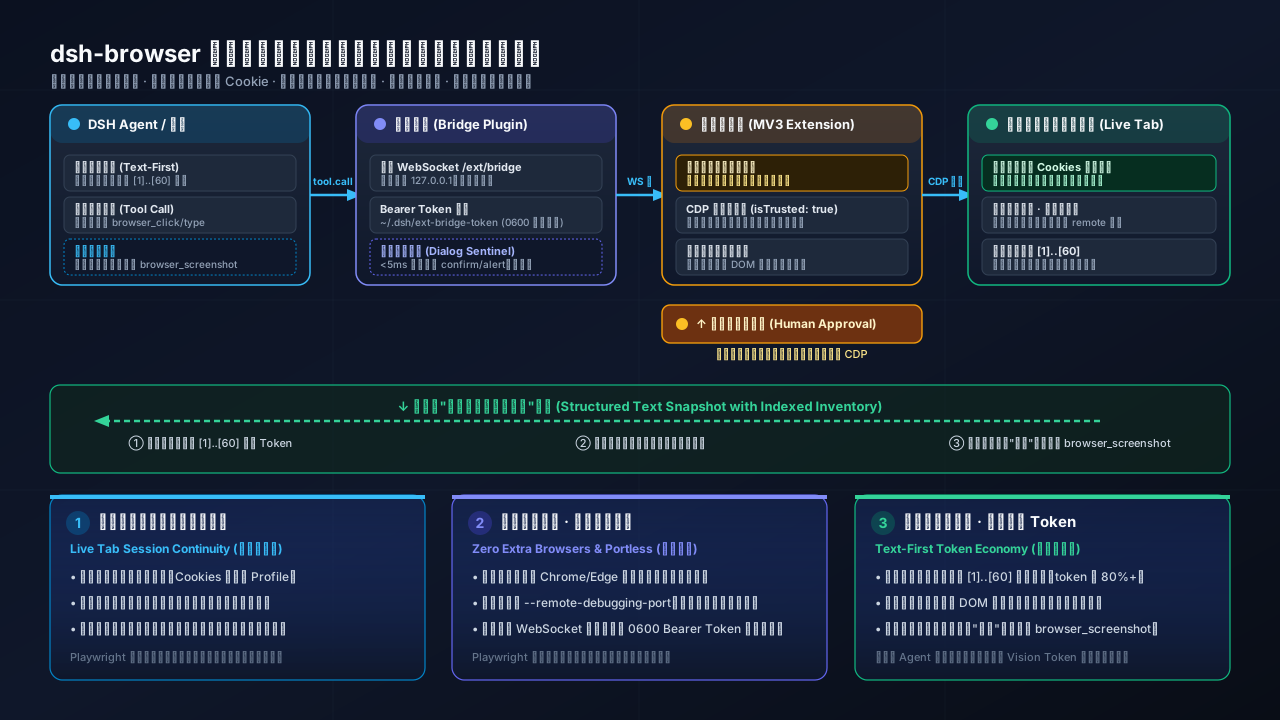
Most browser-automation agent stacks rely on headless Playwright or Puppeteer. While effective for automated testing, running an interactive personal agent with that architecture creates distinct trade-offs:
dsh-browser attaches directly to the Chrome or Edge tab you are already browsing in, so existing logins, cookies, session credentials, and user profiles remain instantly available without manual re-authentication or credentials sharing.--remote-debugging-port (which exposes an unauthenticated control surface), dsh-browser operates via an unpacked MV3 extension communicating with the host over a local, bearer-token-authenticated loopback WebSocket.dsh-browser gates state-changing actions behind explicit user approval in the side panel. While browser_click uses content script el.click() (synthetic event), coordinate clicks (browser_click_at), keyboard input (browser_press/browser_type), and drag/upload dispatch genuine CDP events (isTrusted: true) that modern web applications accept, while sensitive form values are masked in snapshots.| Key | Type | Default | Description |
|---|---|---|---|
token | string | generated | Fixed bearer token. When absent, a token is generated on first boot, persisted at ~/.dsh/ext-bridge-token (chmod 0600), and printed in the boot log. |
toolTimeoutMs | number | 90000 | Per-tool-call budget, leaving time for the extension's 60-second approval window. |
snapshotMaxChars | number | 32000 | Upper bound on one rendered snapshot's characters, minimum 500 (also negotiated to the extension via hello.ok caps). |
maxInteractiveItems | number | 60 | Upper bound on interactive inventory items per snapshot. |
sessionWorkspacePath | string | ~/.dsh/browser-sessions | Dedicated Host Workspace for extension-created sessions. The plugin creates and idempotently registers the directory on the first implicit session.create; the session cwd becomes this path, so the GUI shows a browser-sessions workspace group. Set "" to keep sessions Ungrouped. |
deferSessionCreate | boolean | true | Sessions materialize only on the first message: session.create answers with a provisional id (nothing persisted), history reads empty, and the first session.prompt creates the real session (same id, original payload). Opening the panel without chatting leaves zero trace in the session store/GUI. |
Workspace grouping is best-effort. If the composition has no workspace domain, directory creation fails, or workspace.create rejects the path, the plugin logs one warning and sends every session creation without an injected workspace so browser chat remains usable.
The remote installer downloads an installer-managed workspace, builds the plugin, and registers its official bundle in the local dsh web profile. It requires neither Git nor a local clone:
curl -fsSL https://raw.githubusercontent.com/DightEndless/dsh-browser/refs/heads/main/scripts/install.sh | bash
cd ~/.dsh/dsh-browser && pnpm start
To skip the build, install the published package instead:
dsh plugin --profile web add @dightendless/dsh-bridge-browser
That name resolves to the prebuilt package on npm (npm i @dightendless/dsh-bridge-browser if you manage the profile by hand); the same bytes are attached to the v0.3.5 release as a tarball for offline installs.
On Windows, run the PowerShell installer instead:
$s="$env:TEMP\dsh-install.ps1"; irm https://raw.githubusercontent.com/DightEndless/dsh-browser/refs/heads/main/scripts/install.ps1 -OutFile $s; powershell -NoProfile -ExecutionPolicy Bypass -File $s
cd $HOME\.dsh\dsh-browser; pnpm start
Developers can instead clone the repository and run ./scripts/install.sh followed by pnpm start from that checkout. The local mode uses the current branch without downloading or overwriting source files. Both installation modes register the same profile bundle; build tools resolve only from the selected workspace and never from a parent checkout or parent node_modules directory.
The workspace pins dsh 0.2.0-rc.2 as its minimum supported runtime, and the package's peer ranges accept the 0.2.1-alpha line too (0.2.1-alpha.1 included, which is the build the plugin marketplace verifies against). Older DSH releases are not supported:
npx @deepseek-ai/dsh@0.2.0-rc.2 web
The installer copies the unpacked extension to ~/.dsh/browser-extension and opens chrome://extensions. Load that stable directory in Chrome and use the side panel. Loopback connections are discovered automatically and require no token entry; non-loopback deployments still require the configured bearer token.
/api trust fence (which only guards client-connection's routes), so it carries its own bearer-token authentication: the first frame must be hello with the token within 5s, verified in constant time. Failed auth closes the socket./api carrier pins to loopback (settings.*, credentials.*, host.pickDirectory, host.openPath) are refused for non-loopback remotes even with a valid token — defense in depth for --host 0.0.0.0 deployments.dsh web --host 0.0.0.0 on untrusted networks.Frames are JSON objects discriminated by t, defined in protocol.ts — the single source of truth shared with the extension through the workspace package's ./src/* export. The built package also publishes @dightendless/dsh-bridge-browser/protocol for external consumers.
hello (auth + caps), rpc (gateway method passthrough), respond (resolve a host interaction by its RPC id), tool.result, pong.hello.ok (echoes negotiated caps), rpc.result, respond.result (correlated acceptance or error), event (bridge-owned projection of dsh Remote streams and waterfalls), tool.call, ping, error.Each respond carries a globally unique transport id as well as the host interaction's rpcId. The extension routes its receipt only to the panel that initiated it and rejects pending responses on timeout, panel closure, or bridge disconnection.
| Tool | Purpose |
|---|---|
browser_snapshot | Structured text snapshot (title/URL/main/inventory/forms); delta: true returns only changes. |
browser_click / browser_click_at / browser_type / browser_press / browser_upload / browser_eval | Operate inventory items by stable index, or click a viewport point with trusted input: drop-down and toggle typing, real key defaults, attaching a local file, and evaluating an expression through the DevTools protocol. |
browser_scroll / browser_navigate / browser_open_tab / browser_back / browser_forward / browser_reload | Page movement. |
browser_get_text / browser_images / browser_screenshot / browser_wait | Read regions / image addresses / a saved view / settle and condition waits. |
browser_snapshot (default 32k chars) costs roughly 8–10k tokens for typical English text; the exact count depends on language and tokenizer, and delta snapshots cost a fraction of that. The system-prompt section tells the model to snapshot on demand rather than hoard page text.bridge-closed (extension not connected), timeout, no-active-tab, content-unavailable (page needs a refresh), action-failed (stale inventory index — the model should re-snapshot).protocol.ts). Add tools by registering on ctx.tools and dispatching over the bridge; the extension's content script dispatches by action name.hello.ok) let the plugin dictate snapshot budgets to the extension without a shared config file.(frame, index) addresses. Restricted or short-lived frames are reported as unavailable without failing the whole page snapshot.~/.dsh/ext-bridge-token or set token in config); no expiry.BrowserSkill 的 DeepSeek Harness 浏览器自动化桥接插件,通过原生浏览器工具控制可见的 Chrome 和 Edge Agent Window,支持可访问性与 VOM 页面观察、截图、隔离的多会话控制和 Web UI 实时观察浮层。
纯文本 agent 的联网搜索桥:搜索网页与 X,返回结构化 JSON 证据(search/fetch/引用)。
DSH 免费搜索插件:7 个引擎(DuckDuckGo/Bing/SearXNG 免费 + Exa/Perplexity/DeepSeek 付费)、自动回退、设置页 UI(API key 输入 + 官网链接)、web_fetch、引擎测试工具。