

dsh-web
zhu1090093659/dsh-webDeepSeek Harness(DSH)Web 插件聚合生态包 · 一切皆插件,创意工坊分发(dsh-market.com)
Cherry Studio‑style text/code block pasting for DeepSeek Harness Web
Paste long code or text into the DSH Web composer → it lands as a bordered, collapsible, language‑tagged card instead of a wall of text. Names follow the DSH interface language (中文 / English). On send, the original content is restored as a fenced code block — and in the conversation it stays folded into click‑to‑expand cards, so your bubbles never become text walls again.
English | 简体中文
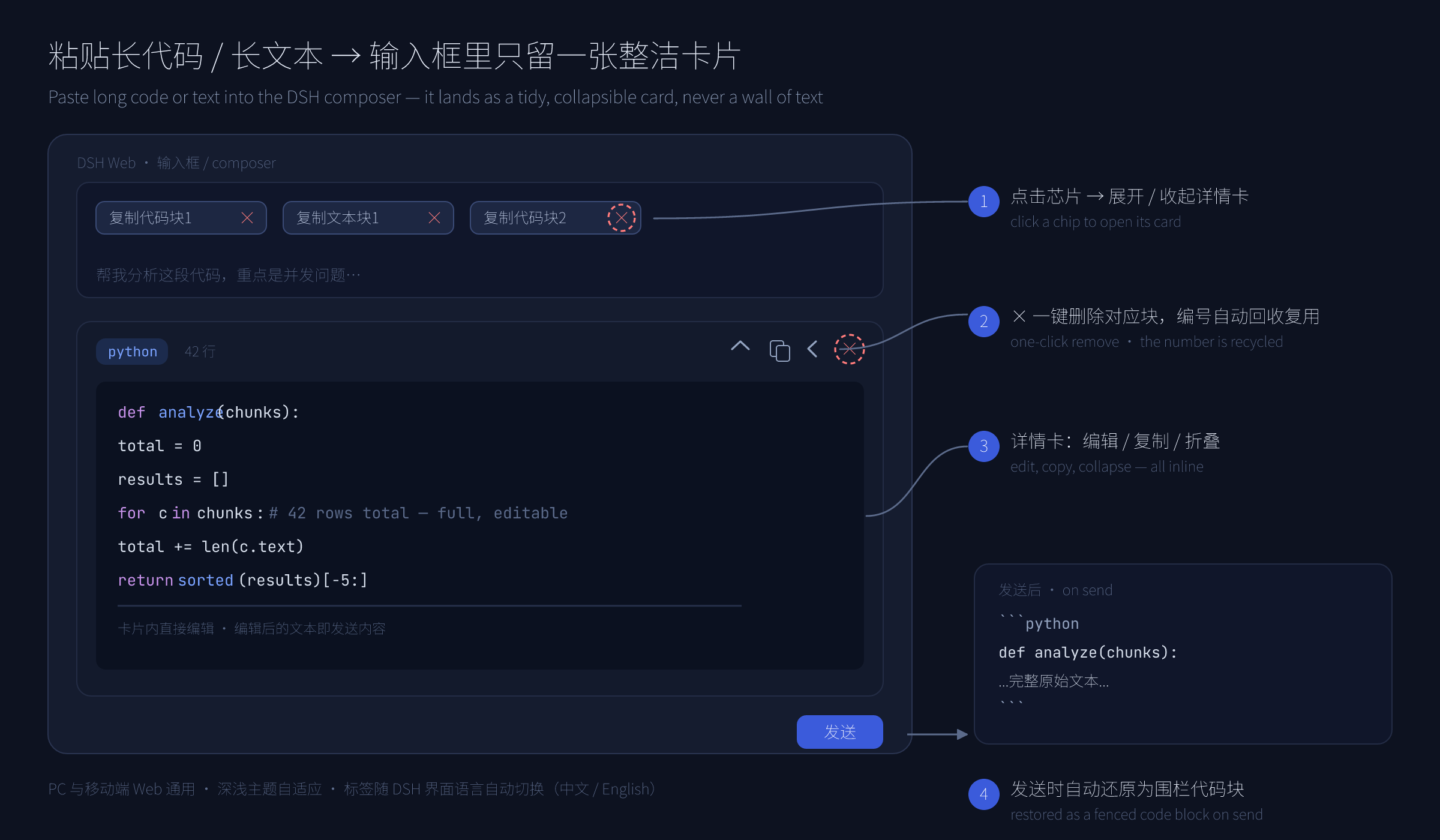
Copying a 200‑line stack trace, an API response, or a long log into a chat input turns the composer into an unreadable blob. This plugin folds any qualifying paste into a chip (built on DSH's own hidden‑reference mechanism, the same one file uploads use) plus an editing detail card — the draft stays clean, and the content stays fully editable and restorable.
text.代码块 1 / Code #1, 文本块 N / Text #N. A leading glyph and tint tells the two apart at a glance — </> blue for code, Aa gray for text. Switching Settings → Language live-retitles every chip.× delete button (the detail card has one too); a removed number is recycled immediately.```lang … ``` block when you send; a failed send automatically refills the input.python · 128 行 / python · 128 lines). Click the header to expand, again to collapse; the card's copy button grabs the original fenced text verbatim. Bare ``` fences fold as code (only an explicit ```text folds as a text block).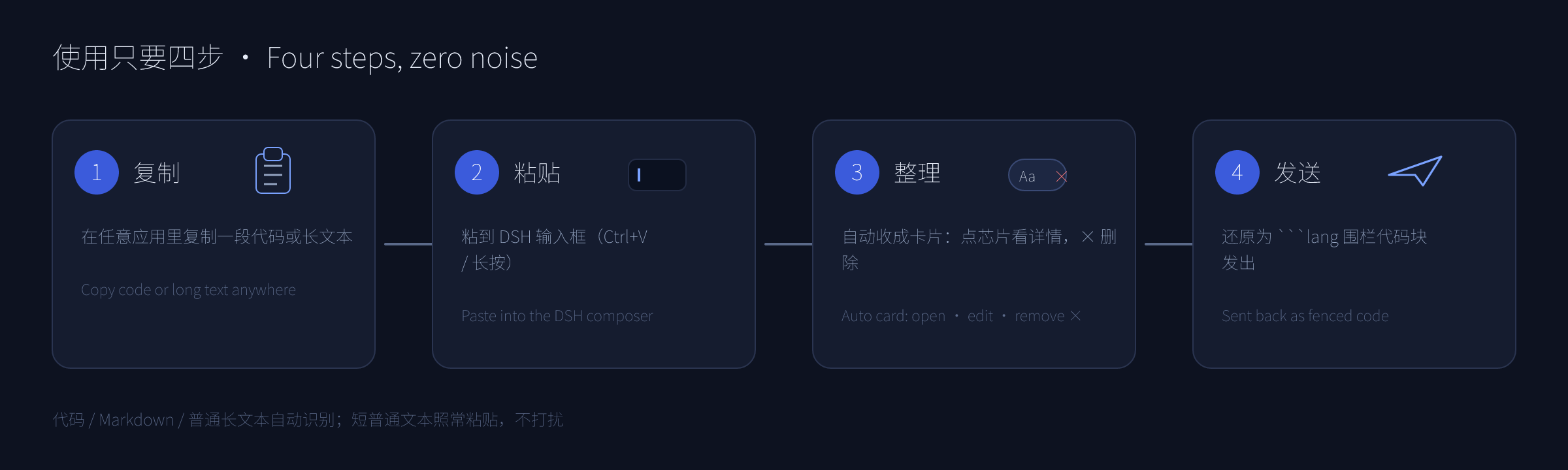
Chip labels, tooltips, line counts, and the send-time error notice all render through the official DSH locale service: the plugin registers a paste-code-block dictionary namespace with complete zh / en key sets, and its composer dock declares that namespace, so everything re-renders on every language switch.
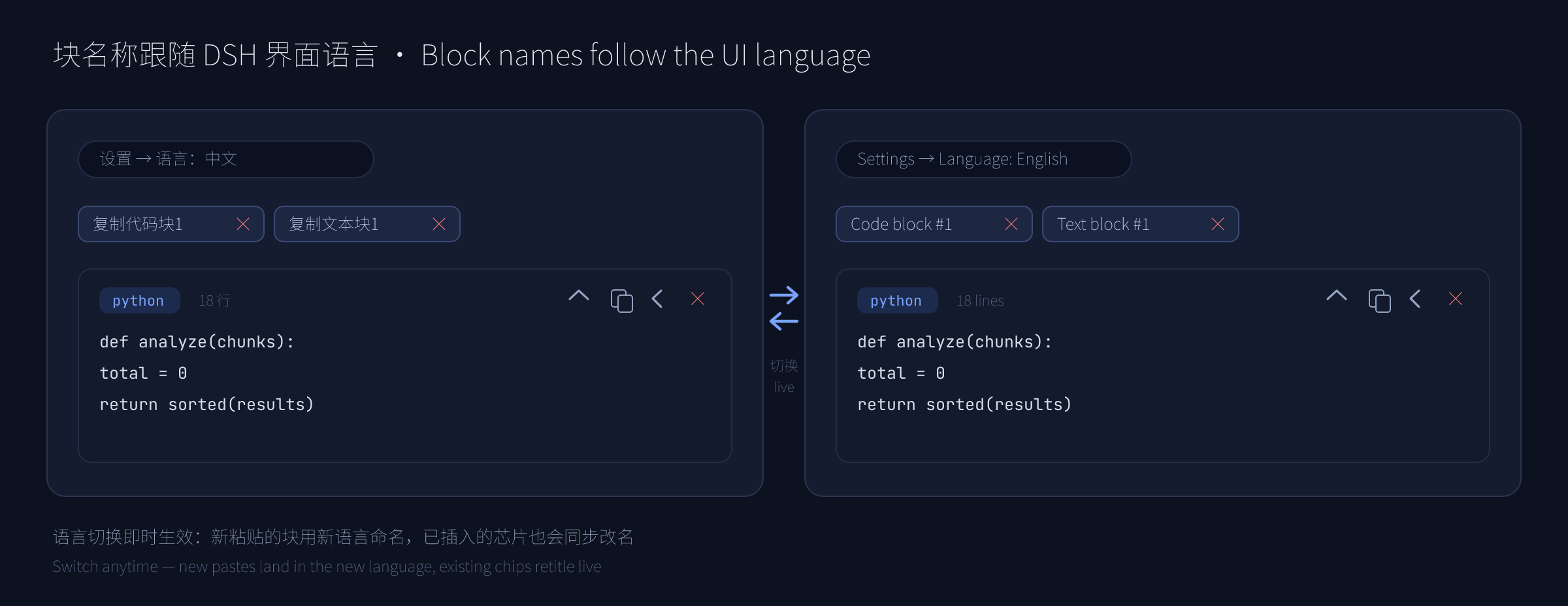
代码块 2 chip still resolves to its block after switching to English (where it now reads Code #2), and vice versa.Requires DSH 0.1.x (developer preview — APIs may change). Published on npm — install by name:
dsh plugin --profile web add dsh-paste-code-block
Or from this repository / a local checkout:
dsh plugin --profile web add github:cjm-m/dsh-paste-code-block   # from GitHub
dsh plugin --profile web add file:/path/to/dsh-paste-code-block  # from a local folder
Restart dsh web after installing.
代码块 1 / Code #1.× to delete that block.Detection threshold: contains a newline / ≥ 2 lines / length ≥ 96 / indented & brace-dense / fenced — any one turns the paste into a block.
```text ``` so they never smear into one line.Backspace) also frees its number — plugin state is reconciled against the editor continuously.Ctrl+Z brings it back.dsh-paste-code-block/
├── src/
│ ├── client.js # Web (browser) half — paste capture, chips, detail card, × delete, sent-message fold, draft-rebuild recovery
│ ├── index.js # Host (node) half — intentionally empty (pure UI plugin)
│ ├── parse.js # Pure block-detection + fence-splitting logic (canonical, unit-tested)
│ └── i18n.js # Locale dictionaries, label & fold-title builders (canonical, unit-tested)
├── tests/
│ ├── parse.test.js # node:test unit tests for src/parse.js
│ ├── i18n.test.js # node:test unit tests for src/i18n.js
│ └── fold-smoke.test.js # end-to-end fold scan against a DOM shim (runs the real client bundle)
├── docs/
│ ├── design.md # Design rationale (numbering, anchors, codec, i18n, chip ×, sent-message fold, draft-rebuild recovery)
│ └── images/ # README mockups (PNG + editable SVG sources)
├── cordis.patch.yml # DSH bundle patch declaring the host plugin
├── package.json # Package + DSH plugin manifest
├── README.md # English
└── README.zh-CN.md # 简体中文
npm run check   # syntax-check the JS halves
npm test        # run unit tests (node:test, 61 tests)
MIT — see LICENSE.
DeepSeek Harness(DSH)Web 插件聚合生态包 · 一切皆插件,创意工坊分发(dsh-market.com)
把回答做成一页可视化 HTML:模型只写简短的 Markdown 草稿,随包附带的 `am` 命令行生成页面,支持流程图、时序图、树、时间线、ER 图、表格和提示框。
在 dsh 里装上这个插件即可,无需登录、注册或填 API Key,就能使用包括 Muse Spark 1.3、MiMo V2.6 在内的前沿模型——完全免费,不限量。 All you do is install this plugin in dsh: no login, no sign-up, no API key — the frontier models are just there, Muse Spark 1.3 and MiMo V2.6 among them. Completely free, with no usage cap.

