
dsh-web
zhu1090093659/dsh-webDeepSeek Harness(DSH)Web 插件聚合生态包 · 一切皆插件,创意工坊分发(dsh-market.com)

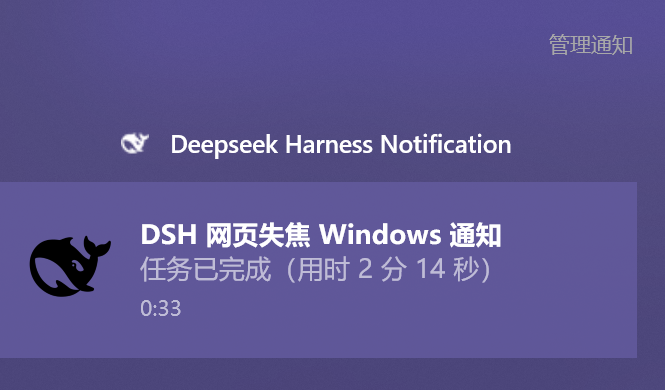
DSH 桌面通知:所有前端失焦时把决策 / 授权 / 中断 / 完成发到 Windows 通知中心;点击复用已有页面切回对话。
所有 DSH 前端都失焦时,把「需要你决策 / 需要你授权 / 意外中断 / 任务完成」发到 Windows 通知中心;通知标题是会话标题,点击通知复用已打开的 DSH 页面切回对应对话。

dsh plugin --profile web add @carbonzhao/dsh-desktop-notify
重启 dsh web,然后硬刷新页面(Ctrl+Shift+R)。也可以从源码安装:dsh plugin --profile web add github:CarbonZhao-02692/dsh-desktop-notify。
界面与体验。
| 事件 | 触发点 | 通知内容 |
|---|---|---|
| 需要你选择决策 | user-questions/request(含方案确认 plan-review) | 需要你选择决策:<问题> |
| 需要你授权 | approval/request | 需要你授权:<工具名> — <原因> |
| 意外中断,请重试 | turn/end reason=error / interrupted / max-tokens,以及 api-session/error | 任务意外中断:<错误>,请重试 |
| 任务已完成 | turn/end reason=completed | 任务已完成(用时 X) |
通知标题取自对应会话的标题(sessionTitle 服务折叠出的标题);标题还没生成时回退到该会话第一条用户消息。通知正文是对应提示。
每个 DSH 页面每 3 秒向 /dsh-desktop-notify/focus 上报:
{ "id": "页面 id", "focused": true, "visible": true }
focused = document.visibilityState === 'visible' && document.hasFocus()。浏览器窗口失焦、切到其他标签页、焦点在地址栏,都会使 focused 为 false。
host 的门控只有一条:
focused=true → 不是“所有前端失焦”,静默不发。focused=false → 发通知。sendBeacon 上报 closed: true,立即从汇总移除。visible 只用于状态展示,不参与门控。
配置项 enableCard 决定通知形态:
enableCard: false(默认)只显示正常的 Windows toast,不显示自绘卡片:
activationType="protocol" 和 launch="dsh-desktop-notify://open?session=<id>&origin=<origin>";Windows 调用协议 helper assets/open.ps1。assets/toast-listener.ps1,在隐藏 PowerShell 进程里保持 ToastNotification 存活;如果 Activated 事件被投递,也会调用同一个 helper。/dsh-desktop-notify/activate,用 ShowWindow / SetForegroundWindow 恢复并置前 Edge/Chrome 窗口(只有最小化时才 SW_RESTORE,最大化保持不变)。/dsh-desktop-notify/activation,收到后调用 uiWorkspace.openSession(sessionId)。enableCard: true只显示右下角原生 WPF 卡片,不发送任何 Windows toast:
assets/notify-card.ps1,显示应用名、鲸鱼图标、会话标题和正文,不抢焦点,20 秒后自动关闭。assets/open.ps1,后续的激活、窗口恢复、标签页切换与上面相同。没有页面时的兜底:如果 host 发现没有任何已连接的 DSH 页面,会让 helper 在默认浏览器打开一个引导页;引导页把会话 id 写入 localStorage 并跳回 DSH,新页面加载后自动打开对应对话。
DSH 设置 → 通用 → 桌面通知:
enableCard,立即生效并持久化到 %DSH_HOME%\super-injector\dsh-desktop-notify-config.json;关闭则只发 Windows toast,打开则只显示可点击卡片。也可以直接调用 HTTP 接口:
# 查看焦点状态与最近通知
Invoke-WebRequest -UseBasicParsing http://127.0.0.1:3080/dsh-desktop-notify/status

# 强制发一条测试通知(force 忽略焦点门控;带 sessionId 时点击会回到该对话)
$body = @{ kind='complete'; force=$true; sessionId='session-...'; body='测试通知' } | ConvertTo-Json -Compress
Invoke-WebRequest -UseBasicParsing -Method POST -ContentType 'application/json' `
  -Body ([Text.Encoding]::UTF8.GetBytes($body)) `
  http://127.0.0.1:3080/dsh-desktop-notify/test
默认值在 lib/index.js 的 DEFAULTS 里;通过 loader 行的 config 覆盖:
- id: dsh-desktop-notify
  name: '@carbonzhao/dsh-desktop-notify'
  config:
    onlyWhenUnfocused: true   # false = 页面聚焦时也发
    clickToOpen: true         # false = 通知不可点击回会话
    enableCard: false         # true = 仅自绘卡片;false = 仅普通 Windows toast
    ignoreSubagent: true      # 后台子代理会话不提醒
    notifyOnDecision: true
    notifyOnApproval: true
    notifyOnInterruption: true
    notifyOnComplete: true
    minTurnDurationMs: 0      # 完成提醒的最短轮次时长(毫秒)
    toastAppId: 'DeepSeek.DSH.Notify'
    toastAppName: 'Deepseek Harness Notification'
    toastIconPath: ''         # 默认 assets/deepseek-harness.png
    toastAppIconPath: ''      # 默认 assets/deepseek-harness.ico
web profile;实测 0.2.1-rc.2(当前 checkout)。HKCU\Software\Classes\dsh-desktop-notify(自定义协议 helper)。HKCU\Software\Classes\AppUserModelId\DeepSeek.DSH.Notify(应用名与图标)。HKCU\Software\Classes\dsh-desktop-notify 协议;卡片模式不发送 toast,也不注册协议。powershell.exe 显示 toast 或卡片,并在临时目录写一个 .ps1 脚本。/focus、/status、/test、/activate、/activation、/open;其中 /activate 和 /open 只接受 loopback 请求,/open 还需要每次进程随机生成的密钥。enableCard: false)<toast activationType="protocol" launch="dsh-desktop-notify://open?session=session-...&origin=http%3A%2F%2F127.0.0.1%3A3080">
<visual><binding template="ToastGeneric">
<text>示例会话标题</text>
<text>点击通知应回到对应对话</text>
<image placement="appLogoOverride" src="file:///.../assets/deepseek-harness.png"/>
</binding></visual>
<audio src="ms-winsoundevent:Notification.Default"/>
</toast>
enableCard: true)shown
clicked
start uri=dsh-desktop-notify://open?session=session-...
activate hwnd=... minimized=False maximized=True foreground=True
tab selected: 示例会话标题 — DeepSeek Harness ...
activation queued session=session-... target=dsh-... live=1
activation delivered session=session-... client=dsh-...
enableCard: false 时通知中心里的 toast 点击是否触发协议/Activated 取决于 Windows 环境;当前这台 Windows 10 上两者都未触发。enableCard: true 时可点击的是右下角原生卡片;卡片 20 秒后自动关闭。ShowWindow + SetForegroundWindow;只有最小化时才 SW_RESTORE,最大化窗口保持最大化。系统前台锁定、虚拟桌面切换等极端情况仍可能失败。%TEMP%\dsh-desktop-notify-helper.log;卡片日志:%TEMP%\dsh-desktop-notify-card.log;toast listener 日志:%TEMP%\dsh-desktop-notify-toast.log。插件是纯 ESM/CJS JavaScript,无构建步骤、无第三方运行时依赖。
本地修改后重新加载插件或重启 DSH。
MIT。见 LICENSE。
图标来自官方 DSH 前端资源(MIT);DeepSeek Harness 与鲸鱼标识归各自所有者,本插件非官方出品。见 NOTICE。
DeepSeek Harness(DSH)Web 插件聚合生态包 · 一切皆插件,创意工坊分发(dsh-market.com)
把回答做成一页可视化 HTML:模型只写简短的 Markdown 草稿,随包附带的 `am` 命令行生成页面,支持流程图、时序图、树、时间线、ER 图、表格和提示框。
在 dsh 里装上这个插件即可,无需登录、注册或填 API Key,就能使用包括 Muse Spark 1.3、MiMo V2.6 在内的前沿模型——完全免费,不限量。 All you do is install this plugin in dsh: no login, no sign-up, no API key — the frontier models are just there, Muse Spark 1.3 and MiMo V2.6 among them. Completely free, with no usage cap.

