
dsh-web
zhu1090093659/dsh-webDeepSeek Harness(DSH)Web 插件聚合生态包 · 一切皆插件,创意工坊分发(dsh-market.com)

DSH 备忘录插件:侧边栏快速记录 + 本地 SQLite + GitHub 私有仓库同步 + 图片截图|Memo plugin for DeepSeek Harness
中文 | English
A memo/scratchpad plugin for DeepSeek Harness — sidebar entry with quick capture, local SQLite storage, sync to a private GitHub repository, and image/screenshot support.
Built for the moment a requirement changes mid-conversation: capture it in seconds, find it later, keep the context, never lose it.
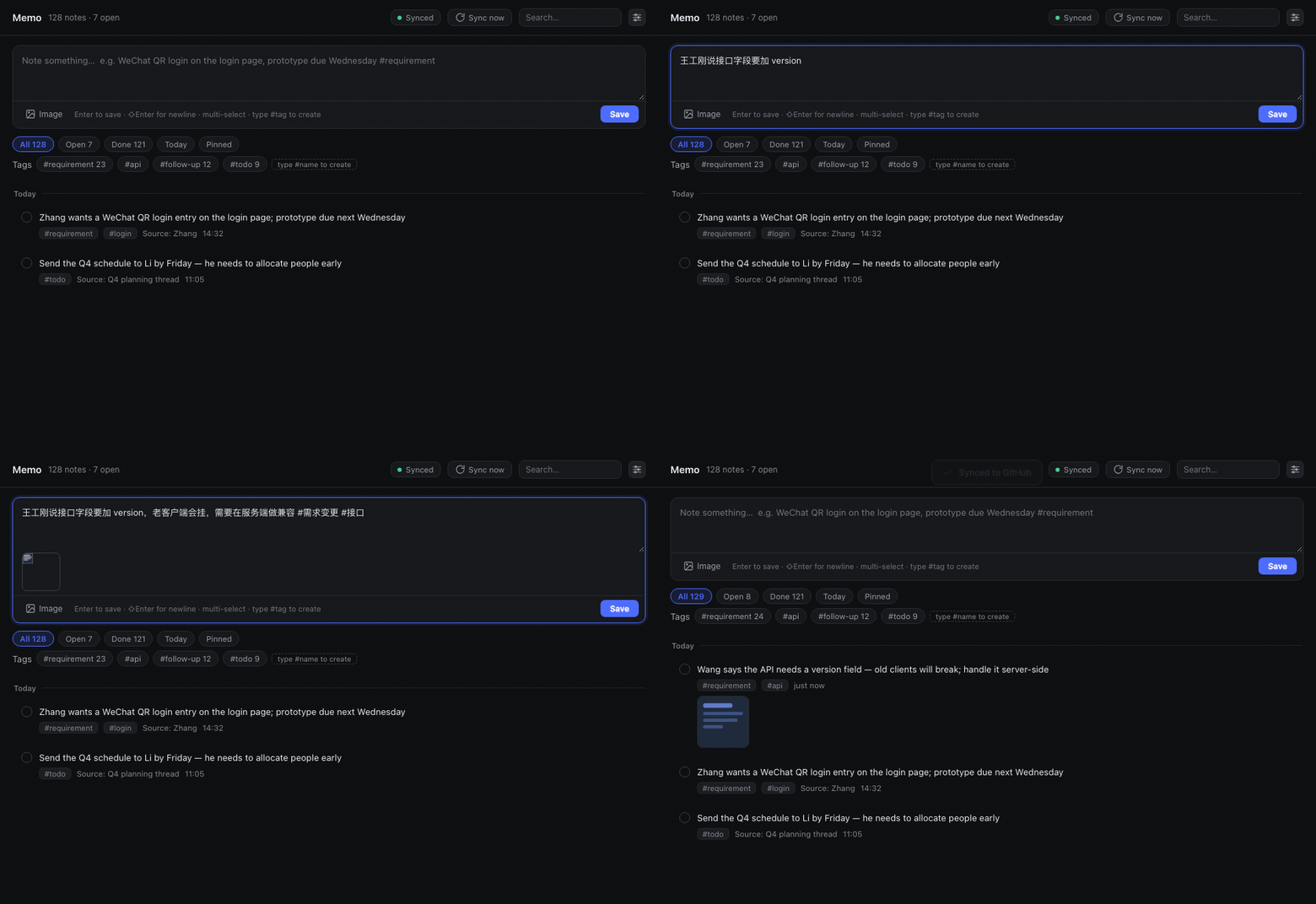
Type it, press Enter — thirty seconds later it is in your private GitHub repository
| Main panel | Capturing with images |
|---|---|
 |  |
| Search across everything | GitHub sync settings |
 |  |
| Sidebar entry | Bottom-rail icon next to Settings, with an open-items badge; click to switch to the memo panel |
| Quick capture | Always-present input at the top of the panel; Enter saves; the box is drag-resizable |
| Images & screenshots | ⌘V paste / drag-and-drop / file picker (multi-select); content-hash deduplicated, one copy per image |
| Editable | Inline editing on the card — body and images both; tags follow the #tags in the body, images can be added/removed one by one |
| Tags | Type #anything in the body and it is created automatically — not a fixed whitelist |
| Pinning | Pinned notes sort first and show a pin badge plus a left accent bar on the card; the pin button lights up too |
| Drag & drop | Hold and drag a card to reorder it within the same day group, with transition animation (inlined SortableJS) |
| Ascending / descending | One button right of the Pinned chip flips the date direction: descending = today on top, ascending = oldest on top; day groups only — order inside a day never moves, and the choice is remembered locally |
| Search | CJK-safe substring search plus #tag / source: / after: / before: / has:image / is:open qualifiers |
| Local storage | node:sqlite (built into Node) — zero external dependencies, no native module compilation |
| GitHub sync | Auto-pushes the text layer to a private repo (30s debounce), plus daily compact SQLite snapshots |
| No build step | The client half is a hand-written module bundle using React.createElement — edit and refresh |
node:sqlite; dsh's Electron usually ships 24.x)npm install neededdsh plugin --profile <your-profile> add @adamcjm/dsh-memo
<your-profile> is your dsh profile name (e.g. web, tui). Restart dsh afterwards.
Pins to the repository's default-branch HEAD instead of a published release:
dsh plugin --profile <your-profile> add github:adamcjm/dsh-memo
git clone https://github.com/adamcjm/dsh-memo.git
dsh plugin --profile <your-profile> add link:/path/to/dsh-memo
With link: your edits are live (refresh the page for client changes; restart for host changes).
The desktop profile is owned exclusively by the dsh desktop app and the CLI refuses to write to it (it reports profile "desktop" is managed exclusively by the Electron application). Wire it manually:
Edit ~/.dsh/profiles/desktop/package.json:
{
  "dsh": {
    "profile": {
      "bundles": [
        // ... existing bundles ...
        "@adamcjm/dsh-memo"                       // ← add
      ]
    }
  },
  "dependencies": {
    // ...
    "@adamcjm/dsh-memo": "^0.2.11"                // ← add
  }
}
Install dependencies (creates the symlink):
cd ~/.dsh/profiles/desktop
pnpm install
Restart DeepSeek Harness.
dsh --profile <profile> --dump-config | grep -A3 "id: memo"
Or just look at the UI: a Memo icon should appear at the bottom of the sidebar.
Open the Memo icon at the bottom of the sidebar and type into the input at the top, then press Enter:
Mr. Zhang wants a WeChat QR login entry on the login page; prototype due next Wednesday #requirement-change #login
#requirement-change and #login become tags automatically, and the tag markers are stripped from the body.
Hover a row and click Edit (the pencil); the row expands in place into an editor:
#tags in the body become the note's tags (remove a #tag from the body and the tag is removed too)#tags — visible, and saved back as-is⌘Enter saves, Esc cancelsSaving regenerates the .md source of truth, bumps rev, and syncs to GitHub within 30 seconds.
Date dimension: ascending / descending
One button sits to the right of the Pinned filter chip; it shows only the current direction — click it to flip:
localStorage), so it survives reopening the panelWithin one day: drag & drop
Within one day group, hold a card and drag it to change the order:
.md source of truth as order:, so it survives syncing to another machineThree ways, freely mixable and repeatable:
⌘V in the input⌘ / ⇧ in the file dialog for multi-selectImages are named by SHA-256 and stored in attachments/, so pasting the same image twice costs one copy. Click a thumbnail to view it full size.
Tags are not fixed. The defaults (#requirement-change #todo #follow-up #idea #meeting) are just starting suggestions:
#customer-A or #MrZhang in the body and save → the tag is created and attached to that notebuy milk#groceries, meeting,#work also count); a tag name ends at whitespace or punctuationUse the search box in the panel header and press Enter. Qualifiers combine:
| Syntax | Meaning |
|---|---|
scan | Body or source contains the string (works for short CJK queries too) |
#requirement-change | By tag |
source:MrZhang | By origin |
after:2026-10-01 before:2026-10-08 | By date range |
has:image | Only notes with attachments |
is:open is:done | Only open / only completed |
| Key | Action |
|---|---|
Enter | Save the current input |
⇧Enter | Newline inside the input |
⌘V | Paste an image from the clipboard |
Esc | Close an overlay (settings / image zoom) |
yourname/dsh-memo-data)repo scopeAfter that:
Three layers, resolved in order:
| # | Location | Notes |
|---|---|---|
| ① | ~/.dsh/memo/.config.json | Saved from the plugin's settings dialog — survives restarts |
| ② | Plugin config config.repo in cordis.patch.yml | Deployment-time default |
| ③ | remote.origin.url in ~/.dsh/memo/.git/config | Existing git trace (a manual git remote add counts) |
Only when all three miss does the panel say "not configured". The sync-badge tooltip reports which layer is in use (runtime / config / git-remote).
Token lookup order (none of them ever enter the repository):
~/.dsh/memo/.token (mode 0600)DSH_MEMO_GITHUB_TOKENGITHUB_TOKENWhen pushing, the token only ever appears in the git process arguments (http.extraheader) — it is never written into .git/config.
The data root is ~/.dsh/memo/, which is itself a git repository:
~/.dsh/memo/
├── memo.db                  # SQLite working DB (engine; git-ignored, rebuildable from notes/)
├── notes/2026-10/<id>.md    # ★ the text source of truth: one file per note
├── attachments/<xx>/<sha256>.<ext>      # images, content-hash named
├── log/2026-10.jsonl        # append-only action log (.gitattributes sets merge=union)
├── snapshots/memo-YYYY-MM-DD.sqlite     # daily compact snapshot, 7 kept
├── .token                   # credentials (0600, git-ignored)
├── .config.json            # remote repository setting (saved from the UI, synced too)
├── .gitignore
└── .gitattributes
A SQLite file in git is an unmergeable binary: if two machines both edit it, git can only pick one entire file — you lose everything from the other machine, not just one note. It also rewrites whole database pages on every change, so a single small edit becomes a complete new blob and the repository balloons.
Hence three layers:
| Layer | Role | If it breaks |
|---|---|---|
| ① Local SQLite | Query engine and index | Delete it; it rebuilds from ② |
② notes/ + attachments/ + log/ | Sync source of truth — this is what git moves | ③ is the backstop |
| ③ Private GitHub repo | Backup and history | — |
The daily .sqlite files under snapshots/ are committed too, satisfying "the SQLite file lives on GitHub as well" — but they are disaster recovery only and never participate in merges.
Delete memo.db* and restart dsh (or call the rebuild API). The plugin scans notes/**/*.md and rebuilds everything, including tags, sources, due dates and attachment references.
dsh plugin --profile <your-profile> remove @adamcjm/dsh-memo
~/.dsh/profiles/desktop/package.json and remove the two @adamcjm/dsh-memo entries from dsh.profile.bundles and dependenciescd ~/.dsh/profiles/desktop && pnpm installUninstalling the plugin does not delete your data. If you are sure:
rm -rf ~/.dsh/memo # local data (including credentials)
If you synced to GitHub, the remote repository (e.g. yourname/dsh-memo-data) is yours to delete.
git clone https://github.com/adamcjm/dsh-memo.git
cd dsh-memo

node test/smoke.mjs                    # host half, 64 checks: CRUD / tags / attachments / rebuild / snapshots / credentials
node test/client-precheck.mjs          # client half, 25 checks: module protocol / slot registration / component rendering
node test/ui-feedback-check.mjs        # UI details, 80 checks (incl. pinning and drag wiring)
node test/edit-interaction-check.mjs   # theme foreground + clickable edit area, 15 checks (real mount via jsdom + React)
node test/tag-rules-check.mjs          # tag rules & edit round-trip, 52 checks (position / fidelity / host-client parity)
node test/edit-check.mjs               # editing & image refcounting, 29 checks
node test/reorder-check.mjs            # ordering, 20 checks (done does not jump / drag persists / old-db migration)
node test/drag-check.mjs               # real-browser drag, 12 checks (Chrome + CDP; skipped without Chrome)
node test/panel-mount-check.mjs        # real panel mount, 7 checks (jsdom + React; proves the Sortable instance is attached)
node test/sort-check.mjs               # ascending/descending, 23 checks (jsdom + React, real clicks: day groups only / order inside a day untouched)
node test/i18n-check.mjs               # i18n, 22 checks (zh/en switching, missing-key fallback)
node test/config-check.mjs             # sync config, 18 checks
node test/hot-swap-check.mjs           # hot swap, 9 checks
None of these need dsh running. The client tests need to resolve react / react-dom (they look in the project first, then borrow from a dsh profile); the real-mount tests also need jsdom (installed as a devDependency by npm i, skipped when absent).
package.json        dsh.bundle.patch + dsh.client (platform: web)
cordis.patch.yml    host plugin row: id: memo
lib/index.js        host half: SQLite / attachments / Markdown source of truth / git sync / HTTP API
lib/client.js       client half: window.__ModuleLoader__.load({id, factory}) + React UI
                    (SortableJS 1.15.7 — MIT — is inlined here for drag-and-drop reordering)
test/               independently runnable test files (host / client / UI / tag rules)
fetch('/memo/api/<method>'); the host serves it via ctx.webServer.register({ kind: 'prefix' })ctx.slots.register({ name: 'sidebar.panellist', id, order, label }, Icon) — the icon component receives { size, active }ctx.slots.register({ name: 'main', key: id }, Panel) — both ids must match; the shell calls ctx.layout.selectPanel(id) when the icon is clickedlib/client.js): refresh the page (the module system derives revisions from mtime / ctime / size and hot-swaps)lib/index.js): restart dsh (host code loads at process start)lib/client.js rewritten exactly while dsh boots: the client-side HMR watch can hot-swap the bundle while its first load is still in flight, so DSH ends up executing the same bundle twice. The bundle now tolerates its own duplicate registration (a second duplicate factory registration is ignored, because a registration already exists) instead of failing the whole web boot. Every other error is still rethrownLIKE, not FTS5 — SQLite's trigram tokenizer requires query terms of 3+ characters, and the most common Chinese queries are two characters ("扫码", "登录"), which would silently return nothing. Correctness firstDeepSeek Harness(DSH)Web 插件聚合生态包 · 一切皆插件,创意工坊分发(dsh-market.com)
把回答做成一页可视化 HTML:模型只写简短的 Markdown 草稿,随包附带的 `am` 命令行生成页面,支持流程图、时序图、树、时间线、ER 图、表格和提示框。
在 dsh 里装上这个插件即可,无需登录、注册或填 API Key,就能使用包括 Muse Spark 1.3、MiMo V2.6 在内的前沿模型——完全免费,不限量。 All you do is install this plugin in dsh: no login, no sign-up, no API key — the frontier models are just there, Muse Spark 1.3 and MiMo V2.6 among them. Completely free, with no usage cap.

