
packages/dsh-task-board
zhu1090093659/dsh-web侧边栏多列任务看板:卡片交给真实 DSH 智能体会话执行,支持 cron 定时(Host 侧到点执行,关浏览器也生效)。

输入框一键进/出 Plan 模式(/plan 的快捷点击),常驻小按钮。
A one-click enter/exit Plan mode button for the DSH web input bar (a quick-click shortcut for /plan) — a plugin for DeepSeek Harness (dsh) web.
Unofficial project: independently developed and maintained by a community member, not an official DeepSeek product.
⚠️ DISCONTINUED (2026-10-01)
DSH 0.2 already ships Plan mode entry points: pick 「计划」in the composer's
+Command menu, or type/plan; exit with the official 「计划」status badge in the composer. This plugin only saved you one click (plus pending-guard / auto-hide), so the official build leaves no capability gap — the author has uninstalled it and stopped maintaining it.
- Last release:
v0.4.1(verified on DSH 0.2.0-rc.2). No further fixes or compatibility work.- It has been removed from the author's three profiles (desktop / web / sandbox). You may keep installing it, but compatibility going forward is at your own risk.
- What to use instead: the
/plancommand, or 「计划」in the composer+menu; exit via the 「计划」badge in the composer.- Thanks to everyone who used it.
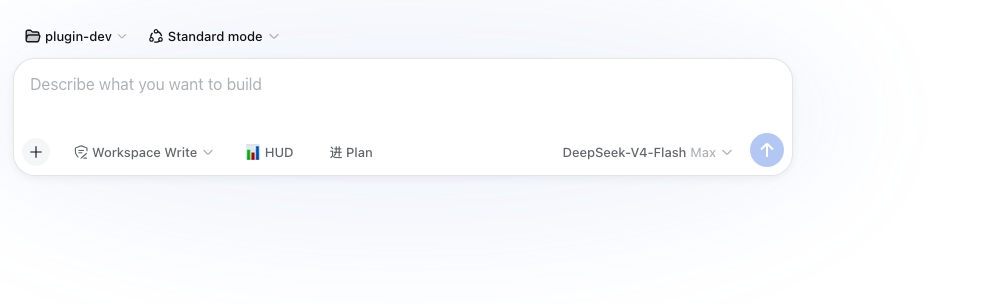
The checklist icon button at the left end of the input tool row (official DSH design tokens, follows dark/light theme).
/plan toggle command./plan toggle is queued, the button is disabled (the same "switching" semantics as the official plan chip), so a stray click can't reverse the switch./plan command, official chip, agent switching mid-run) are reflected in real time.Official bundle install (one line):
# DSH 0.1.7 and later:
dsh plugin --profile web add "github:a903067276-rgb/dsh-plan-switch#main"
# DSH 0.1.5 and older (this release needs 0.1.7+):
# dsh plugin --profile web add "github:a903067276-rgb/dsh-plan-switch#v0.3.2"
Restart dsh web after installing (bundle layers are composed at startup). Requires pnpm on PATH (dsh plugin forwards to pnpm).
Manual mount (fallback): see docs/install.md — symlink into ~/.dsh/profiles/web/node_modules/ plus a single entry in ~/.dsh/cordis.patch.yml, then restart.
A checklist icon button appears at the left end of the input tool row (official DSH design tokens, follows dark/light theme). Click it to enter plan mode — the same as typing /plan. While plan mode is active the button hides itself: the official plan card takes over the status display, so there is never a duplicated indicator; while a /plan toggle is pending the button is disabled, so a second click can't reverse the switch.
| Platform | Status |
|---|---|
| macOS | ✅ fully tested (development environment) |
| Linux | ⚠️ expected to work (pure frontend button, no platform dependency), untested |
| Windows | ⚠️ expected to work (pure frontend button, no platform dependency), untested |
dsh web) — the code calls commands.execute with the 3-argument contract (rc.8+) and auto-degrades to the 2-argument one on rc.6/rc.7v0.4.1): it declares peerDependencies: {"@deepseek-ai/dsh": "^0.1.7-rc.1 || ^0.2.0-rc.1"}, so a mismatched host refuses to load it with an explicit reason instead of failing quietly. Settings move to the 0.1.7 model (plugin Config, live-editable .volatile() fields), so changes apply without a restart.^0.1.7-rc.1 || ^0.2.0-rc.1) and dsh.compatibility.dshReleases adds "0.2.0-rc.1": "compatible" — verified on a real 0.2.0-rc.1 host and a shadow instance. Since 0.2 the host gates profile bundles on peer compatibility and skips the whole bundle when the declared range misses the running host, so this range is what keeps the plugin loading.v0.3.2: that line keeps the old behavior and uses no 0.1.7-only API.v0.3.2) are not supported on 0.1.7 — no known behavior regression — it only lacks the localized plugin metadata. Upgrade the plugin together with the host.| Your DSH version | Install this | Note |
|---|---|---|
| 0.1.0-rc.6 and newer (incl. 0.1.1-rc.1/rc.2) | main (v0.3.2+) | Best effort — 3-arg call with auto-degrade to 2 args on rc.6/rc.7 (verified locally on rc.6/rc.8, not guaranteed) |
| 0.1.5-rc.1 | main (v0.3.2+) | ✅ Verified: the official slot catalog still declares conversation.input.left (occupants: [], replaceRisk: none) — no migration needed; the official Plan chip only exits plan mode, and the official README states there is deliberately no inactive affordance (which this plugin provides) |
| 0.1.0-rc.8 and newer (conservative) | v0.3.1 — dsh plugin add github:a903067276-rgb/dsh-plan-switch#v0.3.1 | Last build without the degrade logic |
| 0.1.0-rc.6 – 0.1.0-rc.7 (conservative) | v0.3.0 — dsh plugin add github:a903067276-rgb/dsh-plan-switch#v0.3.0 | 2-argument commands.execute contract |
/plan command, so nothing extra is required on any platform.lib/index.js): no behavior — this is a pure UI plugin; the client half is discovered through the dsh.client declaration in package.json (exports["./client"]).lib/client.js): registers the checklist icon button in the conversation.input.left seat using official DSW design tokens (follows dark/light theme); reads plan state live through useProjection("plan"); clicking executes the official /plan command via ctx.remote.commands.execute(sessionId, "/plan", []) — the whole flow stays on the official command chain.pending ? !active : active). While plan mode is active the button returns null (hidden — the official plan card owns the indicator, no duplicate); while a toggle is pending the button is disabled so a second click can't reverse the switch; command failures turn the button error-colored with the message in its tooltip.dsh web after installing or updating (bundle layers are composed at startup); client-side edits apply on a page refresh.lib/index.js (host side, no-op), lib/client.js (web injection)main → pnpm update to verify the install侧边栏多列任务看板:卡片交给真实 DSH 智能体会话执行,支持 cron 定时(Host 侧到点执行,关浏览器也生效)。
DSH Web UI 插件与皮肤合集:任务看板、git 图、右侧面板、远程移动端 UI、桌宠、实时 token 统计与皮肤中心。
助手回复内渲染交互式 UI 组件:布局、图表、表单、测验、mermaid、3D 场景与回传事件循环。
