
dsh-web
zhu1090093659/dsh-webDeepSeek Harness(DSH)Web 插件聚合生态包 · 一切皆插件,创意工坊分发(dsh-market.com)

A minimal DeepSeek Harness agent preset with a stateless sympy_calculate tool that runs Python against a local SymPy development checkout.
A third-party DeepSeek Harness agent preset based on minimal. It adds one
stateless tool, sympy_calculate, which runs a complete Python script in a
fresh process against a local SymPy development checkout.
Security:
sympy_calculateexecutes arbitrary Python with the current user's permissions and inherited environment. It is not sandboxed. Enable it only in sessions whose model and permission policy you trust.
The tool defaults to ~/sympy-dev/sympy and its venv:
sudo apt install -y python3-venv
mkdir -p ~/sympy-dev
git clone https://github.com/sympy/sympy.git ~/sympy-dev/sympy
python3 -m venv ~/sympy-dev/sympy/venv
~/sympy-dev/sympy/venv/bin/python -m pip install -e ~/sympy-dev/sympy
For a different checkout or interpreter, set SYMPY_ROOT / SYMPY_PYTHON
before starting DSH.
Among shipped profiles, install into web only. The web bundle provides
the agent-preset-registry service the preset needs. A custom profile can
use the preset if that profile provides the service as well.
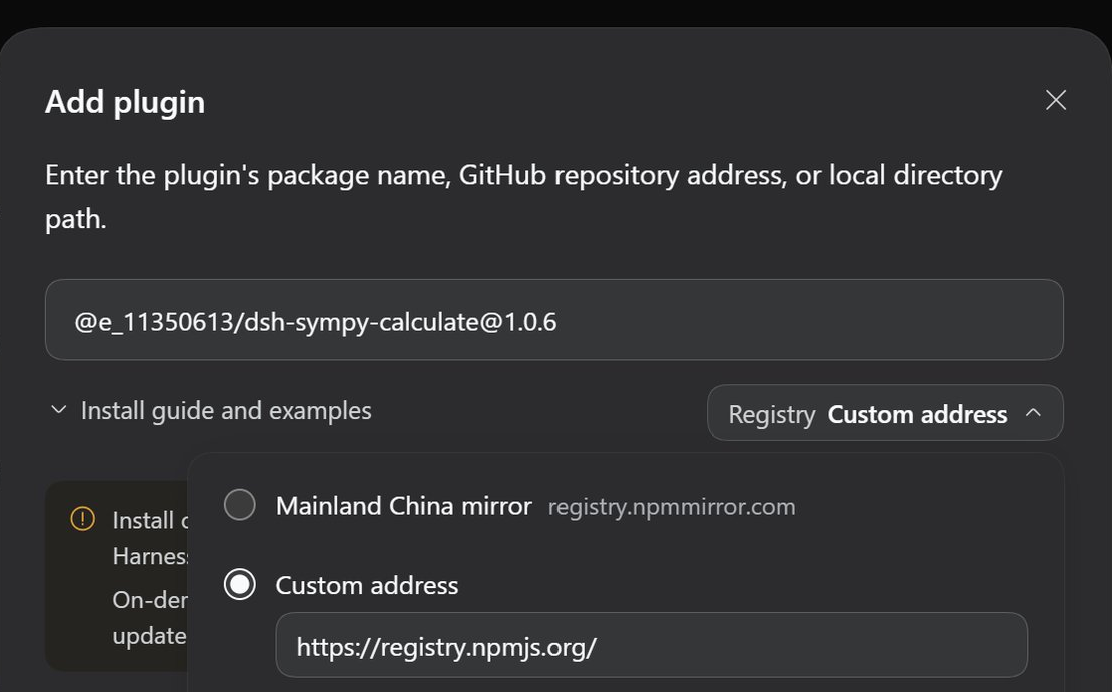
The easiest way is from the Web UI: go to Plugins → Add plugin, enter
@e_11350613/dsh-sympy-calculate@1.0.6, choose Custom address under
Registry, and enter https://registry.npmjs.org/. Then select Install.
No GitHub URL or SSH key is needed.
Alternatively, from the CLI, install
@e_11350613/dsh-sympy-calculate
from npm into the web profile. If dsh is already on your PATH, replace
the npx --yes @deepseek-ai/dsh@0.2.1-rc.2 prefix with dsh.
npx --yes @deepseek-ai/dsh@0.2.1-rc.2 plugin --profile web add \
  @e_11350613/dsh-sympy-calculate@1.0.6
HTTPS tarball, if you prefer to install directly from GitHub:
npx --yes @deepseek-ai/dsh@0.2.1-rc.2 plugin --profile web add \
  https://codeload.github.com/11350613/SymPy-Calculate/tar.gz/v1.0.6
Git shorthand, when GitHub SSH access is already configured:
npx --yes @deepseek-ai/dsh@0.2.1-rc.2 plugin --profile web add \
  github:11350613/SymPy-Calculate#v1.0.6
From a DeepSeek Harness source checkout, use pnpm dsh:
pnpm dsh plugin --profile web add \
  @e_11350613/dsh-sympy-calculate@1.0.6
Start or restart the web profile. SymPy Calculate will then be
available as an agent preset for new tasks.
Check the composed profile:
npx --yes @deepseek-ai/dsh@0.2.1-rc.2 --profile web --dump-config \
  | grep "SymPy Calculate"
In the Web UI, confirm that SymPy Calculate appears as an agent preset without a Failed to load badge.
sympy_calculate expects one complete script:
{
  "code": "from sympy import *\n\nx = symbols('x')\nprint(integrate(x**2 / (1 + x**4), (x, -oo, oo)))\n"
}
Output:
sqrt(2)*pi/2
| Symptom | Fix |
|---|---|
sympy_calculate: no Python interpreter under ... | Run the SymPy setup above, or export SYMPY_ROOT / SYMPY_PYTHON before starting dsh. |
| Remove the plugin | npx --yes @deepseek-ai/dsh@0.2.1-rc.2 plugin --profile web remove @e_11350613/dsh-sympy-calculate |
Removal fails with ERR_PNPM_MISSING_TARBALL_INTEGRITY | Run cd ~/.dsh/profiles/web && pnpm remove @e_11350613/dsh-sympy-calculate --config.trust-lockfile=true (skips lockfile verification for this removal), then restart DSH. |
v1.0.6@e_11350613/dsh-sympy-calculate@1.0.6v22.23.211.24.02.43.03.12.3Bug reports and feature requests: https://github.com/11350613/SymPy-Calculate/issues
MIT. See LICENSE.
DeepSeek Harness(DSH)Web 插件聚合生态包 · 一切皆插件,创意工坊分发(dsh-market.com)
把回答做成一页可视化 HTML:模型只写简短的 Markdown 草稿,随包附带的 `am` 命令行生成页面,支持流程图、时序图、树、时间线、ER 图、表格和提示框。
在 dsh 里装上这个插件即可,无需登录、注册或填 API Key,就能使用包括 Muse Spark 1.3、MiMo V2.6 在内的前沿模型——完全免费,不限量。 All you do is install this plugin in dsh: no login, no sign-up, no API key — the frontier models are just there, Muse Spark 1.3 and MiMo V2.6 among them. Completely free, with no usage cap.

