

dsh-web
zhu1090093659/dsh-webDeepSeek Harness(DSH)Web 插件聚合生态包 · 一切皆插件,创意工坊分发(dsh-market.com)

统计思考行里的关键词并在展开后按词标红;标题行上每个词一个计数徽章,点徽章即单独开关这个词;每个词可设底色、文字颜色、字号(10-22px,与宿主正文尺寸同一区间)、字体、加粗/斜体/下划线与「完整词」匹配;插件有独立的设置分区。
A DSH plugin that counts and highlights keywords inside chain-of-thought rows ("thinking" rows), with its own section in Settings.
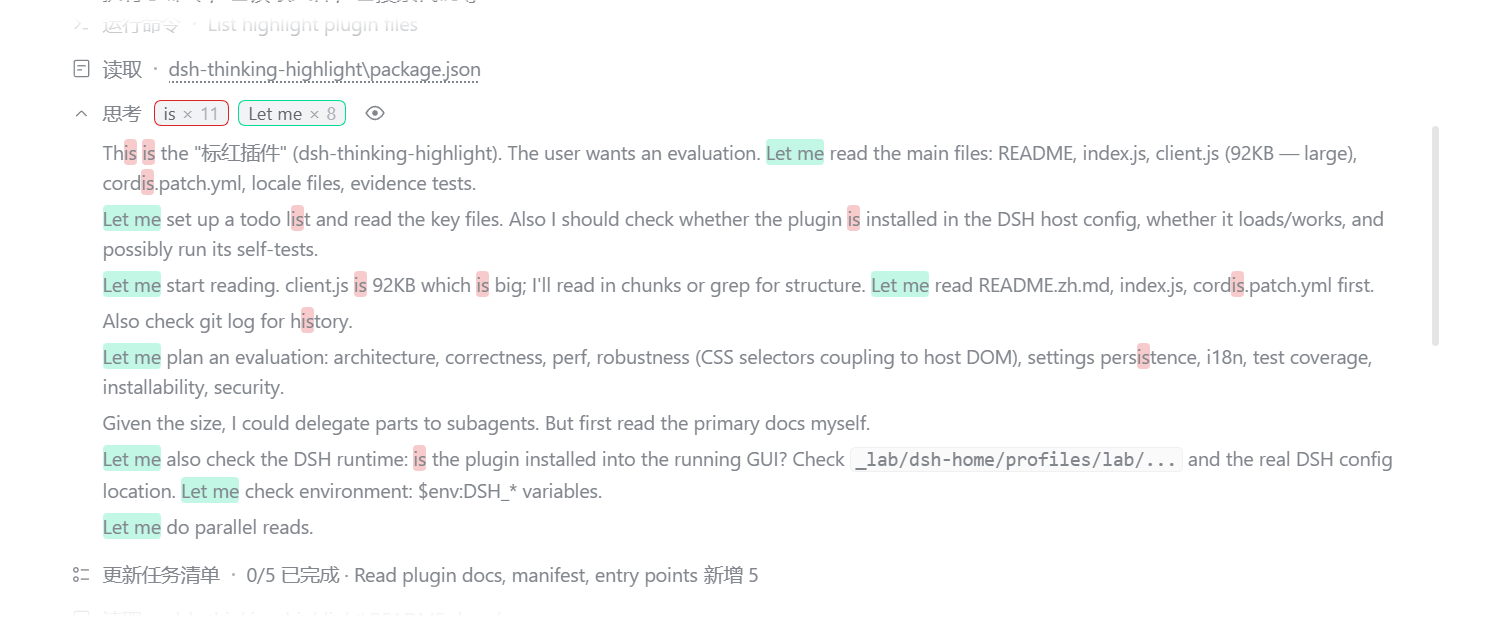
keyword × n right after its title, one chip per keyword, so you
can see at a glance which word keeps coming back and how often.is either matches everywhere or only where it stands alone
(never inside this or ThisIs).Works on both surfaces — the DSH web UI (dsh web) and the desktop app. Pick whichever line matches how you run DSH:
# dsh web, from npm (installs straight into the `web` profile)
dsh plugin --profile web add @yokira404/dsh-thinking-highlight

# any other profile name
dsh plugin --profile desktop add @yokira404/dsh-thinking-highlight
Reload the page (or restart the app) and the settings page is there. In the dsh-market plugin it is the same one-click card.
From a checkout, instead of npm:
git clone https://github.com/Yokira404/dsh-thinking-highlight.git
cd dsh-thinking-highlight
node evidence/install.mjs desktop        # or another profile name
That installer records a link: dependency pointing at the checkout, adds the package to
dsh.profile.bundles, and creates a junction under <profile>/node_modules. Then restart the app: the card
appears in Plugins → 已安装, where the switch enables or disables it.
dsh plugin add does the first two of those itself, for a local folder, a tarball or an npm name alike.
The dependency entry is not optional: the Plugins page only lists a package the profile records as a dependency (or as a shipped-optional bundle). A package that is merely selected in
dsh.profile.bundlesloads fine but gets no card — and therefore no switch.
dsh with a web profile (dsh web 0.1.0-rc.6 or newer is what dsh-market itself needs).react and react-dom/client, which the host already
serves to browser halves. It declares no @deepseek-ai/* dependency and no engines range, so it does not
constrain which harness build you run.[data-variant="think"]) exists in dsh desktop 0.2.0-rc.2 and in the
@deepseek-ai/dsh-client-ui-chat shipped with dsh web; evidence/host-shape.mjs asserts the markers it
depends on are still in the installed bundle.Ctrl + , → 标红插件 / Thinking Highlighter in the left navigation.
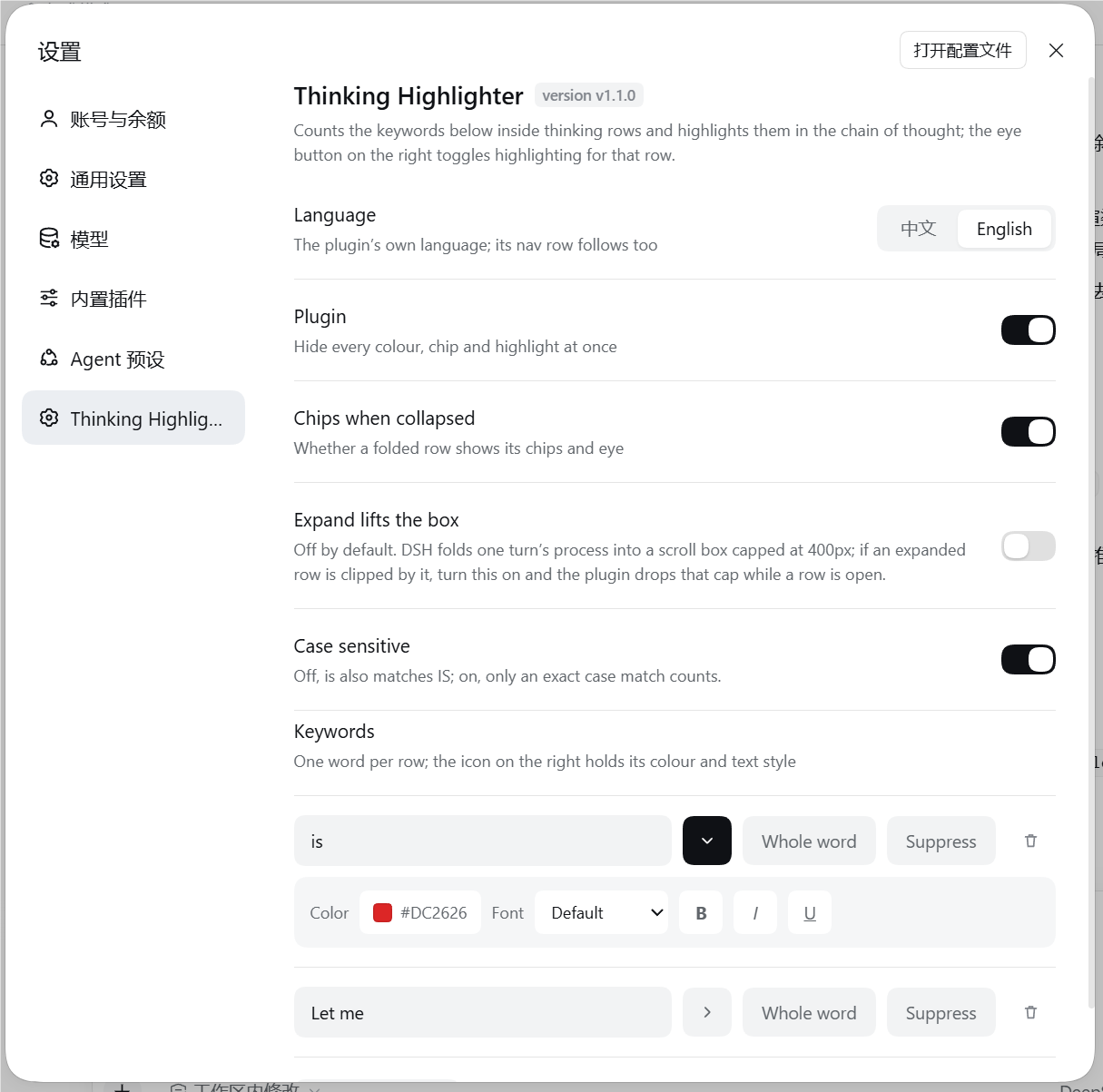
| Row | What it does |
|---|---|
| Language | 中文 / English for the plugin's own UI; the nav row follows it too |
| Plugin | Hides every colour, chip and highlight at once |
| Chips when collapsed | Whether a folded row shows its chips and eye |
| Expand lifts the box (off by default) | DSH folds a turn's process into a scroll box capped at 400px; with this on, an expanded row temporarily drops that cap so a long chain of thought can be read without scrolling inside the box |
| Case sensitive | Off (default): is also matches IS |
| Keywords | One row per word: text field, ▸ style, 完整词 / whole word, suppress, delete |
| ▸ style panel | Tint colour, text colour (Theme hands it back to the host), text size (10–22 px stepper), font, Bold, Italic, Underline, and Badge settings for that word's chip |
| Badge settings (in the keyword heading) | The same words as the button inside a word's panel, but this one opens the shared chip look every word follows by default |
Settings live in the browser's localStorage and apply immediately.
The chips that carry each word's count are editable on their own: 徽章设置 / Badge settings at the end of a
word's ▸ style panel opens the editor for that word's chip, and the button of the same name in the keyword
heading opens the same editor for the shared badge every word follows — its tooltip says so, and the dialog's
own header names what it is editing. A word leaves the shared look only once something in its own editor is
changed — until then its dialog says 跟随全局 / Follows the shared badge, and the shared badge is what its
chips are drawn from.
The dialog is the host's own modal (full-viewport layer, masked backdrop, card on the secondary layer), and it edits as you go — there is no draft to lose:
| Part | What it does |
|---|---|
| Preview | The row the chip will sit on, drawn with the transcript's own chip builder, so what is previewed is what the row will draw |
| Templates | Six built-in looks (Default, Emphasis, Pill, Outline, Square, Glow) applied in one click, and Save as template for your own. Your templates are a list that grows, so they live in the My templates dropdown instead of a row of chips — pick one to put it on, and the button beside it deletes the one that is picked |
| Size | 0.5×–2.4×, by stepper or slider, with Follow the word's size on by default so the chip still tracks that word's text size. A chip taller than the line it sits on makes its row grow instead of being clipped |
| Colour | Fill, text and frame, each with a colour well and a way back to the theme — the frame can also keep borrowing the word's own colour |
| Style | Shape (rounded / pill / square), stroke (thin / thick / none), shadow (none / soft / glow) and bold |
| Texture | An image you upload, redrawn to at most 96 px on its long edge and stored in this browser only; tiled, stretched or fitted, with its own strength |
| Reset | Hands the word back to the shared badge (or, from the shared editor, everything back to the default look) — it stays available only while there is something to reset |
The thinking row is a sealed built-in component with no slot to render into, so the plugin decorates the rendered DOM instead — by splitting text nodes, never by replacing them:
[data-disclosure-row] line, not by being the row's first element: while
the model is still streaming the host renders a visually-hidden "running" status span before it, and a chip
set parked in that 1 px box is a chip set nobody can see.[data-disclosure-row] line in a flat DisclosureRow, and — since 0.2.1 — as the next sibling of the
[data-disclosure-header] block that now wraps that line. Reading only the line's own sibling is what made
0.2.1 lose the body entirely (the line sits alone inside the header block, so that sibling is null); both
nestings describe the same "first element after the header", so the lookup tries them in turn.[data-cot-translation] > (toolbar, rendered reasoning). The plugin decorates and counts the rendered
reasoning only — the toolbar's button, spinner and failure text are chrome, not chain of thought — and when
the reader flips the view, the marks and the numbers follow whichever text is on screen.flex: auto), which is why the chip
group has a fixed width cap and clips only itself.[data-dsh-hl="off"] neutralises them) so that muting a keyword, streaming or a host
re-render during that time cannot leave the row with nothing to show when the eye comes back on.color: currentColor rather than a fixed hex, so
"follow the theme" needs no second code path — and the eye-off rule has an inherited value to hand back.--dsh-th-chip-scale factor on the chip element; the stylesheet draws the chip's line
box at the height the client computed for it (--dsh-th-chip-line) — a chip on a collapsed row sits on a header
line the host pins to a fixed height with contain: size layout, where an oversized chip would be clipped
instead of read. The height the host gives that line is 24px + var(--dsh-content-font-delta), and the host
publishes that delta as a calc() over the reader's content font size: a custom property's computed value is
the token sequence, not the length it stands for, so the plugin derives the number from the size the host sets
as a plain <n>px instead. host-shape.mjs asserts that definition is still in the installed bundle — reading
nothing here is exactly how an oversized chip would go unmeasured.setRoom / sweepRooms, the same give-and-take as the fold lift). The row is
raised only while it is folded — an expanded row's height is its own content's — so a scaled-up badge is a size
rather than a crop.position: fixed, so it covers the viewport from
where the plugin already is, and the row it edits is named by id rather than by position — a row deleted while
its editor is open closes the editor instead of handing it to whichever row slid into that place.text prop. The plugin reaches it through the fiber React attaches to
every element it created (__reactFiber$…); anything unexpected reads as "unavailable" and the DOM text is
used instead.[data-variant="think"] rows as DSH renders them today. A DSH release that changes
those internals can require an update here; when a lookup fails the plugin degrades to doing less, never to
breaking the transcript. evidence/host-shape.mjs models the installed markup and also asserts the markers
it depends on are still present in the app's own bundle, so a DSH rename fails a test instead of going quiet.[data-disclosure-header] block, one level deeper than before.
That is the shape 1.4.0 could not find (chips drew, the chain of thought stayed unmarked); the body lookup
now handles both nestings, and host-shape.mjs asserts the installed disclosure still renders the new
header block so a further change fails a test.[data-cot-translation],
and the plugin marks and counts the translated text (or the original, when the reader switches back) while
leaving the toolbar alone. Rows that are folded still count the whole original chain, because a folded row
has no body at all.min(10).max(22).default(14)). The plugin cannot read the host's schema at runtime, so host-shape.mjs
asserts those two numbers are still in that bundle — a DSH release that changes the range fails a test first.localStorage. A change made in another window arrives through the browser's
storage event; the plugin re-reads the store and rebuilds every row. A texture lives there too, which is why
an upload is redrawn small first and refused rather than stored if it is still too large.node evidence/selftest.mjs # 71 checks: splitting, undoing, counting, case, colour, size, whole-word edges
node evidence/client-harness.mjs # 190 checks: the browser half really runs, against a stubbed host
node evidence/css-check.mjs # 33 checks: the stylesheet literal (braces, chip/row/panel/editor rules)
node evidence/locale-check.mjs # 11 checks: package meta, both locale files and the version tag agree
node evidence/host-shape.mjs # 40 checks: the installed row markup, plus its markers in the app bundle
node evidence/e2e-bundle.mjs <page-url-with-token> @yokira404/dsh-thinking-highlight <cookie>
The self-tests extract the shipped functions out of client.js by brace matching and run them against a DOM
stub — never a copy — and the harness executes the factory, apply, the settings page and a full row
decoration with React stubbed out. They exist because the failure modes here are quiet ones: a template
literal that loses its tail, counts that count themselves, a cache that keeps a highlight from coming back.
host-shape.mjs is the one suite that models the DOM the host actually renders — the hidden status span, the
body nested inside the disclosure block — because a fixture built from the plugin's own assumptions cannot
catch a wrong assumption. It skips its bundle check with a printed SKIP when the app is not installed here.
e2e-bundle.mjs checks a running scratch profile end to end: the host row activates, the boot graph carries
the browser half, and the served bundle is byte-identical (sha256) to client.js.
| File | Role |
|---|---|
package.json | bundle manifest: dsh.bundle.patch + dsh.client (platform: web) |
cordis.patch.yml | inserts the thinking-highlight row into a profile |
index.js | host half; makes the package loadable and publishes dsh.client |
client.js | browser half: the settings section and the reasoning-row decoration |
locale/*.json | card title and description, in the {"meta": {...}} shape DSH reads |
icon.svg | plugin icon |
docs/ | the screenshots used above |
At runtime, window.__DSH_TH__ exposes settings(), rows() ({ highlighted, count, hasBadges, marked, folded }), refresh(), clear(), pass(), passes() and diagnose() for poking at the decoration from the
console.
diagnose() covers the case where the plugin has clearly loaded — its settings page is there — and yet no chips
appear. It switches on a page-state probe and answers the one question the other seams cannot: does the plugin
see any reasoning row on this page at all? It returns the current counts; reload, and every pass then writes
what it found to localStorage['dsh-thinking-highlight.state.probe'] — the stored settings, the last pass's row
and keyword counts, and a per-row record (count, chips present, marks still in the document, folded, expanded).
It is off by default because it writes on every pass; diagnose(false) turns it back off.
Use the card's 卸载 / Remove in the Plugins page, or delete the link: dependency, the
node_modules/@yokira404/dsh-thinking-highlight junction and the dsh.profile.bundles entry by hand. Unloading
removes every chip, puts the split text nodes back, drops the plugin's stylesheet and takes its dsh-th-body
marker class off the host's elements.
MIT © 2026 Yokira404
DeepSeek Harness(DSH)Web 插件聚合生态包 · 一切皆插件,创意工坊分发(dsh-market.com)
把回答做成一页可视化 HTML:模型只写简短的 Markdown 草稿,随包附带的 `am` 命令行生成页面,支持流程图、时序图、树、时间线、ER 图、表格和提示框。
在 dsh 里装上这个插件即可,无需登录、注册或填 API Key,就能使用包括 Muse Spark 1.3、MiMo V2.6 在内的前沿模型——完全免费,不限量。 All you do is install this plugin in dsh: no login, no sign-up, no API key — the frontier models are just there, Muse Spark 1.3 and MiMo V2.6 among them. Completely free, with no usage cap.

