
dsh-web
zhu1090093659/dsh-webDeepSeek Harness(DSH)Web 插件聚合生态包 · 一切皆插件,创意工坊分发(dsh-market.com)

延续 simon300000/dsh-auto 的 DSH WebUI 自动审批权限档位:每次审批只走一次单轮模型审查、不再起审查子代理,只自动放行审查通过的动作、其余全部转回人工审批;并会把用户确认过的决定记成项目级与全局级的允许/拒绝名单,右侧栏另有审批时间线。
English | 中文
This project only auto-approves the requests that pass review — it does not solve unattended operation.
This project is forked from / based on simon300000/dsh-auto.
dsh-auto-pass adds a 自动审批 (Auto Approve) permission preset to the DeepSeek Harness Web UI. Every action that needs approval goes through a single-shot model review — one plain model call, no child Agent, no tools and no transcript, fed only the normalized action plus your last direct message — and the plugin auto-approves only the requests that pass that review. A model denial, a host safety downgrade, and a failed review are all handed back to DSH's normal approval chain, so the user decides. The one exception is the "Reject on denylist" switch (off by default): once you turn it on, a denylist hit fails the tool call outright instead of opening an approval card.
On top of that sit two layers of permission memory: an allowlist (allowed directly from then on, with no model call) and a denylist (handed to you directly, with no model call), both at project and global scope. A rule comes from one of three places: your own promote/demote action in the timeline, the suggested rule the Reviewer returned with its review, or the rule a threshold writes by itself — after the same permission in the same project has been approved (default 3 times; auto-approvals and your own approvals both count) or denied (default 3 times; your own rejections count, and so does a model denial nobody overrode) in a row: the approval side writes the allowlist rule automatically (project scope when the session has a working directory, otherwise global) with no question card, while the denial side still asks you (this project / global / do not add). Either side uses the match condition the review already returned — or the action's permission fingerprint (the normalized signature, see below) when the review returned none. Answering "do not add" on the denylist stops the plugin from asking about that action again.
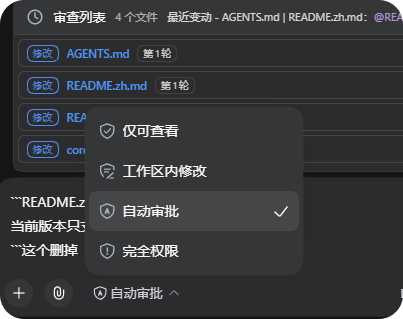
Select the 自动审批 permission preset (DSH 0.1.5-rc.1):
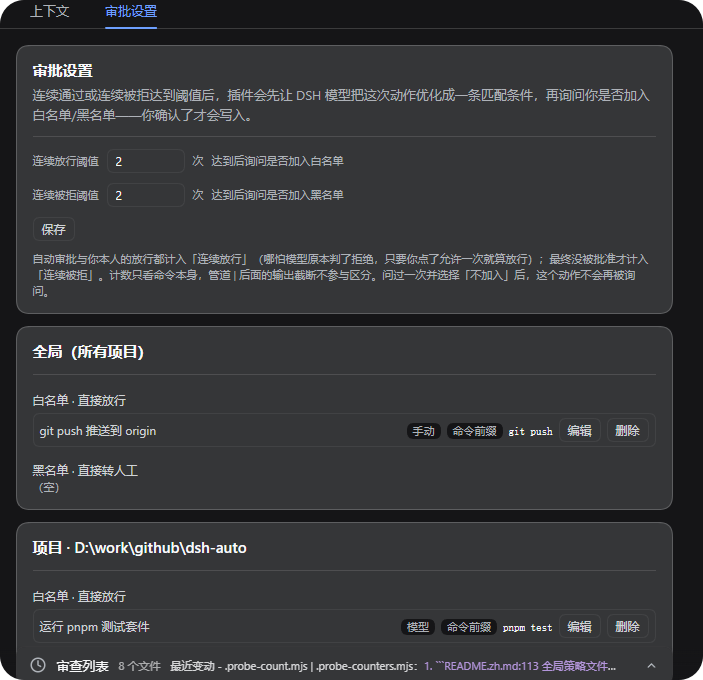
The "Approval policy" panel — both thresholds plus the global and project allow/deny lists (conversation tab):
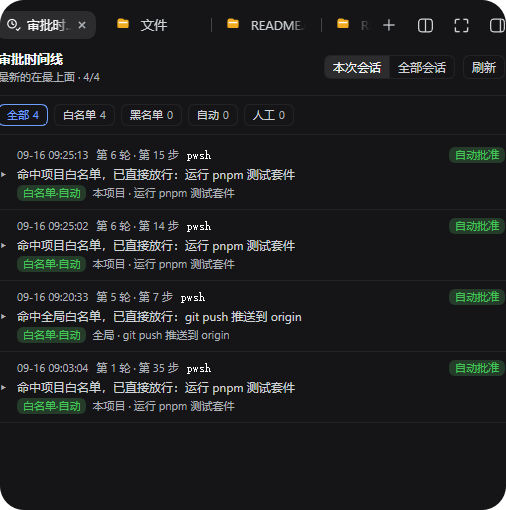
The "Approval timeline" panel — one row per decision, filterable by All / Allowlist / Denylist / Auto / Human (right sidebar):
flowchart TD
    action["Action"] --> sandbox{"Allowed by<br/>workspace-write?"}
    sandbox -- Yes --> execute["Execute directly"]
    sandbox -- "No: request escalation" --> review["🧐 Auto Approve"]
    review -- Allow --> approved["Execute this action once"]
    review -- "Deny / review failed" --> deferred["Hand back to the user (ask)"]
    exact["Resolve a permission signature"] --> lists{"Allowlist hit?"}
    lists -- Yes --> approved
    lists -- "Denylist hit (default)" --> deferred
    lists -- "Denylist hit + reject enabled" --> rejected["Reject outright (rejected)"]
    lists -- "Neither" --> review
With 自动审批 selected, ordinary actions permitted by workspace-write run without any approval call. The diagram shows the sandbox-escalation path; other tool approval rules can also trigger Auto Approve. An approval request only exists when a tool actually asks for escalation (sandbox_permissions plus justification), so a call that never escalates never reaches the plugin.
approval/request only when the session's current permission preset is 自动审批; other presets continue through DSH's existing approval chain. The plugin registers its handler with prepend, so it answers before the Web UI's human-approval forwarder; that part does not depend on bundle order (the permission-preset override above still requires the bundle to be installed after dsh-web-app).timeoutMs (90 s by default) covers that whole call including streaming. The Reviewer gets no child Agent, no tools, no file access and no session history, so it cannot investigate — it decides from what it is handed.ask_user_question answer, passed in full by default — maxEvidenceChars 0 means no truncation, a positive value clips each to that many characters). Only those two can establish authorization; nothing else is in the prompt at all.sandbox_permissions) is not by itself a reason to deny — under the confined sandbox a test command needs it just to spawn a child process, so pnpm test with danger-full-access should still be allowed. What is always denied: deletion/overwrite, uploading or force-pushing, reading credentials or keys, sudo / changing the system or registry / a command that itself writes outside the workspace, code of unknown origin, and disabling security facilities.outcome is required in the reply, which must be a single line of JSON (an outer Markdown code fence is tolerated). A compact {"outcome":"allow"} defaults to low risk and unknown authorization; omitted fields on a denial default to high risk and unknown authorization. Explicit assessments may also contain risk_level, user_authorization and rationale, plus an optional rule suggestion. The plugin only ever downgrades, never upgrades: critical risk always becomes a denial, and so does high risk without at least medium user authorization. Invalid output, an unresolvable or over-long action, no review-model route to call, a timeout and any infrastructure failure are never turned into an automatic denial: they hand the request back to the user.allowed-once for a review-passed request, and rejected when a denylist hit meets the opt-in "Reject on denylist" switch (off by default, so a denylist hit normally goes to the user as well). For a hand-off the review's opinion is also written into the approval request's reason, so the approval card itself shows why.description/justification the model rewrites every time, everything after a pipe (| Select-Object -Last 20), a trailing output redirect such as 2>&1, and differences in how the working directory is spelled. Arguments that really do change the authorization, such as an escalation marker, are always kept, so an escalated retry is not treated as an ordinary call and a different argument (another test file, say) is still a different permission. The fingerprint is what "similar permission" means here: it is the matching unit for list rules, the counting key for consecutive approvals, and the value the timeline's "add to list" form fills in by default (shown as Permission fingerprint, the signature match kind). That value can only be looked at, never typed: the plugin computes it, anything typed by hand is a rule that can never match, and other match kinds cannot be switched to it (a fingerprint can only be generated from a timeline record). What you get to read is a rendering of it rather than the machine string: the raw value is full of NUL separators, which a browser draws as little boxes, and selecting that text and copying it loses the separators (you paste pwshcmd:pnpm testx:{…}, a useless string) — so use the Copy fingerprint button next to it (it goes through the clipboard API and copies every character). Rule lists and forms show one compact line (bash · npm test · sandbox_permissions=danger-full-access), a record's detail shows three lines — tool / command (or arguments) / extra arguments — and the raw string lives in the tooltip.-Last 30); switch the match kind to "command prefix" in the form when you want to cover other arguments of the same command. Declining on the denylist stops future counting and asking for that action.tool/call event, which also happens for PTC-dispatched tools) no signature is created. Such requests take part in neither list matching nor counting — otherwise they would all collapse into one empty signature and a few approvals would auto-approve every unresolvable call.The parent session records the approval events and a compact plugin notice (switchable off in the settings, on by default). The notice is injected after the approval settles, so it carries both the review verdict and the final outcome, for example [auto] Auto Approve allowed bash · Matched: allowlist · low/medium · 0 steps · final result:approved · Rationale: ... — a hand-off therefore shows whether you eventually approved or rejected it. The line is capped at 240 characters, and the review prompt, its suggested rules and the matched rule text never enter the context. If you explained a rejection, that reason arrives as a second one-line notice ([human] rejection reason from the user:...). Host logs record the route, risk, authorization, token usage and outcome of each review, but not full prompts or file contents; the token usage of each review is also stored on the record and shown in the timeline.
Every decision is recorded. The two panels are deliberately kept apart so the conversation area does not fill up with approval noise: the conversation tab holds "Approval policy", the right sidebar holds the "Approval timeline". The panel data comes from the plugin's own localhost routes (/api/dsh-auto-pass/log, /config, /models (the review-model candidate directory), /policy, /rule, /rule/draft, /rule/revert).
"Approval policy" contains the consecutive-approval and consecutive-denial thresholds (applied as soon as you save them, stored in the global section of the policy file) and the allow/deny lists at global and project scope (each rule shows its label, its source — manual/model/memory — and its match condition, and can be edited (change its label or match condition; the rule is updated in place, id kept) or deleted individually; the same rule never shows up twice: adding a rule with the same tool + match condition updates the existing one, a rule that an existing broader rule already covers is not written again, and a broader rule merges away the narrower rules it covers — the panel tells you which of the three happened). The settings card under Settings → Plugins (the same card also sits at the bottom of the "Approval policy" panel) holds the panel placement plus four switches: inject approval results into the context (off means the result line is no longer written into the model conversation; the timeline is unaffected), reject on denylist, open the approval timeline automatically (two paths: ① a just-happened approval — within a minute — reveals the timeline while the right sidebar is collapsed, and also when you closed the timeline tab yourself (the sidebar is still there, our tab is gone: the next approval brings it back); ② switching into a session that piled up unread records reveals it once — you were away for over a minute, or more than 5 records are unread. Records already on disk never pop it, and neither does a visible timeline nor a sidebar showing another tool while our tab is still open. Those two silent cases are reported by the unread badge on the right-sidebar tab — shown first in the tab chip, it is per session (it counts only the session you are in; other sessions keep their own count and show it when you switch there) and is cleared as soon as the timeline is on screen, or by any interaction (click / focus / scroll / wheel / key) while it is already open), and ask for a reason after a rejection (the first option is that review's model note, one click away; you can also type your own or pick "No comment"). The auto-open switch is global (since 2026-10-09: turning it off once stops it in every session, including new ones; it used to be stored per session in the project policy file's prefs, and that path is gone). All of them live in this plugin row's config (the - id: dsh-auto-pass row of the profile patch, written through the host settings service), apply immediately, and survive restarts. The same card also carries a "Review model" section (added 2026-10-08): which provider and model run the review, the reasoning effort, the review timeout and the output limit. Leaving provider and model empty follows the current session, and an empty effort uses the model default; candidates come from the host model directory (searchable, click to fill, or type a value that is not listed), "Clear" empties both route fields at once (a half-filled route is refused), and saving writes back to this plugin row's config for every session. Managing project rules requires knowing the current project directory: the plugin first asks the host's session list and otherwise falls back to the cwd of the newest approval record in this session.
The "Approval timeline" has quick filters at the top — five chips (All / Allowlist / Denylist / Auto / Human), each carrying the number of records in this session (the panel only looks at the current session; the this-session/all-sessions switch was removed in 2026-09-18, while the records keep their session fields); allowlist and denylist look at whether the approval matched a list rule, auto at what the plugin approved by itself, and human at what you decided — the latter two exclude list hits, so the four never overlap and their counts add up to the total; the four stack (with several lit, a record matching any of them is shown), while All clears the selection. The list is grouped by day (today / yesterday / MM-DD) and every record sits on a timeline rail — a vertical line plus a dot tinted by the outcome (green = approved automatically, amber = waiting for you or rejected outright, gray = you already decided). A collapsed row head is two lines: the first is hh:mm:ss · tool · source chip · auto-add badge · verdict badge, the second the review opinion, so you can tell why a request was allowed or handed to you without expanding it; expanding one starts with a verdict callout (allowed automatically · low risk / handed to you · critical risk, success or warning tint) carrying risk, authorization, the matched rule and the consecutive counts as chips, followed by a "Basis" block (the review rationale, the approval reason, the rejection reason you gave) and a rule card for the rule this approval wrote — with its undo button; every technical field sits in a collapsed "Debug info" section at the bottom, split into This action (permission fingerprint — one click to copy the raw string —, command, extra args, action JSON, turn/step) and Review & usage (suggested rule, decided-by, review model, token usage, latency, time); duplicate or permanently empty rows are gone (the tool row merged into the fingerprint row, the signature summary just repeated tool + command, Auto-promoted never happens on new records, and the reviewer step count is always 0 in a single-shot review); the detail ends with two collapsible cards whose header is the toggle (click the title to expand / collapse): "Add to a list" (form collapsed by default) and "Debug info". The add form has three rows with visible labels (match kind / match value / rule label), one Scope pick (this project / global) plus two action buttons — "Allow it from now on" and "Hand it to me from now on" — sharing that scope; a record that auto-added an allowlist rule at the threshold carries a short badge on the first line — +allowlist (hover it to see where the condition came from — model suggestion for the rule the review model handed back, fingerprint when it fell back to this action's permission fingerprint — plus the scope and rule label; when an existing rule already covered the action the badge reads allowlist covered instead); a match condition is a command prefix, an exact signature, or a path prefix (the kinds this action cannot use are disabled, so no rule that can never match gets written) — a path prefix takes a single-segment wildcard (D:/work/x/src/*.js, files directly in that directory), while a cross-directory ** is refused; expanding a record lets you promote it to the allowlist or demote it to the denylist, at "this project" or "global" scope. The rule to add is prefilled with the suggested rule the Reviewer produced for that review (model-authored, and able to cover a class of actions such as command_prefix: pnpm test), or with the action's exact signature when the record has no usable suggestion (for example the review did not finish, or the model's "exact signature" does not match this action) — the narrowest option, and the very value the detail shows as Signature; that form is editable — match kind (command prefix / exact signature / path prefix), match value and label are yours, and the four buttons add exactly what you wrote, with no model in the loop. Switching the match kind asks the host to regenerate that value for the new kind with one extra model call (/rule/draft), falling back to a locally derived value; the same call can be used to fill in the value before you commit. A suggestion that plainly does not cover the reviewed action (the model has written things like danger-full-access as an "exact signature") is dropped — it is not used as the form's default either — and the exact signature is used instead. Rules that get displaced are named, and the add can be undone: when the rule you add covers narrower ones you confirmed earlier (a command prefix covering the exact signature of one action, say), the plugin deletes those narrower rules — one list never holds two rules that cover each other — and names them in the result, the record and the host log; that record's detail then offers Undo this add, which removes the rule this add wrote and puts the displaced ones back exactly as they were (it refuses, and says why, once the add was already undone or the rule has been changed since). A rule the approval threshold wrote by itself carries the same undo entry, and the detail marks it as auto-added (no prompt). Editing a rule in the policy panel also names the narrower rules it merged away, but that path has no undo.
dsh-context's model: a tab beside Chat/Trajectory in the conversation view (conversation.view) holds the policy panel and a right-sidebar tab (sidebarRightTabs) holds the timeline, or both. placement: all (default) registers both, so the conversation tab is visible at once; auto prefers the right sidebar and falls back to the conversation tab when the sidebar seat is unavailable — so the panels also work without any third-party sidebar plugin. Use tab or sidebar to keep just one.settings.plugin.item, under Settings → Plugins) switches the placement at runtime; the choice is written to this plugin row's config (the profile patch row - id: dsh-auto-pass, via the host settings service) and survives restarts. The host half exports the config schema for that row (settings forms only accept entries a plugin exposes, with .volatile() fields), so the card and the panel both read and write the same values.auto-approved / handed to user / rejected outright / review incomplete) and the outcome badge, with the review opinion on the second line; the turn/step lives in the detail's debug section. Expanding it starts with a verdict callout (conclusion + risk/authorization/matched-rule/consecutive-count chips), then a Basis block (review rationale, approval reason, the rejection reason you gave) and the rule card for what this approval wrote (with its undo button); the technical fields live in the collapsed "Debug info" card at the bottom, in two groups — This action: the signature (the exact string the form writes into a list, with a copy button), command, extra args, action arguments (truncated to 500 characters), turn and step; Review & usage: suggested rule, decided-by, the review model, token usage, latency and time. The "Add to a list" card (collapsed by default) holds the form, which gives every row a visible label, one Scope picDeepSeek Harness(DSH)Web 插件聚合生态包 · 一切皆插件,创意工坊分发(dsh-market.com)
把回答做成一页可视化 HTML:模型只写简短的 Markdown 草稿,随包附带的 `am` 命令行生成页面,支持流程图、时序图、树、时间线、ER 图、表格和提示框。
在 dsh 里装上这个插件即可,无需登录、注册或填 API Key,就能使用包括 Muse Spark 1.3、MiMo V2.6 在内的前沿模型——完全免费,不限量。 All you do is install this plugin in dsh: no login, no sign-up, no API key — the frontier models are just there, Muse Spark 1.3 and MiMo V2.6 among them. Completely free, with no usage cap.

