
dsh-web
zhu1090093659/dsh-webDeepSeek Harness(DSH)Web 插件聚合生态包 · 一切皆插件,创意工坊分发(dsh-market.com)

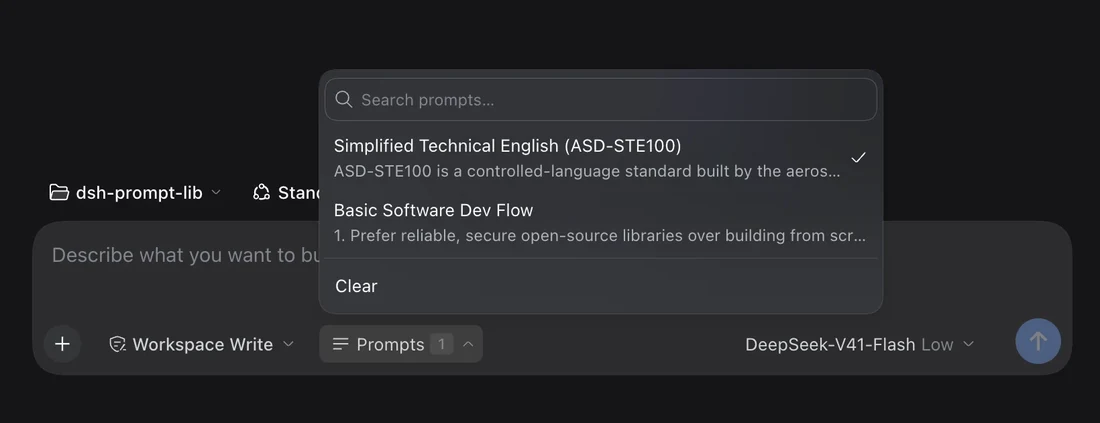
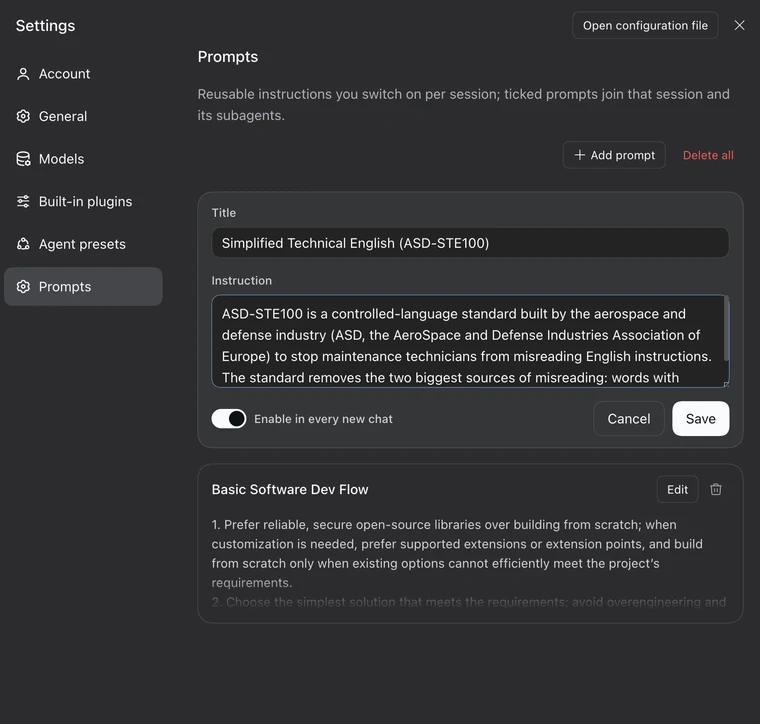
提示词库存放在插件配置中,含 Settings 页面与输入框选择器:勾中的提示词注入该会话的每一步模型调用,subagent 继承其最近祖先会话的选择。
🥷 Keep your own prompts inside DeepSeek Harness, and switch them on for a chat in one click.
A prompt that is ticked applies to every model step of that session, and to the subagents it starts.
Published on npm as @stmol/dsh-prompt-lib.
Any bundle source works: the npm package, the repository, a tarball, or a local folder.
@stmol/dsh-prompt-lib.dsh plugin add @stmol/dsh-prompt-lib.Restart DSH after the first install; later edits reach the running app through HMR. There are no automatic updates: remove the plugin and add it again.
dsh plugin add link:/path/to/dsh-prompt-lib
A linked checkout keeps its own node_modules, so the plugin's one dependency has to be installed there too:
cd /path/to/dsh-prompt-lib && npm install
Without it the plugin fails to load and nothing appears in Settings.
Prompts are matched by an id generated behind the scenes, not by title, so renaming a prompt keeps every session pointed at it.
A prompt can be set to start enabled. Every session that has never been ticked by hand opens with those defaults already on, and the picker shows them ticked, so the count on a fresh chat matches what that chat will use.
The first hand edit to a session, whether that is ticking, unticking or Clear, becomes that session's own choice and takes over from then on. Unticking the last default prompt records "none here" instead of falling back to the defaults you just removed.
A session that has ticks of its own uses exactly those, and an empty list counts as a choice. A session with no choice at all takes the choice of the nearest ancestor session, so a subagent inherits from the chat that started it. Only a whole line with no choice anywhere falls back to the defaults for new chats.
DeepSeek Harness(DSH)Web 插件聚合生态包 · 一切皆插件,创意工坊分发(dsh-market.com)
把回答做成一页可视化 HTML:模型只写简短的 Markdown 草稿,随包附带的 `am` 命令行生成页面,支持流程图、时序图、树、时间线、ER 图、表格和提示框。
在 dsh 里装上这个插件即可,无需登录、注册或填 API Key,就能使用包括 Muse Spark 1.3、MiMo V2.6 在内的前沿模型——完全免费,不限量。 All you do is install this plugin in dsh: no login, no sign-up, no API key — the frontier models are just there, Muse Spark 1.3 and MiMo V2.6 among them. Completely free, with no usage cap.

