dsh-mise
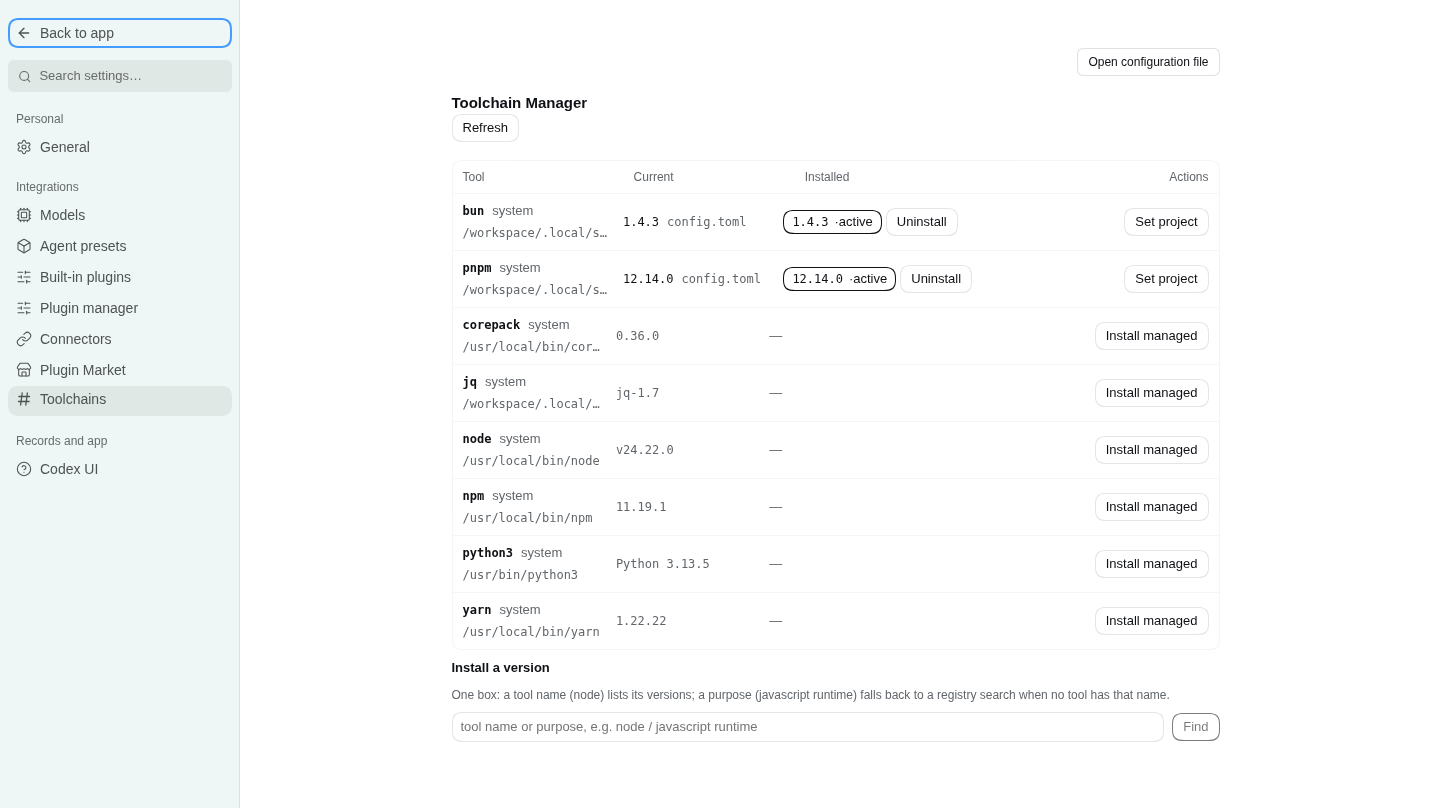
Toolchain manager for DeepSeek Harness (dsh), backed by mise. One settings page shows what is installed and what is available, and installs, pins, uninstalls and prunes by directory (.mise.toml-driven). Nine agent tools expose the same surface to the model, so an agent can see the machine, pick a version, install it, pin it and clean up afterwards without guessing.
English | 中文
- Host half (
src/index.ts + src/mise.ts, built to dist/): every mise invocation, JSON parsing, the write gate, and a set of endpoints on the plugin's own /mise RPC channel.
- Client half (
src/client.ts, built to dist/client.js): a settings.section page (order 48) that talks only to that channel — it serves no HTTP route of its own and never touches a binary.
No @deepseek-ai/* package is imported at runtime: the host half is plain ESM, the browser half is one self-contained bundle whose React comes from the harness module table.
Install
dsh plugin --profile web add github:SOVLOOKUP/dsh-mise
Requires dsh >= 0.2.0-rc.2 and a mise binary on the host (or miseBin pointing at one). The build output in dist/ is committed, so a source install needs no build step; mise itself is not bundled — install it from mise.jdx.dev first.
What the page shows
The nine tools
Writes are recorded as tasks because tool calls are request/response: the panel polls the running one, an agent starts with background: true and polls mise_progress. A large toolchain download therefore does not pin a single call for fifteen minutes.
Configuration
Set in the plugin row (or the settings form):
Write boundaries
- Only mise's own install directory and config files are touched;
prune always runs with --tools, so mise's config-tracking table is left alone.
- Uninstall takes an explicit
tool@version and is two steps: mise uninstall removes the files, then mise unuse --path <source.path> --no-prune removes the request that pointed at it — otherwise the row would linger as "not installed".
- A request that was never installed (or is left over from an earlier uninstall) gets its own "remove from config" action, a bare
mise unuse at the same explicit path.
- A real prune always runs the dry run first; the returned
removed list is that preview, not a guess.
- Panel buttons are user clicks and skip approval; agent write tools follow
writeMode.
MISE_AUTO_INSTALL is not set: installs happen only when asked for.
Activation and persistence
On load the plugin puts <data dir>/shims at the front of the host process PATH — the effect of mise activate, without editing shell config. It applies to that process and the shells it spawns; a terminal outside the host is untouched. Managed versions win where a config pins one, and shims fall back to the system copy otherwise, so a command never disappears.
If the image points XDG_CONFIG_HOME / XDG_DATA_HOME at /tmp, mise's state would be wiped on restart. Every load therefore re-creates the persistent copies under $HOME (~/.config/mise, ~/.local/share/mise) and symlinks the /tmp defaults at them; a non-empty directory is only reported as drift, never deleted.
Build from source
npm install        # types only: typescript, @types/*, @deepseek-ai type packages, react for the tests
npm run build      # tsc -p tsconfig.json → dist/, then scripts/finish-client.mjs
npm run typecheck  # sources + tests
npm test           # build, then test/host.ts and test/client.ts
npm run check      # the delivery gate: build + typecheck + both tests
test/host.ts drives the channel with a fake ctx (method matrix, readonly refusal, approval gate, progress-line merging, background task polling). test/client.ts fakes window.__ModuleLoader__ and document, then really renders the page with react-test-renderer and asserts that it only uses the /mise channel and paints the host's data.
Harness loads the built files, not the sources: dist/ has to be committed.
License
MIT


