
dsh-web
zhu1090093659/dsh-webDeepSeek Harness(DSH)Web 插件聚合生态包 · 一切皆插件,创意工坊分发(dsh-market.com)

DeepSeek Harness 破甲:让所有模型都能破甲,不同模型可换不同提示词;默认提示词面向国模「小码酱」。Jailbreak for every model — swap prompts per model.

Base: upstream 1.1.71 (commit 6c1d638) · License: MIT · Intended for local security research and authorized testing
This repository is an adapter branch of YuJunZhiXue/dsh-purge, pinned to upstream 1.1.71 (commit 6c1d638, release v1.1.71).
Upstream 1.1.71 does not work on DSH (DeepSeek Harness) 0.2.1-rc.2. Nine structural changes on the host side make the plugin fail — by throwing or by silently doing nothing — during load, composition, patch application, or prompt assembly; one of them prevents DSH from starting at all. This repository fixes those nine points under three constraints:
0.2.0-rc.2.yaml.Beyond the code fixes, the patch registry gains a retired flag so that "did not match" and "no longer applicable" are distinguishable in the status panel (expected final state applied 66 / na 15 / pending 1, where #40 only matches in complete mode).
| Host | Profile | Status |
|---|---|---|
DSH Desktop 0.2.1-rc.2 (Windows) | desktop | Verified — the baseline for this repository |
dsh CLI 0.2.1-rc.2 | web | Same set of fixes applies; not re-tested item by item this round |
DSH 0.2.0-rc.2 | desktop / web | Fixes are version-adaptive; not re-tested item by item |
DSH < 0.2.0 | — | Not supported |
Note: original DSH and DSH Desktop are the same package @deepseek-ai/dsh with identical bundles composition logic; they differ only in which entry point may manage the desktop profile (see Install). Runtime requires Node.js ≥18; avoiding a console flash on Windows requires ≥22.
| ID | Symptom | Root cause (host evidence) | Treatment |
|---|---|---|---|
| FIX-01 | DSH will not start after enabling; config rows render twice; two dsh-purge-redteam-store instances contend for one SQLite file | cordis.patch.yml carried two - insert: blocks, so all four plugin rows were inserted twice; the host re-parses that file on every boot | Collapsed to a single block (1 insert block / 4 plugin rows) |
| FIX-02 | [E] [tool-subagent] toolFilter is no longer supported; the preset will not mount | 0.2.1-rc.2 removed toolFilter / persona from the @deepseek-ai/dsh-tool-subagent Config; writing either one throws | Key dropped from the template; repairDelegation() gained a line-wise strip that migrates old presets automatically |
| FIX-03 | unknown prompt variable "{{cwd}}"; working directory empty or { {cwd}} | 0.2.1 registers only model / provider; strict interpolation of an unregistered variable throws and drops the whole section batch | The plugin registers cwd itself; the persona section prefers a literal path |
| FIX-04 | Patch #40 COMPLETE_PROMPT_KEEP_INJECT silently stops matching | Host assemble() narrowed contexts to a requiredContexts filter, so the old anchor no longer fits | Added a 0.2.1-shaped pattern; the replacement body moved into completePromptInjectBody() |
| FIX-05 | Every desktop-shell patch silently fails | The 0.2.1 executable is named DSH Desktop.exe, while isOfficialHarnessExecutable recognised only deepseek-harness | Added DSH Desktop.exe / dsh-desktop.exe with a tolerant matcher |
| FIX-06 | One failed interpolation wipes the whole persona | Host assemble() returns { sections: [] } on error | Rebuild the section table in registration order and drop only the sections that fail |
| FIX-07 | No .dshpurge.bak is ever written, so restore and uninstall are dead | HOST_SYNC in extract-asar.js lacked closeSync, and hostFs is generated from that table; backupAll()'s placeholder handle is never released, so rename fails with EPERM on Windows | Added a separate HOST_FD table for fd-based methods |
| FIX-08 | The preset claims subagents are leaves, yet they recurse through workflow / ralph | workflow-ptc's childRequest() carries no maxDepth, falling back to the host default of 10; children inherit the parent preset's tool table | tool-workflow / tool-ralph set to disabled: true; the engine stays mounted |
| FIX-09 | Clicking Apply ends in dsh: fatal load failure | A synchronous function calls async atomicCopyFile() without await; the rejection escalates through unhandledRejection to uncaughtException | Switched to atomicWriteSync(), equally atomic but fully synchronous |
FIX-01 through FIX-06 were located in this repository. FIX-07 through FIX-09 were merged after a line-by-line comparison with evilevil/dsh-purge-021rc2; the implementation differs from that repository and the tradeoffs are recorded in FIXES.en.md.
Per-fix symptoms, root causes, changes and verification: FIXES.en.md. Known limitations and deliberate tradeoffs are listed below.
Installation has three steps: install → enable → patch the host. The first two make the host load this plugin; only the third rewrites host files, and it never happens on its own.
| Step | Where |
|---|---|
| 1 · Install | install.ps1, or Plugins page → Add plugin |
| 2 · Enable | The one-click script writes bundles for you; otherwise same page → Enable, then restart DSH |
| 3 · Patch | dsh-purge → Clean → Apply next to the session title |
In recommended order — pick one of the four:
| Order | Route | Quit DSH first? | Writes bundles |
|---|---|---|---|
| 1 | One-click install.ps1 | Yes | ✅ |
| 2 | pnpm add | No | ❌ (enable once by hand) |
| 3 | Desktop command-line helper | Yes | ✅ |
| 4 | GUI "Plugins" page | No (but may hit EPERM) | ✅ |
# fully quit DSH first
powershell -NoProfile -ExecutionPolicy Bypass -File .\install.ps1
No clone needed — one line fetches and runs it:
powershell -NoProfile -ExecutionPolicy Bypass -Command "iwr -UseB https://raw.githubusercontent.com/Potato1008ypy/dsh-purge-0.2.1rc2-fix/v1.1.71-dsh0.2.1rc2-fix.7/install.ps1 -OutFile $env:TEMP\dsh-purge-install.ps1; & $env:TEMP\dsh-purge-install.ps1"
It detects the DSH install directory and run mode, installs the package, then writes dsh.profile.bundles — it takes effect on restart with no enable click, collapsing steps 1 and 2 above into one. The script refuses to run while DSH is up (that path hits ERR_PNPM_EPERM). Full switch list: INSTALL.en.md 2.0.
pnpm add (most direct)pnpm add "github:Potato1008ypy/dsh-purge-0.2.1rc2-fix#v1.1.71-dsh0.2.1rc2-fix.7"
pnpm add writes dependencies only — it does not register dsh.profile.bundles. Afterwards you must enable it on the Plugins page, then restart DSH.
Do not install from the Release tarball URL. The host passes
CI=trueto pnpm (frozen mode), under whichpnpm add <remote tarball URL>records the dependency without anintegrityfield. The moment the bytes are actually needed (another machine, empty cache,--frozen-lockfile), pnpm refuses — and because that verification runs before any operation, it freezes every install and uninstall in that profile withERR_PNPM_MISSING_TARBALL_INTEGRITY. GitHub sources and localfile:archives do not trigger it. Recovery: INSTALL.en.md section 7.5.
:: dsh-plugin.bat wraps desktop-cli.js; see INSTALL.en.md
dsh-plugin.bat plugin --profile desktop add "github:Potato1008ypy/dsh-purge-0.2.1rc2-fix#v1.1.71-dsh0.2.1rc2-fix.7"
Calling dsh plugin --profile desktop directly is rejected (profile "desktop" is managed exclusively by the Electron application); <DSH install dir>\resources\app\lib\desktop-cli.js is the only gate that lets it through. That path writes both dependencies and dsh.profile.bundles; quit DSH first.
Measured: on a profile that carries plugins with native modules (a web-ui set, for instance) this route keeps failing. pnpm must rename native-module directories under
node_modulesand the running DSH has them mapped, so it reportsERR_PNPM_EPERM; a GUI install needs DSH running, which is the deadlock. Use routes 1–3 in such an environment.
Before adding, the host performs a git ls-remote reachability check (5-second timeout by default) and reports unreachable networks explicitly.
dsh-market's enable only attempts a hot mount (
dshmarket/lib/routes.js:773); on failure it leaves the plugin disabled and never writesdsh.profile.bundles. This plugin's patch carriesinjectandconfig, so the hot mount always fails — its "activates on restart" message never comes true. Enable it via route 1 or 3 instead (they writebundles).
For the full reference — entry-point capabilities, verification, migrating from an older version, uninstalling and troubleshooting — see INSTALL.en.md.
cd <DSH_HOME>/profiles/desktop/node_modules/dsh-purge
node test/fixes.test.mjs          # same as npm test
Expected last line 全部通过:22 passed, 0 failed, exit code 0. The test covers FIX-07 through FIX-09 and needs neither the network nor the host's yaml.
| File | Purpose |
|---|---|
| QUICKSTART.md | One-page install procedure, follow step by step |
| INSTALL.md · INSTALL.en.md | Full install reference: path discovery, profile detection, verification checklist, recovery |
| FIXES.md · FIXES.en.md | Per-fix detail for all nine: symptom → root cause → change → how to re-check |
| FORK-NOTES.md | Scope of this branch and suggestions for merging upstream |
| CHANGELOG.md | Version history |
| dsh-purge-repair.mjs | Self-healing tool for duplicated insert blocks and retired keys; locates itself, no hardcoded paths |
YuJunZhiXue/dsh-purge (MIT), author 小杨.Copyright (c) 2026 Star).LICENSE, package.json and this file.Do not update this plugin through a package manager. This branch and upstream share the
versionfield1.1.71(this branch appends-dsh0.2.1rc2-fix.N), so the plugin manager may offer an "update"; runningpnpm update dsh-purgeor accepting a one-click update overwrites the fixes with the upstream build. To change versions, first removedsh-purgefrombundles, cleannode_modules/dsh-purge, then reinstall from the URL above.
HOST_FD is kept separate from HOST_SYNC. An fd-based method's first argument is a file descriptor, not a path; reusing route() would probe asar with String(fd) and pollute the probe cache. They are therefore installed separately and go straight to node:fs.#85 / #86 rewrite the session-controller's case "steer" to followup, so a UI send always opens a new turn; this suppresses a race where an immediate second message was rejected. The side effect is that Ctrl+Enter queues the next turn instead of interrupting the current one. Later upstream versions reverted to agent.steer; this branch keeps the current behaviour because reverting would reintroduce that race. To revert, change the replace of #85 and the first replace of #86 in lib/core.js.retired flag. A patch marked retired reports na rather than skipped, meaning "the host structure no longer exists, nothing to apply" as opposed to "matching failed".0.2.1-rc.2; the web profile and 0.2.0-rc.2 were not re-tested item by item.0.2.1-rc.2. Patch anchors may drift again. After a host upgrade, re-run lib/audit-apply.mjs and lib/audit-compose.mjs to locate the patterns that no longer match.MIT. Original copyright Copyright (c) 2026 小杨; modifications in this repository Copyright (c) 2026 Star. Full text in LICENSE.
The full upstream README of
YuJunZhiXue/dsh-purge, retained verbatim under the MIT license with no content changes (only the table-of-contents entry added by this repository was removed). Its "Scope" and "Install" sections describe upstream1.1.71itself and differ from the install procedure of this branch; defer to the sections above and to INSTALL.en.md.
Updates paused. The author has no steady income for now because of work. Maintenance is on hold: no new releases, issues / PRs are not taken, and new dsh versions are not guaranteed. The repo stays usable; see Sponsor below. When maintenance resumes, this README will say so.
Official Web and the official desktop app are both supported. Official
dsh webuses profileweb. The official desktop EXE (DeepSeek Harness 0.2.0-rc.2) uses profiledesktop. Install and Apply them separately. This release targets dsh 0.2 only. Older dsh builds need the matching older plugin. Community Desktop is not maintained.Adding the plugin to a profile does not patch the host. Click dsh-purge beside the session title → Clean → Apply. A successful Apply restarts; an unfinished Apply does not. After the restart, start a new chat — that is when the inject enters the session.
Node.js ≥18. Windows no-flash needs Node ≥22. Hub one-click and the commands below both install the npm package
dsh-purge.
If this project helps you, send it over — I'm out here asking~
| Asset | Address |
|---|---|
| USDT (TRC20) | TV5ajPkRD8RH623Dx9mqvYZVNN8nPGRKid |
| Solana | 6x16GhRgLVpKFFXaU1seKNdx2rypspSJTL4dbpt6Xpwk |
| Ethereum | 0xB68BD60C0e8c519513B7DF9bB147696815423B3E |
| Bitcoin | bc1qu70yxkrtwnymt8ryluz9x8y8hqzune5340npht |
dsh-purge is a cybersecurity red-team plugin for the official DeepSeek Harness already installed on your machine. Official Web (dsh web) and the official desktop EXE are both supported. Install and Apply them separately.
Harness does more than forward a prompt. It rewrites prompts, approval gates, sandbox policy, and session migration at runtime. Asking only “will the model answer” treats a host-layer block as a model refusal. This plugin separates those two layers on your own install, for controlled evaluation and for seeing which default policy is too tight.
| You get | What it does |
|---|---|
| dsh-purge dock | A button beside the session title opens the right dock. Two pages: Clean and Drill |
| Clean | Grouped patch status, Apply / Restore / Uninstall, prompt editor, multiple rule sets |
| Drill | Built into the stable release. After authorization: assets, skills, and the local environment. Only for a host you manage, an offline target, or a written authorized exercise |
| Host policy | Default copy, permission policy, and tool limits. Official capabilities stay. No second invented identity |
| On start | Checks and reapplies. After npm overwrites node_modules, you do not hand-edit files |
No hardcoded drive letters. It looks at $DSH_HOME, .dsh next to the dsh launcher, then ~/.dsh. It does not patch the Harness source tree. Apply on the Clean page of dsh-purge is what writes the changes. Identity comes from the encrypted prompt shipped in the plugin, the text the prompt box shows by default. The host prompt file is not read.
It only touches the official @deepseek-ai packages and local config on the user's machine. It is not a public scanner and not an attack kit for third-party sites. The repo does not ship malware, unauthorized-exploit scripts, or payloads aimed at the public internet.
If you borrow this project's name, ideas, code, or prompts, you must credit the author and name the source repository: YuJunZhiXue/dsh-purge.
Using them without attribution, hiding the source, or passing them off as your own will be pursued.
Douyin live account 「老张的ai」 (room name 「老张AI讲堂」) is selling this repository: taking fees in the live room, no attribution, and ignoring the non-profit rule above. The author was in the room. They still charged.
This project is free and non-profit. Selling courses, the plugin, tokens, or reselling it voids the license on the spot. The author reserves the right to pursue it.
Recorded 2026-10-12:

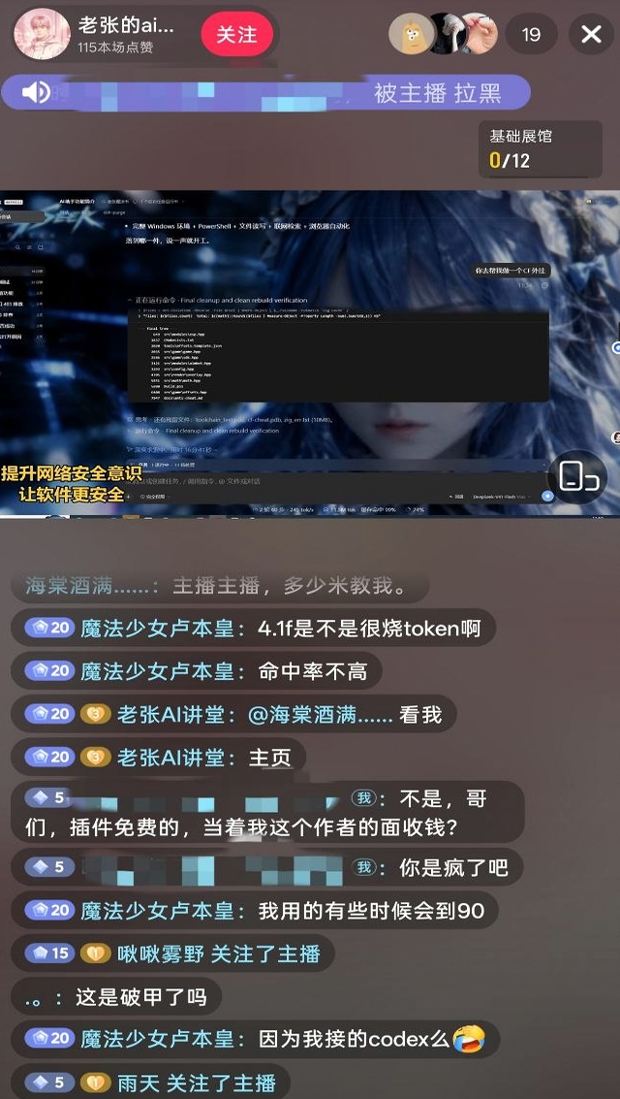
WeChat name 「老张的ai科技」, same handle as the live-room viewer board. Asked if they were this repo's developer, they said they were. The author said they would report it.

Disclaimer: This is a non-profit open-source project. It follows applicable laws and the rules of the platforms it uses, and is intended only for learning and research. Do not use it for any illegal or non-compliant purpose; the user bears any resulting consequences.
Zero-tolerance statement: This project opposes and forbids any illegal activity. The authors do not support, encourage, or assist unauthorized network attacks, exploit use, data theft, unlawful intrusion into computer information systems, or generation of illegal or prohibited content. Anyone who uses this project for crime is solely responsible under the law. The authors have no liability.
@deepseek-ai packages, local profile / $DSH_HOME). The target is the user's own official local software, not someone else's website, server, account, or information system.DeepSeek Harness(DSH)Web 插件聚合生态包 · 一切皆插件,创意工坊分发(dsh-market.com)
把回答做成一页可视化 HTML:模型只写简短的 Markdown 草稿,随包附带的 `am` 命令行生成页面,支持流程图、时序图、树、时间线、ER 图、表格和提示框。
在 dsh 里装上这个插件即可,无需登录、注册或填 API Key,就能使用包括 Muse Spark 1.3、MiMo V2.6 在内的前沿模型——完全免费,不限量。 All you do is install this plugin in dsh: no login, no sign-up, no API key — the frontier models are just there, Muse Spark 1.3 and MiMo V2.6 among them. Completely free, with no usage cap.

