
dsh-web
zhu1090093659/dsh-webDeepSeek Harness(DSH)Web 插件聚合生态包 · 一切皆插件,创意工坊分发(dsh-market.com)

Some settings to make deepseek harness more comfortable to use
Vibe coded. This plugin was written almost entirely by an AI assistant (OpenCode,
deepseek-v4.1-flash) from natural-language prompts, with light human review and testing. It is not a carefully hand-engineered product: read the code before trusting it, expect rough edges, and check what it changes in your dsh profile — in particular it overrides your agent presets with a retargeted copy of the installed ones (see Install). Use at your own risk.
Personal preferences for DeepSeek Harness (dsh): a tunable companion to the official compaction engine, a llama.cpp model enrichment for the Models page, and tab notifications, packaged as a single dsh bundle.
@deepseek-ai/dsh-compaction-basic engine is
the reference behaviour; this plugin wraps it with a settings page so the
threshold, the retention, the summarization model/reasoning and an optional
end-of-turn compaction become user-configurable. It also adds a
/force-compact command.meta.n_ctx, architecture.input_modalities, aliases) and fills
the corresponding llm-pi-ai model entries (context window, text/image input).dsh-notice-center (MIT).0.1.7-rc.1 — built on the current settings domain (Config
fields marked .volatile() on the Host, ctx.configForms on the Client) and
on BasicCompactionEngine. Tested on 0.1.7-rc.2 and 0.2.0-rc.2.llm-pi-ai provider (e.g. your llama.cpp server) for the model
enrichment.From the registry (once published):
dsh plugin --profile web add dsh-malko-prefs
# then restart dsh web
Or from a local checkout / tarball:
dsh plugin --profile web add /path/to/dsh-malko-prefs
dsh plugin --profile web add ./dsh-malko-prefs-0.1.0.tgz
The bundle layer does two things (see cordis.patch.yml):
malkoPrefs and the
malkoModels probe Service, whose strict Typert wire definition is
contributed through the package ./typert export that
@deepseek-ai/dsh-typert-loader registers automatically on mount;preset-cordis, preset-minimal,
preset-ptc, preset-standard) with the preset the installed dsh
actually ships, retargeted at dsh-malko-prefs/compaction.A patch replaces a preset row's config wholesale, and the compaction backend
lives nested inside the preset, so the whole preset must be supplied. Instead
of freezing a copy, cordis.patch.yml asks dsh-malko-prefs/preset-config for
the body at load time:
- id: preset-standard
  name: 'dsh-malko-prefs/preset'
  config: !!js process.getBuiltinModule('node:module').createRequire(baseUrl)('dsh-malko-prefs/preset-config')('standard', baseUrl, ctx)
dsh-malko-prefs/preset is a small wrapper around the upstream
@deepseek-ai/dsh-agent-preset: the upstream row is an EntryGroup, so the
Loader deliberately skips interpolation of its config; the wrapper is an
ordinary plugin, so the computed config is evaluated and then registered with
the same agentPresets.register() call.
src/preset-config.cjs locates
@deepseek-ai/dsh-web-app/presets/<id>.patch.yml in the running dsh, parses it
with the Loader's YAML dialect (so !!js nodes survive), evaluates those nodes
against the Loader context (they drive disabled rows and customSkillDirs),
and swaps @deepseek-ai/dsh-compaction-basic for
dsh-malko-prefs/compaction. The plugin therefore follows the installed dsh
version instead of requiring a regeneration after every upgrade.
Rollback: dsh plugin --profile web remove dsh-malko-prefs (then restart).
One release supports every dsh that ships
@deepseek-ai/dsh-web-app/presets/{cordis,minimal,ptc,standard}.patch.yml
(currently 0.1.7-rc.1 and later). Because the preset bodies are read from the
running dsh, a dsh upgrade changes them without a plugin release; engines.dsh
declares the lower bound. There is no separate “old dsh” package line.
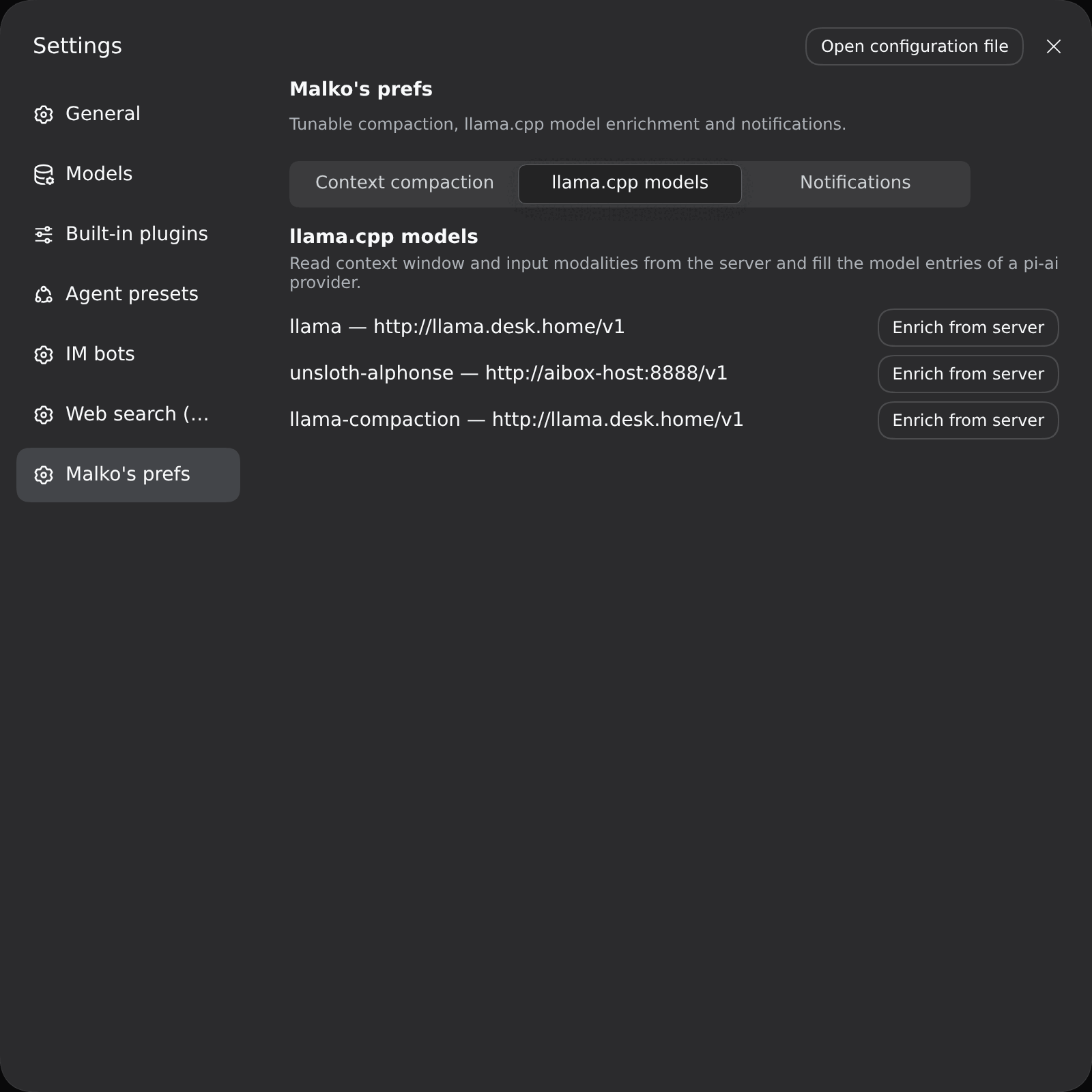
Adds a section to Settings, split into three sub-tabs: Context compaction, Notifications and llama.cpp models (the tab bar stays pinned while the panel scrolls). All fields are applied live (no restart).
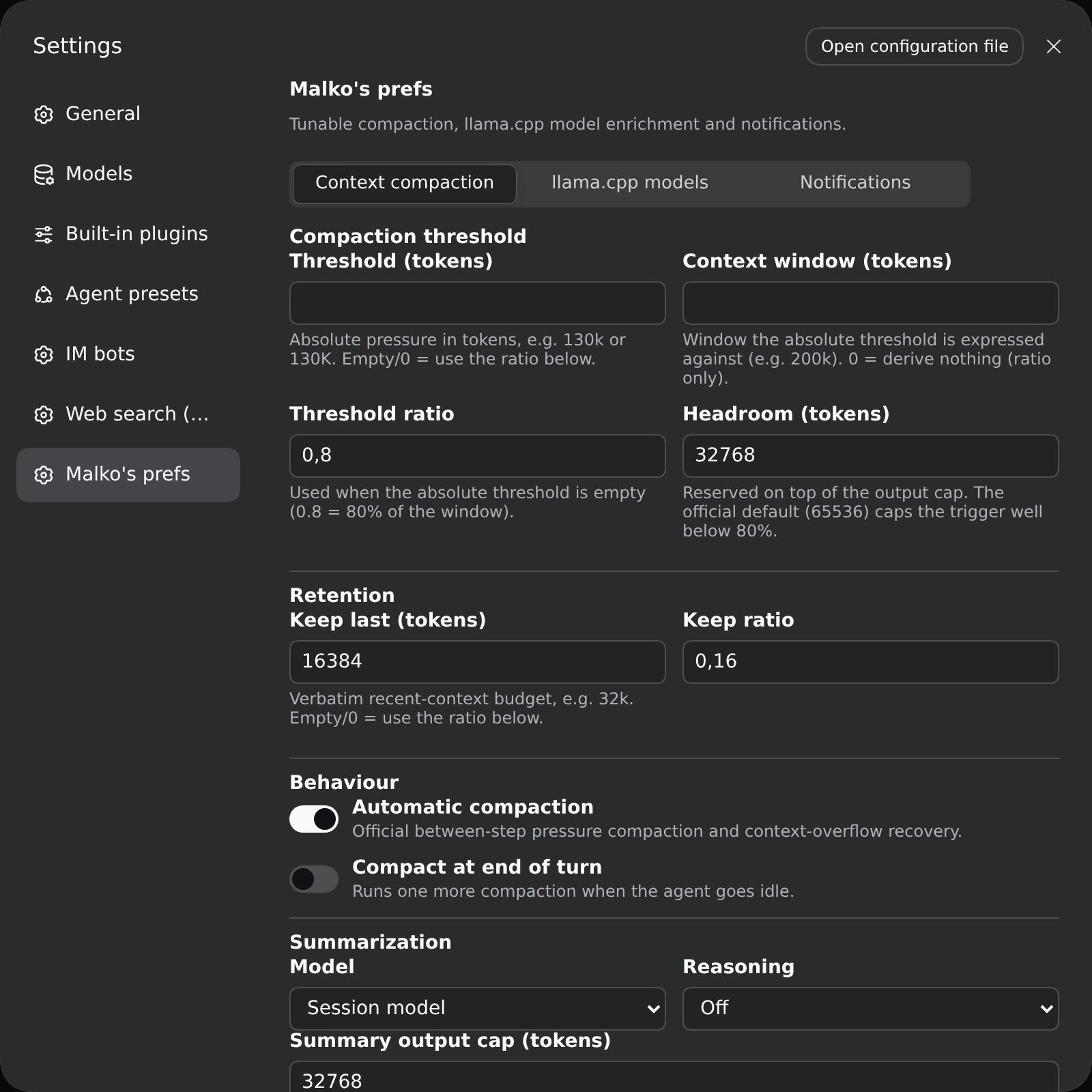
| Field | Meaning |
|---|---|
| Threshold (tokens) | Absolute pressure in tokens, e.g. 130k / 130K / 1.5m. Empty/0 = use the ratio below. |
| Context window (tokens) | Window the absolute threshold is expressed against (e.g. 200k). 0 = ratio only. |
| Threshold ratio | Used when the absolute threshold is empty (0.8 = 80% of the window). |
| Headroom (tokens) | Reserved on top of the output cap. The official default (65536) caps the trigger well below 80%. |
Effective trigger: min(window × ratio, window − output − headroom); when an
absolute threshold and a context window are set, it becomes exactly that
threshold. Default: ratio 0.8 + headroom 32768 → compacts around 160k on a
200k window.
Keep last (tokens) (absolute, e.g. 32k) or Keep ratio — the verbatim
recent-context budget.
Session model (default) or Custom model.Custom model; populated from the
llm-pi-ai catalog.Default, Off, or any level the selected model declares
(session mode exposes only Default / Off). The instruction is appended
after the replayed prefix, so the provider's prompt cache stays warm.Summary output cap, Extra compaction attempts, Overflow recovery attempts.
For every llm-pi-ai provider that declares a baseURL, Fetch from server
reads GET {baseURL}/models. It then shows a review of every discovered
model and what importing would change: context window (from
meta.n_ctx/n_ctx_train), output cap, and input modalities (from
architecture.input_modalities); models that do not exist yet are marked new
model. Tick the models you want (or use Select all) and click Import —
only the selected ones
are written (existing entries are updated, new ones appended). The request
authenticates as the provider does: the endpoint's apiKeyEnv credential is
resolved (dsh credentials, then the host environment) and sent as
Authorization: Bearer …, so an api-key-protected server works.
Two independent features, both driven by the official client signals
(sessions, uiSession.sessionStatus); nothing is persisted beyond the config.
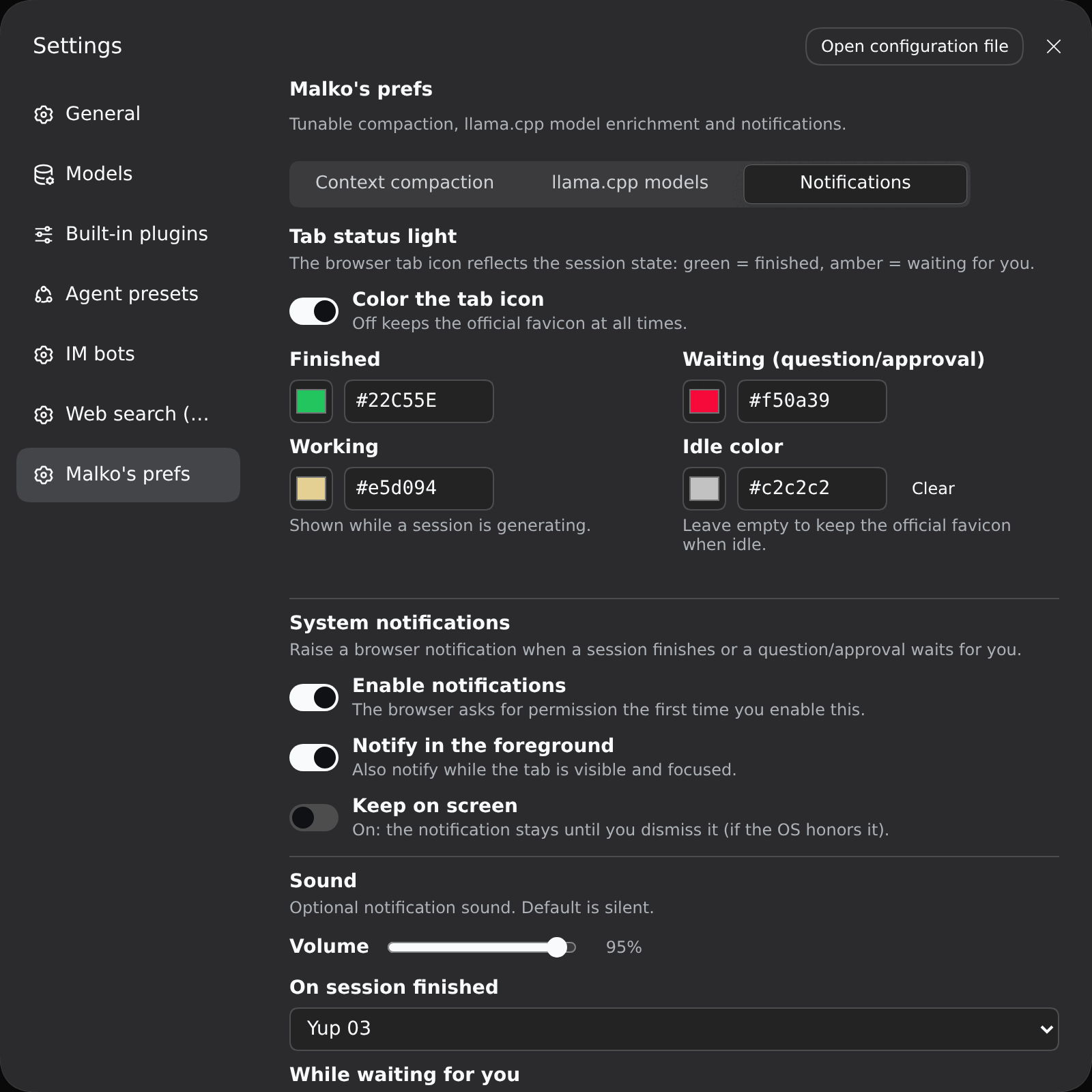
Tab status light — recolours the browser tab icon:
| Colour | Meaning | Clears when |
|---|---|---|
| amber | a session waits for you (question / approval / plan review) | you handle it |
| working | a session is generating | it stops running |
| green | a main session finished while you were away | you open that session / return to the tab |
| idle | nothing to report (official favicon unless you set a colour) | — |
Priority is amber > working > green > idle, and sub-agent sessions are ignored.
All icon links are repainted together (DSH ships a dark and a light favicon
selected by prefers-color-scheme).
System notifications — settings are grouped by notification type. One global master switch (Enable notifications, opt-in; the browser asks for permission once), one global Notify in the foreground (off = only fire when the tab is not visible and focused) and one global Volume. Then one group per type — When a session finishes and While waiting for you (question / approval / plan review) — each with its own Notify enable, Keep on screen (stay until dismissed) and sound.
Sound (per type) — each group's selector defaults to No sound (both
defaults are silent on a fresh install). The list is: No sound, two built-in
synthesized chimes (Chime Up / Chime Down, no asset needed) and 45 bundled
opencode sounds (see assets/audio/README.md); picking
one previews it and the Host serves the mp3s at /malko-prefs-sounds/<id>.mp3.
If that route is unavailable the player falls back to a chime — but browsers may
block audio until you have interacted with the page at least once.
The sound is decoupled from the banner: once a sound is chosen for a type it plays on that event (completion / waiting) even when notifications — or that type — are disabled; with No sound nothing plays.
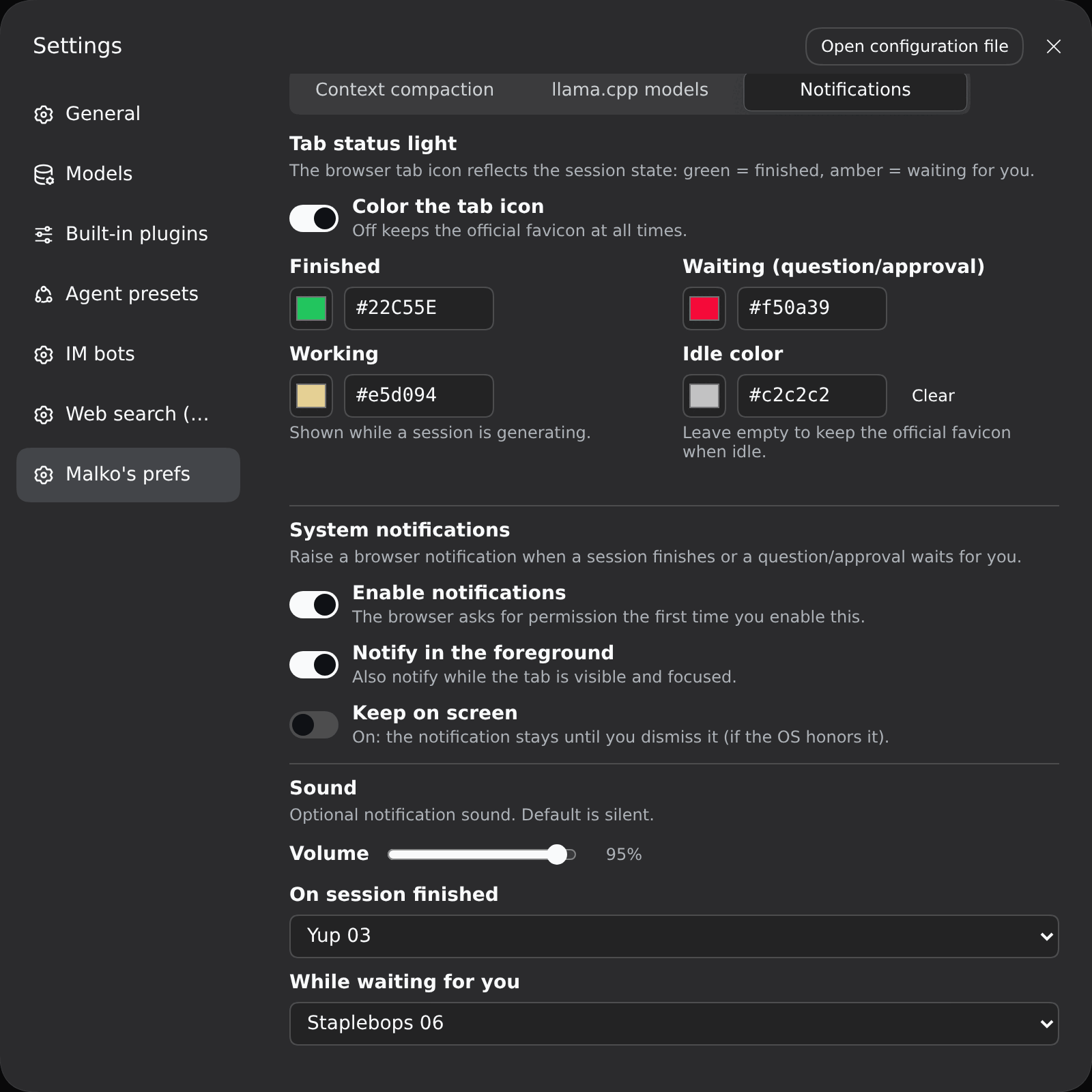
| Field | Key | Default |
|---|---|---|
| Color the tab icon | colorsEnabled | on |
| Finished / Waiting / Working / Idle color | green / amber / working / black | official sidebar colors for green/amber, blue for working; black empty = official favicon |
| Enable notifications (master) | notifyEnabled | off |
| Notify in the foreground (global) | notifyForeground | off |
| Volume (global) | notifyVolume | 0.6 |
| Finished: notify / keep on screen / sound | notifyDoneEnabled / notifyDonePersistent / notifyDoneSound | on / off / none |
| Waiting: notify / keep on screen / sound | notifyPendingEnabled / notifyPendingPersistent / notifyPendingSound | on / off / none |
System notifications need a secure context —
http://127.0.0.1:PORTorlocalhost. Opened over a LAN IP the Notification API is unavailable (a browser rule, not a plugin one); the tab status light still works.
/compact — the official dsh command (idle manual compaction)./force-compact — compact now: immediately when the agent is idle,
otherwise queued and consumed at the next model step (bypasses the threshold).host plugin (lib/index.mjs)
├─ Config (volatile) ──▶ settings page "malko-prefs"
├─ service malkoPrefs ──▶ live prefs + force queue
├─ service malkoModels ──▶ llama.cpp probe (wire def in lib/typert.host.mjs)
├─ /malko-prefs-sounds/<id>.mp3 ──▶ bundled sound library
└─ /force-compact command
client plugin (lib/client.js)
├─ mounts its own malkoModels Remote via ctx.remote.$mount()
├─ tab status light + notifications (src/notify.ts, optional uiSession)
└─ settings page: 3 sub-tabs (compaction / models / notifications)
preset plugin (lib/compaction.mjs)
└─ MalkoCompactionEngine extends BasicCompactionEngine
├─ rebuilds its policy from malkoPrefs before each operation
├─ summarize() → model + reasoning control (cache-safe order)
└─ agent/status idle → optional turn-end compaction
The engine reuses the official engine for everything else (durable
transactions, pruning, overflow recovery), so behaviour matches
compaction-basic unless a preference changes it.
Note: service classes avoid JS private members (#x) — cordis binds service
methods to a proxy, and private members would throw
Receiver must be an instance of class ....
node build.mjs            # esbuild → lib/{index,compaction,typert.host}.mjs + lib/client.js
node scripts/check.mjs    # static conformance checks
| File | Role |
|---|---|
src/prefs.ts | preference fields, defaults, parseTokenText |
src/index.ts | host plugin: volatile Config, malkoPrefs, /force-compact |
src/compaction.ts | MalkoCompactionEngine (extends the official engine) |
src/remote.ts | shared wire identity + probeInvocation() builder |
src/typert.ts | Host Typert manifest (zod strict codecs) |
src/typert.host.ts | the ./typert export entry dsh-typert-loader imports |
src/probe.ts | malkoModels Service (llama.cpp /models probe) |
src/client.ts | settings page (three sub-tabs) |
src/notify.ts | tab status light + notifications + sound player (ported from dsh-notice-center) |
assets/audio/ | 45 bundled notification sounds (opencode, MIT) |
src/whale.ts | the recolored official whale SVG used as the tab icon |
src/preset.ts | ordinary-plugin wrapper that registers a computed preset with agentPresets |
src/preset-config.cjs | builds each agent preset from the installed dsh presets and swaps the compaction engine |
scripts/check.mjs | manifest / bundle / preset / cache-safety checks |
The package is publication-ready:
private is removed; LICENSE (MIT) and author are set; files ships
lib/, cordis.patch.yml, scripts/, assets/ and LICENSE.prepublishOnly runs the build and scripts/check.mjs.dsh.bundle.patch, exports["./client"] and
exports["./package.json"], the client bundle id equals the package name,
and the client requires only baseline platform modules (react,
@deepseek-ai/dsh-client-ui-primitives).npm publish (unscoped/public).Caveat: engines.dsh declares the supported dsh range. The preset bodies are
read from the installed dsh at load time, so the plugin follows preset content
changes automatically; only a new preset id requires adding a row to
cordis.patch.yml and src/preset-config.cjs.
@deepseek-ai/dsh-web-app/presets/*.patch.yml
through the dsh install and uses js-yaml; a future dsh that moves or
reformats those files will fail loudly at preset mount instead of silently
mounting a stale copy./force-compact busy path uses the engine's context-overflow entry,
which compacts the maximal safe head (retention 0).127.0.0.1/localhost); the
tab status light's green/amber state is in-memory and resets on reload./malko-prefs-sounds route is unavailable the
player falls back to a synthesized chime.DeepSeek Harness(DSH)Web 插件聚合生态包 · 一切皆插件,创意工坊分发(dsh-market.com)
把回答做成一页可视化 HTML:模型只写简短的 Markdown 草稿,随包附带的 `am` 命令行生成页面,支持流程图、时序图、树、时间线、ER 图、表格和提示框。
在 dsh 里装上这个插件即可,无需登录、注册或填 API Key,就能使用包括 Muse Spark 1.3、MiMo V2.6 在内的前沿模型——完全免费,不限量。 All you do is install this plugin in dsh: no login, no sign-up, no API key — the frontier models are just there, Muse Spark 1.3 and MiMo V2.6 among them. Completely free, with no usage cap.

