
dsh-web
zhu1090093659/dsh-webDeepSeek Harness(DSH)Web 插件聚合生态包 · 一切皆插件,创意工坊分发(dsh-market.com)

把 DeepSeek Harness 的对话一键存入思源笔记(SiYuan)。支持单条/本轮/整窗口同步、AI 摘要、公式与 mermaid 图表原样保留。
把 DeepSeek Harness 里值得留下的对话,挑出来沉淀成你自己的开发知识库。 右键选中,笔记就进了思源——公式和 mermaid 图表原样保留。
一次开发对话几千字,真正值得留下的可能就那么几段:一个想通的方案、一个踩了半天的坑、一组调出来的参数。剩下的推演和试错,过一周你也不会重读。
问题是这些碎片都埋在里面。整段存下来懒得翻,什么都不存下次重新踩一遍。
这个插件解决挑选:
思源在这里不是备份盘,是组织层:双链、大纲、标签、数据库视图都是现成的。
#方案设计#、#问题排查# 这类标签,方便聚合检索下面全部是从 DeepSeek Harness 对话框右键同步过去之后,在思源笔记里的原始截图——没有手动排版,没有二次编辑。
对话里写什么,笔记里就是什么:Markdown 语法、LaTeX 公式、mermaid 图表、代码块、表格,全部按思源的块模型重新组织,而不是变成一堆纯文本。
兼容性一览:
| Harness 里的写法 | 同步后成为 | 是否丢格式 |
|---|---|---|
**粗体** *斜体* ~~删除线~~ | 思源对应的行内样式 | ✅ 完整保留 |
$E=mc^2$ | 思源行内公式 NodeMathInline | ✅ 可编辑 |
$$...$$ | 思源公式块 NodeMathBlock | ✅ 可编辑 |
| ```mermaid flowchart | 思源图表块(可缩放) | ✅ 可交互 |
| ```javascript | 思源代码块 + 语法高亮 | ✅ 语言标记都保留 |
| Markdown 表格 | 思源表格块 | ✅ 对齐方式保留 |
- [x] 任务 | 思源任务列表块 | ✅ 可勾选 |
| 无序/有序列表 | 思源列表块(含嵌套) | ✅ 层级保留 |
文本样式与标题 —— 对话里怎么写,笔记里就怎么显示。粗体、斜体、删除线、行内代码、超链接、中文标点全部原样保留,不是转成纯文本后重新加粗的
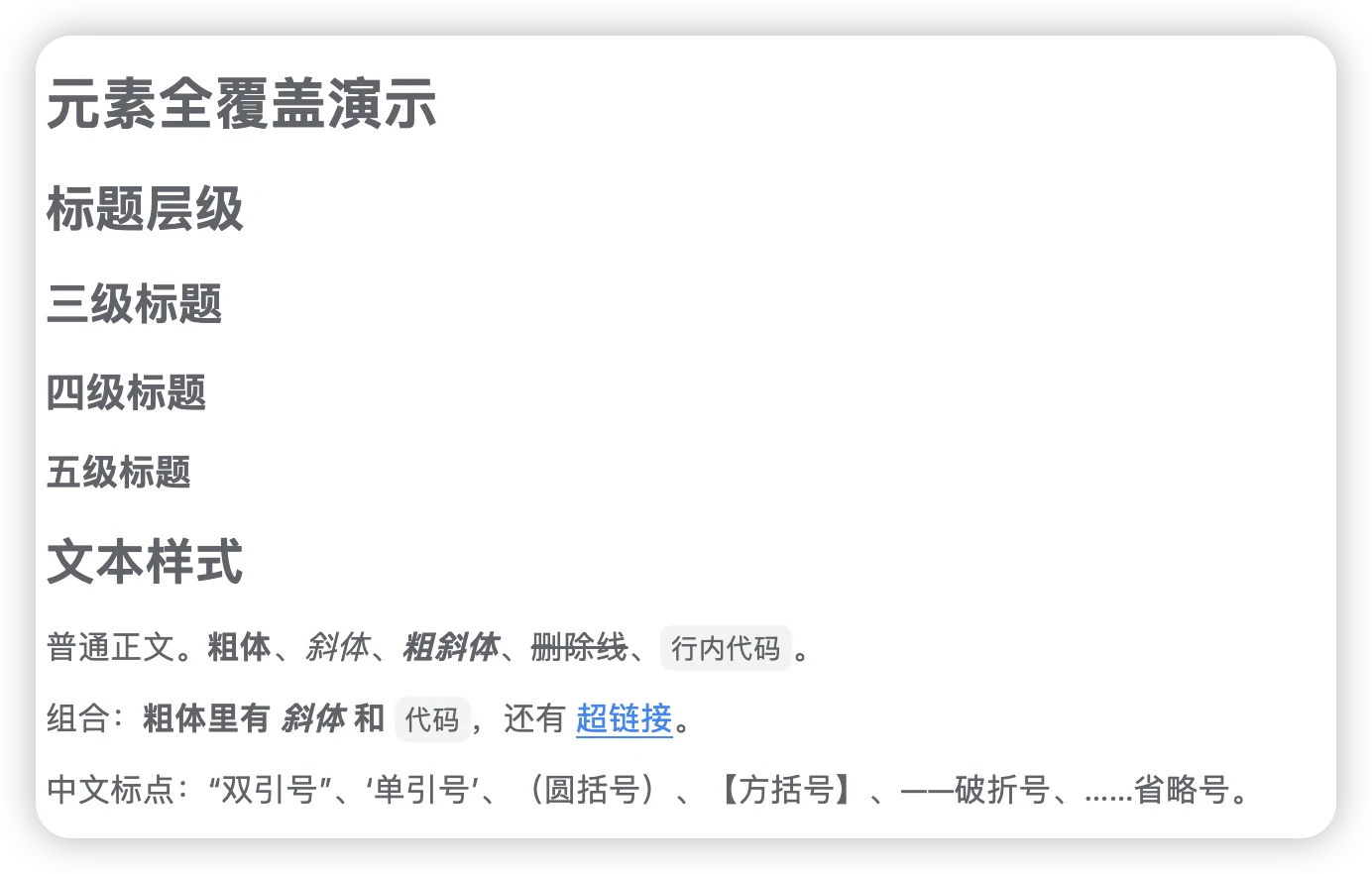
公式 —— 对话里写的 LaTeX 直接变成思源公式块,点一下就能继续编辑。行内、块级、多行对齐、矩阵都支持
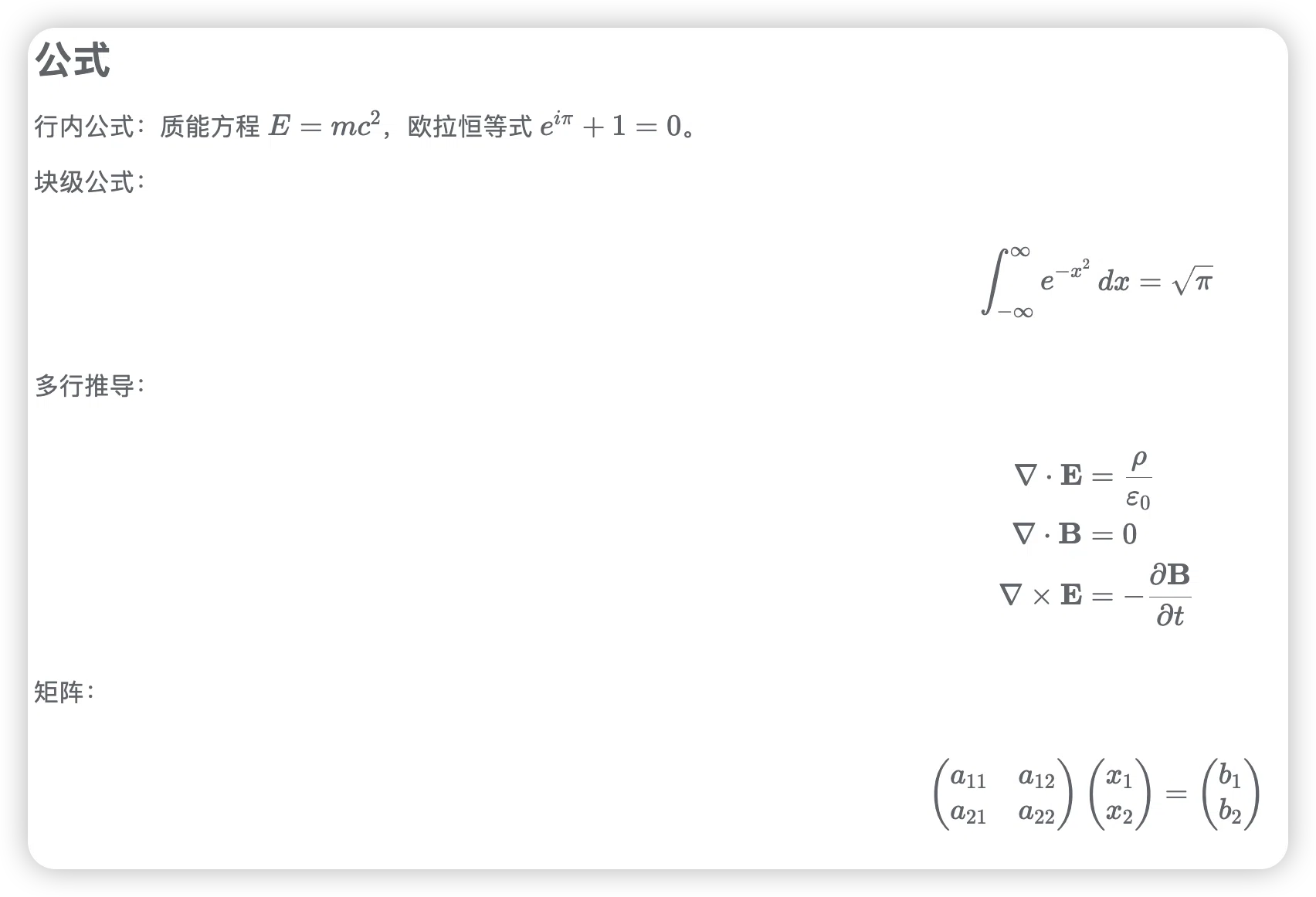
流程图 —— 对话里是 ```mermaid 代码块,同步后思源自动识别并渲染成图形,不是一段代码
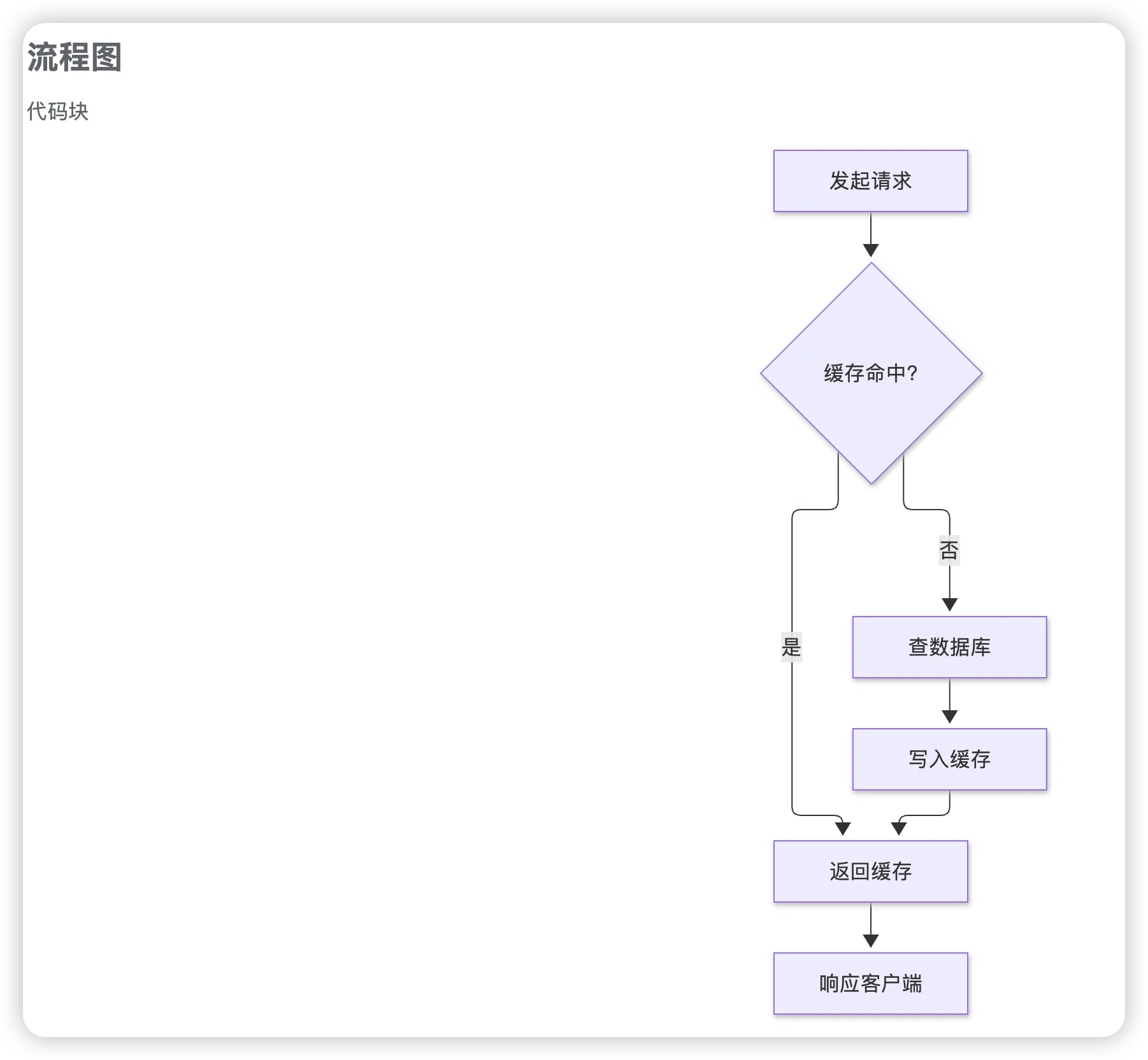
时序图 —— 多方交互和请求响应顺序,同步后保留全部结构
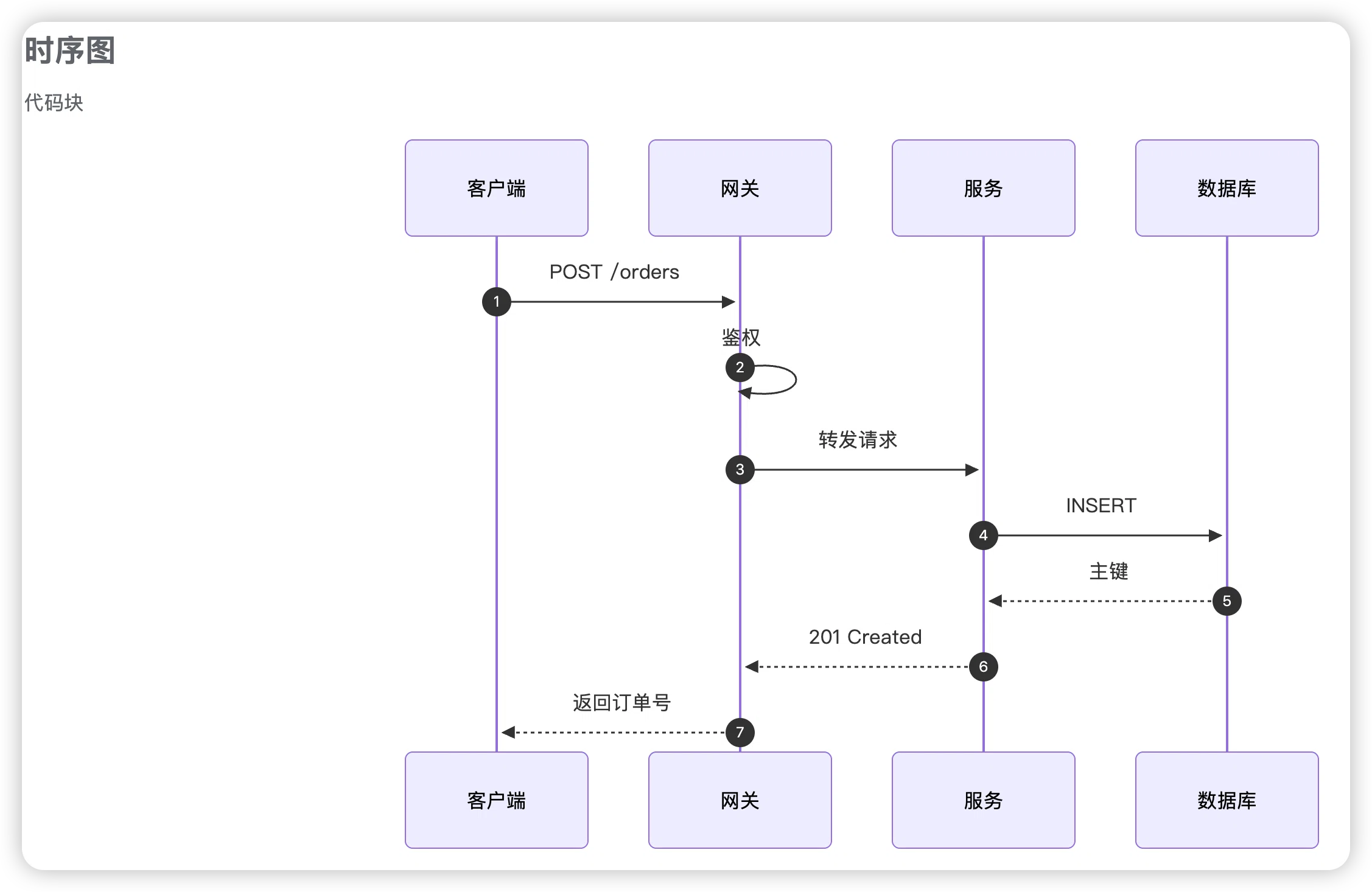
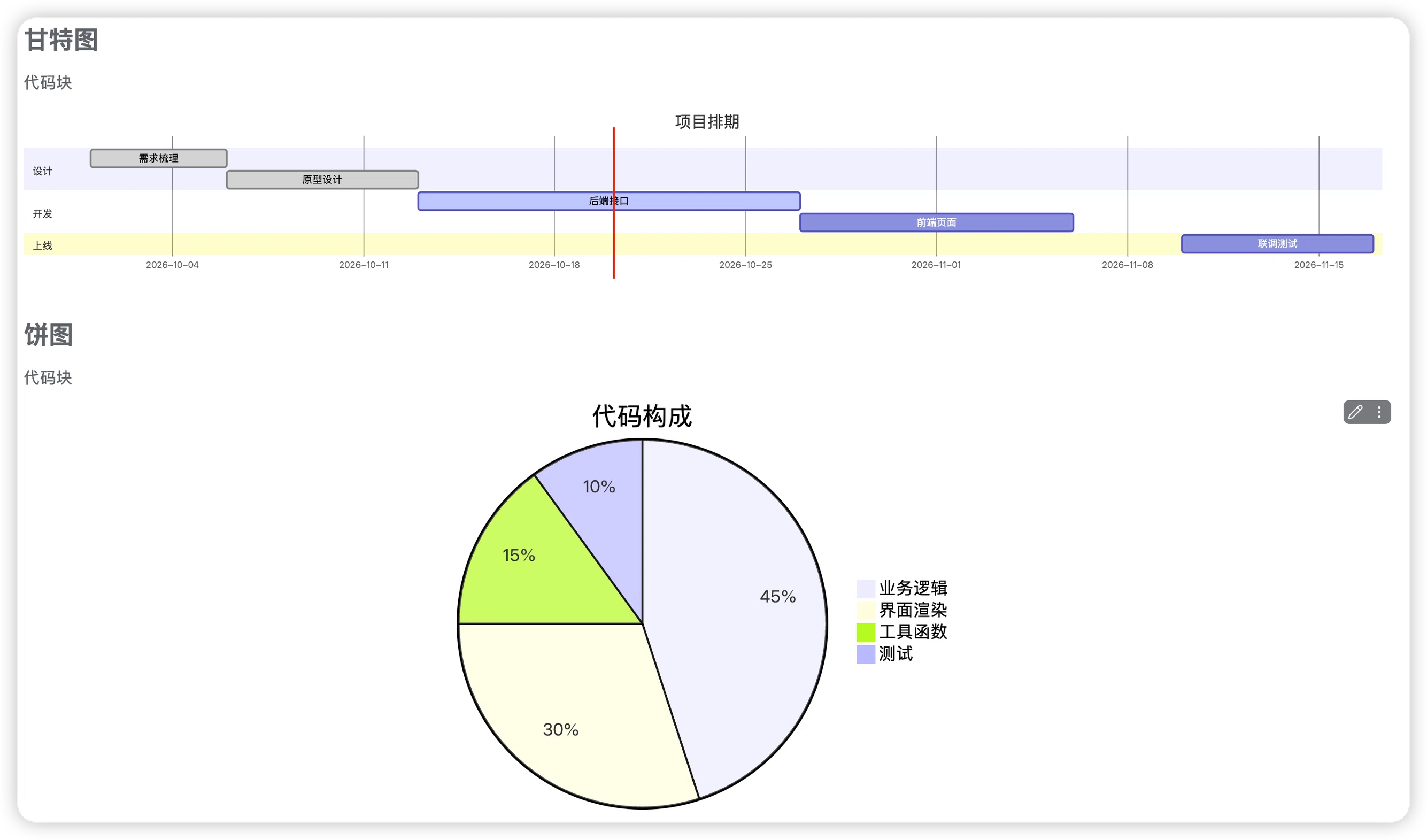
甘特图与饼图 —— 同一个对话里两种图都能识别,各按各的类型渲染
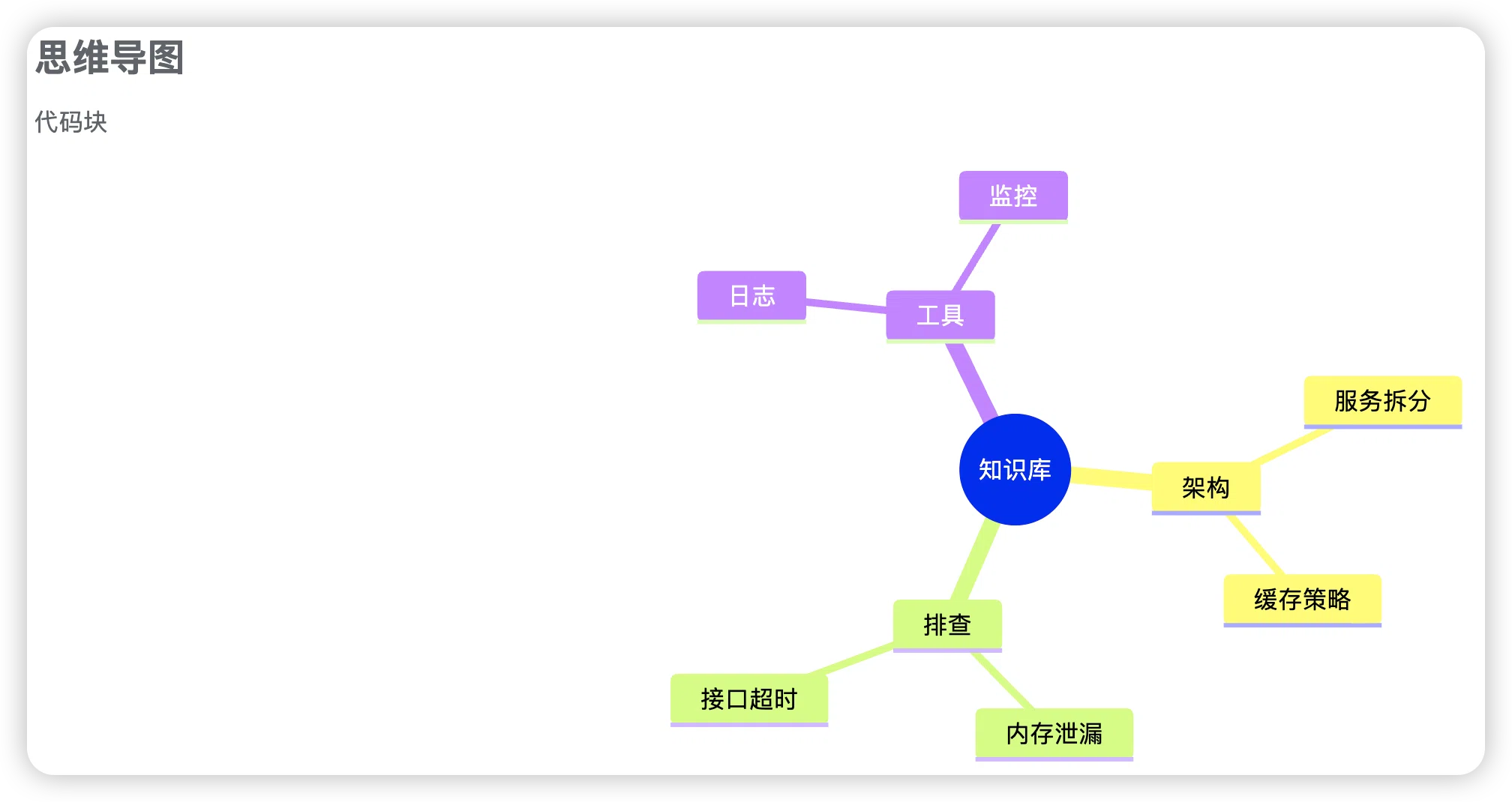
思维导图 —— 对话里写的 mindmap 层级结构,同步后自动展开成树
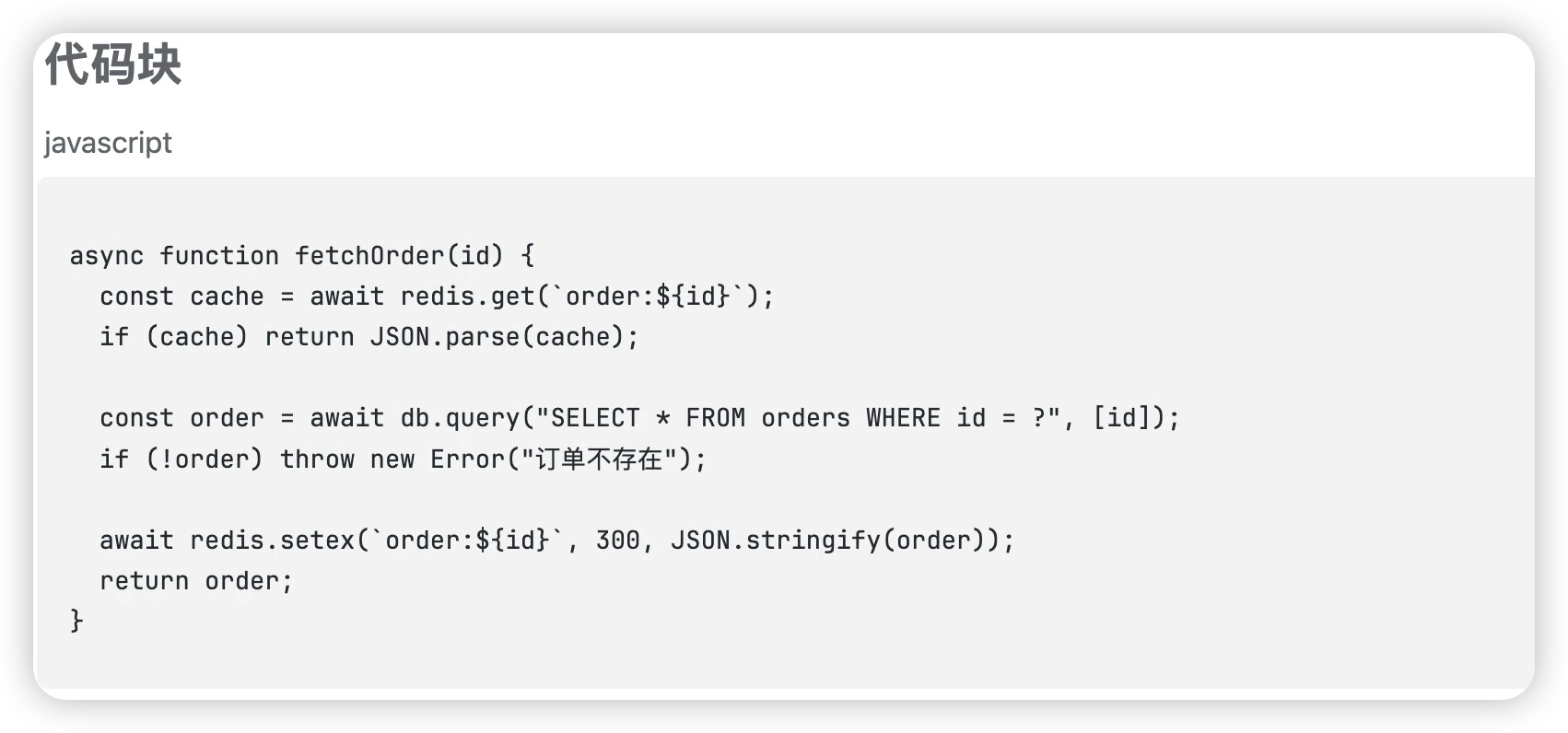
代码块 —— 语言标记(图里左上角的 javascript)都是同步时自动带过去的,缩进、注释、中文注释全部保留
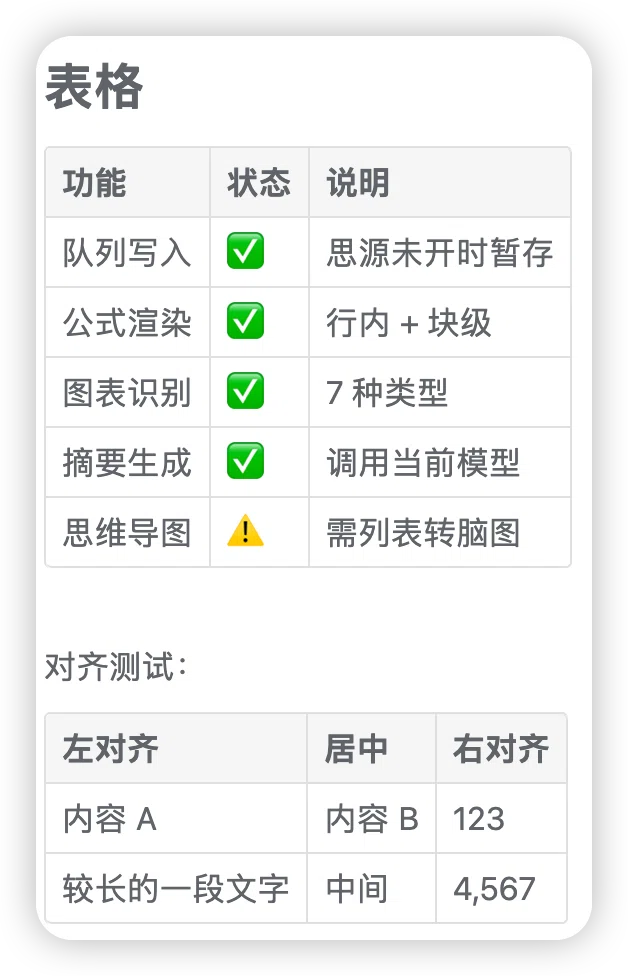
表格 —— Markdown 表格转成思源表格块,左中右对齐都能保留
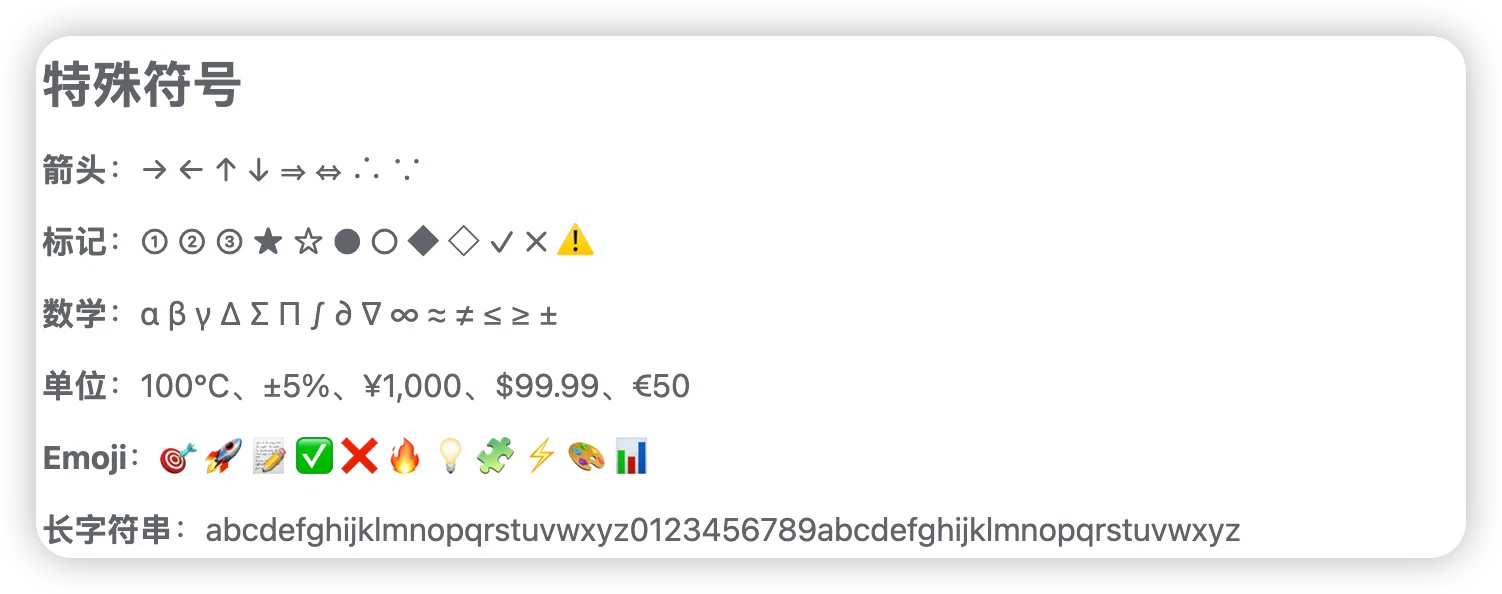
特殊符号 —— 箭头、数学符号、单位、Emoji、长字符串,同步过程不做任何转义或替换
右键任意消息:
| 菜单项 | 作用 |
|---|---|
| 复制 | 复制这条消息的纯文本(插件接管右键后补回的原生功能) |
| 同步这条消息到思源 | 只存这一条 |
| 同步本轮对话 | 这一轮问答 |
| 同步整个窗口的全部对话 | 窗口里所有已加载的对话 |
| 思源笔记设置… | 打开控制面板 |
deepseek对话 里,改成 架构决策、问题排查、性能优化两种方式,任选其一。装完都要重启 Harness。
不依赖 Git,一条命令搞定:
dsh plugin --profile desktop add dsh-siyuan-sync
需要机器上已装 pnpm。如果提示
pnpm was not found,先装:npm i -g pnpm
适合想改代码、或者 npm 装不上的情况。
macOS / Linux
git clone https://github.com/LuoX218/dsh-siyuan.git
cd dsh-siyuan
chmod +x install.sh
./install.sh
Windows(PowerShell)
git clone https://github.com/LuoX218/dsh-siyuan.git
cd dsh-siyuan
.\install.ps1
PowerShell 若提示「禁止运行脚本」,先执行一次:
Set-ExecutionPolicy -Scope Process -ExecutionPolicy Bypass
Windows 脚本用目录联接(Junction)代替符号链接,不需要管理员权限。
三个改动,都在 ~/.dsh/profiles/desktop/ 下:
node_modules/package.json 的 dependenciesdsh.profile.bundles第 2、3 步是插件能出现在「设置 → 插件 → 第三方插件」列表里的关键。脚本会自动备份 package.json。
其他 profile 用 --profile <名字> 指定(Windows 用 -Profile <名字>)。
必须完全退出 DSH 再启动——托盘图标右键 → 退出。只关窗口只是缩到托盘,代码不会重新加载(Node 按 URL 缓存 ESM 模块,重载插件补丁不会重新 import)。
重启后:
dsh-siyuan,可以启用/停用macOS / Linux
./uninstall.sh
Windows
.\uninstall.ps1
npm 方式:
dsh plugin --profile desktop add dsh-siyuan-sync@latest
克隆方式:
cd dsh-siyuan
git pull
./uninstall.sh && ./install.sh
思源必须开着——插件通过思源内核 API 写入,token 从 conf/conf.json 自动读取(macOS / Windows / Linux 路径都已适配)。
| 系统 | 状态 | 说明 |
|---|---|---|
| macOS | ✅ | 已充分测试 |
| Windows | ✅ | 安装脚本已提供,代码路径全平台适配 |
| Linux | ✅ | 使用 ~/.config/siyuan/conf/conf.json |
代码只用 Node 内置模块,路径拼接统一走 path.join,不调用任何 shell 命令。
入口:设置 → 插件 → 第三方插件 → dsh-siyuan,点「配置」。
面板顶部显示连接状态(思源是否可达、版本号),下面是四组设置。
决定内容写到哪、怎么组织。
| 设置项 | 选项 | 说明 |
|---|---|---|
| 目标笔记本 | 任意名字 | 填不存在的名字会自动创建。想按主题分类就填 架构决策、问题排查 |
| 日期格式 | 2026-10-20 / 2026/10/20 / 2026年10月20日 | 只影响文档标题和存放路径 |
| 归类方式 | 同一天追加一篇 / 每次新建文档 | 前者适合日记式归档,后者适合每次同步都是独立主题 |
| 每段时间标题 | 不添加 / 二级 / 三级 / 四级 | 每段内容开头那个时间戳的标题级别。三级适中,不添加则不显示时间 |
面板里会实时显示「存放位置:xxx / xxx」,改完立刻能看到最终路径。
控制同步过去的 Markdown 长什么样。
| 设置项 | 选项 | 说明 |
|---|---|---|
| 段落之间的分隔线 | 显示(推荐)/ 不显示 | 每次同步之间插一条 ---,多次同步视觉上分得开 |
| 每段显示时间戳 | 显示 / 不显示 | 关掉后只保留正文,适合连续记录同一主题 |
| 流程图 / 图表配色 | 跟随思源 / 强制浅色 / 强制深色 / 高对比 | mermaid 的配色方案。夜间看不清时改「强制深色」或「高对比」 |
| 自动标签 | 按内容自动加标签 / 不加标签 | 命中关键词时在正文前插 #方案设计# 这类标签 |
只在同步整个窗口时生效。
| 设置项 | 选项 / 说明 |
|---|---|
| 整窗口同步时 | 「先问是否提取摘要」会弹选择框;「直接存全文」跳过提问 |
| 提取摘要的提示词 | 多行文本框,可完全自定义。留空则用内置模板(概览 / 时间线 / 主要工作 / 关键信息 / 问题与解决 / 图文 / 后续,并要求配 gantt、flowchart、pie 等图表) |
提示词失焦自动保存。想强制某种输出格式,直接在里面写就行,比如「每次都要有饼图」。
| 设置项 | 选项 | 说明 |
|---|---|---|
| 写入前预览 | 先预览再写入 / 直接写入 | 预览面板里可以改标题和正文,确认后才写。觉得多余就关掉 |
| 重复内容提醒 | 已存过时提示我 / 不检查直接存 | 按内容指纹判断,避免同一段内容反复堆积 |
面板下半部分是待写入队列,每条显示标题、字数、相对时间、重试次数和失败原因。
失败原因分四类:offline(思源没开)、auth(token 失效)、missing(目标文档被删,会自动重建)、other(其他错误,附原始信息)。
| 限制 | 原因 |
|---|---|
| 思源必须运行才能写入 | 写入只能走内核 API |
| 思维导图不能直接生成 | 思源的脑图是原生块,需从列表右键转换 |
| 已有内容不会自动更新 | 改了排版设置只影响新同步的内容 |
| 摘要需要先选模型 | 会话没选模型时无法生成 |
MIT
Pick out what's worth keeping from DeepSeek Harness and grow it into your own development knowledge base. Right-click to save into SiYuan; formulas and mermaid diagrams come through intact.
A development conversation runs thousands of words. What's actually worth keeping might be a few paragraphs: a design that clicked, a bug that ate an afternoon, a set of tuned parameters. The rest you won't reread.
This plugin is about selection — you decide what's kept, what's kept stays usable, and it compounds into a searchable knowledge base.
SiYuan isn't a backup drive here; it's the organization layer: backlinks, outlining, tags, database views.
#design#, #troubleshooting# and friends, for aggregationEvery image below is a raw screenshot of SiYuan after right-clicking sync in a DeepSeek Harness conversation — no manual formatting, no re-editing.
What you type in the chat is what lands in the note: Markdown, LaTeX, mermaid, code fences, tables — all rebuilt as SiYuan's native blocks instead of flattened into plain text.
| Written in Harness | Becomes in SiYuan | Fidelity |
|---|---|---|
**bold** *italic* ~~strike~~ | matching inline styles | ✅ |
$E=mc^2$ | inline math NodeMathInline | ✅ editable |
$$...$$ | math block NodeMathBlock | ✅ editable |
| ```mermaid flowchart | diagram block | ✅ interactive |
| ```javascript | code block with highlighting | ✅ language marker kept |
| Markdown table | table block | ✅ alignment kept |
- [x] task | task list block | ✅ checkable |
See the Chinese section for the full gallery.
Right-click any message:
| Item | What it does |
|---|---|
| Copy | Copies the message as plain text (the native action the plugin replaces) |
| Sync this message | Just this one |
| Sync this turn | The question-and-answer pair |
| Sync the whole window | Everything loaded |
| SiYuan settings… | Open the panel |
Two options. Either way, restart Harness afterwards.
No Git needed, one command:
dsh plugin --profile desktop add dsh-siyuan-sync
Requires pnpm. If you see
pnpm was not found, install it first:npm i -g pnpm
For hacking on the code, or when npm isn't an option.
macOS / Linux
git clone https://github.com/LuoX218/dsh-siyuan.git
cd dsh-siyuan
chmod +x install.sh
./install.sh
Windows (PowerShell)
git clone https://github.com/LuoX218/dsh-siyuan.git
cd dsh-siyuan
.\install.ps1
If PowerShell refuses to run the script:
Set-ExecutionPolicy -Scope Process -ExecutionPolicy Bypass
The Windows script uses a directory junction instead of a symlink, so no admin rights are needed.
Three changes, all under ~/.dsh/profiles/desktop/:
node_modules/package.json → dependenciesdsh.profile.bundlesSteps 2 and 3 are what make the plugin show up under Settings → Plugins → Third-party plugins. Your package.json is backed up automatically.
For another profile, pass --profile <name> (Windows: -Profile <name>).
After restarting Harness:
macOS / Linux
./uninstall.sh
Windows
.\uninstall.ps1
npm install:
dsh plugin --profile desktop add dsh-siyuan-sync@latest
Clone install:
cd dsh-siyuan
git pull
./uninstall.sh && ./install.sh
SiYuan must be running — the plugin writes through its kernel API, reading the token from conf/conf.json (macOS / Windows / Linux paths all handled).
| Platform | Status | Notes |
|---|---|---|
| macOS | ✅ | Fully tested |
| Windows | ✅ | Install script provided; all code paths adapted |
| Linux | ✅ | Uses ~/.config/siyuan/conf/conf.json |
Open via Settings → Plugins → Third-party plugins → dsh-siyuan → Configure. The panel header shows connection status; four groups follow.
Storage — target notebook (created on demand), date format, grouping mode (one note per day vs. one per sync), timestamp heading level.
Layout — separator between segments, timestamp visibility, mermaid color scheme (follow theme / force light / force dark / high contrast), auto-tagging on or off.
Summary — whether whole-window syncs ask before summarizing, and a fully customizable summary prompt (leave empty for the built-in archival template).
Behavior — preview before writing, duplicate detection.
The queue section at the bottom lists pending entries with retry counts and failure reasons, each individually retryable or removable.
| Limitation | Reason |
|---|---|
| SiYuan must be running | Kernel API is the only write path |
| No direct mindmap generation | SiYuan mindmaps are native blocks; convert from a list |
| Existing content isn't updated | Layout changes only affect new syncs |
| Summary needs a selected model | Uses the current session's model |
MIT
DeepSeek Harness(DSH)Web 插件聚合生态包 · 一切皆插件,创意工坊分发(dsh-market.com)
把回答做成一页可视化 HTML:模型只写简短的 Markdown 草稿,随包附带的 `am` 命令行生成页面,支持流程图、时序图、树、时间线、ER 图、表格和提示框。
在 dsh 里装上这个插件即可,无需登录、注册或填 API Key,就能使用包括 Muse Spark 1.3、MiMo V2.6 在内的前沿模型——完全免费,不限量。 All you do is install this plugin in dsh: no login, no sign-up, no API key — the frontier models are just there, Muse Spark 1.3 and MiMo V2.6 among them. Completely free, with no usage cap.

