
dsh-web
zhu1090093659/dsh-webDeepSeek Harness(DSH)Web 插件聚合生态包 · 一切皆插件,创意工坊分发(dsh-market.com)

周期性 Excel 模板填充与对账复核:一次声明文件、工作表、表头行、匹配键与金额列,写入前逐格预览,按精确两位小数比较金额,把未匹配行列为异常项,最后导出填好的模板副本并附 HTML 报告与可回溯到源行的 JSON 轨迹。
Fill recurring Excel templates, review reconciliation exceptions, and trace every value to its source.
Financial disclaimer: SheetFlow assists with data preparation and reconciliation review. It does not provide accounting, tax or financial advice and is not an accounting system. AI mappings and all exported amounts, formulas and exceptions require independent review before business use. Acknowledging an exception does not resolve it or approve a payment.
v0.1.0-pre preview: tested on Windows with Node 24.19.0 and DSH Web 0.2.0-rc.2. Chinese / English workbench. Three examples plus one newly created synthetic blind dataset verified. A real deepseek-v4-pro / max run proposed the correct columns but needed two source-header-row corrections before export. This is one assisted success, not proof of unattended mapping or production workbook compatibility. See the real model review. GitHub Pre-release downloads; no npm publication for this preview.
中文 · Compatibility · Validation evidence · Recipe format
The blind export also passed a delegated native Microsoft Excel UI check: forced recalculation, a live formula edit/undo, all eight rows and three merged regions. Screenshots and results. This was operated by Codex on synthetic data, not a human accounting sign-off.
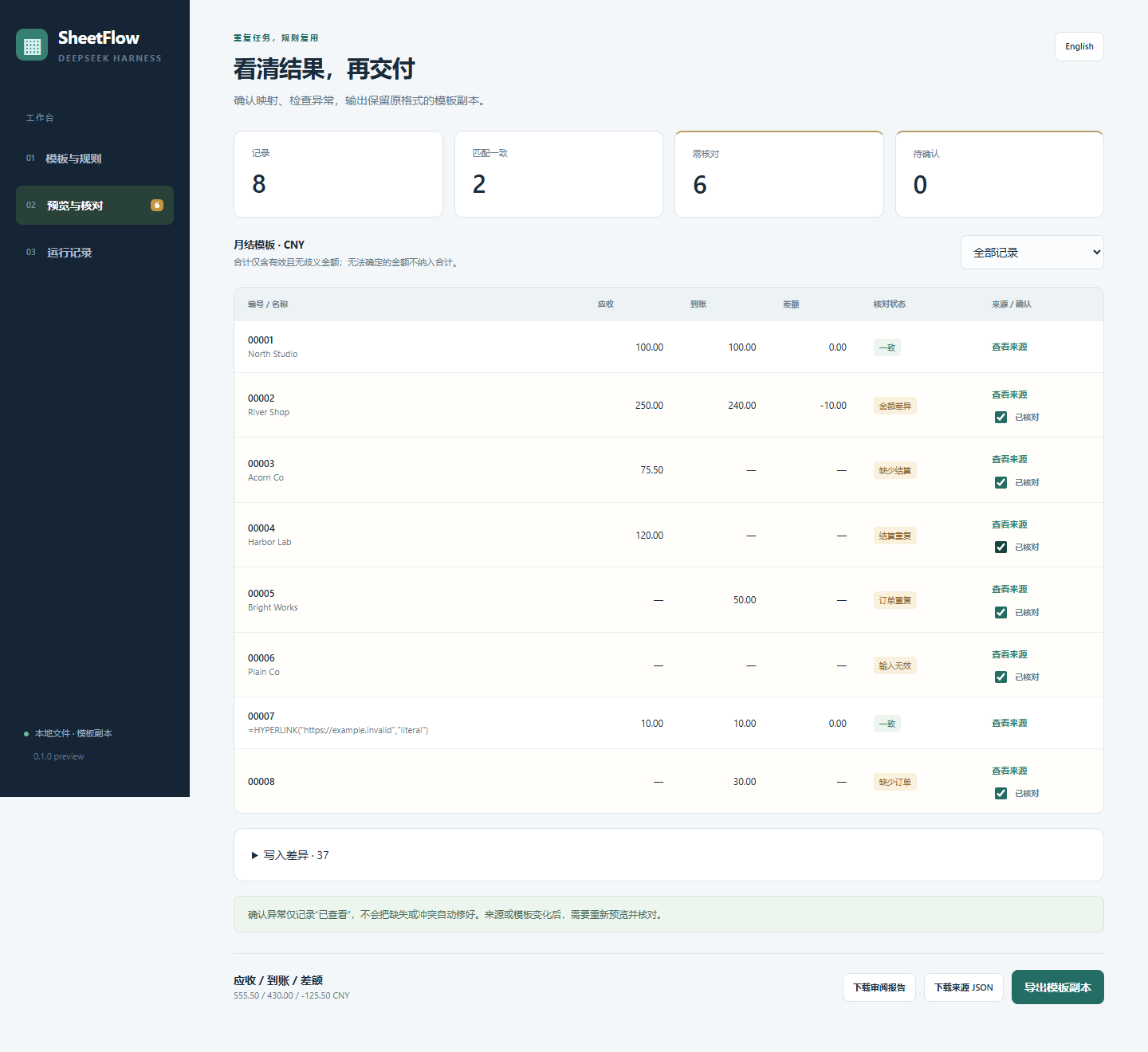
Demo screenshot: synthetic example data.
An independent community plugin for DeepSeek Harness. Start with an orders table, a settlements table, and an existing business template. Confirm the mapping once, preview every write, review every exception, and export a new template copy with an HTML report and JSON trace.
Use Node 24, or Node 22.19+ within the 22.x line. No Microsoft Excel or model API key is needed for this local sample.
# Run in the extracted source folder
npm ci --cache .cache/npm
npm run build
npm run dev
Open the local URL printed in the terminal. Choose Load sample mapping, confirm the mapping, then Generate preview. The sample has eight records: two matched and six exceptions. Review evidence and acknowledge all exceptions to export. New .xlsx, .html, and .json files are saved alongside the inputs in examples/month-end/.
The standalone preview verifies rule execution. AI proposals are available inside DSH.
Install and configure DSH using its official instructions. Build this source folder using the commands above, then register the plugin:
dsh plugin --profile web add /absolute/path/to/dsh-sheetflow
# A built .tgz can be registered with the same command.
dsh web
In DSH, select a workspace containing the two source tables and template. To try the example, select the plugin's examples/month-end folder. Click SheetFlow 填表台 and switch to English if desired.
Confirm mappings and the writable region, generate a preview, inspect exceptions, and export a new copy. For AI help, send mapping instructions, wait for the current DSH session to finish, then choose Load proposal and confirm it.
Add .dsh-sheetflow/ and generated sheetflow-*.xlsx, sheetflow-*.html, sheetflow-*.json to the business workspace's .gitignore. Histories and reports contain business data. Input files remain local during deterministic processing; using AI sends the supplied instructions, bounded samples, and inspection results through your configured DSH model provider.
Ordinary .xlsx templates and .xlsx / UTF-8 comma-separated .csv tables; one key and one two-decimal amount per source, one shared currency and business period, a fixed reserved writable region. Sources may be separate sheets of the same workbook. Recipes are per DSH session; use JSON to transfer them.
This preview does not calculate Excel formulas, perform currency conversion, fuzzy matching, many-to-many reconciliation, OCR/PDF ingestion, or insert template rows. Formulas are preserved and caches invalidated; open the copy in Excel and recalculate before relying on formula outputs. Macros, digital signatures, external workbook links and protected target sheets are rejected. Complex workbook fidelity and remote/sandbox-only filesystem backends are unverified. Full limits.
npm run check
npm run test:e2e
Browser tests use Windows Google Chrome when available; otherwise run npx playwright install chromium. SHEETFLOW_CHROMIUM_PATH can select a browser. .npmrc uses legacy peer resolution to work around the tested DSH prerelease dependency graph; DSH itself should be installed separately using its official instructions.
For another local fixture:
$env:SHEETFLOW_WORKSPACE = "examples/next-month"
npm run dev
Import that folder's recipe.json through Advanced. The next-month example demonstrates 0.10 + 0.20 = 0.30; the supplier example uses another sheet, row range and prefilled template.
MIT licensed. Preview acceptance, integration boundaries, and the next validation gate are documented in validation.md.
DeepSeek Harness(DSH)Web 插件聚合生态包 · 一切皆插件,创意工坊分发(dsh-market.com)
把回答做成一页可视化 HTML:模型只写简短的 Markdown 草稿,随包附带的 `am` 命令行生成页面,支持流程图、时序图、树、时间线、ER 图、表格和提示框。
在 dsh 里装上这个插件即可,无需登录、注册或填 API Key,就能使用包括 Muse Spark 1.3、MiMo V2.6 在内的前沿模型——完全免费,不限量。 All you do is install this plugin in dsh: no login, no sign-up, no API key — the frontier models are just there, Muse Spark 1.3 and MiMo V2.6 among them. Completely free, with no usage cap.

