
dsh
OpenPetsHQ/openpets将 DeepSeek Harness 的生命周期状态、错误与审批请求,桥接到本地运行的 OpenPets 桌面伙伴。

DSH 向你提问时在屏幕右下角弹出毛玻璃通知卡片,点击卡片即恢复并置顶窗口、回到发起询问的会话。
A plugin for DSH (DeepSeek Harness). When DSH asks you a question with ask_user_question while you are looking at something else, it raises a real acrylic notification card in the bottom-right corner of your Windows desktop. Clicking the card restores and raises the DSH window and navigates back to the Session that asked.
SetWindowCompositionAttribute + DWMWA_WINDOW_CORNER_PREFERENCE, painted with TextRenderer.DrawText), because the renderer Notification API, NotifyIcon balloons and WinRT toasts all failed to show a banner in this Electron shell.user-questions/request waterfall ({ prepend: true }) and passes the answer back to the original listener.node:child_process, node:fs, node:path) and registers a webServer route, so there are no runtime npm dependencies.GET /message-reminder/status.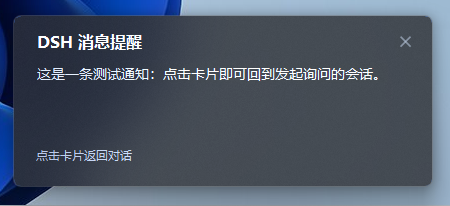
A real card raised by ask_user_question while you are looking at something else: the title comes from the plugin config, the body is the question summary, and clicking anywhere on the card restores the DSH window and returns to the asking Session.
Notification.Install it from the DSH plugin market (dshmarket) once the plugin is listed there, or add it to a profile by hand. Installing from a local checkout is the path that always works:
dsh plugin --profile <your-profile> add link:/path/to/dsh-message-reminder
Once the package is published to npm, the registry form works too:
dsh plugin --profile <your-profile> add dsh-message-reminder
The package declares its own bundle patch (dsh.bundle.patch), so it inserts its row into the profile when the profile loads. dsh plugin add is a pnpm add inside the profile, so make sure the package name also appears in that profile's bundle list:
// $DSH_HOME/profiles/<your-profile>/package.json
{
  "dsh": { "profile": { "bundles": ["...", "dsh-message-reminder"] } }
}
Override by row id in your profile's cordis.patch.yml (a config block replaces the whole default block, so repeat every field you want to keep):
- id: message-reminder
  config:
    title: DSH 消息提醒                    # card title
    skipWhenViewingSession: true           # no card while the asking Session is on screen (default)
    skipWhenFocused: false                 # also skip the renderer notification while the page is focused
    windowProcessName: DeepSeek Harness    # process whose window is raised when the card is clicked
    sound: true                            # true | false | asterisk / exclamation / question / hand / beep
    notifyMode: auto                       # auto | balloon | renderer
notifyMode: balloon is the historical name of the helper-process card channel; renderer forces the page's own notification and is the easiest way to test without spawning a child process. The sound plays when the card is actually shown, so it never "beeps without a card".
index.js               host half: watches questions, spawns the card, serves the SSE channel
client.js              browser half: subscribes to the channel, navigates on click
notify.ps1             the card helper script (one short-lived process per question, ASCII-only)
cordis.patch.yml       inserts the host row into the current profile
locale/{zh,en}.json    the name and description shown for the plugin
icon.svg
SetWindowCompositionAttribute acrylic (Windows 10 1803+). If the system rejects the call the card degrades to a solid background and everything else still works.DSH 调用 ask_user_question 询问用户时,在屏幕右下角弹出一张通知卡片;点击卡片会把 DSH 窗口恢复并置顶,同时自动回到发起询问的那个会话。
标题取自插件配置(默认「DSH 消息提醒」),正文是问题摘要(超过 160 字符截断);点击卡片任意位置即可回到发起询问的会话,点右上角 ✕ 只关掉卡片。
| 时机 | 行为 |
|---|---|
DSH 调用 ask_user_question,且页面不在该会话(或窗口已最小化) | 在工作区右下角(内缩 18px)弹出毛玻璃卡片并播放提示音,标题默认 DSH 消息提醒,正文为问题摘要(多个问题时附带「共 N 个问题」),底部提示「点击卡片返回对话」 |
DSH 调用 ask_user_question,但页面正显示该会话且窗口是当前活动窗口 | 不弹卡片、不响:问题卡片已经在用户眼前的输入区里 |
| 点击卡片 | 把窗口恢复并置顶,然后把页面导航回发起询问的会话并展开待回答的问题卡片 |
| 点击右上角 ✕ | 忽略这条通知:卡片关闭,不置顶、不跳转;询问仍在原地等待回答 |
| 弹出 / 关闭 | 从屏幕右边缘滑入(约 260ms,ease-out-back,过冲约 20px 后回弹到位);点击或 ✕ 后向左滑出关闭(约 150ms) |
| 问题被回答 / 被取消 | 卡片随辅助进程一起消失 |
会话本身与询问流程完全不受影响:插件只是观察 user-questions/request,并把决定继续交给原来的应答者。卡片不会抢焦点,鼠标悬停时描边变亮、✕ 出现底衬。
滑动只改窗口位置(15ms 一帧的 Timer 插值),刻意不用透明度淡入:淡入需要分层窗口,会和 DWM 合成的 acrylic 毛玻璃打架。实测轨迹(1920 屏幕):
380ms left=1920  完全在屏幕右边缘外
400ms left=1822  滑入
480ms left=1459  过冲峰值(静止位 1482)
540ms left=1482  精确停在静止位并保持
「忽略」只是让辅助进程以退出码 0 结束(点击是 42),Host 会把这次结束归类为「已被忽略的气泡」,因此既不重试也不回退到渲染进程通知;下一次询问照常弹出。
Windows 的前台锁会让 SetForegroundWindow 无声失败,所以点击后按顺序尝试并每步回验 GetForegroundWindow:
ShowWindow(SW_RESTORE),若被隐藏则 SW_SHOW,再 BringWindowToTop;AttachThreadInput 挂到当前前台线程后 SetForegroundWindow(前台锁只会让给拥有前台窗口的线程),完成后解除挂接;SwitchToThisWindow;HWND_TOPMOST → HWND_NOTOPMOST」把 z 序顶上来(不会把用户从未固定的窗口留在置顶状态);FlashWindowEx 闪任务栏按钮,至少让用户注意到。实测三种情形都能把窗口带到最前:最小化、被另一个已聚焦窗口盖住、正常后台。
「是否已经在看这个会话」只有页面自己知道,所以 client.js 会把「当前 mainView 的会话 + 页面是否可见 + 页面是否聚焦」上报给 Host(retainedBy.mainView),Host 在询问到来时据此决定是否弹卡片。
判定「用户看不到」用的是两个信号的与:visibilityState === 'visible'(没被最小化/切到别的标签)且 document.hasFocus()(是当前活动窗口)。Chromium 不提供遮挡信号——被别的程序完全盖住的窗口 visibilityState 仍然是 visible——所以聚焦状态是把「就在用户眼前」和「压在别的程序后面」区分开的那个信号。于是这几种情况都会提醒:
只有「窗口在前台、且正显示发起询问的会话」才不打扰。整条规则在 isViewingAsk() 里,配置项是 skipWhenViewingSession(设 false 则完全不抑制)。
dsh-message-reminder/
├── index.js          Host 半边:监听询问、拉起卡片进程、提供 SSE 通道
├── client.js         浏览器半边:订阅通道、点击后导航
├── notify.ps1        卡片辅助脚本(每次询问一个短命进程,ASCII-only,每次按需读取)
├── cordis.patch.yml  把 Host 行插入当前 profile
├── locale/{zh,en}.json  插件卡片上显示的名称与说明
└── icon.svg
user-questions/request 是一条 waterfall;插件行在所有 bundle 行之后加载,若不声明 prepend: true,浏览器里回答问题的那个监听者会先返回结果,插件就永远看不到这次询问。因此 Host 以 { prepend: true } 注册为最外层监听者,记录询问后用 next() 把回答权交回去。Notification API 需要与 AUMID 绑定的开始菜单快捷方式,这个 Electron 外壳没有。实测三种系统通知机制(渲染进程 Notification、NotifyIcon 气泡、WinRT toast)都被 Windows 送达通知中心却从不显示横幅,因此改为绘制一个置顶窗口:窗口不受该限制。卡片本身是真毛玻璃——SetWindowCompositionAttribute(ACCENT_ENABLE_ACRYLICBLURBEHIND) 提供真实的背景模糊(须先设置 DWMWA_USE_IMMERSIVE_DARK_MODE 才会得到深色色调),DWMWA_WINDOW_CORNER_PREFERENCE 负责圆角;文字用 TextRenderer.DrawText 直接画在窗口自己的 Paint 里,因为任何子控件都会用自己的背景盖掉模糊。/message-reminder/events(SSE,沿用 dsh-client-hmr 的通道写法)把 ask / click / resolved 推给页面,页面用 ctx.uiWorkspace.openSession(sessionId) 回到会话。渲染进程无法自行恢复/置顶窗口,这一步由辅助脚本完成。点击上报有两条独立通道:辅助脚本退出码 42 是 Host 信任的结论,stdout 的 click 只是抢先通知。找不到可用 PowerShell、或卡片连续 5 次没能启动时,Host 会改用 channel: 'client' 让页面自己发 Notification(在 macOS/Linux 上这就是默认路径)。
在 profile 的 cordis.patch.yml 里按行 id 覆盖(config 整体替换,需写全要保留的字段):
- id: message-reminder
  config:
    title: DSH 消息提醒                    # 卡片标题
    skipWhenViewingSession: true           # 页面已显示该会话时不打扰(默认开)
    skipWhenFocused: false                 # 页面聚焦时连渲染进程通知也跳过
    windowProcessName: DeepSeek Harness    # 点击卡片时要置顶的进程名
    sound: true                            # true 播放系统提示音 | false 静音 | asterisk / exclamation / question / hand / beep
    notifyMode: auto                       # auto | balloon | renderer
notifyMode: balloon 是「辅助进程卡片」这条通道的历史名称;renderer 强制使用页面自带通知,也便于在不拉起子进程的前提下测试。提示音在卡片真正显示的那一刻播放(WinForms 的 Shown),所以不会出现「响了一声但卡片没弹出来」。
GET /message-reminder/status 返回当前通道、SSE 连接数、存活的卡片进程、页面最新上报的视图状态(view)、待回答询问,以及最近的诊断记录(Host 事件与浏览器上报的事件,各带时间戳):
curl.exe -s http://127.0.0.1:19387/message-reminder/status
排查「没看到通知」时依次确认:channel、connections 是否 ≥ 1、view 是否恰好等于发起询问的会话且 visible 为真(此时按设计不弹)、diagnostics 里有没有 ask-listener → broadcast → balloon-click(其中 code: 42 即点击成功)。
SetWindowCompositionAttribute 的 acrylic(Win10 1803+),系统若拒绝该调用,卡片会退化为纯色背景,其余行为不变。将 DeepSeek Harness 的生命周期状态、错误与审批请求,桥接到本地运行的 OpenPets 桌面伙伴。
通过二维码或机器人凭据将 IM 机器人接入 DeepSeek Harness(支持飞书、微信、钉钉、企业微信、QQ、Slack、Telegram、Discord 和 WhatsApp 共 9 种渠道)。
通过 WebSocket V2 将 DeepSeek Harness 接入 Avernet Bot 协作网络,支持自动注册、Agent 会话隔离、工具调用事件和多 Bot 路由工具。

