

dsh-web
zhu1090093659/dsh-webDeepSeek Harness(DSH)Web 插件聚合生态包 · 一切皆插件,创意工坊分发(dsh-market.com)

A lightweight, unofficial phone interface for DeepSeek Harness (DSH) running on your own Windows computer. Open a browser on your phone to work with local projects and conversations, send instructions, respond to supported approvals, and transfer workspace files. Your computer runs DSH; Pocket Bridge provides the connection and a small browser interface.
New releases focus exclusively on DSH. Codex and Dot are retired from the new gateway and Windows installer. Previous combined releases and their installers remain available in GitHub Releases, with no further integration updates. Upgrading preserves the installation directory, connection keys, device records, uploads, and existing local journals. It does not close Codex, delete its conversations, or remove your target applications.
Pocket Bridge is independent and unofficial. It is not affiliated with or endorsed by DeepSeek, OpenAI, or Cloudflare. DSH, model access, and any provider fees are separate. See third-party notices.
Other community phone clients and plugins exist, including DSH Mobile Remote, dsh-mobile, and dsh-Remote. Pocket Bridge focuses on a small browser interface, a Windows installer, bounded thumbnail-first image viewing, protected content transport and exact-version compatibility reporting. Its optional plugin reuses an identified gateway and exposes actionable local diagnostics. Consult each project's own platform, protocol and security requirements before choosing it.
Capabilities depend on the installed DSH runtime, its plugins, and the connected account. This is a purpose-built mobile interface, not a complete reproduction of every desktop plugin. Unsupported operations must be explained or unavailable rather than presented as working buttons. Read the compatibility matrix and manual acceptance record.
Preview.21 recognizes supported local Markdown image and file links and builds image controls or file actions with DOM elements. A link is metadata, not permission to read a computer file; it is never turned into an unrestricted browser href or used to grant access. The new preview path does not automatically fetch remote image URLs.
Images close to the visible transcript request JPEG thumbnails no larger than 960 pixels on either side and 200 KiB. The Windows converter can choose a smaller size to meet that byte limit. The page runs at most two image reads concurrently, and each gateway runs one Windows conversion at a time with a bounded queue and deadline. Original reads remain limited to 8 MiB, 8,192 pixels per side and 20 million pixels. Thumbnail support depends on the PC's raster decoder; a failed thumbnail does not silently download the original.
Tap an image to open its original in the page, or choose Download original. Image blobs stay in bounded page memory; this view does not write them to browser persistent storage or the public asset cache. Changing the conversation or connection, or disposing the page, cancels pending work and releases its image URLs. Explicit downloads and DSH's own source files have separate storage lifetimes.
Workspace image paths use the conversation's real DSH workspace boundary. An outside-workspace raster needs an exact approval created locally with scripts/approve-dsh-image.js: supply the bridge installation with --base, its DSH home with --dsh-home, the exact --session and absolute --file, then --approve. The signed approval binds the gateway instance, session, canonical workspace and file, file identity and SHA-256, and expires after 24 hours. Use the same local command with --revoke to remove it. Model-generated text cannot create an approval. File changes, missing approval, expiry and revocation block a later server read; revocation cannot recall bytes already delivered or downloaded.
#k= fragment private.Preview.21 is the image-preview candidate described in the release notes. Its actual interface was operated in a 390 by 650 desktop-browser phone viewport against real DSH 0.2.1-rc.2: a session's tool image loaded automatically and its original opened in the page. These observations are separate from a final installer and production recheck, and do not establish physical iPhone/Android or older npm-host acceptance. Earlier compact model, reasoning, goal and plan controls remain documented in Preview.20 acceptance. The desktop console retains its strict local Start DSH action. To close DSH, exit it from the DSH application.
The verified npm build path remains available, but npm publication is deferred pending authorization for the intended npm account and package name. Signing in to DSH does not authorize npm publication. A community website Preview.19 catalog update was submitted separately; neither a prepared package nor a website entry establishes availability in the npm-backed public Discover index. See the distribution instructions.
The Windows installer bundles Node.js and cloudflared with their license texts. It does not bundle DSH. Temporary tunnel addresses can change after a restart; use the newly copied link when that happens. A tunnel that is unavailable or disconnected does not mean a message was accepted. Do not repeatedly send an instruction with an uncertain delivery result.
For DeepSeek-V4.1-Flash-1017, DeepSeek recommends Harness 0.2.1-rc.1 or newer. Preview.16 adds exact native-desktop recognition and plugin version admission for 0.2.1-rc.2. Model names and choices come from the connected runtime. A plugin version declaration does not establish compatibility with every newer or older build; consult the exact-version acceptance record.
Phone content requires browser WebCrypto in a secure context. Use the HTTPS tunnel, or a local HTTPS entry whose certificate your phone trusts. Ordinary LAN HTTP does not provide this context and is not a supported plaintext fallback. The local console provides HTTPS setup guidance; certificate trust must be configured separately.
The plugin adds Pocket Bridge to DSH Settings, with explicit gateway start and pause, private QR pairing, and connection diagnostics. It uses the existing lightweight phone interface. A running local listener, an available encrypted connection, and successful phone delivery are reported separately.
Install the tested .tgz from a release through the appropriate DSH plugin manager. The plugin requires a genuine Node.js 24+ runtime; internet tunnels require cloudflared separately. The Windows installer includes both. The plugin retains gateway data outside the replaceable package and does not close DSH when phone access is paused. See the plugin guide and exact acceptance scope.
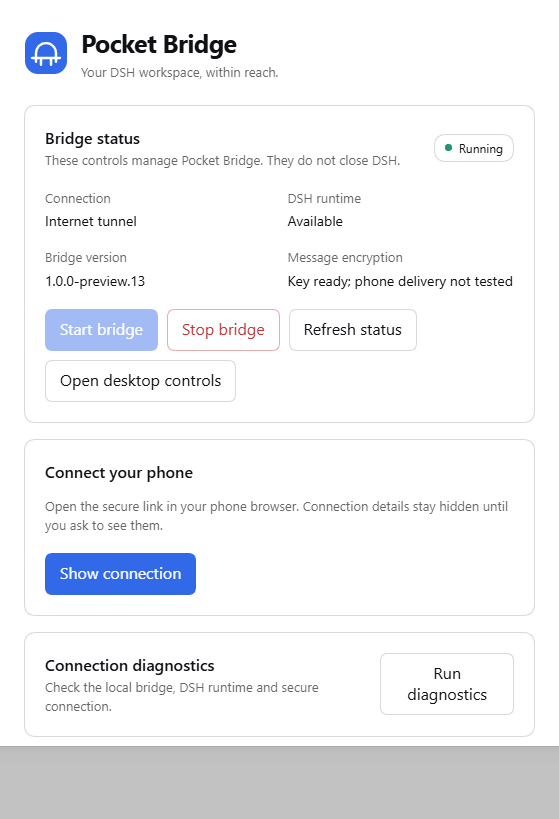
Actual plugin operation on npm DSH Web 0.2.0-rc.2. Connection details are hidden; this is separate from physical-phone acceptance.
Source users need Node.js 24 or newer. For an internet tunnel, install cloudflared separately or use the official distribution expected by the local configuration. Then run:
node scripts/gateway-daemon.js
The desktop launcher and local console report the actual listener address; the gateway avoids claiming another application's occupied port. Runtime configuration and generated keys are local files excluded from this repository. Do not copy another person's configuration, access links, logs, or notification credentials into a public checkout.
DSH's official npm entry point is npx @deepseek-ai/dsh web. Historical npm tests cover specific versions and flows, not a promise that every old or future build is fully compatible. DSH remains a rapidly changing developer preview. See the exact test limits in the matrix and the official project.
The supported phone content channels use authenticated encrypted requests and responses, including messages and protected workspace transfers. A passive tunnel relay receives ciphertext for those channels. It still sees traffic metadata and serves the initial web application; a relay that actively substitutes that application is outside this protection. The model provider necessarily receives the instructions submitted to it by DSH.
The raw original DSH web interface is not exposed as a remote alternative in new releases. Open the original interface locally on the computer when needed. Encryption failures, missing keys, expired authorization, and unsupported capabilities must be reported without falling back to plaintext remote content.
An optional primary and backup Quick Tunnel pair is available for the Windows gateway and is off by default. Backup-address reminders can appear after every 1, 3 or 5 qualifying entries, a custom interval from 1 to 9,999, or never. The default is every entry. A fresh navigation or reload counts only after authentication and the encrypted connection are ready; conversation switches, reconnection and returning to an existing page do not count. Preferences and counts belong to the current browser origin. Choosing Never suppresses every automatic popup, including a changed address, while the manual backup panel remains available. If browser storage fails, the panel explains that the interval cannot be retained. The copied address carries no credentials; that other origin needs its own login and encryption-key setup before it can be used. Both paths share the same PC, network and Cloudflare service, so they are not independent disaster recovery.
An optional private Tailscale HTTPS entrance can avoid serving the initial application through Cloudflare. It is disabled by default, preserves the bridge's device and encryption checks, and does not install or configure a VPN. Real phone enrollment and connectivity must be verified after the owner sets it up. The phone's Settings → Connection and compatibility panel shows the observed runtime and implemented interface coverage separately from release acceptance.
Local DSH history, uploads, configuration, and browser drafts have separate storage boundaries. Do not assume that every file on the computer or phone is encrypted at rest. Optional notification services are separate external recipients. No personal notification script or account is included. See SECURITY.md for the precise scope.
Pocket Bridge uses its own bridge mark and a shared set of simple controls. On phones, one top row contains the conversation heading and connection indicator. Session actions and activity controls live in the labelled menu; model, tool, permission and goal choices open from the composer's labelled options button. Long drafts scroll within a bounded input instead of occupying the transcript. The existing controls retain their state when moved, and return to their wider desktop layout when appropriate. Primary touch actions have at least a 44-pixel target. The interface uses system fonts and local assets, with light and dark palettes and Chinese, English, and Spanish text.
Model and reasoning choices use the same compact card, with a back action that keeps the model list available. Successful picker choices close after 150 ms instead of 700 ms. Goal, plan and context-compaction controls use separate tabs; opening the goal tab does not fetch plan selection or command lists. Enter and exit plan actions are serialized, and closing or remounting a dialog clears its listeners and page-inert state. Completed or stale goal state cannot be presented as a confirmed edit. These interaction changes do not weaken runtime discovery, authorization, encryption or mutation readback.
History is paged, unchanged message rows are reused, streaming updates are coalesced, and images load small thumbnails near the viewport before an explicit original read. These reduce work without removing content, authentication, or encryption. Network speed, tunnel stability, runtime discovery, and the amount of history can still affect response time; thumbnail-first loading is not a guarantee of a faster first conversation load.
The computer's public-asset compression cache checks current source bytes and file identity on every request it receives. Brotli quality 5 reduces first-miss compression work; gzip remains at level 6. The largest Lite script is preloaded from its existing fingerprinted path without changing execution order. On a previously trusted origin, fixed public scripts can be reused from the phone's cache after their bytes, active pin and access-key epoch are rechecked. The emergency updater and manifest stay online; installing new code still requires the normal explicit verified update. A new origin or an empty cache still needs its first download. Private conversation and file responses are not added to this public cache.
Concurrent modern-session queue, goal and model reads share only an in-flight request, with a one-second join window and fresh reads after mutations or connection changes. Repeated catalog updates preserve unchanged navigation buttons instead of recreating them. In the recorded desktop-browser tunnel run, static scripts and DOMContentLoaded improved, but first conversation content still took about nine seconds and did not beat the earlier run. Fresh Windows process discovery remains a measured bottleneck. See Preview.18 acceptance for the actual timings, measurement method and device limits.
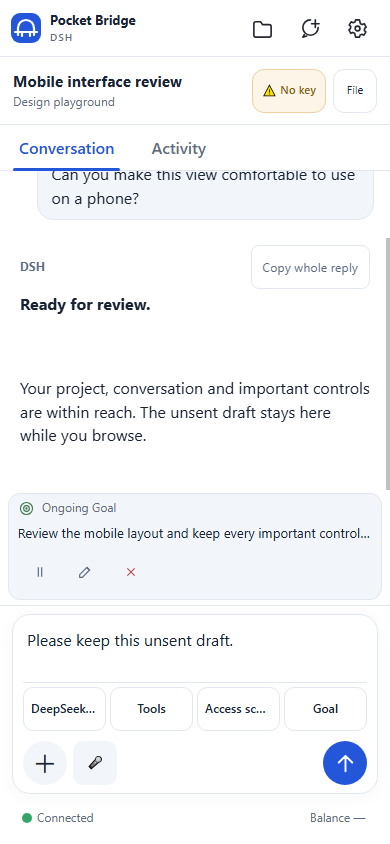
UI demonstration with synthetic content. This image is not a live account, encrypted connection, or physical-phone acceptance result.
npm run ci
npm run audit
npm run scan:strict
The isolated suite covers the DSH/shared gateway, encryption, authorization, file scope, UI behavior, lifecycle, payload closure, and upgrade retention. It does not substitute for operating a real runtime or a physical phone. Live checks are recorded separately, with the runtime version, transport, observed result, and untested boundaries.
Public product documentation is in English. User-facing mobile translations remain available. Report reproducible bugs through GitHub Issues; keep credentials, complete connection URLs, and private transcripts out of public reports. See SECURITY.md for sensitive reports.
Pocket Bridge's own code and original artwork are under the MIT license.
DeepSeek Harness(DSH)Web 插件聚合生态包 · 一切皆插件,创意工坊分发(dsh-market.com)
把回答做成一页可视化 HTML:模型只写简短的 Markdown 草稿,随包附带的 `am` 命令行生成页面,支持流程图、时序图、树、时间线、ER 图、表格和提示框。
在 dsh 里装上这个插件即可,无需登录、注册或填 API Key,就能使用包括 Muse Spark 1.3、MiMo V2.6 在内的前沿模型——完全免费,不限量。 All you do is install this plugin in dsh: no login, no sign-up, no API key — the frontier models are just there, Muse Spark 1.3 and MiMo V2.6 among them. Completely free, with no usage cap.

