
dsh
OpenPetsHQ/openpets将 DeepSeek Harness 的生命周期状态、错误与审批请求,桥接到本地运行的 OpenPets 桌面伙伴。

通过 MCP 让 ChatGPT Web 创建、查看、继续和监督 DeepSeek Harness Agent 会话与 Goal,同时保留 DSH 原生的审批、沙箱与工作区安全模型。
Let ChatGPT drive your local DSH agents.
在 ChatGPT 里创建任务、继续会话、监督 Goal、处理审批并检查结果,不用在 ChatGPT 和 DSH 之间反复复制 Prompt。
dsh-chatgpt-bridge connects ChatGPT Web → secure MCP tunnel → DeepSeek Harness (DSH). ChatGPT becomes the control surface; DSH keeps the agent loop, tools, skills, subagents, workflows, sandbox, approvals and workspace security model.
The bridge connects the two sides. It does not replace DSH, modify DSH core, or route DSH model traffic through ChatGPT.
Published 0.6.0 targets DSH 0.1.7-rc.2 exactly. The unpublished working tree now targets 0.2.0-rc.2, with local tests and packed official CLI/Web/MCP acceptance passing on 2026-10-08. The package version has not been bumped or republished. See the current compatibility evidence and published-release evidence. After a successful connection, ChatGPT should see tool count = 23.
A normal ChatGPT + local-agent workflow has too much manual glue:
Think in ChatGPT
      ↓
copy prompt to DSH
      ↓
wait / inspect logs
      ↓
copy result back
      ↓
review in ChatGPT
      ↓
repeat
With the bridge:
ChatGPT Web
   ↓  create / continue / supervise / approve
Secure MCP tunnel
   ↓
dsh-chatgpt-bridge
   ↓
DeepSeek Harness
   ↓
local workspace + tools + agent runtime
You stay in ChatGPT while DSH remains the execution engine.
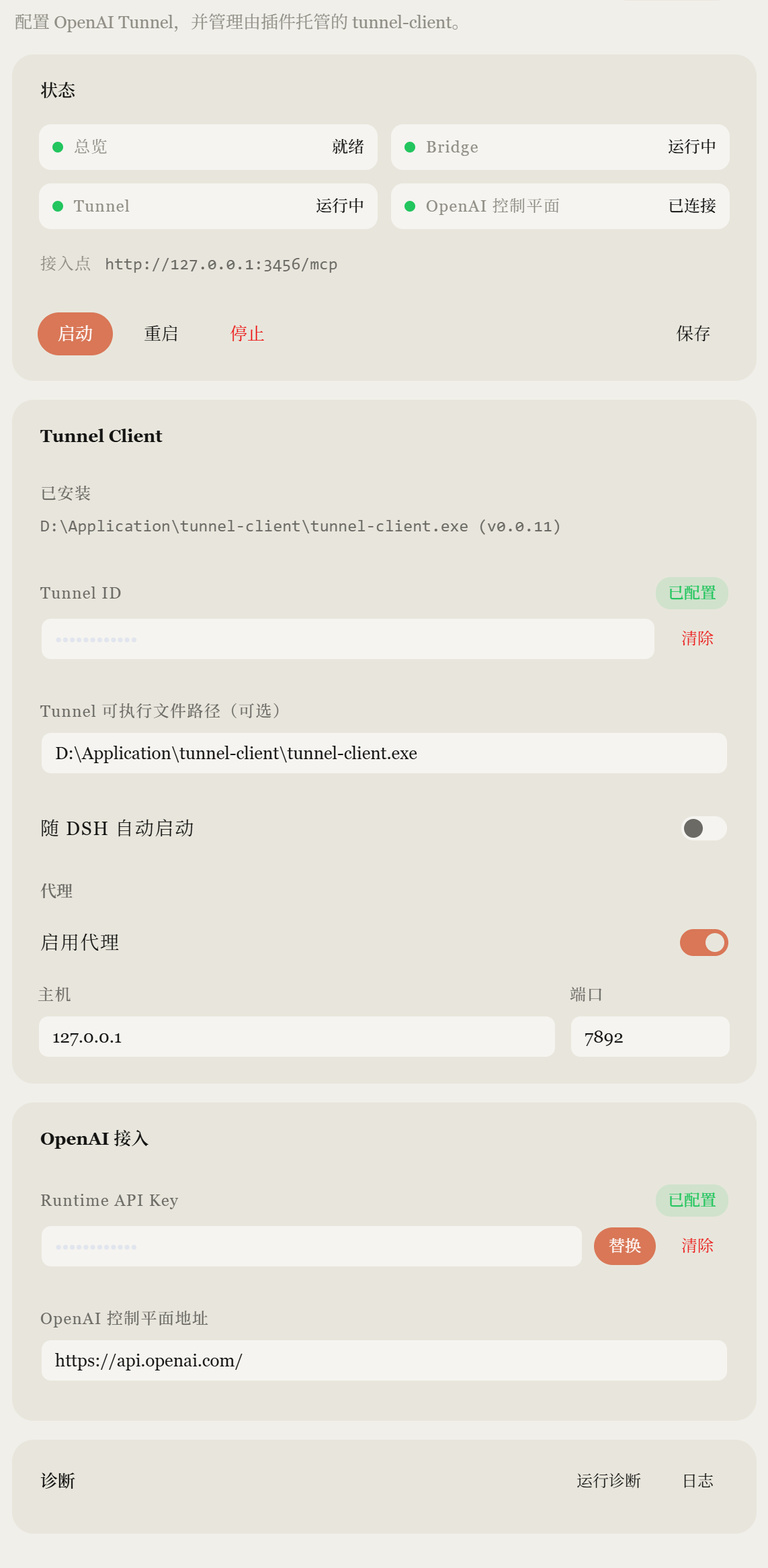
The screenshot is from a real DSH Web installation with sensitive values masked.
0.1.7-rc.2 (dsh on PATH)Install v0.6.0 into the matching DSH 0.1.7-rc.2 host:
dsh plugin --profile web add dsh-chatgpt-bridge@0.6.0
To install from a reviewed source checkout instead:
npm ci
npm run typecheck
npm run build
npm test
npm run test:release
pnpm dlx @deepseek-ai/dsh@0.2.0-rc.2 plugin --profile web add "file:$PWD"
Source installation into a real profile was not part of release verification. Back up the profile before upgrading DSH: DSH owns V3 session migration. npm install dsh-chatgpt-bridge alone is not enough: the plugin must be added to a DSH profile bundle. Published v0.5.1 remains tied to the older DSH 0.1.1-rc.2 host.
dsh web
Keep DSH Web and the bridge in the same web profile/runtime so ChatGPT-created sessions appear live in the UI.
Default local endpoints:
| Service | Endpoint |
|---|---|
| DSH Web | http://127.0.0.1:3080 |
| Bridge MCP | http://127.0.0.1:3456/mcp |
Windows PowerShell:
Get-Content "$HOME\.dsh\chatgpt-bridge.token"
macOS / Linux:
cat ~/.dsh/chatgpt-bridge.token
Treat this token like a password. Do not commit it, post it, or paste it into public chats.
Alternatively, set DSH_CHATGPT_BRIDGE_TOKEN yourself and the bridge uses it instead of generating a file.
ChatGPT Web cannot reach a plain localhost MCP endpoint directly. Use the secure MCP/tunnel connection mechanism currently supported by OpenAI and forward it to:
http://127.0.0.1:3456/mcp
Use the bridge token as the MCP bearer credential where the connection flow requires it.
The bridge keeps a localhost-first design: it binds 127.0.0.1, never exposes a public interface, and never self-hosts a tunnel.
After connecting, refresh/rescan the MCP tools in ChatGPT and run a read-only check:
请使用已连接的 DSH App,只做只读检查:
1. 调用 dsh_health
2. 调用 dsh_list_workspaces
3. 不修改任何文件
4. 返回 bridge version、health 和 workspace 名称
A healthy first check should look like:
bridge version = 0.6.0
tool count = 23
If health is OK, the version matches, and your registered workspace appears, the control path is ready.
A practical pattern is:
ChatGPT: define the task and constraints
        ↓
Bridge: create / start a DSH Goal
        ↓
DSH: execute inside its registered workspace
        ↓
Bridge: wait, inspect status, surface approvals
        ↓
ChatGPT: review the result and decide what happens next
For a safe first run, start with a read-only Goal:
使用 DSH App 创建一个只读检查目标:
- workspace 使用 dsh_list_workspaces 查到的已注册工作区
- goal:只读检查项目
- constraints:read_only=true
- 列出项目结构并总结 README
- 等待目标结束后只汇报结果,不修改任何文件
This is a control bridge, not a remote shell replacement.
127.0.0.1, never exposes a public interface, and never self-hosts a tunnel.If you only need inspection, use read-only prompts and keep DSH constraints read-only.
127.0.0.1 only exists on your machine. Confirm that your supported secure tunnel/MCP connection forwards to the bridge endpoint and that the bridge token matches the running DSH profile.
401 UnauthorizedRe-read the token from the active DSH home/profile and make sure the connector sends the matching bearer credential.
The bridge only lists registered DSH workspaces. Register the project in DSH first; the bridge intentionally does not auto-register arbitrary filesystem paths.
Run the bridge and DSH Web in the same web profile/runtime. Separate runtimes may persist sessions but will not provide the same live UI behavior.
Restart/upgrade the plugin as needed, then refresh/rescan the MCP tools on the ChatGPT side.
Tunnel: stopped, tunnel-health-url-timeout)Check ~/.dsh/chatgpt-bridge/logs/manager.ndjson for the tunnel-client startup lines. A common cause is
the wrong tunnel-client binary: each GitHub release ships two flavors, and the reduced runtime build
does not accept the flags this plugin passes.
| Asset | Binary | Works with this plugin |
|---|---|---|
tunnel-client-v<version>-<os>-<arch>.zip | tunnel-client | yes — use this one |
tunnel-client-runtime-v<version>-<os>-<arch>.zip | tunnel-client-runtime | no — rejects --admin-ui.log-buffer-events |
Symptom with the runtime build:
warn  unknown flag: --admin-ui.log-buffer-events
warn  tunnel-client exited code=1 signal=null
warn  runtime mutation failed: tunnel-client did not report a health URL in time
The startup error now also carries the child's exit status and last stderr line, so this shows up in the
UI instead of looking like a network problem. Install the full client binary (the plugin looks for a file
named tunnel-client; do not rename the runtime build to fake it), point Tunnel executable path at
it, and start again.
While you are here, also check the other common causes: Tunnel ID / Runtime API Key not configured,
and — on networks that cannot reach api.openai.com directly — Enable proxy left off.
This is an actively maintained, independent DSH plugin. Compatibility releases track DeepSeek Harness changes while preserving the bridge's MCP/tool semantics and security boundaries.
Current source version:
dsh-chatgpt-bridge@0.6.0
Compatibility: v0.6.0 → DSH 0.1.7-rc.2. The exact release commit passed Ubuntu and Windows CI on Node 22 and 24, including a packed-package install and model-free official DSH CLI/Web/MCP integration. Browser UI, real-model work, ChatGPT and tunnel end-to-end remain unverified for this version. The older published v0.5.1 package targets DSH 0.1.1-rc.2.
Distribution and ecosystem listings:
Third-party directory labels describe those directories' own checks; they are not security audits or endorsements.
The bridge is a standalone DSH plugin with no DSH core modifications. Development focuses on:
Before publishing a new version, run npm run typecheck, npm run build, npm test and npm run test:release. The last command installs the actual tarball and exact DSH host in a disposable directory.
MIT. See LICENSE.
Unofficial community project. Not affiliated with or endorsed by OpenAI or DeepSeek.
将 DeepSeek Harness 的生命周期状态、错误与审批请求,桥接到本地运行的 OpenPets 桌面伙伴。
通过二维码或机器人凭据将 IM 机器人接入 DeepSeek Harness(支持飞书、微信、钉钉、企业微信、QQ、Slack、Telegram、Discord 和 WhatsApp 共 9 种渠道)。
通过 WebSocket V2 将 DeepSeek Harness 接入 Avernet Bot 协作网络,支持自动注册、Agent 会话隔离、工具调用事件和多 Bot 路由工具。

