
bowenliang123/dsh-context
bowenliang123/dsh-contextDSH 上下文洞察面板:Context 仪表盘 + /context命令 + Context 浏览器,查看 Context的分类组成、内容详情、演进趋势、压缩/注入事件、统计等一站式 Context 全生命周期管理。

在会话窗口左下角的悬浮面板中显示 OpenCode Go 订阅用量(滚动/每周/每月的已用与剩余百分比及重置时间)。
OpenCode Go 订阅用量悬浮面板:在 DeepSeek Harness Web GUI 会话窗口左下角显示订阅额度使用情况。
Esc 与点击面板外部关闭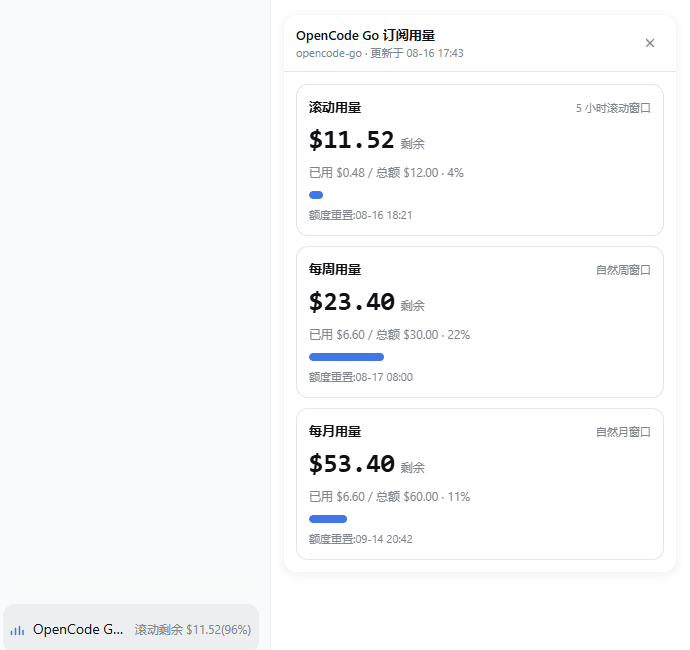
DSH Web 浏览器
   │  1. 点击会话窗口左下角按钮
   ▼
GET /plugins/opencode-usage/stats
   │
   ▼
DSH Host 插件
   │  2. ctx.credentials.resolve("OPENCODE_GO_API_KEY")
   │  3. GET https://opencode.ai/zen/go/v1/usage
   │     Authorization: Bearer <api-key>
   │  4. 透出 percent / remainingPercent / resetsAt
   ▼
返回 JSON,由 React 面板渲染
官方接口只返回 percent 与 resetsAt:
{
  "usage": {
    "rolling": { "status": "ok", "percent": 30, "resetsAt": "..." },
    "weekly":  { "status": "ok", "percent": 19, "resetsAt": "..." },
    "monthly": { "status": "ok", "percent": 9,  "resetsAt": "..." }
  }
}
插件直接展示官方 API 返回的百分比,不做金额换算。
dsh-plugin-opencode-usage/
├── cordis.patch.yml   # bundle patch: 把插件插入 profile host 组合
├── lib/
│   ├── index.js       # Host 半: 订阅额度 API 查询 + HTTP 路由
│   └── client.js      # Client 半: 会话窗口左下角悬浮按钮 + 面板
├── LICENSE
├── package.json       # dsh.bundle / dsh.client 元数据
└── README.md
不同模型的额度金额不同(例如 V4 Pro 月度 $15、V4 Flash 月度 $30, 整体月上限 $60),因此插件只展示官方 API 返回的百分比,不做金额换算。
| 窗口 | 官方接口字段 | 说明 |
|---|---|---|
| 滚动用量 | usage.rolling | 5 小时滚动窗口百分比 |
| 每周用量 | usage.weekly | 每周窗口百分比 |
| 每月用量 | usage.monthly | 月度窗口百分比 |
官方 API 只返回 percent 与 resetsAt;插件同时给出 remainingPercent = 100 - percent。
DSH 桌面应用用的是 desktop profile,命令行 dsh web 用的是 web profile,
先确认要装进哪一个。
桌面端(DeepSeek Harness 桌面应用):
dsh plugin --profile desktop add dsh-plugin-opencode-usage
命令行 Web(dsh web):
dsh plugin --profile web add dsh-plugin-opencode-usage
也可以从 GitHub 仓库安装(无构建步骤,lib/ 即源码,可直接引用):
dsh plugin --profile desktop add github:jiekesu967/dsh-plugin-opencode-usage
或者从本地目录安装:
dsh plugin --profile desktop add ./dsh-plugin-opencode-usage
安装后 dsh plugin 会自动写入该 profile 的 dependencies,并把
dsh-plugin-opencode-usage 追加到 dsh.profile.bundles。重启 DSH
(桌面端退出后重新打开)并刷新页面后,会话窗口左下角会出现独立的
“OpenCode Go 用量” 悬浮入口。
在 profile 的 cordis.patch.yml 覆盖 opencode-usage 条目:
- id: opencode-usage
  config:
    # Harness credentials 文件中保存 API key 的变量名
    credentialRef: OPENCODE_GO_API_KEY

    # OpenCode Go 订阅接口
    apiBaseUrl: https://opencode.ai/zen/go/v1

    # host 成功结果缓存时间
    cacheMs: 30000
在 ~/.dsh/.credentials.yaml 中确认存在:
OPENCODE_GO_API_KEY: sk-...
也可以通过 DSH Web 的 Models / Credentials 设置页写入。
入口注册在 shell.overlay,绝对定位于 AppFrame 的会话中心列左下角:
12px、底部 16px12px392px,右侧/顶部超出视口时自动回退ResizeObserver 监听会话中心列,侧边栏展开/收起、详情面板开关、窗口缩放时实时跟随插件在两处声明它需要哪一版 Harness。
1. 逐版本兼容表 —— 市场 / DSH STORE 读它;逐版本声明是必须的,宽泛范围不被接受:
"dsh": {
  "compatibility": {
    "dshReleases": {
      "0.1.5-rc.1": "compatible",
      "0.1.5-rc.2": "compatible",
      "0.2.0-rc.2": "compatible"        // 当前桌面端
    },
    "dsh": ">=0.1.5-rc.1 <0.2.0-0 || >=0.2.0-rc.2 <0.3.0-0"
  }
}
2. 范围声明 —— Harness 启动时的兼容性预检与 dsh plugin add 读它,只比对
@deepseek-ai/dsh 与 @deepseek-ai/dsh-* 这两类 peer:
"engines": {
  "node": "^22.19.0 || >=24.0.0",
  "dsh": ">=0.1.5-rc.1 <0.2.0-0 || >=0.2.0-rc.2 <0.3.0-0"
},
"peerDependencies": {
  "@deepseek-ai/cordis": "^4.0.2",
  "@deepseek-ai/dsh-client-locale":       ">=0.1.5-rc.1 <0.2.0-0 || >=0.2.0-rc.2 <0.3.0-0",
  "@deepseek-ai/dsh-client-ui-renderer":  ">=0.1.5-rc.1 <0.2.0-0 || >=0.2.0-rc.2 <0.3.0-0",
  "@deepseek-ai/dsh-credentials":         ">=0.1.5-rc.1 <0.2.0-0 || >=0.2.0-rc.2 <0.3.0-0",
  "@deepseek-ai/dsh-host-webserver":      ">=0.1.5-rc.1 <0.2.0-0 || >=0.2.0-rc.2 <0.3.0-0"
}
| DSH 版本 | 状态 | 说明 |
|---|---|---|
0.2.0-rc.2 | compatible | 当前桌面端(内置 @deepseek-ai/dsh-desktop-runtime 0.2.0-rc.2) |
0.1.5-rc.2 | compatible | 原验证版本 |
0.1.5-rc.1 | compatible | 原验证版本 |
为什么范围要写成两段:node-semver 只在范围内某个比较符与该版本的
major.minor.patch元组一致、且自身带预发布标签时,才放行预发布版本。>=0.1.5-rc.1 <0.3.0-0这类「看起来覆盖一切」的写法在0.2.0元组上没有这样的 比较符,会把0.2.0-rc.2静默排除(可自行验证:semver.satisfies("0.2.0-rc.2", ">=0.1.5-rc.1 <0.3.0-0") === false)。 所以 0.2.0 这条线必须单独写一段>=0.2.0-rc.2 <0.3.0-0;上界写成<0.3.0-0而不是<0.3.0,是为了让0.3.0-rc.1被正确拒绝而不是意外放行。
0.2.0-rc.2 下插件不需要改动任何运行时代码:它用到的每个 seam 在该版本里都保持原样,
下面按桌面端 app.asar 内 0.2.0-rc.2 的实际源码逐条核对(括号内为核实来源):
| 用到的 seam | 0.2.0-rc.2 |
|---|---|
window.__ModuleLoader__.load({ id, factory })、exports.apply/inject | 不变(dsh-client-modules) |
dsh.client.inject / platform | 不变;依赖的两个包仍在随包清单里(两包均为 0.2.0-rc.2) |
shell.overlay 槽位、data-shell-overlay | 不变(dsh-client-ui-layout) |
AppFrame 子节点顺序(frame.children[1] 即会话中心列) | 与 0.1.5 逐节点一致 |
ctx.slots.inject / ctx.slots.register | 不变(dsh-client-ui-renderer 仍以 "slots" 注册服务) |
ctx.locale.register(ns, { zh, en }) | 不变(LOCALE_ID_PATTERN 与 disposer 语义一致) |
webServer.register({ kind: "exact", path, handler }) | 不变(重复 (kind, path) 仍抛错) |
ctx.credentials.resolve(ref) → { value, source } | 不变 |
ctx.get("webServer") 缺服务时返回 undefined;internal/service 事件 | 不变(cordis 4.0.2 → 4.0.4) |
未声明任何 Harness 依赖时,市场会显示 unknown(未声明) 而不是「兼容」—— 这也是本插件 0.1.0 的状态,0.1.1 起已显式声明。
desktop、命令行 web);headless 下
不注册路由,面板也不出现GET /plugins/opencode-usage/stats 不做鉴权,它继承 webserver 的绑定地址。
默认 profile 绑定 127.0.0.1,只有本机可访问;若你把 profile 的
webServer.config.host 改成 0.0.0.0,同一局域网内的任何人都能读到用量百分比。
API key 本身不会离开 host 进程(只作为请求头上游使用),所以泄露的是用量信息而非凭据。
介意的话请保持回环绑定,或在反向代理层限制该路径。MIT
DSH 上下文洞察面板:Context 仪表盘 + /context命令 + Context 浏览器,查看 Context的分类组成、内容详情、演进趋势、压缩/注入事件、统计等一站式 Context 全生命周期管理。
会话与当日 API 费用统计、预算图框(已用%)、官方余额、历史看板,支持峰谷计价与官方价格一键同步。
侧边栏计费仪表盘:从会话日志聚合真实用量(按模型/按日统计调用、Token、缓存),按最新多厂商官方价格估算人民币费用,订阅套餐(coding/token/agent)通道豁免计费,并带各厂商健康状态圆点。

