
dsh-web
zhu1090093659/dsh-webDeepSeek Harness(DSH)Web 插件聚合生态包 · 一切皆插件,创意工坊分发(dsh-market.com)

dsh LLM provider plugin: self-maintained pi-ai bridge, model selector, provider quota/billing and settings UI for DeepSeek Harness
中文说明 · English
A plugin for dsh (DeepSeek Harness). It replaces four entries of dsh's plugin tree — the pi-ai adapter (llm-pi-ai), the native DeepSeek adapter (llm-deepseek), the model selector (ui-model-selection) and the official Models settings page (ui-settings-models) — and adds quota lookups and provider management on top.
What you get:
The UI strings are Chinese; the plugin ships no English UI yet, so the English screenshots below show English app chrome around the plugin's Chinese panels.
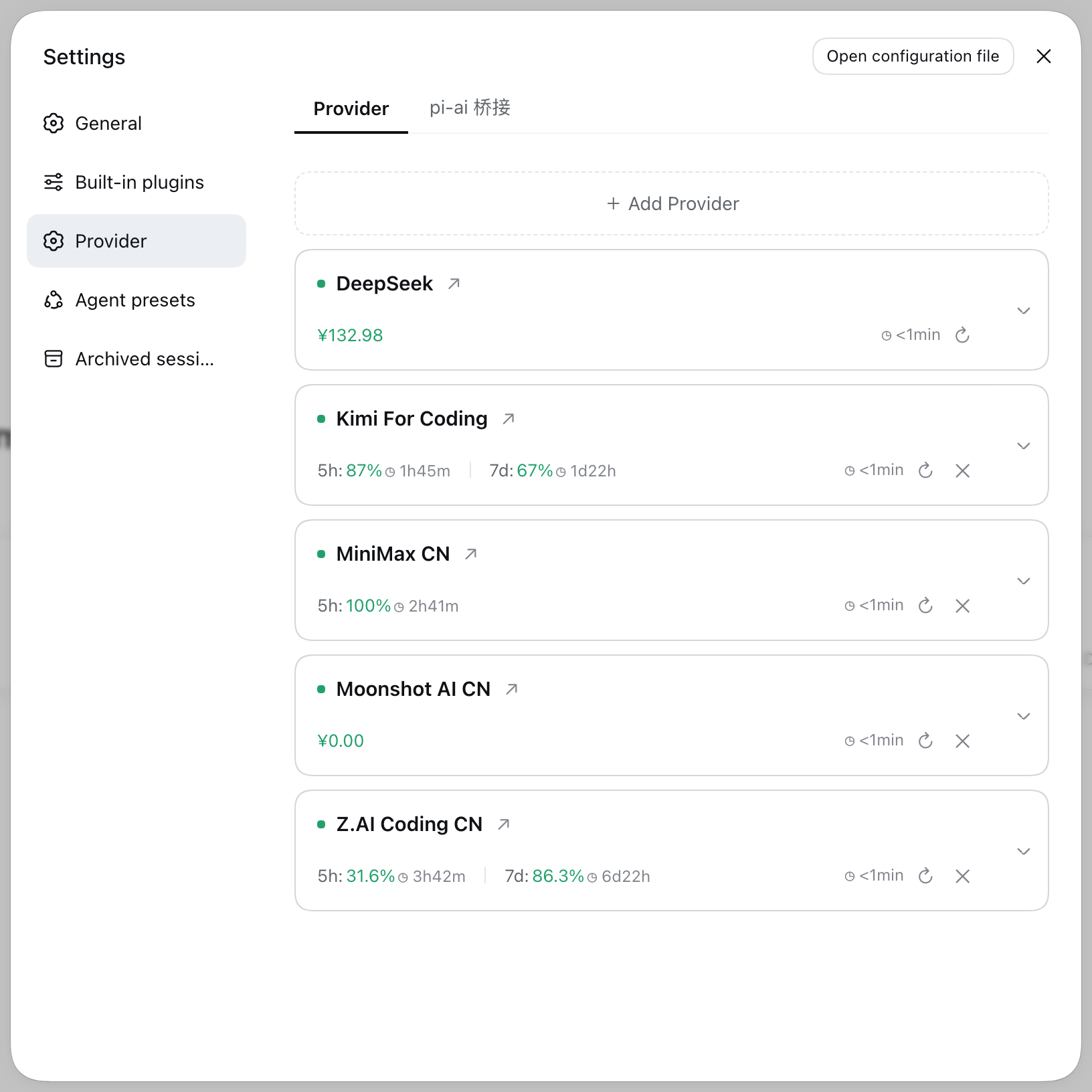
Every image comes from scripts/capture-screenshots.sh: a real dsh instance in a disposable sandbox, driven by headless Chromium through test/e2e/specs/screenshots.spec.mjs, once per shell language (*.png for English, *.zh.png for Chinese).
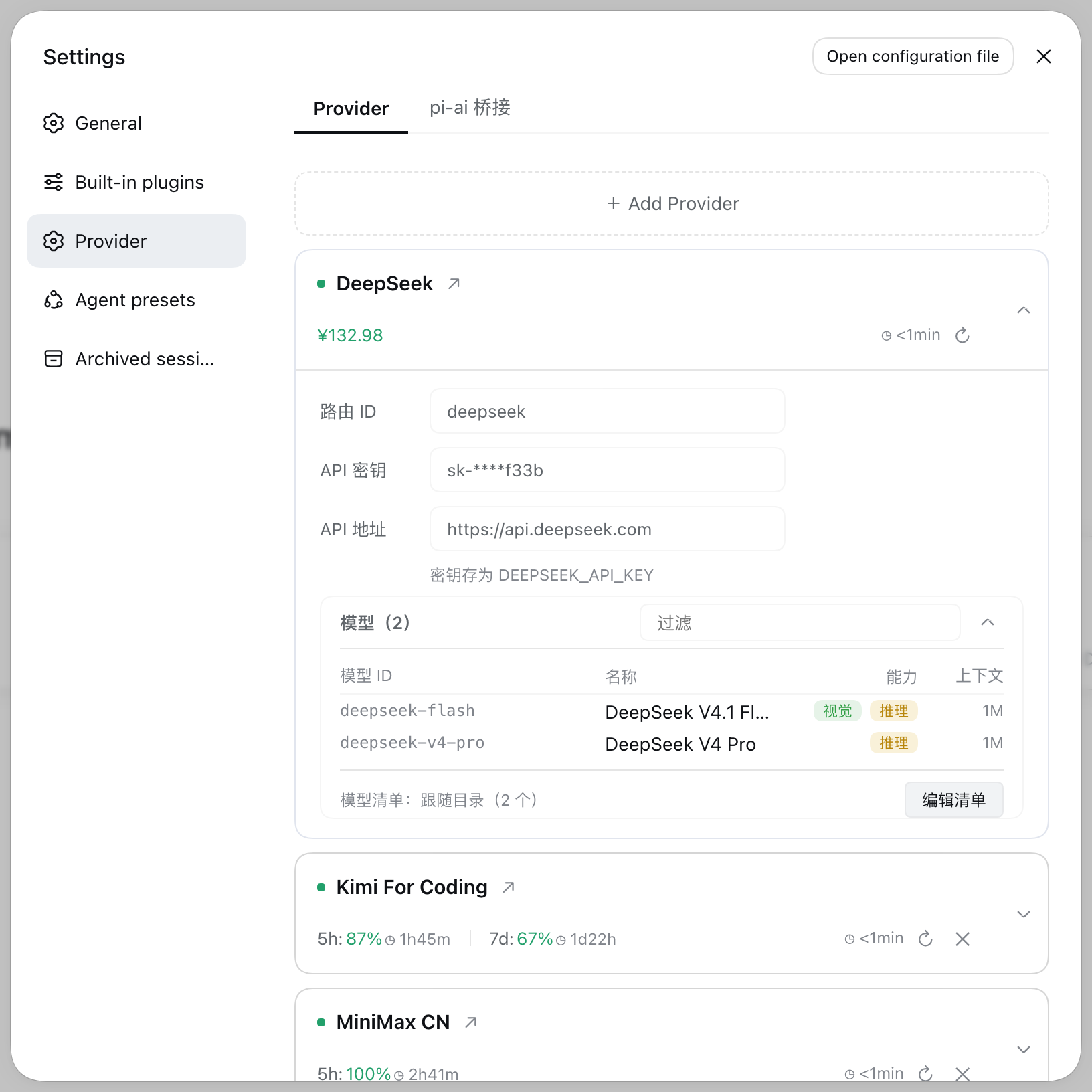 Card body: route id, stored key, endpoint, credential name, and the model list of that route. | 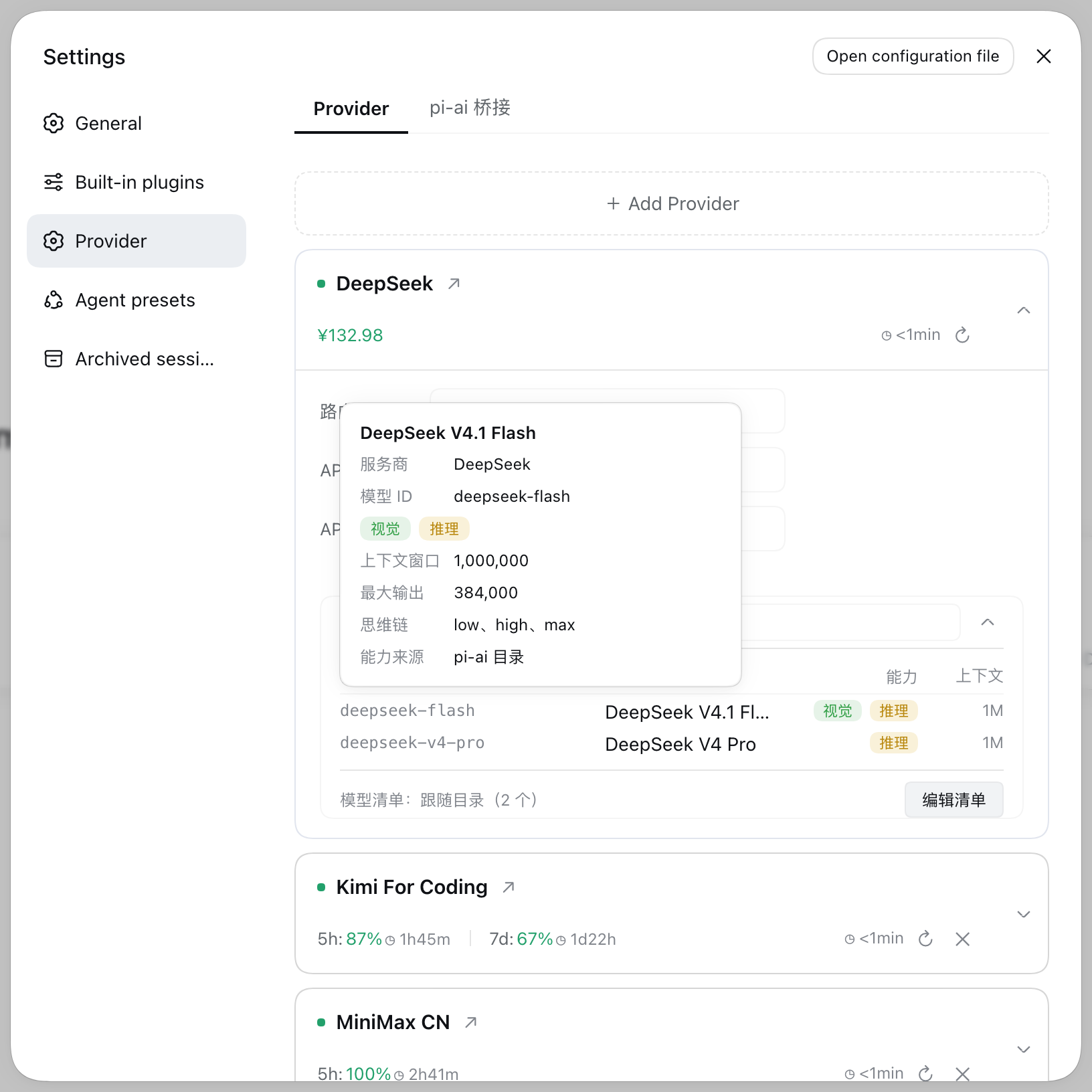 Model detail card on hover: provider, model id, capabilities, context window, max output, reasoning efforts, and which of the three sources the capability came from. |
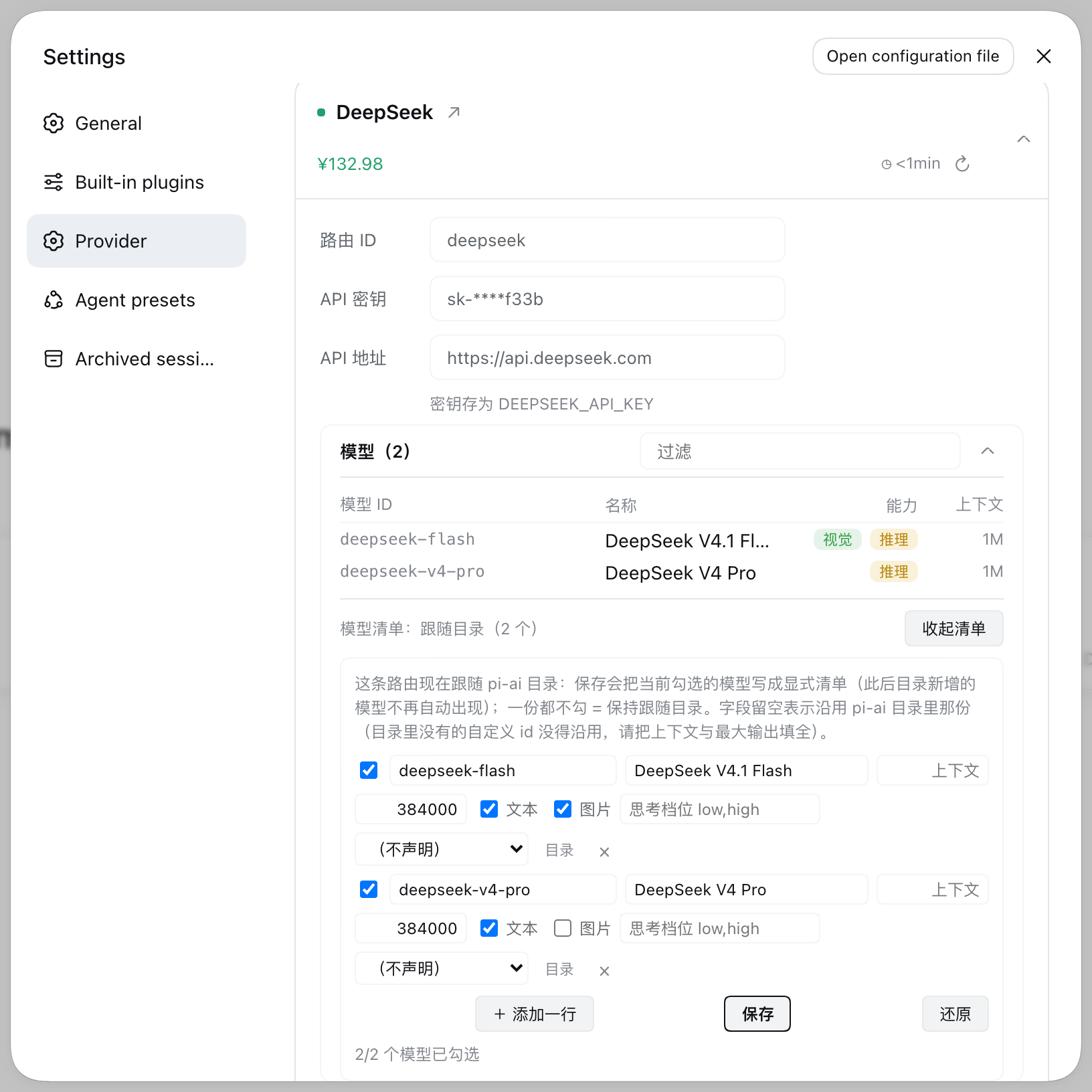 Model list editor: tick models and edit fields per row; ticking none goes back to following the pi-ai catalog. | 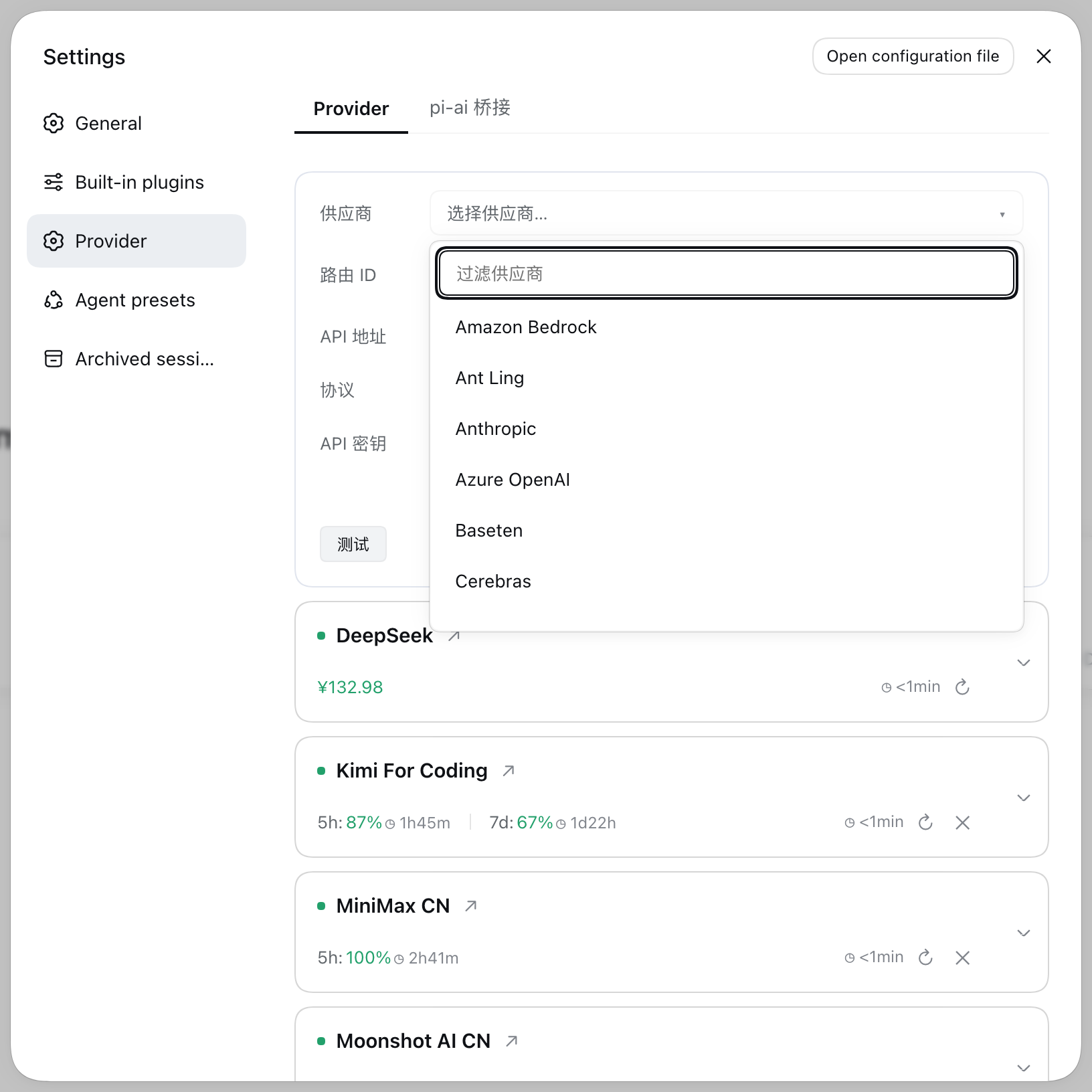 Adding a provider: 43 presets behind a filter box, endpoint and key, and a test that must pass before the write. |
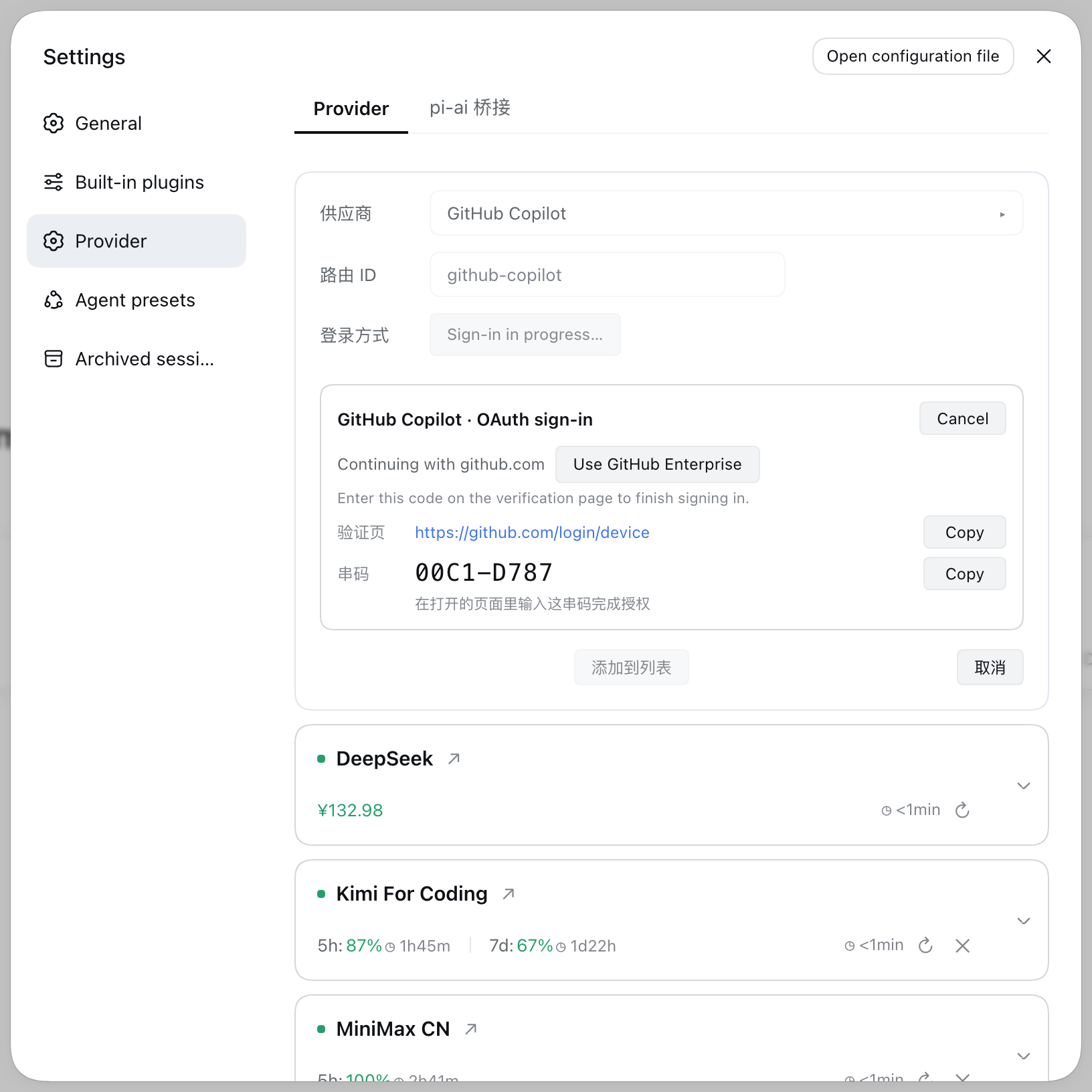 OAuth sign-in: subscription providers use a device code and land in the same credential store. | 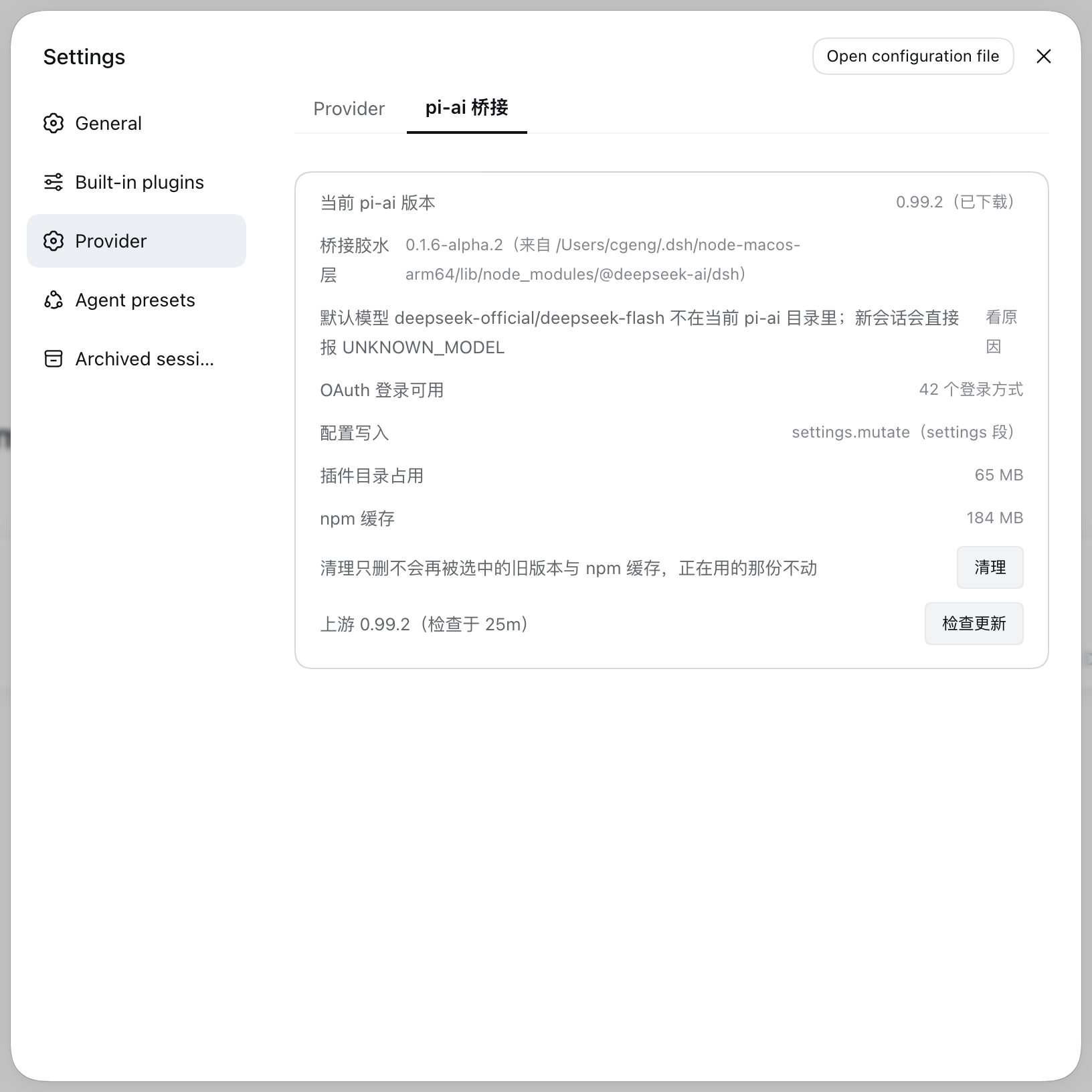 pi-ai bridge: which pi-ai is in use and where it came from, whether upstream has a newer one, in-place swap, and disk usage. |
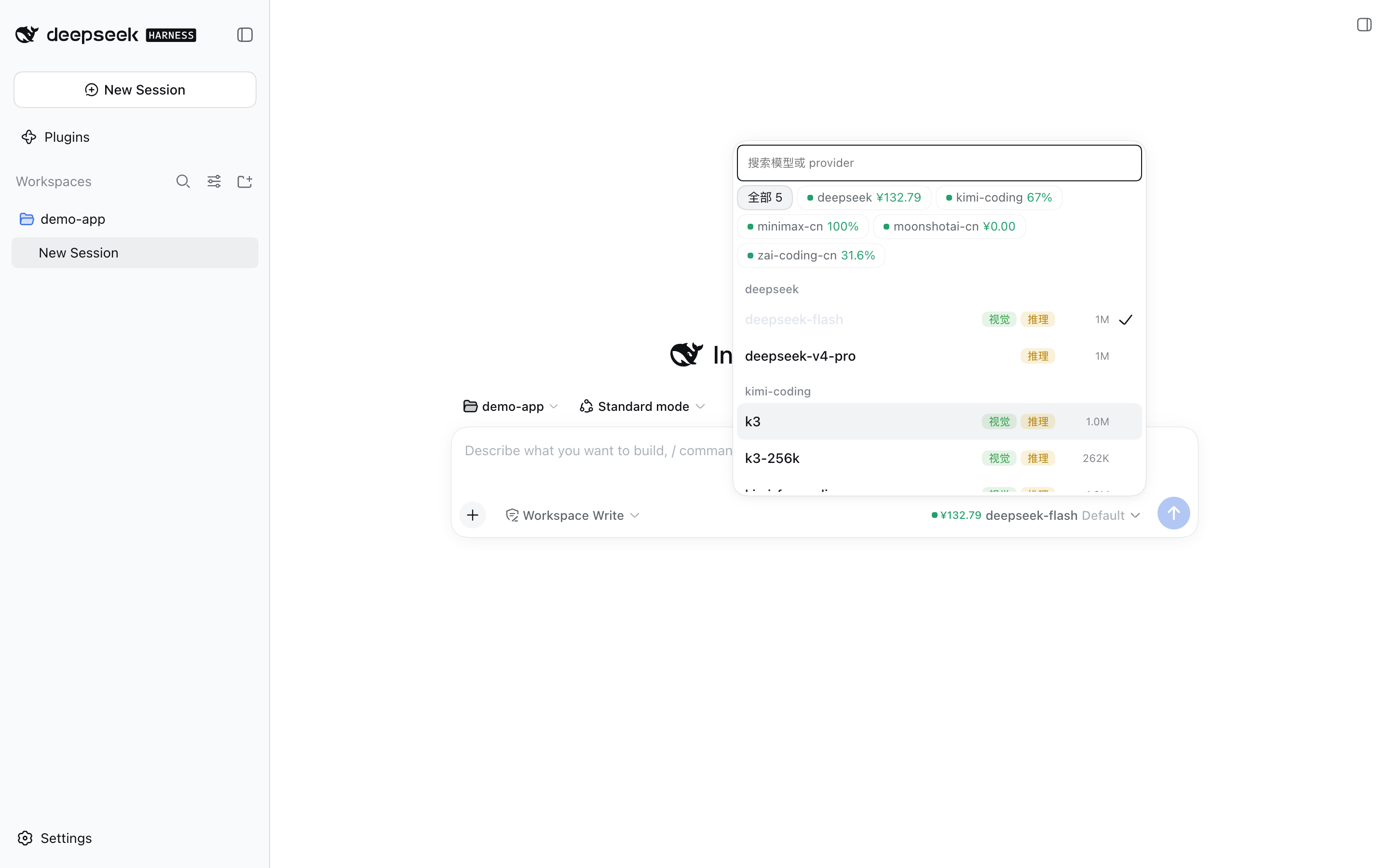
Model selector: the provider filter row carries the same quota snapshot, model rows carry capability badges and context size, the current model is ticked.
From npm:
dsh plugin --profile web add @dsh-one/dsh-llm-provider
dsh web     # restart required: the plugin tree changed
Add @<version> to the package name to install one specific version.
Upgrading an already-installed plugin requires restarting the dsh process; refreshing the page is not enough. The plugin's cordis.patch.yml is re-read from disk on every mount, but the module code is cached by Node per path, and under pnpm's hoisted layout that path does not change between versions (node_modules/@dsh-one/dsh-llm-provider) — a refresh recomposes the entry tree without re-importing the module, so the code loaded at process start keeps running. If a new version seems to change nothing, look here first.
Requires dsh 0.1.6-alpha.1 or newer, including the 0.2 line. The plugin declares
@deepseek-ai/dsh-authorization as an optional peer, and dsh 0.2 checks that range
against the running dsh version at install/boot — a plugin whose range excludes the
runtime is refused with an incompatibility error.
To work on this repository, link the checkout into the profile instead:
scripts/install-deps.sh   # install dev dependencies
npm run build             # lib/ is build output and is not committed
# link ~/.dsh/profiles/<profile>/node_modules/@dsh-one/dsh-llm-provider -> this checkout
# and set "@dsh-one/dsh-llm-provider": "link:<path>" in the profile's package.json dependencies
cd vendor && npm install  # optional: a pinned pi-ai kept in the checkout
dsh web                   # restart required: the plugin tree changed
Published packages ship neither vendor/ nor its lockfile, so the pinned pi-ai only exists in a checkout. It is optional either way: a source that isn't installed is skipped and the plugin falls back to the pi-ai that ships with dsh. A missing directory means "not installed", not "incompatible", so nothing about it appears in the UI.
The plugin declares a DeepSeek route in its own config (llm-pi-ai.providers.deepseek, credential name DEEPSEEK_API_KEY), because the built-in llm-deepseek entry is disabled. A new install therefore shows a DeepSeek card with no key:
Keys are stored through dsh's own credential service under the route's apiKeyEnv, so they are the same credentials the official stack reads. Nothing here needs a plugin config file.
Providers come from llm-pi-ai.providers in settings.yaml. With no route there, the quota panel is empty — add one from the settings page as above. Keys are resolved by dsh's credentials service through each route's apiKeyEnv.
One plugin serves both host generations, choosing its path from runtime capabilities, never from a version number:
| Capability | 0.1.x (e.g. 0.1.6-alpha.2) | 0.2.x (0.2.0-rc.2 onward) |
|---|---|---|
| Where configuration lives | the llm-pi-ai section of settings.yaml | the plugin's own entry config in the profile patch (a settings namespace is the id of a loaded entry) |
| Read | settings.get/section('llm-pi-ai') | the legacy section is read from the loader entry list (the row whose id is llm-pi-ai, via options.config; not the include entry's own {path, patches}); UI writes live in the entry config |
| Write | settings.mutate('llm-pi-ai', ops) | ctx.configEditor.edit(entry, change) (writes the profile patch and lets Loader reload) |
| Providers the official bundle sees | the config passed in is registered by settings.installSection as the composition base, and resolution is mergeLayers(base, user section); so only the built-in defaults and the entry config are handed over, and the user's routes come from the settings user layer | only the config passed in (config.providers.get()); it no longer reads the llm-pi-ai section, so it gets the complete merged result |
The bridge copy (the glue layer) is taken from the tree the host itself runs: on Desktop that is the copy inside app.asar, on the command line the one in the install tree — and those two differ both in dsh-llm-pi-ai and in the pi-ai beside it (measured: Desktop 0.2.0-rc.2 + pi-ai 0.87.1, CLI install tree 0.1.6-alpha.2 + 0.85.1), while model ids change with the pi-ai version (the same model is deepseek-v4-flash in 0.85.1 and deepseek-flash in 0.99.1). Picking the wrong one shows up as "the model in my session suddenly does not exist", so the choice matches on the host tree plus the glue generation (0.1.x uses settings.installSection, 0.2.x uses settings.configure) and falls through otherwise. The pi-ai row in the bridge tab names the tree it came from (Desktop / dsh-install / profile / vendor) and the tooltip shows the package directory that was actually loaded.
Which tree the host runs is asked of the process, not guessed from directories: the plugin reads process.argv[1] to find the dsh that is running it (resolving symlinks first — on the command line that is the bin/dsh symlink, not lib/bin.js inside the package) and, once it confirms the entry lives inside the @deepseek-ai/dsh package, uses it as the first clue, right after Electron's bundled copy. So where dsh is installed does not matter: a sandbox installed with --dsh-version, a custom prefix in a container, a profile inside some project directory — the tree that is actually running wins. When that clue is unavailable (Electron's argv[1] is not guaranteed to be the dsh entry) it simply drops out and the other clues still apply.
When the plugin has been reinstalled while dsh keeps running (installing swaps the package directory and takes vendor/ with it), the live process still remembers the old path. The plugin therefore re-checks the disk before every catalog read: if that pi-ai is gone it falls back to reading the model catalog and provider presets from the host's own tree — instead of the silent "add-provider list only has the custom gateway and every model badge is gone" state — and shows a row in the pi-ai bridge tab saying the running directory is no longer on disk and a dsh restart is what fixes it. The running bridge itself is still the in-memory copy; a restart is what brings the two back in sync.
Model-id mismatches are reported up front instead of on send: when the session's current model is not in the loaded catalog the model selector shows a notice at the top (listing ids that are available for that provider), and when the agent-default-model row points at a missing id the pi-ai bridge tab shows a warning row.: the disabled flags in the patch are !!js expressions ("disable the official row only while this plugin's entry is present and enabled"), evaluated by the Loader on every check, so flipping the plugin toggle propagates. There is no "plugin off, official disabled, no models at all" dead end; when the expression fails it never disables the official row (official plugins stay usable).
On the very first mount that expression cannot see this plugin's entry: the Loader evaluates each row's disabled synchronously in list order, and our row is appended last by the bundle patch's insert. So on a cold start the guard answers "did not find myself" → the official rows mount anyway → mounting our bridge then hits "same provider declared twice" (LlmError: configurable provider "..." is already declared) and the whole plugin entry fails to activate (observed on Desktop 0.2.0-rc.2). This plugin therefore disables those four rows itself at startup (src/official-rows.ts, in-process only, nothing is written back) and mounts the bridge once they are disposed; after any reload the patch guard works normally. If the bridge still cannot be mounted, the plugin itself stays active and the reason shows up in the pi-ai bridge tab instead of the whole plugin going dark.
The two host generations merge differently, because they differ in which layer is writable:
llm-pi-ai section is the writable user layer, and the official bundle reads mergeLayers(composition base, user section). We follow the same rule: built-in defaults and the entry config form the base, the user section is layered on top, merged field by field, recursively. What the UI shows is therefore what actually takes effect, and a route the user deletes in the UI does not come back from the base. (That was a real trap: handing over the whole merged set as the base made mergeLayers keep every key in it forever — after unsetting apiKeyEnv the official adapter still threw MISSING_CREDENTIAL, and a deleted route reappeared on the next read.)providers key (not by the route count): deleting every last route writes providers: {}, which still counts as taken over, so an empty set must not bring the defaults and the legacy section back. The first UI write persists the whole set as it was (built-in defaults included), so ordinary use never loses the default route; conversely, hand-writing (or restoring) an entry config without deepseek means deliberately not having that default route.Both write strategies stay in place and are chosen by capability, with an automatic switch to the other one and a memory of which works (self-healing): host upgrades or downgrades, a disabled entry, or a profile patch overridden by a home patch need no configuration change. A "configuration writes" row in the pi-ai bridge tab names the path in use, where providers came from, and any warning that did not clear. A path that simply does not exist on this host (0.1.x has no configEditor; on 0.2.x settings.mutate cannot write the old namespace) is not reported as a warning — that is a version difference, not a failure.
What gets written is a field-by-field merge: omitting a field does not delete it. Deletions have to be stated explicitly (the unsets field of a merge op over HTTP, the fix actions on a card in the UI) — clearing apiKeyEnv after an OAuth sign-in goes through this path, because leaving that ref in place makes the official adapter resolve only it and throw MISSING_CREDENTIAL, which kills the sign-in that just succeeded.
The providers handed to the official bundle are a live accessor: on 0.2.x a change to our entry's config takes Loader's volatile fast path and does not remount the plugin, so a snapshot taken at mount time would leave the official side (config.providers.get()) on the old value — configuration written in the UI would only apply after a dsh restart. Every read therefore merges again, and reuses the same object only when the content is unchanged (compared structurally), so the official identity-based memoisation still works.
Both write paths now behave identically: merge merges field by field, unsetFields deletes only the fields named (an emptied route is kept as {routeId: {}}, which is a valid profile and exactly the shape of an OAuth-only route), and only unset removes a whole route.
A live accessor alone is not enough: the official bundle's own loader/volatile-update listener sits on its child fiber, and cordis filters events by owner.fiber === fiber, so it never sees a volatile update of our entry — additions and removals in the route set are not re-registered, and chatting after adding a provider hits NO_ADAPTER until a restart. The plugin therefore catches that event itself and disposes then re-mounts the bridge child fiber: the old registrations go away with the fiber, and the fresh mount declares them again from the current config, which is what makes the route set line up.
pi-ai updates are triggered two ways: once in the background at plugin startup (throttled to 6 hours, DSH_PROVIDER_UPDATE=off disables it) and by the 「检查更新」 button on the provider page (POST /provider/update).
Either way, nothing is replaced before it passes both checks: the tarball integrity from the registry (dist.integrity) and the compatibility check. Only then is the new version marked as pending a restart, and a version you already run is not downloaded again — the manual "check for updates" button compares against the version in use first. A new pi-ai version can be swapped in place without a restart: once a verified download is pending, the pi-ai bridge tab offers "立即切换" (POST /provider/swap). The host loads the new one first and only then disposes the old, and rolls back to the previous copy if any step fails (a failure is a message, not a dead bridge). Restarting dsh still works too.
A downloaded pi-ai costs around 80 MB, so only versions newer than the one dsh ships with are kept: a duplicate at the same version or older is removed after an install, and the npm cache lives in the system temp directory (<tmpdir>/dsh-llm-provider-npm-cache) instead of the plugin directory. The "pi-ai bridge" tab shows the current footprint (vendor/ total plus npm cache) next to a "clean up" button (POST /provider/prune) that removes versions that can no longer be selected and the cache; the version in use and any version already downloaded and waiting for a restart are left alone.
scripts/test-profile.sh        # start the plan-test profile (port 3081) and open a browser
scripts/test-profile.sh stop   # stop it
The test instance uses a separate profile, so instances can run side by side: PORT=3082 PROFILE=plan-test-foo LOG=/tmp/dsh-plan-foo.log scripts/test-profile.sh. It sets DSH_PROVIDER_TEST=1, which makes the browser half append · 测试 to the page title and stamp 「测」 on the favicon. The generated profile also links a second local plugin, dsh-sidekick ($DSH_HOME/workspaces/dsh-mobile/plugin); edit those lines in the script on a machine that doesn't have that checkout.
node lib/adapters/run.js all            # run every quota adapter (keys from env or ~/.dsh/.credentials.yaml)
node lib/adapters/run.js kimi-coding --key sk-xx

npm test                                # build + 15 offline tests; this is what finishing and merging run
npm run typecheck                       # tsc --noEmit (npm test does not include it)
The 14 tests cover route discovery, the credential check, the patch layer, the pi-ai compatibility check, directory-link removal (unlinking must not touch the target), the retention rule for pruning old versions, the multi-source merge of model capabilities, provider configuration across both host generations (including self-healing), namespace adaptation for model discovery, the provider preset list, the vendor state merge, the OAuth routes (including mounting and degrading the authorization service), the GitHub Copilot quota parsing, and the browser half's wiring. AGENTS.md describes the development workflow (no coding on main, everything in a worktree).
dsh's model catalog comes from the pi-ai version it was built with. The bridge makes it run on a version the plugin maintains:
dsh-llm-pi-ai bundle is copied to vendor/llm-bridge/, with a link next to it pointing at vendor/pi-ai/<version>/. Node resolves bare specifiers from there, so the copy picks up the newer pi-ai.api/*.lazy, providers/all) are lazy imports and all come from the new version; the dsh bundle copy only provides the stable glue.llm-pi-ai entry is disabled in cordis.patch.yml; the plugin takes over its settings section, model discovery and catalog.Which pi-ai gets used is decided by the compatibility check before anything is loaded. Rolling back needs no link edit: delete the downloaded version and the next start falls back to the next source.
loadBridge() lists candidates in priority order, checks each one and takes the first that passes:
| Source | Directory | Used when |
|---|---|---|
| Downloaded | vendor/pi-ai/<version>/ (newest first) | the updater downloaded it and it passed the check |
| Pinned dependency | vendor/node_modules/@earendil-works/pi-ai | optional; used when installed (cd vendor && npm install) |
| Bundled with dsh | found along the official bundle's node_modules chain (no hardcoded path) | neither of the above is installed, or fails the check |
Sources that are not installed are skipped silently. A source is only listed as skipped, with a reason, when it exists but fails the compatibility check. The pi-ai that ships with dsh follows dsh's own release cycle and is not necessarily older than upstream.
A duplicate at the same version never takes the hot-update slot: a downloaded version that is not newer than the best local source (dsh's own copy, the pinned dependency) is ordered after both local sources — it is the same code, so the local copy is reused and the 80 MB duplicate plus a needless restart are avoided. Only a strictly newer version sorts first.
Neither of the last two directories is hardcoded. The official bundle is resolved along the module resolution chain in this order: the profile's node_modules, the dsh installation tree (including the node_modules nested inside the dsh package), then this plugin. pi-ai is resolved the same way, starting from the bundle that was found. A different dsh layout (bundle inside its own install directory, dependencies hoisted elsewhere) therefore does not make a source disappear.
vendor/package.json pins the version of the optional dependency, and the two do not overwrite each other: updates only ever write to vendor/pi-ai/<new version>/. Both live under vendor/ because the bridge copy at vendor/llm-bridge/ resolves upwards into vendor/node_modules first, so choosing that source needs no link.
The bridge copy's imports of pi-ai (subpaths and named exports) are extracted from its source, a probe file is generated from them in the plugin's own temporary directory with a link to the candidate, and that file is required. The resolution rules match the copy exactly, but the module URL differs, so one failing candidate does not affect the next and does not pollute the real copy.
The extraction covers named imports and re-exports, dynamic import(), side-effect and namespace imports, and export *. Checking before loading is required: Node keeps a half-initialized record for an ESM file that failed to load, and requiring it again only reports not yet fully loaded. There is no "load first and fall back on failure" path.
Candidates that fail the check are listed in bridge.rejected from /provider/status. When the imports cannot be extracted at all the check cannot run, and the chosen source is accepted on the grounds that its directory exists — that case is reported as probeUnverified: true. The updater likewise only replaces a version that passes the check.
Takes over the composer's conversation.input.model slot and the /model command (the official ui-model-selection entry is disabled in cordis.patch.yml):
<provider-id>/<model-id> · reasoning effoDeepSeek Harness(DSH)Web 插件聚合生态包 · 一切皆插件,创意工坊分发(dsh-market.com)
把回答做成一页可视化 HTML:模型只写简短的 Markdown 草稿,随包附带的 `am` 命令行生成页面,支持流程图、时序图、树、时间线、ER 图、表格和提示框。
在 dsh 里装上这个插件即可,无需登录、注册或填 API Key,就能使用包括 Muse Spark 1.3、MiMo V2.6 在内的前沿模型——完全免费,不限量。 All you do is install this plugin in dsh: no login, no sign-up, no API key — the frontier models are just there, Muse Spark 1.3 and MiMo V2.6 among them. Completely free, with no usage cap.

