
dsh-web
zhu1090093659/dsh-webDeepSeek Harness(DSH)Web 插件聚合生态包 · 一切皆插件,创意工坊分发(dsh-market.com)

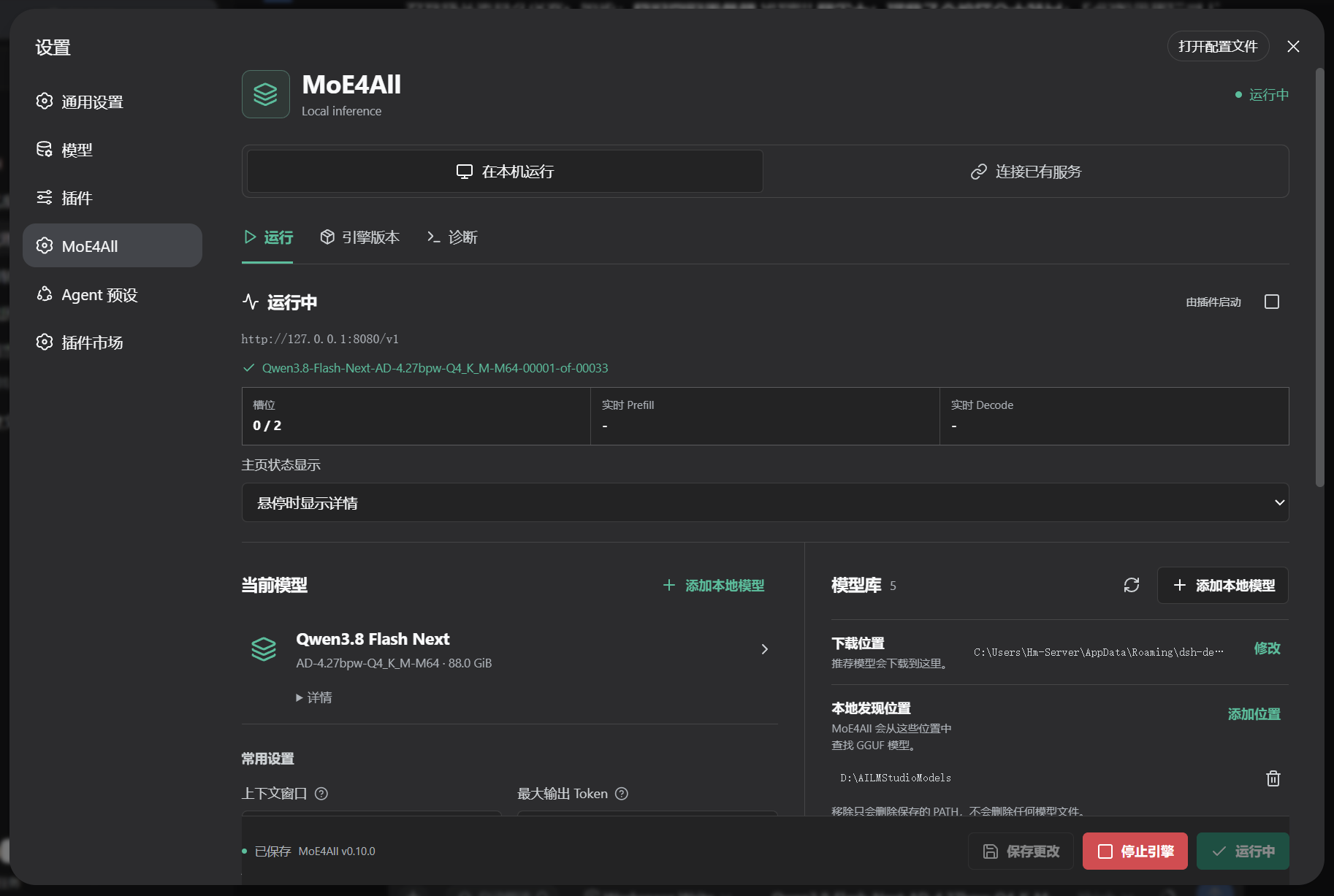
在 DSH 中运行 MoE4All 本地模型,支持引擎自动安装、模型发现与下载、推理参数配置和实时速度监控,也可连接已有服务。
dsh-llm-moe4all connects DeepSeek Harness (DSH) to a MoE4All OpenAI-compatible server. It can discover models, configure DSH automatically, download and manage local MoE4All Engine releases, and start or stop a guarded local Engine process.
Chat, tools, images, reasoning blocks, retries, and replay stay on DSH's own @deepseek-ai/dsh-llm-pi-ai adapter. Plugin updates and Engine updates are separate: updating this plugin never replaces the Engine, models, KV cache, or conversations.
Chinese documentation: README.zh.md
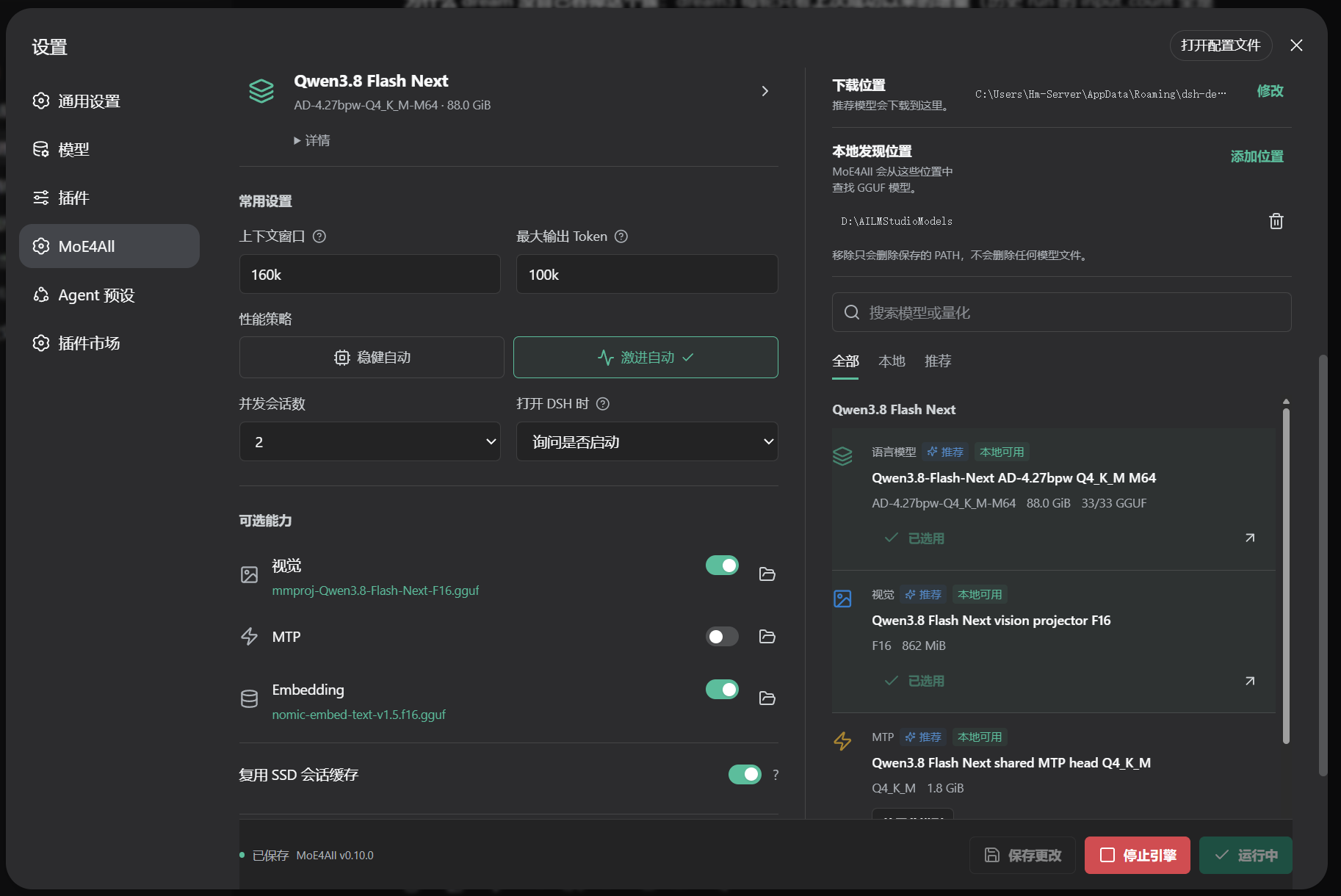
The same MoE4All page covers Engine status, live slot speed, model selection, automatic profiles, optional capabilities, and advanced settings.
The chat model selector also offers reasoning controls for discovered Qwen3.5/3.6 models (including 35B) and Qwen3.8 FlashNext. Qwen3.5/3.6 exposes Off, Low, Medium, High, Xhigh, and Max; strength uses the Engine's Qwen35 prompt-instruction mapping, so the Engine must include that support. FlashNext exposes Off, Low, Medium, and Xhigh, matching its native template. Off sends chat_template_kwargs.enable_thinking=false, not an empty effort. A route containing only these recognized models defaults to Medium unless a provider default was customized. Rediscovery adds missing choices while retaining custom effort mappings and unrelated compatibility settings; other models are not assigned these capabilities by guesswork.
Install-MoE4All-Plugin.cmd.The installer provides Chinese and English guidance, lists the DSH homes it can identify, and asks which one to modify. It recognizes normal DSH Desktop installs, running source-built DSH instances, and an explicitly entered DSH_HOME. It then stores the bundled prebuilt plugin package under the selected home and adds it to the web profile. It does not clone GitHub source, run an install-time build, or require administrator rights.
A manually entered home uses its matching detected launcher. If no launcher can be matched and several are available, the installer asks which launcher to use rather than choosing the first one.
If an earlier Git installation left an unreachable commit in the selected profile, the installer replaces only the dsh-llm-moe4all dependency before pnpm resolves the profile. The original package.json and pnpm-lock.yaml are restored automatically if installation fails.
Restart the profile after installation. DSH loads Bundle membership only at profile startup.
Open Plugin Market, search for MoE4All, choose dsh-llm-moe4all, and click Install. Restart DSH when prompted. The npm command will become the preferred terminal path after the package is published:
dsh plugin --profile web add dsh-llm-moe4all
The Release ZIP contains a prebuilt dsh-llm-moe4all.tgz. The one-click installer uses it by default, avoiding Git source resolution and install-time compilation:
powershell.exe -NoLogo -NoProfile -File .\install-plugin.ps1
Starting with 0.2.1, ZIP-installed copies can check GitHub Releases and update from inside the plugin. Existing 0.2.0 copies need the newer Windows installer once to gain this capability. Market-managed installations keep the Market update flow when its public API is available.
The default endpoint is http://127.0.0.1:8080/v1. Existing servers can be used in connection-only mode, including a custom IP, port, and API key.
Automatic Engine installation and the Windows installer support Windows x86_64. Other hosts can connect to an existing OpenAI-compatible service; automatic Engine installation there is not supported. Open DSH through its local loopback address to use Engine controls. Real-time throughput is collected from a plugin-managed Engine's output; an external server does not provide those logs.
Inside the integrated MoE4All Agent, model downloads default to the product's stable models directory and the native file chooser is owned by the Agent window. The setup defaults to two concurrent slots. Startup failures preserve the original error and logs, with general suggestions to reduce concurrency, reduce context, switch automatic profiles, or choose a smaller model. Built-in plugin updates belong to the Agent bundle; standalone plugin self-updates remain available outside the bundle.
The plugin checks shortly after DSH opens and every six hours while its page remains open. Use Settings > MoE4All > Diagnostics > Check plugin updates for a manual check. Downloading/installing a plugin update always requires confirmation.
.tgz installs: check this repository's latest stable GitHub Release, not main or prerelease tags. The prompt shows download progress, stop/retry controls, and a release-page link. SHA256 and the prebuilt package are verified before the current DSH profile's installer runs with dependency build scripts disabled. Only this plugin's dependency is retargeted; an installation failure attempts to restore the previous manifest, lockfile, and package. Backups remain in profiles/<profile>/.moe4all-plugin-updates./dsh-market/api/v1/* API when available. Development links/checkouts are not silently replaced by release archives. Unsupported hosts can use the Windows installer or their original installation method.dsh-llm-moe4all, not Engine releases, model files, KV caches, credentials, or conversations. Engine updates remain under Settings > MoE4All > Engine.For an npm-installed copy (after npm publication), update with:
dsh plugin --profile web update dsh-llm-moe4all
Restart the DSH profile after a Bundle update.
The ZIP installer pins a versioned local .tgz; the command above cannot fetch a newer local archive. Use the built-in Release updater (0.2.1+) or rerun the newer ZIP installer for the same DSH home. Catalog listing does not convert a local-file dependency into a market-managed one.
Use DSH's Plugins page to disable the Bundle without removing it. To uninstall it completely from the web profile:
dsh plugin --profile web remove dsh-llm-moe4all
Restart DSH afterward. Removal preserves MoE4All Engine files, downloaded models, KV cache, and saved plugin settings so an accidental uninstall does not delete large local data.
0.1.1-rc.2 (DSH Desktop 0.6.3), DSH 0.1.5-rc.3, and the official DSH 0.2.0-rc.2 line.0.1.1 through 0.1.7 prerelease lines and the 0.2.0 prerelease/stable line..node-version and package.json.0.1.1-rc.2 and 0.2.0-rc.2 runtime tests install the packaged plugin, verify host access and native-provider model discovery, and exercise plugin self-update, failure rollback, and restart activation without loading GPU models. Node, npm, pnpm, and Actions are pinned; the Windows runner uses the windows-2025 family.Most users should configure the plugin in Settings > MoE4All. The page covers local or remote connection, model library, conservative/aggressive automatic profiles, context and output limits, MTP, vision, embeddings, KV session cache, Engine versions, startup behavior, and advanced launch arguments.
For deployment automation, the Bundle row remains configurable in YAML:
- id: moe4all-engine
  config:
    mode: auto
    host: 127.0.0.1
    port: 8080
    executable: D:\MoE4All\infr.exe
    arguments:
      - serve
      - --ctx
      - 160k
      - D:\Models\model.gguf
MOE4ALL_ENGINE may provide the executable path. Remote endpoints require allowRemoteEndpoint: true; the plugin never launches an Engine on another machine. A managed local Engine can explicitly listen on a local LAN address or 0.0.0.0, with a persistent API key for non-loopback serving. API key values are stored through DSH credentials, not in the plugin's ordinary configuration.
Startup choices are manual, ask on DSH startup, or automatic. Low resources or an unavailable resource measurement require confirmation; a busy port offers a free alternative rather than stopping another process. By default, unloading/disabling the plugin or exiting DSH stops only its own Engine (stopOnUnload: true). An externally started server is never stopped.
The plugin can:
infr.exe directly with shell: false, monitor it, and stop only the process it owns;It does not upload model files, conversation content, or API keys to the plugin repository. Remote endpoint access and non-loopback Engine serving require explicit configuration.
dsh-llm-moe4all is enabled under Plugins.dsh on PATH, then rerun the script. The manual command is printed on failure.When reporting a bug, include the plugin version, DSH version, operating system, and the relevant diagnostic lines. Remove API keys, private paths, prompts, and other personal data first.
npm ci
npm run check
The repository includes compiled lib/ output so GitHub installs do not need install-time build approval. Both v<package-version> and release-<package-version> tags trigger publication. The tag must exactly match package.json. Release publication waits for the compatibility matrix and official installation smoke test, then creates a prebuilt .tgz, a one-click Windows ZIP, and SHA-256 hashes. Prerelease versions are marked as prereleases; this workflow does not publish to npm.
See Maintaining and Releasing for module boundaries, validation, and the ready-to-copy catalog submission entry. Screenshots are declared in screenshots.json; catalog listing is separate from releasing the plugin.
Apache-2.0. See LICENSE, NOTICE, and Third-Party Notices.
Report ordinary bugs through GitHub Issues. Do not post credentials or private data. For a security issue, use GitHub's private vulnerability reporting surface when available; otherwise contact the maintainer privately before opening a public issue.
DeepSeek Harness(DSH)Web 插件聚合生态包 · 一切皆插件,创意工坊分发(dsh-market.com)
把回答做成一页可视化 HTML:模型只写简短的 Markdown 草稿,随包附带的 `am` 命令行生成页面,支持流程图、时序图、树、时间线、ER 图、表格和提示框。
在 dsh 里装上这个插件即可,无需登录、注册或填 API Key,就能使用包括 Muse Spark 1.3、MiMo V2.6 在内的前沿模型——完全免费,不限量。 All you do is install this plugin in dsh: no login, no sign-up, no API key — the frontier models are just there, Muse Spark 1.3 and MiMo V2.6 among them. Completely free, with no usage cap.

