
dsh-web
zhu1090093659/dsh-webDeepSeek Harness(DSH)Web 插件聚合生态包 · 一切皆插件,创意工坊分发(dsh-market.com)

On-demand egress routing plugin for DeepSeek Harness: import vless/vmess/trojan/ss nodes, route only blocked traffic (GitHub, pip, npm) through them, fall back automatically, never auto-delete nodes. 给 DSH 的按需网络出海插件:选择性走节点、直连失败自动回退、失效只标记不删除。
github.com 连不上、pip install 卡住、Agent 抓不到网页——但你又不想让所有流量都绕道境外。
这个插件做的是选择性出海:导入你自己的 vless / vmess / trojan / ss 节点,然后只让该走节点的流量走节点,其余保持直连,直连失败时自动回退。
装完在 设置 → 网络代理 里粘贴链接即可;Agent 侧会多出一个 net_proxy 工具,终端里的 curl / git / pip / npm 也会自动按同一策略走,不用每条命令加 -x。
关闭(全直连)/ 智能(名单内走节点,其余直连,失败自动回退)/ 全局(都走节点)正常 / 失效 / 本机不可用(例如本机没有 IPv6 出口时的 IPv6 单栈节点)。绝不自动删除节点;失效只改状态并让后续调用避开,删除只在你手动点击时发生list 返回备注与状态)vless://(含 Reality)、vmess://、trojan://、ss://,可多行批量导入# 推荐:直接从 GitHub 安装(插件名 dsh-egress-router)
dsh plugin --profile web add github:gswenxue/dsh-egress-router
装完后重启一次 DSH Web(或让 profile 就绪后重新打开页面),设置里就会出现 网络代理。
# 用仓库地址(等价)
dsh plugin --profile web add https://github.com/gswenxue/dsh-egress-router

# 从 Release 的源码压缩包安装
dsh plugin --profile web add https://github.com/gswenxue/dsh-egress-router/archive/refs/tags/v0.1.0.tar.gz

# 本地开发:把工作副本 link 进 profile
#   package.json: "dsh-egress-router": "link:/path/to/dsh-egress-router"
#   并加入 dsh.profile.bundles
也可以在 Web 界面 设置 → 插件 → 添加插件 里粘贴同样的地址。
# 片段,可再改)正常智能,通常不用改;需要全部走节点时切 全局设置 → 网络代理:内核状态与端口、三种模式、本地代理地址、导入区,一屏看全。
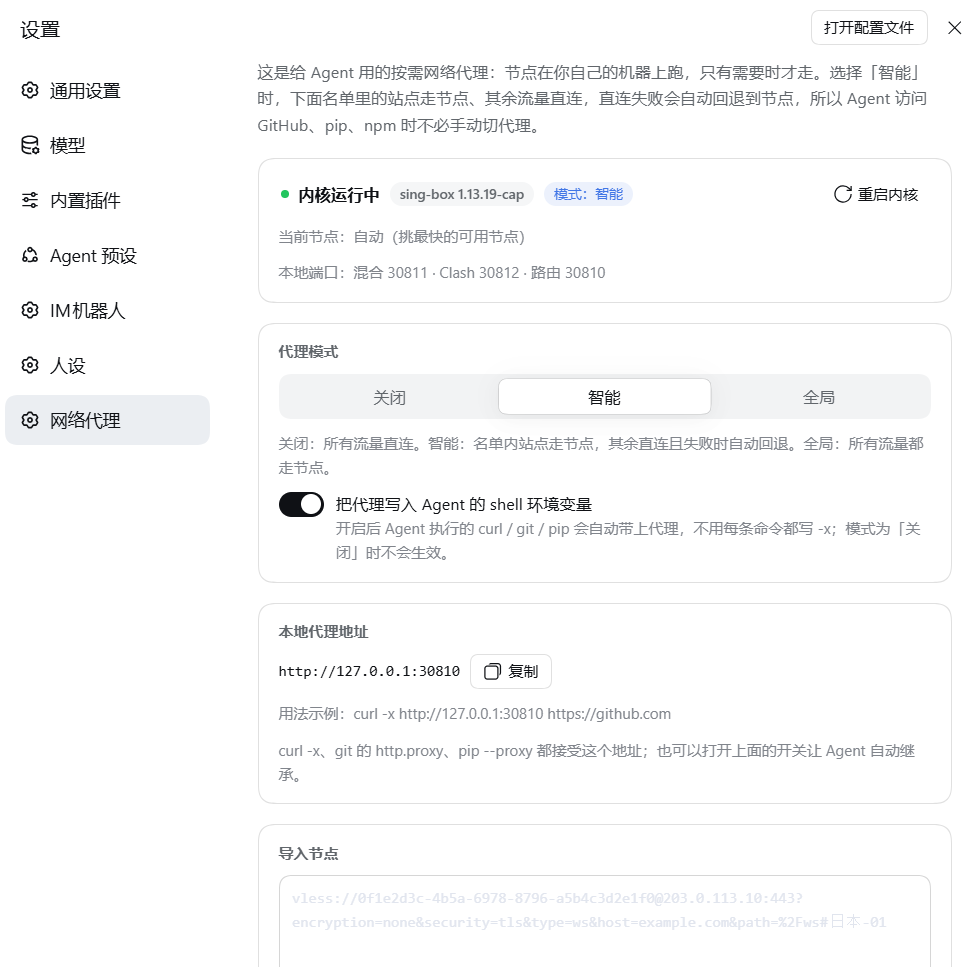
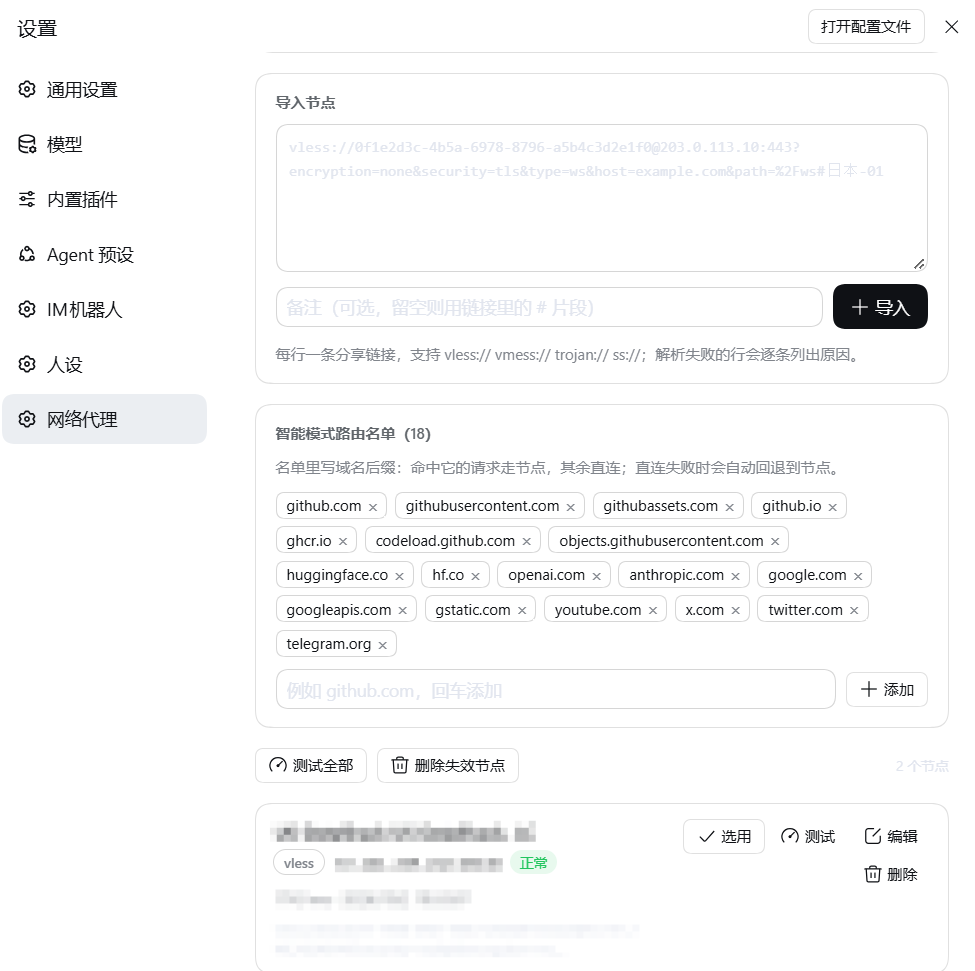
内核不放在仓库里(每个平台 50–65 MB),而是作为 Release 附件 提供:
| 平台 | 附件 | 说明 |
|---|---|---|
| Linux x64 | sing-box-linux-amd64 | 上游 linux-amd64-musl 构建,静态链接 |
| Linux arm64 | sing-box-linux-arm64 | 上游 linux-arm64-musl 构建,静态链接 |
| macOS Intel | sing-box-darwin-amd64 | 上游 darwin-amd64 构建 |
| macOS Apple silicon | sing-box-darwin-arm64 | 上游 darwin-arm64 构建 |
| Windows x64 | sing-box-windows-amd64.exe(+ libcronet-windows-amd64.dll) | 上游 windows-amd64 构建 |
<DSH_HOME>/integrations/dsh-net-proxy/bin/sing-box → 启动lib/core-manifest.js,可自行核对https://<mirror-host>/https://github.com/gswenxue/dsh-egress-router/releases/download/v0.1.0),插件会在其后拼接附件名<DSH_HOME>/integrations/dsh-net-proxy/bin/sing-box(Windows 为 sing-box.exe),插件会直接使用;也可以放在插件包内的 bin/ 目录| 入口 | 说明 |
|---|---|
net_proxy 工具 | status / list / import / remove / use / mode / route / test / clean / fetch / core。fetch 经节点取网页(自动挑正常节点逐个回退,复测确认失效才标记) |
| 本地 HTTP 代理 | 默认 http://127.0.0.1:30810,可直接 curl -x http://127.0.0.1:30810 https://github.com |
| 内核 mixed 入口 | 默认 127.0.0.1:30811(HTTP + SOCKS5,始终走当前选中节点) |
| 子进程环境变量 | 开启「注入 Agent shell 环境」后,http_proxy / https_proxy / all_proxy / no_proxy 指向本地路由器;关闭或切到 关闭 模式会原样还原 |
127.0.0.1 上的三个端口(默认 30810 本地代理 / 30811 内核 mixed / 30812 内核 Clash API,均只绑定回环地址)sing-box 子进程,并按需下载该可执行文件(仅在你点击「下载内核」或首次需要时)<DSH_HOME>/integrations/dsh-net-proxy/(state.json 节点库、sing-box.json 生成配置、sing-box.log 内核日志)state.json 含节点链接(内含 UUID/密码等凭据),请勿把该文件分享出去;本仓库不含任何节点数据web_fetch 按设计豁免进程级代理,模型调用与遥测也不受影响| 位置 | 项 | 默认 |
|---|---|---|
| 设置 → 网络代理 | 模式 | 智能 |
| 设置 → 网络代理 | 注入 Agent shell 环境 | 开 |
| 设置 → 网络代理 | 路由名单(智能模式强制走节点的域名后缀) | github.com、githubusercontent.com、huggingface.co、google.com、x.com … |
| 设置 → 网络代理 | 镜像地址 | 空(用固定 Release 地址) |
| 设置 → 网络代理 | 测速优先(按实测速度选直连/节点) | 开(关闭 = 名单内一律走节点) |
state.json | routerPort / mixedPort / clashPort | 30810 / 30811 / 30812 |
$ curl -sS -o /dev/null -w "%{http_code} %{time_total}s\n" https://github.com
200 4.410922s

$ curl -sS https://api.github.com/rate_limit | head -c 60
{"resources":{"code_search":{"limit":60,"remaining":56,"r

$ git clone --depth 1 https://github.com/octocat/Hello-World /tmp/hello && git -C /tmp/hello log --oneline -1
7fd1a60 Merge pull request #6 from Spaceghost/patch-1

$ net_proxy test
节点测试结果:
- 节点A · 203.0.113.10:443 · 正常 713ms
- 节点B · node.example.com:443 · 正常 1530ms
被阻断域名的自动回退(路由器决策日志,via 为最终走向):
github.com              → proxy
ghproxy.com             → fallback(直连 4000ms 无回应)→ proxy
registry.npmjs.org      → direct
0.2.0-rc.2(Web profile)。插件不声明强制 DSH peer 范围,安装不会被版本检查拦下http(s)://)、hysteria / tuic / wireguard 等协议暂不支持web_fetch 不走代理:DSH 的这个调用点故意把请求钉在已校验地址上,官方设计上豁免进程级 dispatcher。要取被阻断站点,请用 net_proxy 工具或终端里的 curlpath=/xxx?ed=2048 中的 ed 是 Xray 的客户端早发数据指令,不属于 HTTP 请求行;本插件已把它翻译成 sing-box 的 max_early_data(否则会被转义成 %3F 导致服务端 404)dsh-web 重启后重新测量,首个请求会付一次竞速开销(通常几百毫秒)routerPort;新版会先强制断开旧连接并退避重试,
仍失败则面板会显示「本地代理未在监听:…EADDRINUSE」,把 state.json 里的 routerPort 换成别的端口
即可立即恢复(重启 dsh-web 会彻底清理)fetch 默认截断 60000 字节内核为 sing-box(SagerNet/sing-box,GPL-3.0-or-later,附加上游许可条款)的未修改上游构建,按 Release 附件分发。详见 THIRD_PARTY_NOTICES.md。
MIT © 2026 gswenxue
dsh-egress-router — on-demand egress routing for DeepSeek Harness. Import your own vless / vmess / trojan / ss
nodes, then let only the traffic that needs it go through a node: auto mode routes a configurable domain list
through the node, keeps everything else direct, and falls back to the node when a direct connection is blackholed
(watchdog + TLS byte replay). Nodes keep a status (ok / failed / unavailable here), are never deleted
automatically, and their remarks are visible to the agent through the net_proxy tool. The sing-box core is fetched
from GitHub Release assets with SHA-256 verification, so the repository stays small.
Install: dsh plugin --profile web add github:gswenxue/dsh-egress-router
Runs with your user's permissions: it binds three loopback ports, spawns the sing-box core, stores the node library
under $DSH_HOME/integrations/dsh-net-proxy/, and (when enabled) points the agent's child-process proxy environment
variables at the local router. No telemetry. MIT licensed; the bundled core is an unmodified GPL-3.0 upstream build.
DeepSeek Harness(DSH)Web 插件聚合生态包 · 一切皆插件,创意工坊分发(dsh-market.com)
把回答做成一页可视化 HTML:模型只写简短的 Markdown 草稿,随包附带的 `am` 命令行生成页面,支持流程图、时序图、树、时间线、ER 图、表格和提示框。
在 dsh 里装上这个插件即可,无需登录、注册或填 API Key,就能使用包括 Muse Spark 1.3、MiMo V2.6 在内的前沿模型——完全免费,不限量。 All you do is install this plugin in dsh: no login, no sign-up, no API key — the frontier models are just there, Muse Spark 1.3 and MiMo V2.6 among them. Completely free, with no usage cap.

