
dsh-web
zhu1090093659/dsh-webDeepSeek Harness(DSH)Web 插件聚合生态包 · 一切皆插件,创意工坊分发(dsh-market.com)

Git panel plugin for DeepSeek Harness (dsh) — visual staging, commits, push and branch switching in the sidebar
在 DeepSeek Harness 里完成日常 Git 操作,不离开当前会话。
查看改动 · 逐文件暂存 · 提交与推送 · 切换分支 · 浏览历史
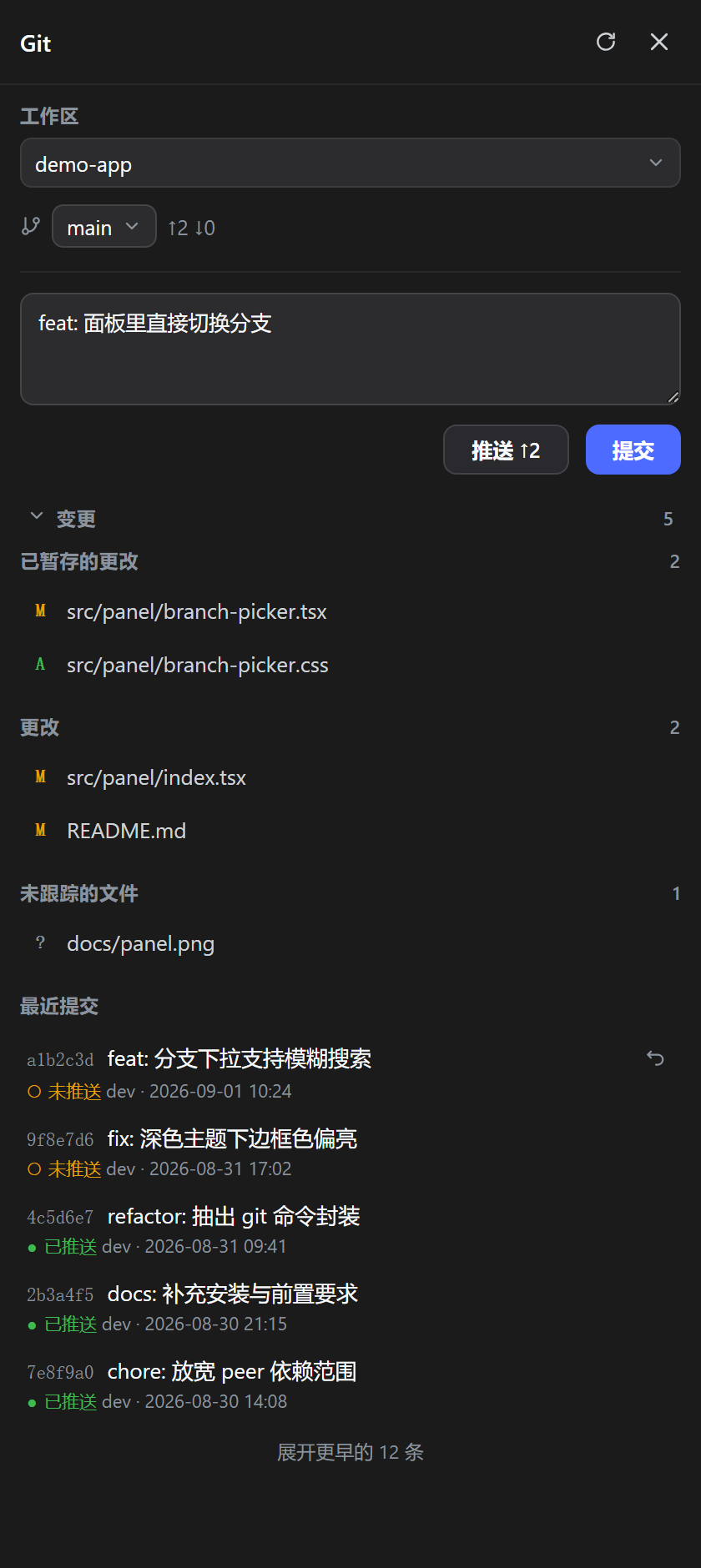
Visual Git panel for DeepSeek Harness: stage, commit, push, switch branches and inspect history without leaving your session.
>= 0.1.1-rc.2:0.1.x 与 0.2.x 两条线都兼容(已适配 0.2.0-rc.2,最低 0.1.1-rc.2)git 且在 PATH 里pnpm 可用(dsh plugin 底层转发给 pnpm)最省事的办法是用插件市场:打开「发现」,搜 dsh-git,点「安装」。
命令行:
dsh plugin --profile <name> add @easytz/dsh-git
<name> 是必填的 profile 名,不能省略——桌面版通常是 web,TUI 是 tui;不确定就看 $DSH_HOME/profiles/ 下的目录名。想钉死版本就写 @easytz/dsh-git@0.5.7。
插件自带 dsh.bundle 层(cordis.patch.yml),dsh plugin add 会同时完成「装进去」和「注册激活」,不需要手写 patch。
装完重启 dsh,侧边栏底部出现 Git 按钮。
官方桌面版(dsh desktop)用户:侧边栏的「插件」页会列出已安装插件,有新版本时标出「可升级」,点升级即可,无需命令行。
CLI 用户:升级到最新版(不带版本号即可,会解析 npm 的 latest):
dsh plugin --profile <name> add @easytz/dsh-git
desktop(dsh plugin --profile desktop add @easytz/dsh-git);用 npm 全局装的 dsh 命令行管不了它,得先用官方桌面菜单栏「Manage dsh command」装好配套命令。@easytz/dsh-git@0.5.9。immutable 缓存(Cache-Control: public, max-age=31536000, immutable),旧代码只有在内核重启、bundle 版本号变化后才会被新代码替换;个别情况下还要强制刷新页面(Ctrl+Shift+R)。latest 解析。点侧边栏底部的 Git 按钮打开面板。
选仓库. 有多个工作区时,顶部「工作区」下拉切换。工作区根目录自己不是仓库、但下面的子目录各自是仓库时,会多出一个「仓库」下拉(见下面「一个工作区装了多个仓库?」)。面板默认停在上次用过的工作区;有会话打开时会跟着当前会话所在的工作区走。
提交. 提交框就在分支行下面,是面板里最顺手的位置:
未跟踪的新文件不会被自动带上,必须逐个点 + 明确选择——这是刻意设计,避免误提交。
推送. 点 推送 ↑n,n 是本地领先远端的提交数。没有待推送的提交时这个按钮是灰的。
切分支. 分支行的下拉,选一个就切过去。旁边的 ↑n ↓n 是相对上游的领先 / 落后数。
看历史. 「最近提交」按时间倒序列出提交,每条标着 ○ 未推送 / ● 已推送。点任意一条弹出提交详情:完整提交信息、改动了哪些文件、每个文件各增删多少行。底部「展开更早的 n 条」看更多。
撤销最近一次提交. 只有最新那一条右侧有撤销按钮。点一下变红进入二次确认,三秒内再点才真的执行:未推送走 reset --mixed(改动退回工作区,不会丢),已推送走 revert(生成一条反向提交,别忘了推送)。
刷新. 标题栏的刷新图标重新读一遍仓库状态。
dsh plugin --profile <name> remove @easytz/dsh-git
<name> 与安装时一致。remove 会把包从 profile 依赖里移除,dsh 随后会把它从激活清单(dsh.profile.bundles)里撤掉。重启 dsh 后按钮消失。
如果你按旧版 README 手动往
$DSH_HOME/profiles/<name>/cordis.patch.yml或$DSH_HOME/cordis.patch.yml里加过- insert:条目,卸载时把那段 YAML 一起删掉。
工作区根目录自己不是仓库、但下面的子目录各自是独立仓库(比如一个 projects/ 下并排放着好几个 repo)时,面板会往下扫一层,把找到的仓库列在一个「仓库」下拉里,选中哪个就操作哪个。选择按工作区记住,下次打开还停在上次那个。
node_modules、dist、build 与点开头的目录 —— 否则 vendored 依赖里自带的 .git 会把列表淹掉。.git 最近被动过的那个仓库。reset --mixed 保留改动,已推送走 revert 生成反向提交)。git pull。已在 Windows 与 macOS 上验证;插件代码没有平台分支,Linux 使用同一套 Git 命令接口。
A third-party plugin for DeepSeek Harness (dsh) that adds a visual Git panel to the sidebar — everyday Git without leaving dsh and without memorising commands.
>= 0.1.1-rc.2: both the 0.1.x and 0.2.x lines are supported (adapted for 0.2.0-rc.2; 0.1.1-rc.2 is the floor)git installed and on PATHpnpm available (dsh plugin shells out to pnpm)Easiest path is the plugin market: open Discover, search dsh-git, hit Install.
From the command line:
dsh plugin --profile <name> add @easytz/dsh-git
<name> is required — your dsh profile (usually web for the desktop/web UI, tui for the TUI). Pin a version with @easytz/dsh-git@0.5.7 if you want reproducibility. The package ships its own dsh.bundle layer, so dsh plugin add both installs and activates it; no hand-written patch needed.
Restart dsh — a Git button appears at the bottom of the sidebar.
Official dsh desktop users: the sidebar Plugins page lists installed plugins and marks available updates — click to upgrade, no CLI needed.
CLI users — update to the latest release (omitting the version resolves npm's latest tag):
dsh plugin --profile <name> add @easytz/dsh-git
desktop profile (dsh plugin --profile desktop add @easytz/dsh-git); an npm-installed CLI cannot manage it — install the bundled command via the desktop menu bar's Manage dsh command first.@easytz/dsh-git@0.5.9 if you want a specific one.Cache-Control: public, max-age=31536000, immutable), so the old code is only replaced after the kernel restarts and the bundle revision changes; hard-refresh the page (Ctrl+Shift+R) if you still see stale UI.latest resolution.Click the Git button to open the panel.
n is how far ahead of the remote you are.↑n ↓n next to it is ahead/behind.reset --mixed when unpushed (changes come back to the working tree), revert when already pushed.dsh plugin --profile <name> remove @easytz/dsh-git
git pull in a terminal.DeepSeek Harness(DSH)Web 插件聚合生态包 · 一切皆插件,创意工坊分发(dsh-market.com)
把回答做成一页可视化 HTML:模型只写简短的 Markdown 草稿,随包附带的 `am` 命令行生成页面,支持流程图、时序图、树、时间线、ER 图、表格和提示框。
在 dsh 里装上这个插件即可,无需登录、注册或填 API Key,就能使用包括 Muse Spark 1.3、MiMo V2.6 在内的前沿模型——完全免费,不限量。 All you do is install this plugin in dsh: no login, no sign-up, no API key — the frontier models are just there, Muse Spark 1.3 and MiMo V2.6 among them. Completely free, with no usage cap.

