
dsh-web
zhu1090093659/dsh-webDeepSeek Harness(DSH)Web 插件聚合生态包 · 一切皆插件,创意工坊分发(dsh-market.com)

SOLIDWORKS for DeepSeek Harness: dsh reads, edits, rebuilds, renders and exports the model in a running SOLIDWORKS 2016+, on the same PC or in a Windows VM. Read-only by default.
   ___ _      __     dsh-solidworks
  / __| \    / /
  \__ \\ \/\/ /      SOLIDWORKS for DeepSeek Harness:
  |___/ \_/\_/       model, assemble, check, draw and export, in the SOLIDWORKS on your desk
dsh drives the SOLIDWORKS you already have open: 2016 and later, on the same PC or in a Windows VM on your Mac.
21 tools · verified on SOLIDWORKS 2016 SP1 and 2019 SP0 · one bridge exe, no runtime to install, no admin · your files read-only by default · MIT
Watch it · Get started · Tools · What it will not do · How it works · Proof · When to skip it · llms.txt · 中文
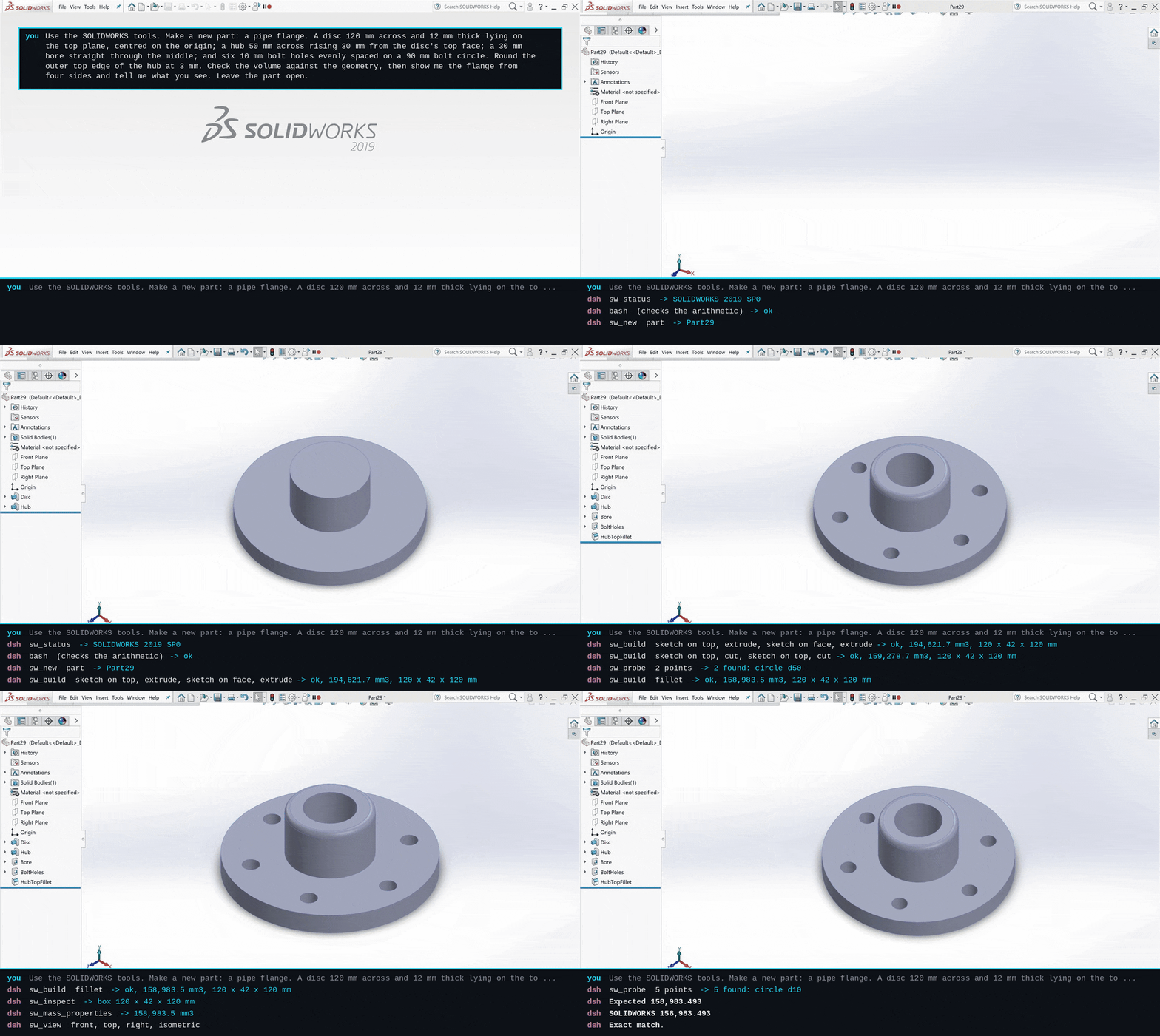
One paragraph in, a flange out. You describe the part; dsh models it in the SOLIDWORKS on your desk, checks the volume against its own arithmetic (158,983.493 mm³ both ways), and looks at it from four sides. It can also put parts together, check them for collisions, count a bill of materials, make the drawing, and work on the files you already have, read-only unless you say otherwise.
Every clip is a real session: dsh 0.2.0-rc.2 with deepseek-flash, SOLIDWORKS
2019 SP0 in a Parallels VM, recorded from the SOLIDWORKS window. The captions
are the session's own tool calls and results, and its own closing words. Time
spent thinking is fast-forwarded; nothing is cut or reordered.
How the clips are made.
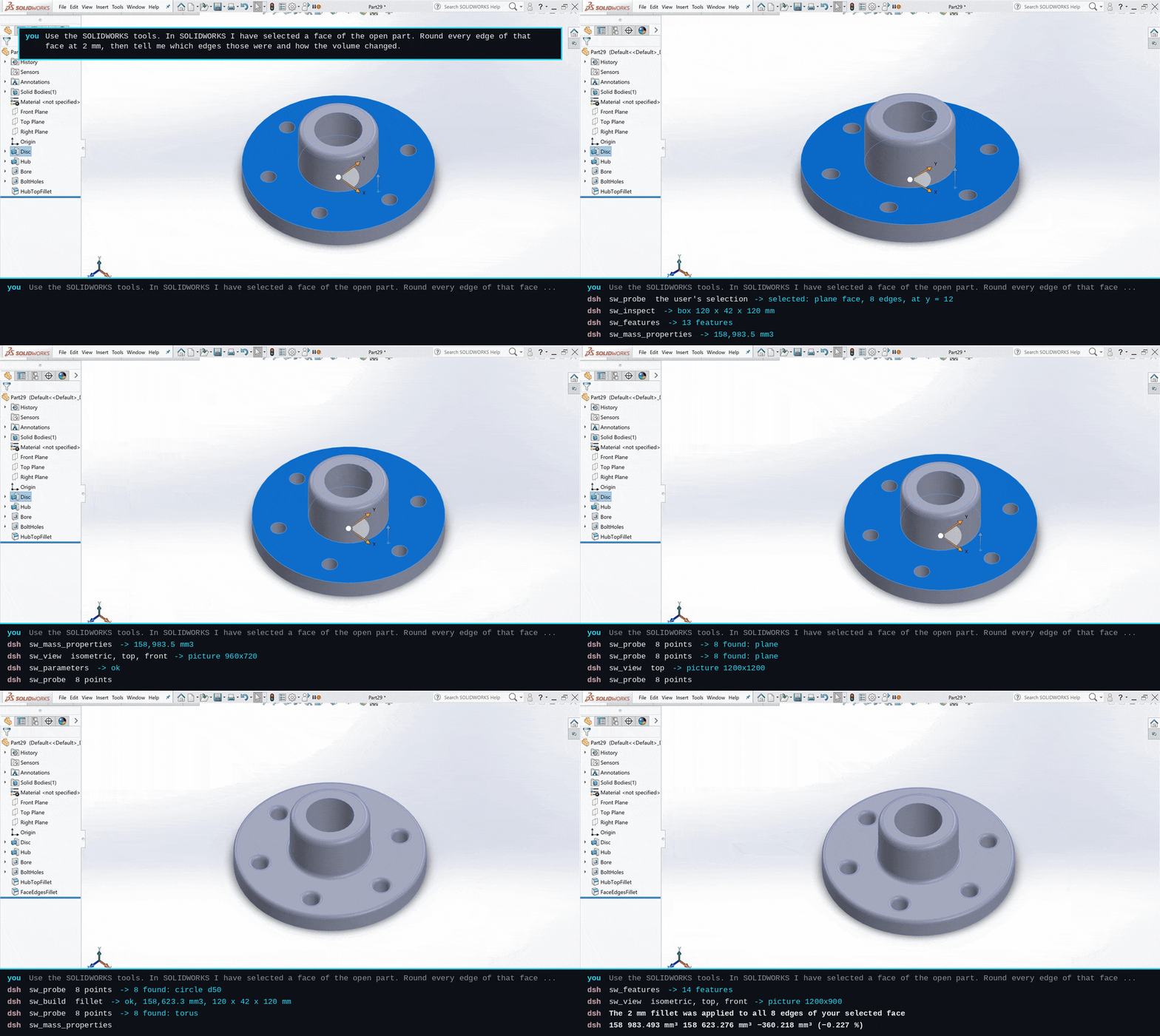
You select a face in SOLIDWORKS and say what to do with it. dsh reads your selection (the flange's top face, 8 edges), rounds every edge of it at 2 mm, and explains why the volume went down by 360.218 mm³ even though one fillet adds material.
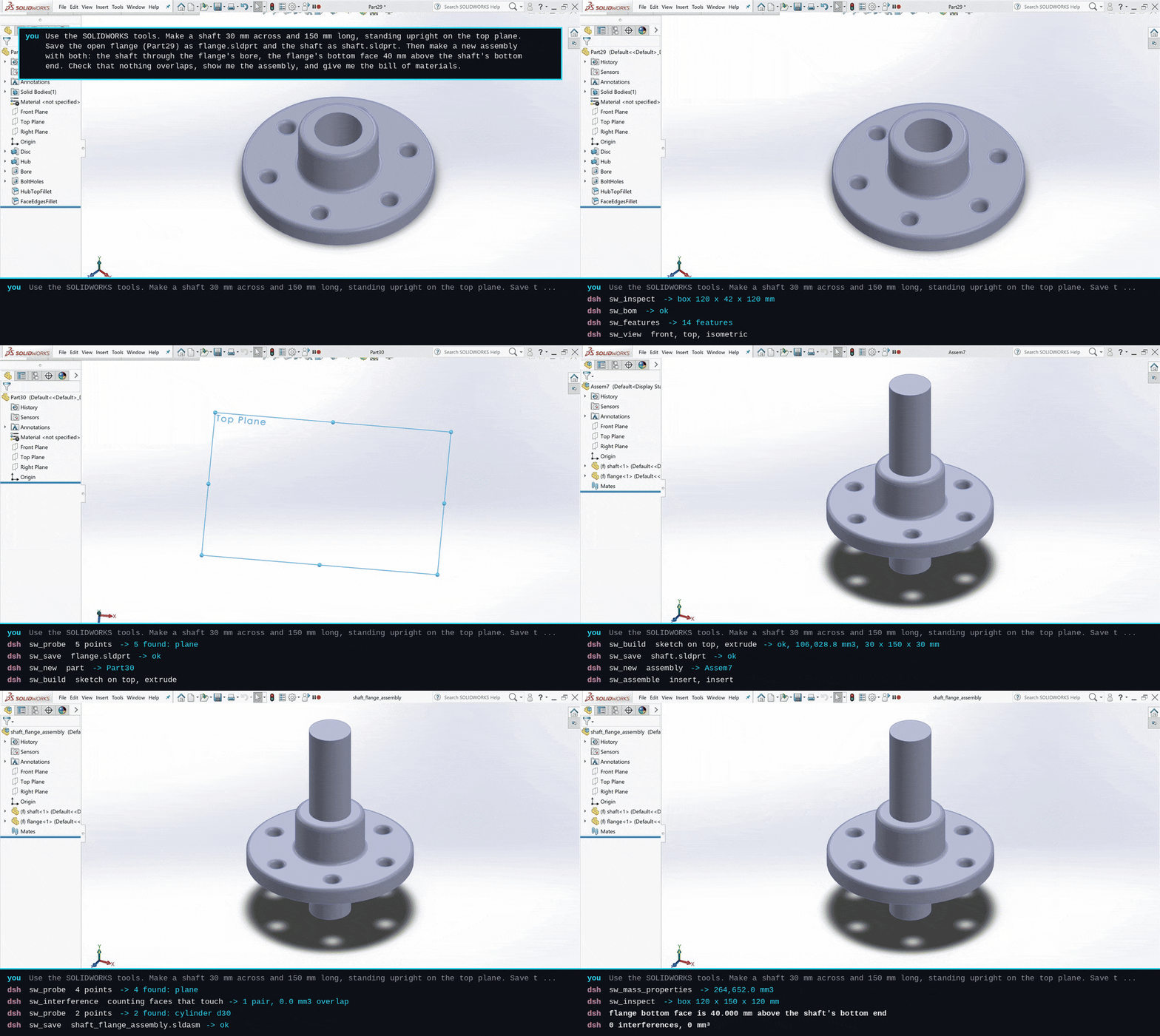
A shaft is modeled, both parts saved, and assembled with the shaft through the bore and the flange 40 mm up. Interference: 0 pairs. dsh also counts faces that only touch, and points out that a 30 mm shaft in a 30 mm bore is a line-to-line fit. Then the bill of materials.
The drawing lays its views out in projection at the largest standard scale that fits, brings in the model's dimensions, and comes back to your workspace as a PDF.
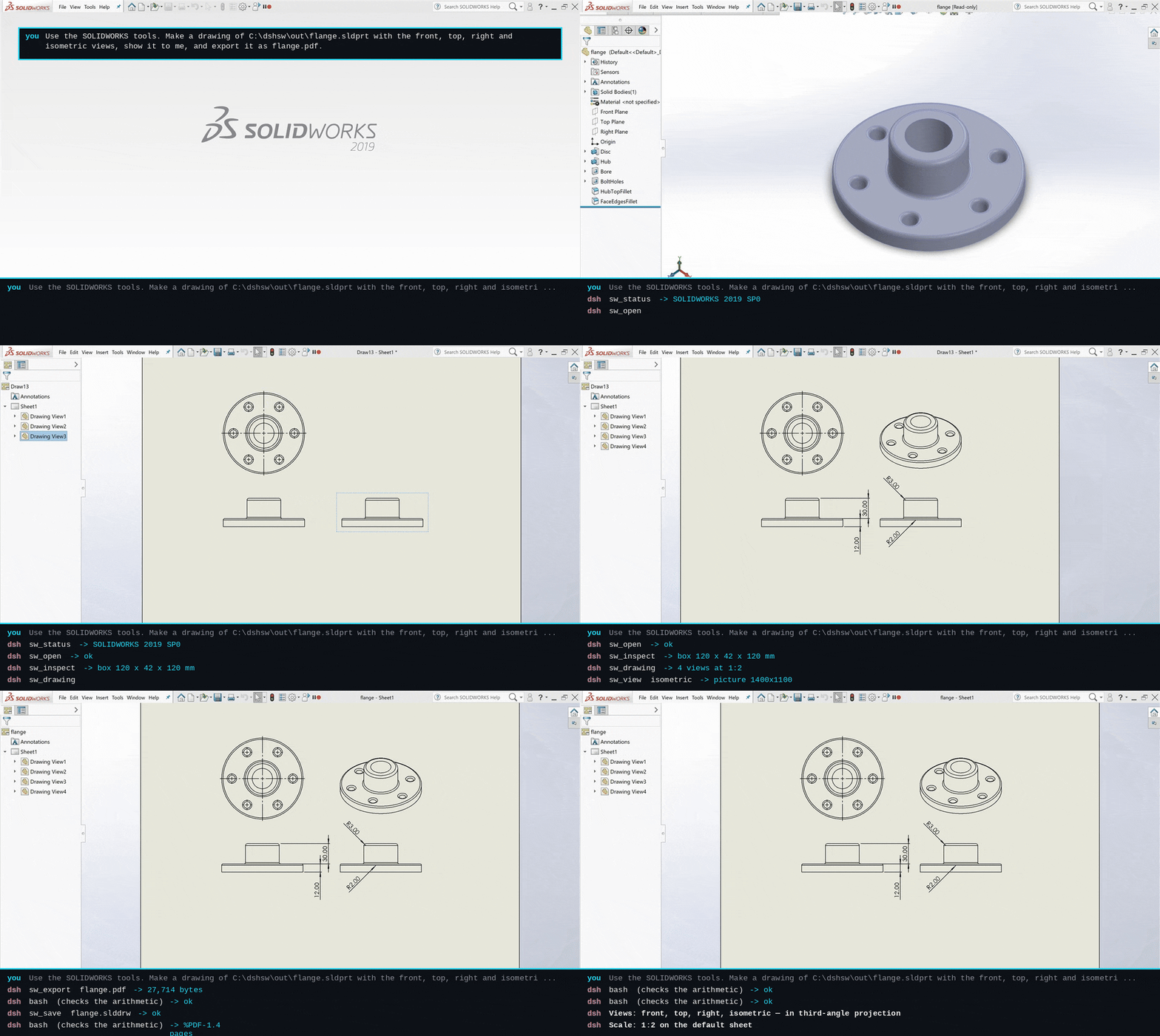
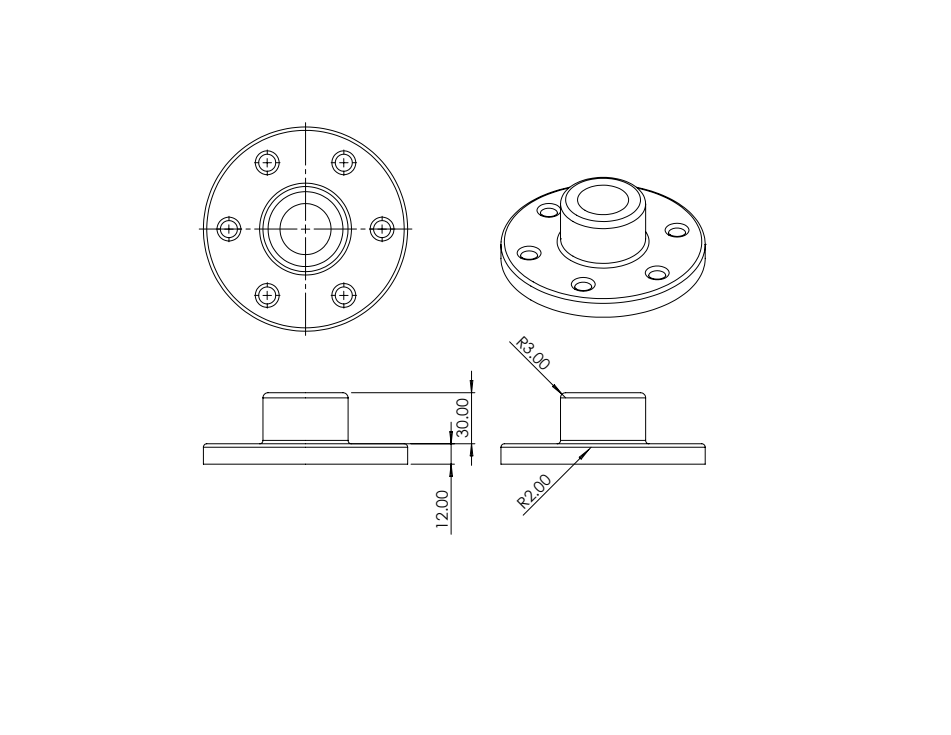
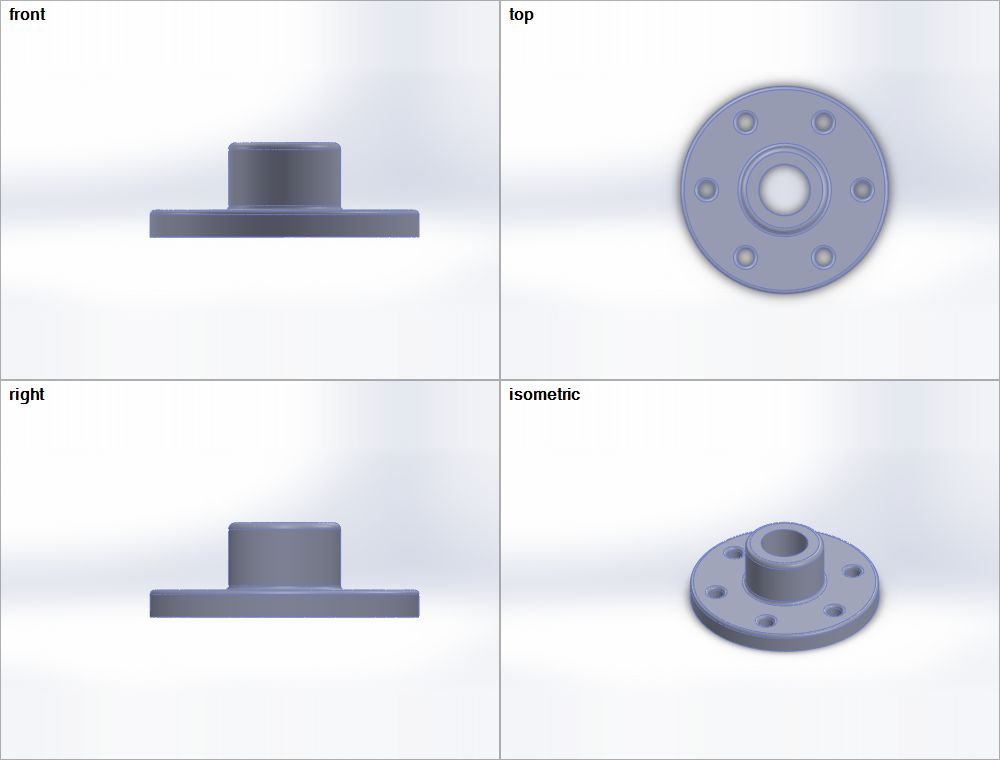
Left: the PDF as exported. Right: sw_view, four views on one picture, which is how dsh looks at what it made.
You need dsh 0.2.0-rc.2 or later (its dsh plugin add uses pnpm, so pnpm on
the PATH) and a running SOLIDWORKS 2016 or later.
dsh plugin --profile web add @dshworks/dsh-solidworks
Start SOLIDWORKS, start dsh, ask. The plugin runs its bundled swbridge.exe
on the first SOLIDWORKS question; there is nothing to pair or install.
dsh plugin --profile web add @dshworks/dsh-solidworks, then
start dsh once. It listens for the bridge and writes a pairing kit.\\Mac\Home\.dsh\dsh-solidworks\windows\ (Parallels shares your Mac home
folder there) and double-click pair.cmd.That installs the bridge for that Windows user, connects it to dsh, and starts it at every sign-in. No administrator, no firewall rule: the bridge dials out to dsh, so Windows never opens a port. If you ask dsh before pairing, the answer says where the kit is.
On VMware, another PC, or a Mac without Parallels sharing, copy the
~/.dsh/dsh-solidworks/windows/ folder to the Windows machine and run
pair.cmd there. If the VM reaches your Mac on an address the kit did not
list, set it:
# ~/.dsh/profiles/web/cordis.patch.yml
- id: dsh-solidworks
  config:
    advertise: ['10.211.55.2']   # Parallels' usual host address
Undo it in the VM with %LOCALAPPDATA%\dsh-solidworks\swbridge.exe uninstall.
swbridge.exe mcp is a plain stdio MCP server with the same 21 tools:
claude mcp add solidworks -- C:\tools\swbridge.exe mcp
The exe is in this package at bin/swbridge.exe and on every
GitHub release with its
SHA-256.
Lengths are millimetres, angles degrees, mass kilograms, whatever units the
document uses; field names say so (value_mm, mass_kg). Geometry is
addressed in one space everywhere: model-space points [x, y, z] in mm, Y up,
the front plane at z = 0, top at y = 0, right at x = 0. Faces and edges are
picked by a point on them. doc is a path, file name or title of an open
document and defaults to the active one.
| Tool | What it does |
|---|---|
sw_status | Release (2016 SP1, 2019 SP0, ...), every SOLIDWORKS instance, the open documents, and any dialog SOLIDWORKS is waiting on. Called first. |
sw_open | Open a .sldprt, .sldasm or .slddrw, read-only unless asked, and activate it. |
sw_new | A new, empty part or assembly from SOLIDWORKS' default template. |
sw_inspect | Type, units, configurations, material, custom properties, bounding box, body and component counts. |
sw_features | The feature tree with suppression state and rebuild errors. |
sw_parameters | Every dimension (D1@Sketch1, value, unit, driven or not) and equation, global variables marked. |
sw_components | An assembly's component tree: file, configuration, state, fixed, position. |
sw_mass_properties | Mass, volume, surface area, density, centre of mass. |
sw_probe | What is at a point: the face, edge or vertex there, with its surface or curve, area or length, normal or axis, diameter and the feature that made it. Without points, whatever the user has selected in SOLIDWORKS right now. Two entities also give the distance and angle between them. |
sw_edit | In memory, then one rebuild: configuration, suppress/unsuppress, global variables, dimensions, custom properties. Each change comes back with before, after and its own outcome. |
sw_build | Model a part in steps: sketch (lines, polylines, rectangles, circles, arcs, centerlines) on a plane or a face, extrude or cut (blind, through all, mid-plane, draft), revolve, fillet, chamfer, shell, offset plane, delete. A failing step undoes the call. Returns each feature with its dimensions, and the part's volume and box. |
sw_study | Up to 50 variants of dimensions and variables in one call, each rebuilt and measured (mass, volume, area, centre of mass, size); every value put back and checked afterwards. |
sw_rebuild | Rebuild and list every feature that fails, with the reason. |
sw_assemble | Insert saved parts with their origin at a point, mate planes, faces, edges or vertices (coincident, concentric, parallel, perpendicular, tangent, distance, angle), fix and float. |
sw_interference | Every pair of components that overlap, with the shared volume, largest first. |
sw_bom | Bill of materials: each file and configuration with its quantity and custom properties, flattened to parts or top-level; optionally a CSV. |
sw_drawing | A drawing of a saved model: views in first- or third-angle projection, the largest standard scale that fits the sheet, the model's dimensions brought in. |
sw_export | A copy in STEP, IGES, Parasolid, ACIS, STL, PDF, DXF/DWG, eDrawings, JPG/PNG/TIF, or native. Path, size and SHA-256 back; fetched into the dsh workspace when the bridge is on another machine. |
sw_save | Save as a new file in an allowed folder (how new documents get one), or over the source file if the bridge was started with --allow-save. |
sw_close | Close a document; unsaved changes are discarded only if this bridge made them. |
sw_view | A PNG of the model: one standard view or up to six on one labelled picture, shaded, wireframe or hidden-line. The user's view is put back afterwards. |
The rules are enforced on the Windows side, where the files are. dsh can ask for anything; only the bridge decides.
sw_edit, sw_build, sw_study and sw_assemble work in memory;
sw_save writes a new file into an allowed folder, and over a source file
only if the bridge was started with --allow-save.sw_build deletes only features it built in this
bridge session, and a sketch of yours that one of them consumed stays; your
features can be suppressed, not removed. It refuses to build while the
rollback bar is above the end of the tree, where new features would land
among yours. sw_study puts every value back and checks that it did.Documents\dsh-solidworks, or a folder you allowed with --allow-write. An
existing file is replaced only when asked.discard.bridge/compat/members.tsv.The link between dsh and a bridge on another machine is authenticated both ways (each side proves the token with HMAC-SHA256 over fresh nonces before a single call crosses) but not encrypted. It is meant for a host-only VM network or a local one; across anything else, carry it through SSH or a VPN. See SECURITY.md.
 dsh (Windows, macOS, Linux)                        Windows, the user's desktop session
 +-------------------------------+                  +----------------------------------+
 | @dshworks/dsh-solidworks      |   same PC:       | swbridge.exe  (.NET Framework 4.8)|
 |  21 sw_* tools, built with    |   stdio MCP      |  MCP server, protocol/tools.json  |
 |  dsh's own MCP tool factory   | <--------------> |  one STA thread + OLE msg filter  |
 |  spawn | listen                |   VM / other PC: |  IDispatch late binding           |
 +-------------------------------+   the bridge     |        |                          |
              ^                      dials dsh       |        v  COM, out of process     |
              |  protocol/tools.json  (HMAC pairing) |  SOLIDWORKS 2016 ... current      |
              +----- one contract, both halves ----- +----------------------------------+
sw_build answers with the part's volume and box,
sw_probe with areas and distances, sw_interference with overlap volumes:
numbers the model compares with what it meant to make. A build that fails
halfway removes what it made, so the part is either built or as it was.IDispatch by name, so the build that
drives 2016 drives 2019 and later, and builds on Linux CI. dynamic and
PowerShell's COM adapter both fail on SOLIDWORKS objects out of process
(TYPE_E_ELEMENTNOTFOUND, measured); Type.InvokeMember does not.bridge/compat/members.tsv lists the
200 members the bridge calls, each with its interface. A test fails if the
bridge calls anything not listed, names a member any way but as a literal, or
if a listed member is missing from the SOLIDWORKS 2016 SP1 interop. It is how
SaveAs2 (2019 SP1+), Get6 (2018+) and IEquationMgr.GlobalVariable
(2016 SP4+) stay out.SolidWorks_PID_<pid> in the desktop's Running Object Table. The bridge
picks the visible one highest in the window Z-order instead of whatever
GetActiveObject returns. We found machines with four instances, three of
them invisible and stuck on a startup dialog.TIMEOUT and says whether it may still complete; later calls fail
fast with SW_BUSY instead of queueing behind it, and sw_status still
answers and names the dialog SOLIDWORKS is waiting on.protocol/tools.json holds the names, schemas, budgets and
error codes. The bridge embeds it; the plugin builds dsh tools from it with
dsh's own createMcpToolDefinition, so validation, error results and image
admission behave as for any MCP server.Every claim on this page was run, against real SOLIDWORKS, on 2026-10-18.
| What | Result |
|---|---|
| Live end-to-end, SOLIDWORKS 2016 SP1 (24.1.0) | 66 of 66 checks, through the real dial-out link, with the release exe |
| Live end-to-end, SOLIDWORKS 2019 SP0 (27.0.0) | 66 of 66 checks, same exe |
Real dsh 0.2.0-rc.2 + deepseek-flash, dsh on Linux, SOLIDWORKS 2019 in a VM (listen) | the four clips above: 12, 17, 23 and 13 tool calls; one refused (a BOM asked of a part: WRONG_DOC_TYPE, which the model corrected), the rest completed |
Real dsh 0.2.0-rc.2 + deepseek-flash, dsh on the Windows PC itself (spawn) | run on 0.1.0, unchanged since: the plugin started its bundled bridge through dsh's subprocess service; 5 tool calls, 5 completed; no bridge left running after dsh exited |
dsh plugin add on dsh 0.2.1-rc.2 (npm latest since 2026-10-19) | the published package installs into a scratch profile and carries no copy of a package dsh supplies; dsh-release-watch re-runs this daily and opens an issue when a dsh release refuses it. Install only: the sessions above ran on 0.2.0-rc.2 |
The published swbridge.exe | rebuilt from source by CI to the same SHA-256 (bridge/swbridge.exe.sha256) |
Pairing from the generated pair.cmd, sign-in start, uninstall | run on 0.1.0, unchanged since: installed with no admin, one instance under the mutex, nothing left after uninstall |
| Unit tests (Linux, no SOLIDWORKS) | 48, including the 2016 member check and both-sides contract checks |
swbridge selftest (Windows, no SOLIDWORKS) | paths, units, JSON, drawing layout and scale, picture letterboxing, CSV, HMAC vector shared with the plugin |
The end-to-end checks test each answer against something the tool did not say
about itself. The modelling ones compute it from the geometry asked for: the
plate above must come to 6000·20 − π·10²·20 − 4·25·(1 − π/4)·20 mm³ and its top
face to that area over 20; a 50 mm cube shelled at 2 mm with one face open to
50³ − 46²·48 = 23,432 mm³; a revolved 10/20 mm tube 30 mm long with a 1 mm
chamfer to π(20² − 10²)·30 − π·(20 − 1/3); a design study at 10 and 40 mm to
that area times 10 and 40, and the plate back at 20 afterwards; two plates mated
face to face must not interfere and a third pushed 10 mm into both must overlap
each by exactly the top face area times 10; the BOM must count 3; the drawing
must have its four views at the sheet's scale and export as %PDF-. The
ownership checks build on a sketch the bridge did not make (saved, closed and
reopened, so it is forgotten): a failed build and a delete of what was built on
it must leave that sketch in place, and a sketch that fails on its second
entity must leave the feature tree exactly as it was. A blind cut sketched on
a plane under the body must reverse itself and remove exactly π·5²·4 mm³, and a
drawing saved next to its part must be the document its .slddrw name exports.
The
reading ones from 0.1.0 still run: the stock box.sldprt must reach 325,500
mm³ after sw_edit sets its depth to 150 mm, the fetched STEP must hash to the
bridge's SHA-256, the refusals must return their codes. On 2016 the run used a
SOLIDWORKS that someone else had a 58-document assembly open in; a check
confirms their documents, dirty flags, active document and the 57 parts their
assembly had loaded came back unchanged.
Measured through the link in the 0.2.1 runs, SOLIDWORKS under x64 emulation on Windows 11 ARM64 (the slower end is the 2016 SOLIDWORKS that also holds the 58-document assembly): the five-step plate build 3.2-4.3 s, a probe 0.3-0.9 s, a four-view picture 2.5-3.4 s, a drawing 1.9-3.9 s, interference on a three-part assembly 1.1-3.2 s, open a part 1.3-1.5 s, export STEP 0.4-0.5 s.
Not verified yet: SOLIDWORKS 2020 and later, Windows 10, x64 hardware. Reports
welcome: open an issue
with swbridge status pasted in.
sw_build covers sketch, extrude, cut, revolve, fillet, chamfer, shell and
planes. Sketches are exact but carry no sketch dimensions or relations; the
features' own dimensions (depths, radii, angles) are named and drivable.sw_open opens SOLIDWORKS documents; import
them in SOLIDWORKS first.| You see | It means |
|---|---|
NOT_CONNECTED | No bridge has paired with this dsh. Run pair.cmd in the VM; if it ran, check %LOCALAPPDATA%\dsh-solidworks\bridge.log there. |
SW_NOT_RUNNING | No SOLIDWORKS in that Windows session, or it is still starting. A second SOLIDWORKS session on one machine stops at "A journal file could not be created" until someone clicks OK. |
SW_BUSY / TIMEOUT with a dialog's text | SOLIDWORKS is waiting for a person. Answer the dialog on the Windows desktop. |
OPEN_FAILED: saved by a newer SOLIDWORKS | Files open only in the release that saved them or later. |
DIRTY ... was not opened by this bridge process on a document dsh made | The bridge restarted and no longer knows it made that document. Close it in SOLIDWORKS. |
no face within 0.5 mm of [x, y, z] | The point is not on the model where the call assumed; the message names the nearest face or edge and how far it is. Components move when mated: use where they are now. |
another bridge holds the link (in the bridge log) | A second machine is paired with the same dsh; the first one connected keeps it. |
the bridge on ... does not have sw_... | The Windows PC still runs the bridge it was paired with before the plugin was updated. Run pair.cmd there again. |
The plugin row, id: dsh-solidworks:
| Key | Default | |
|---|---|---|
link | auto | spawn (dsh on the SOLIDWORKS PC), listen (bridge elsewhere); auto picks spawn on Windows |
listen.host / listen.port | 0.0.0.0 / 47321 | where dsh listens for a bridge; it answers only one that proves the token |
advertise | [] | addresses written into pair.cmd; empty lists this machine's, VM networks first |
token | '' | empty keeps a generated one in $DSH_HOME/dsh-solidworks/pairing.json |
bridge.out, bridge.allowWrite, bridge.allowSave, bridge.pid | spawn mode: passed to the bridge as its flags | |
fetchDir | solidworks | where exports and BOM files from a remote bridge land in the workspace; empty keeps them on Windows |
startupWaitMs | 15000 | how long a call right after dsh starts waits for the bridge to reconnect |
The bridge, swbridge.exe: mcp, connect, status, uninstall, with
--out, --allow-write, --allow-save, --pid. swbridge help has the rest.
DeepSeek Harness(DSH)Web 插件聚合生态包 · 一切皆插件,创意工坊分发(dsh-market.com)
把回答做成一页可视化 HTML:模型只写简短的 Markdown 草稿,随包附带的 `am` 命令行生成页面,支持流程图、时序图、树、时间线、ER 图、表格和提示框。
在 dsh 里装上这个插件即可,无需登录、注册或填 API Key,就能使用包括 Muse Spark 1.3、MiMo V2.6 在内的前沿模型——完全免费,不限量。 All you do is install this plugin in dsh: no login, no sign-up, no API key — the frontier models are just there, Muse Spark 1.3 and MiMo V2.6 among them. Completely free, with no usage cap.

