
dsh-web
zhu1090093659/dsh-webDeepSeek Harness(DSH)Web 插件聚合生态包 · 一切皆插件,创意工坊分发(dsh-market.com)

DSH 会话可读导出:把 DeepSeek Harness 会话导出成可读的 Markdown / HTML / 纯文本 / ZIP 文字稿(思考块、工具调用与结果、代码块、图片、时间戳、标题与用量)
DeepSeek Harness 会话可读导出 —— 把任意会话导出成可读的 Markdown / HTML / ZIP 文字稿。 官方 @deepseek-ai/dsh-session-log-export 只给你一份原始日志(session.v3.jsonl.zstd,二进制、多帧 zstd、events v3),人读不了;这个插件补上缺的那一半:会话头部菜单「导出文字稿」+ /export-md 命令,产出带标题、模型、用量、时间戳、思考块、工具调用与结果、代码块和图片的文字稿,HTML 还能直接打印成 PDF。

官方会话导出给你的是 dsh-session-<id>.zip → session.v3.jsonl.zstd:一坨多帧 Zstandard 压缩的 JSONL。它能喂给工具,但不能读——想知道「当时到底聊了什么、模型调了哪些工具、那张图长什么样」,得自己写解析器。
这个插件把同一份会话日志渲染成人能读的文字稿,并且不改写任何内容:只读日志,原文照搬。
/export-md 斜杠命令(避开官方的 /export);命令解析出的选项会带进对话框,两边永远不会打架meta.json)ctx.fs,受会话沙箱约束)用户 / 助手 / `bash` · 54ms · 结果 43 行),不把 emoji 塞进你的档案件@deepseek-ai/*,commands / connection / fs / sessionPersistence / sessionQuery / attachments 全部在调用时通过 cordis 上下文获取;ZIP 写入器自研(node:zlib 的 raw deflate),PDF 走浏览器打印client-hmr 会热替换npm(推荐):
dsh plugin --profile web add dsh-chat-export
或从 GitHub 仓库直接安装:
dsh plugin --profile web add github:DDDMUC/dsh-chat-export
本地开发(改代码即时生效):
dsh plugin --profile web add link:/绝对路径/dsh-chat-export
装完重启 dsh web(宿主半的新插件行要重启才加载;之后改浏览器半不用)。
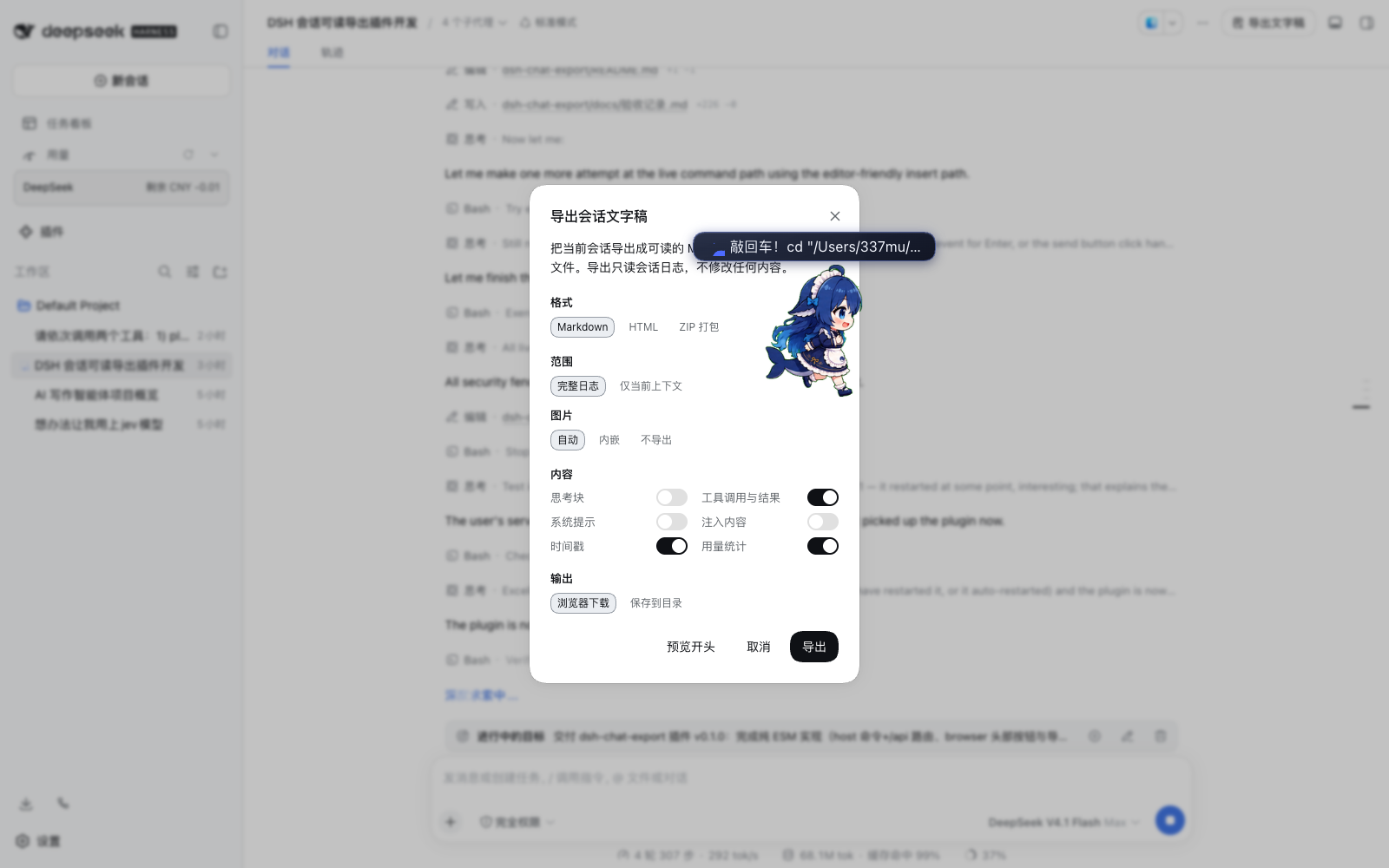
方式一:会话头部图标按钮
方式二:斜杠命令
/export-md                           # Markdown,默认选项
/export-md html                      # 自包含 HTML,可打印成 PDF
/export-md txt                       # 纯文本,无任何标记
/export-md zip --images=embed        # 打包,图片内嵌
/export-md md --thinking --surface   # 带思考块,只导当前上下文
/export-md html --save=/tmp/导出     # 直接写进目录
命令只解析参数,真正的导出在对话框里确认——所以敲错参数会当场报错并给出用法,不会悄悄导出一份你以为不一样的东西。
参数一览
| 参数 | 作用 |
|---|---|
md / markdown | Markdown(默认) |
html | 自包含 HTML |
txt / text / plain | 纯文本(不带任何标记) |
zip | 打包(内含 md + html + txt + 图片 + meta.json) |
--input / --no-input | 用户输入(默认开) |
--output / --no-output | 模型输出(默认开) |
--thinking / --no-thinking | 思维链(默认开) |
--tools / --no-tools | 工具调用与结果(默认关,一次调用一行) |
--system / --no-system | 系统提示词(默认开) |
--injected / --no-injected | 注入内容,如插件/目标/指令注入的用户消息(默认关) |
--timestamps / --no-timestamps | 每条消息的时间戳(默认关) |
--usage / --no-usage | 表头的用量统计(默认关) |
--surface / --no-surface | --surface 只导当前模型上下文;默认完整日志 |
--images=auto|embed|assets|none | 图片策略;auto 表示单文件内嵌、ZIP 放 assets/ |
--limit=N | 单条工具结果的字符上限(默认 4000,0 表示不截断) |
--save[=目录] | 写进目录而不是下载;不填目录则用会话工作目录下的 dsh-chat-exports/ |
Markdown:
# AI 写作智能体项目概览

> 由 dsh-chat-export 从 DeepSeek Harness 会话导出

`session-5e6c2afd-…` · `/Users/example/Documents/Default Project`

| 项 | 内容 |
| --- | --- |
| 模型 | `deepseek-official/deepseek-flash` · `commandcode/…` |
| 时间 | 2026-09-21 00:38:16 → 2026-09-21 23:52:12(23h 13m) |
| 规模 | 116 轮 · 989 步 · 用户 89 条 · 助手 908 条 · 876 次工具调用 · 图片 16 张 |
| 用量 | 输入 1,107,646 · 输出 1,321,824 · 缓存读 310,001,920 · 合计 312,431,390 |

---

## 回合 1 · 27.8s

### 用户 · 00:38:25

任务正文……

### 助手 · 00:38:28 · `deepseek-official/deepseek-flash`

正文……

<details>
<summary>思考(312 字)</summary>

思考正文……

</details>

<details>
<summary>`bash` · 1.2s · 结果 42 行</summary>

**参数**

```json
{ "command": "ls -la" }
结果
输出……

**默认勾选四项:用户输入、模型输出、思维链、系统提示词** —— 导出的就是「对话本身」。

其余四项**默认不勾**:工具调用与结果、注入内容、时间戳、用量统计。
工具调用是这个日志里最吵的部分,读回来时也最没用;时间戳与用量是元信息,不是对话内容。
需要时逐个打开(时间戳与用量各只占一行)。

**产物里没有任何装饰性图标。** 参数和结果都收在同一个折叠里,默认展开的只有「谁在什么时候说了什么」。876 次工具调用的长会话,肉眼可见的就是 876 行 `▶ \`名字\` · 耗时 · 结果 N 行`,需要哪次再点开。

纯文本(`txt`,注意没有任何标记、图标、代码围栏,全靠分隔线和缩进):

```text
想办法让我用上jev模型
========================================================================

session-48310605-bb1a-4966-a207-380f947e220b
/Users/example/Documents/Default Project

模型  commandcode/deepseek/deepseek-v4.1-flash
时间  2026-09-21 21:51:26 → 2026-09-21 22:47:16(55m 50s)
规模  1 轮 · 52 步 · 用户 1 条 · 助手 31 条 · 85 次工具调用
用量  输入 78,004 · 输出 52,120 · 缓存读 4,302,080 · 合计 4,432,204

由 dsh-chat-export 从 DeepSeek Harness 会话导出
------------------------------------------------------------------------

回合 1 · 42m 00s

用户 · 21:51:45
  想办法让我用上jev模型

助手 · 21:51:51 · commandcode/deepseek/deepseek-v4.1-flash
  我先搞清楚 "jev 模型" 指的是什么,同时看一下 DSH 的模型/提供商配置。

  [工具] bash · 54ms · 结果 43 行
    参数  {
          "command": "pwd; echo \"--- workspace ---\"; ls -la"
        }
    结果  /Users/example/Documents/Default Project
        --- workspace ---
        total 1960
正文原样照搬(连 Markdown 标记一起)—— 宁愿保留几个星号,也不悄悄改你说过的话。
文件名:dsh-chat-<会话标题>-<日期>.<扩展名>(标题里的路径分隔符与控制字符会被中和,中日韩字符保留)。
ctx.sessionPersistence.open(id, 'read') 读会话日志(和官方 ZIP 用的是同一个入口,自带多帧 zstd 解码、格式迁移、断尾修复),标题走 ctx.sessionQuery.readTitle,图片字节走 ctx.attachments.readImage。降级链:sessionPersistence → sessionQuery.readSession → readSurface → 直接读会话文件(绕过服务层,官方读取器挂掉时仍然能导出),全都没有才报 503。loadOlder() 一页页翻到 hasMore 为 false),而且没有附件字节。宿主端一把拿全。ctx.connection.fetch:挂在 /api/dsh-chat-export.* 下,白拿连接服务的鉴权与 Host/Origin 围栏(未登录 401,跨源 403)。不用 webServer.register:它的 exact 路由会盖掉 /api 桥接并绕过鉴权。node:zlib 的 raw deflate 加本地头 + 中央目录 + EOCD 就够了,不值得为它引一个依赖。@media print 样式和「打印 / 另存为 PDF」按钮,用浏览器打印。无头 Chrome 那条路要拖进 puppeteer,不成比例。三个从真实日志里挖出来的坑,插件都处理了(写成注释留在代码里):
session.v3.jsonl.zstd 是多帧串联(9.6 MB 的样本有 39,968 帧)。zstdDecompressSync(整文件) 会静默只返回第一帧;createZstdDecompress() 解完第一帧就抛 ZSTD_error_prefix_unknown。所以要么走持久化服务,要么逐帧扫边界。agent/inbox/spliced 的 data.inserted[] 里可能有只此一份的用户消息(样本里 170 条里有 6 条在 user/message 里找不到)。必须按 message id 去重合并,否则漏话。user/message 上没有 turn/step 字段,轮次只能靠 turn/start 边界推。ctx.fs 只有文本写入、没有二进制写入;绕过它直接用 node:fs 会无视会话的沙箱策略。ZIP 请用浏览器下载(对话框里选 ZIP 时保存按钮会禁用并说明原因)。includeDescendants 是那块功能)。[图片] shot.png(640×480, 2.0 KiB)),txt 装不下二进制。assistant/message.data.usage。 官方日志里没有费用字段,所以只能给 token,给不了钱;推理 一栏在不上报该字段的 provider 上是 0。# 标题 的提问会把整份文字稿的目录结构顶掉):
# 不动);<details> / <summary> 会被反斜杠转义成字面量,免得对话里随口一句就把后面半篇内容折叠进去(转义后显示效果完全一样,还是那几个字符)。
其余文字一字不改,代码块内容原样保留。>=0.1.6-alpha.2>=22(用到 node:zlib 的 Zstandard 支持)MIT © 2026 DDDMUC
The official Session export hands you dsh-session-<id>.zip containing session.v3.jsonl.zstd: multi-frame Zstandard-compressed JSONL. Great for tools, unreadable for humans. This plugin renders the same log as a transcript a person can actually read, and never rewrites a byte of it.
Four kinds of content are checked by default: user input, model output, reasoning, and system prompts — the conversation itself. Tool calls, injected context, timestamps, and the usage table are off until asked for. Tool calls are the loudest part of a log and the least useful to read back, so they are off by default; turn them on and each call becomes one collapsed line.
/export-md command (which avoids the official /export). A typed line presets the dialog, so the two can never disagree.transcript.md + transcript.html + transcript.txt + assets/ + meta.json).@deepseek-ai/* imports, a hand-written ZIP writer, and PDF via the browser's own print dialog.dsh plugin --profile web add dsh-chat-export
Restart dsh web afterwards. The browser half needs no restart when you edit it.
Click "导出文字稿" (Export transcript) in the Session header, or type:
/export-md                           # Markdown with the defaults
/export-md html                      # self-contained HTML, printable to PDF
/export-md zip --images=embed        # a bundle with images embedded
/export-md md --thinking --surface   # reasoning on, current context only
/export-md html --save=/tmp/exports  # write straight into a directory
Flags: --thinking, --no-tools, --system, --injected, --timestamps, --no-usage, --surface, --images=auto|embed|assets|none, --limit=N, --save[=dir].
Everything is read through the official services (sessionPersistence, sessionQuery, attachments) resolved from the cordis context at call time, and the exports are produced on the host, not in the browser — the browser only ever holds a paged window of the event log and has no attachment bytes. Routes live under /api/dsh-chat-export.* through ctx.connection.fetch, so they inherit the connection service's authentication and its host/origin fence.
ctx.fs has no binary write, and bypassing it with node:fs would ignore the Session sandbox. Download the ZIP instead.>=0.1.6-alpha.2>=22MIT © 2026 DDDMUC
DeepSeek Harness(DSH)Web 插件聚合生态包 · 一切皆插件,创意工坊分发(dsh-market.com)
把回答做成一页可视化 HTML:模型只写简短的 Markdown 草稿,随包附带的 `am` 命令行生成页面,支持流程图、时序图、树、时间线、ER 图、表格和提示框。
在 dsh 里装上这个插件即可,无需登录、注册或填 API Key,就能使用包括 Muse Spark 1.3、MiMo V2.6 在内的前沿模型——完全免费,不限量。 All you do is install this plugin in dsh: no login, no sign-up, no API key — the frontier models are just there, Muse Spark 1.3 and MiMo V2.6 among them. Completely free, with no usage cap.

