
dsh-web
zhu1090093659/dsh-webDeepSeek Harness(DSH)Web 插件聚合生态包 · 一切皆插件,创意工坊分发(dsh-market.com)

DeepSeek Harness 会话回收站:从会话行菜单删除(或从侧栏标题栏批量移入)后,会话进入回收站,默认保留 15 天(设置里可选 7 / 15 / 30 天),到期条目自动清除;回收站表格显示每条还剩几天,可还原回原工作区,也可单条彻底删除或清空。
A real “Delete session” for the DeepSeek Harness desktop app.
Out of the box a session's row menu offers Pin / Rename / Fork / Archive — and archiving only files a session away into the archive list, it is still there. This plugin adds delete: the session moves into a recycle bin that keeps it for 15 days by default (7 / 15 / 30, changeable in Settings), restorable at any time from Settings → Recycle bin. The files are only really removed on expiry, or when you press Delete / Empty recycle bin. Several sessions at once go through the bulk delete button above the sidebar's workspace list.
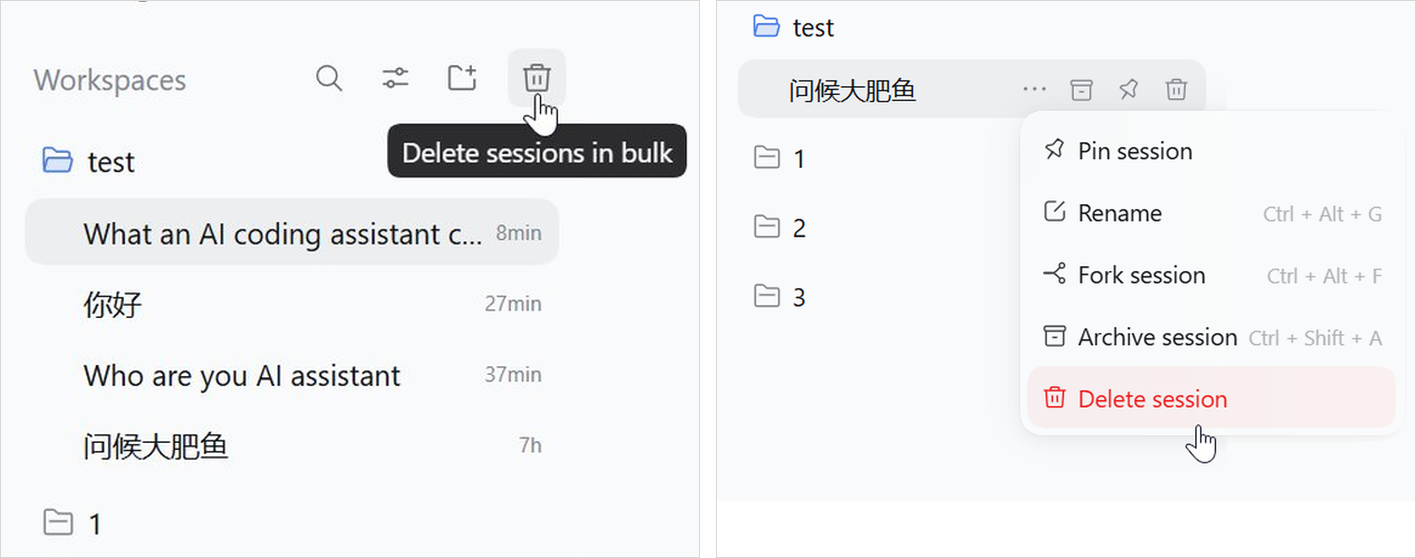
Delete session is appended to the row's … menu — the hover trash button on the row is the same action — and to delete several at once there is a trash button above the workspace list. The two ways in, side by side — left the bulk button, right the row menu with Delete session in red at the end:
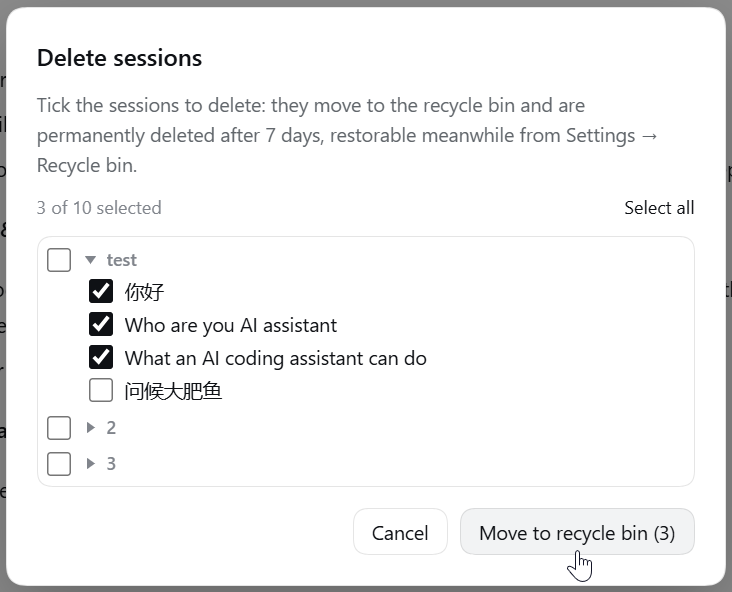
The bulk button opens a picker holding every session:
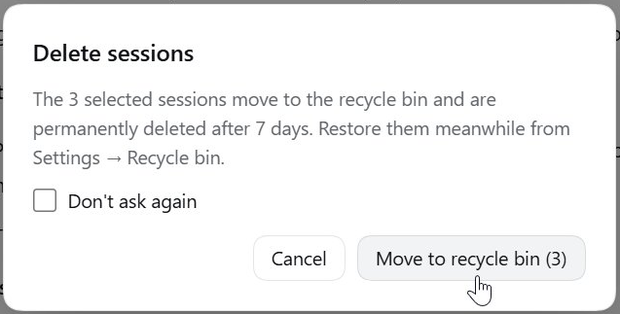
Either way it asks for confirmation first; tick “Don't ask again” and later deletions go straight to the bin, with a switch in Settings to bring the question back:
Settings → Recycle bin shows the bin as a table: Session | Folder | Deleted | Left | [Restore] | [Delete], plus [Empty recycle bin]. Tick the sessions you want and the restore/delete buttons appear in the table's own header row, so a batch acts on exactly what is ticked:
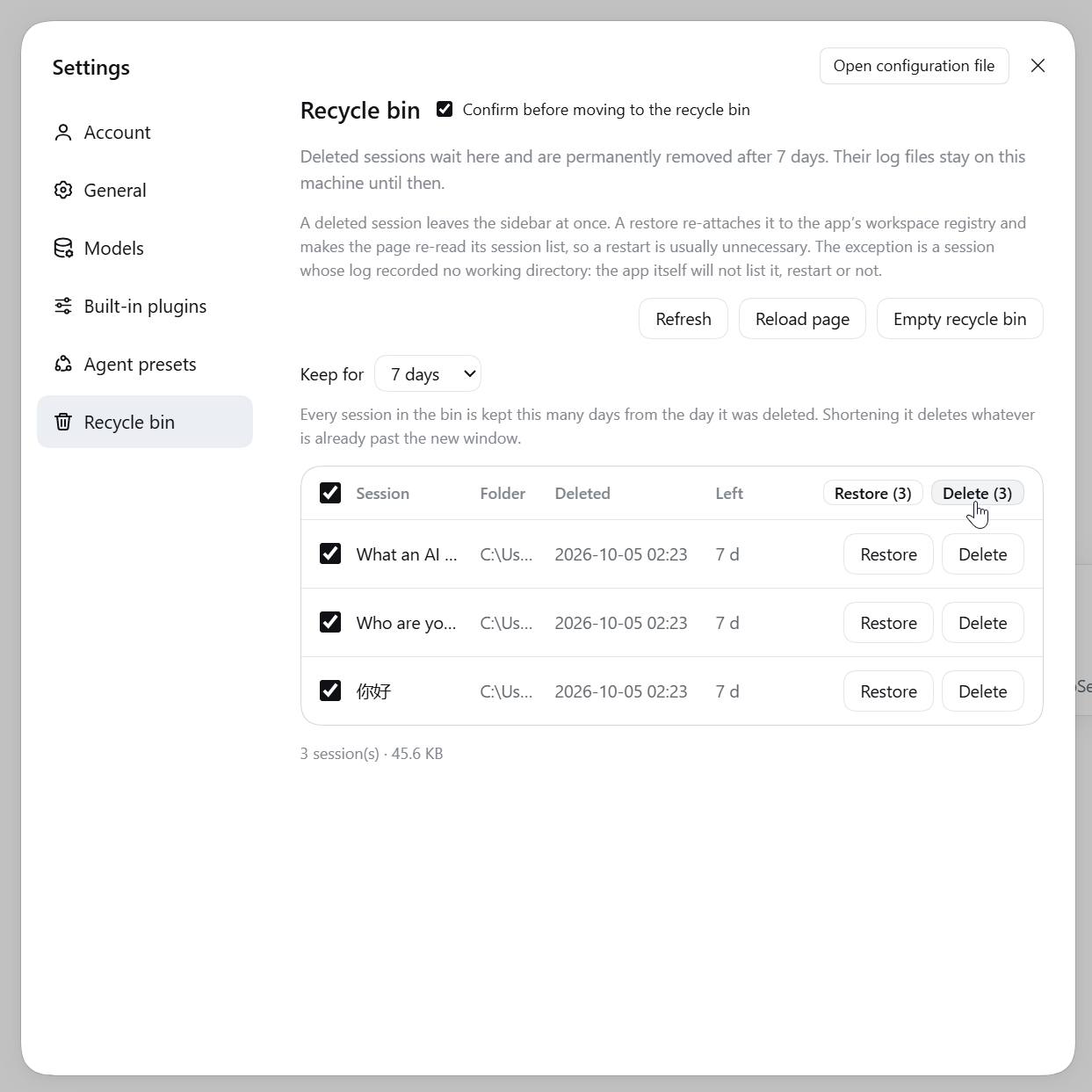
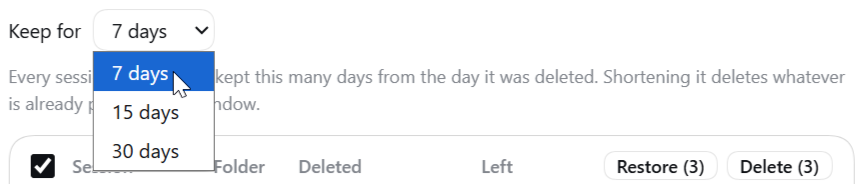
The Keep for period is one number for the whole bin, 15 days by default. It only asks first when the new period would really take rows with it — those are already past the new window and are deleted on the spot; a bin with nothing past it changes straight away:
Requires the DeepSeek Harness desktop app (desktop profile). Written against 0.2.0-rc.2 and run on 0.2.1-rc.2 (Electron 44, Windows); other versions are untested.
Just tell the agent inside DSH:
Install this plugin for me:
github:cckbc/dsh-session-recycle-bin
It installs through the plugin-manager tool, and asks you for approval when it lacks the permission.
github:cckbc/dsh-session-recycle-bin for the source;dsh plugin --profile web add github:cckbc/dsh-session-recycle-bin
# pinning a version is safer: dsh plugin --profile web add github:cckbc/dsh-session-recycle-bin#<commit-sha>
The desktop profile cannot be managed this way — the app owns it — so use the Plugins page above.
git clone https://github.com/cckbc/dsh-session-recycle-bin.git
Clone it wherever you like (pick a directory you will keep), then Plugins → Add plugin → enter the absolute path of that directory.
Keep that directory in place. A local-path install is a
link:dependency: the profile'snode_modules/@cckbc/dsh-session-recycle-binpoints at it, so moving or deleting the directory breaks the plugin.
The app's own notice: plugins have no automatic update — to upgrade, uninstall first and then install the new version. The local-directory route is the exception: git pull, then reopen the app.
Uninstalling: disable/remove it on the Plugins page; whatever is still in the recycle bin lives in <DSH_HOME>/dsh-trash/ and is not removed for you.
<DSH_HOME>/attachments), AgentTeams working directories and similar derived data are outside the bin.dsh-* folders in %TEMP% — the dsh-workspace-changes-* ones are the snapshot store behind the “files changed this turn” card. A normal quit deletes them; a force-kill, a crash or a power-off does not, and nothing sweeps them at startup, so they pile up (one can reach hundreds of MB, because the first snapshot copies every untracked file in that workspace). This plugin never touches them: to reclaim the space, quit DSH from the tray menu rather than the window's close button, then delete dsh-* from %TEMP%. You lose past sessions' change diffs, never the conversations. A .gitignore that hides big untracked files keeps future ones small.workspace.json on disk is already updated, but the running app still remembers the old state.<DSH_HOME>/sessions/ for the workspace directory that holds this id and takes the first hit; if the same id somehow exists under two workspaces (a hand-copied directory, say), the second one is left untouched. The id is dropped from every workspace's account so no phantom row appears after a restart.MIT.
DeepSeek Harness(DSH)Web 插件聚合生态包 · 一切皆插件,创意工坊分发(dsh-market.com)
把回答做成一页可视化 HTML:模型只写简短的 Markdown 草稿,随包附带的 `am` 命令行生成页面,支持流程图、时序图、树、时间线、ER 图、表格和提示框。
在 dsh 里装上这个插件即可,无需登录、注册或填 API Key,就能使用包括 Muse Spark 1.3、MiMo V2.6 在内的前沿模型——完全免费,不限量。 All you do is install this plugin in dsh: no login, no sign-up, no API key — the frontier models are just there, Muse Spark 1.3 and MiMo V2.6 among them. Completely free, with no usage cap.

