
packages/dsh-task-board
zhu1090093659/dsh-web侧边栏多列任务看板:卡片交给真实 DSH 智能体会话执行,支持 cron 定时(Host 侧到点执行,关浏览器也生效)。

把含“需要注意的会话”的工作区按紧急度排到侧栏会话列表最前——待你处理优先,其次运行中,再次完成未读,最后刚读过的——并为这些行画状态竖条、着色底与着色标题,一次运行结束时播放一次收敛动效。所有颜色都取自当前主题自身的变量;决定完成会话置顶时长的三个窗口都是可配置项。
Shows which workspace is working, in the sidebar.
A DeepSeek Harness (dsh) Web GUI plugin that highlights running sessions and pins busy workspaces to the top of the sidebar.

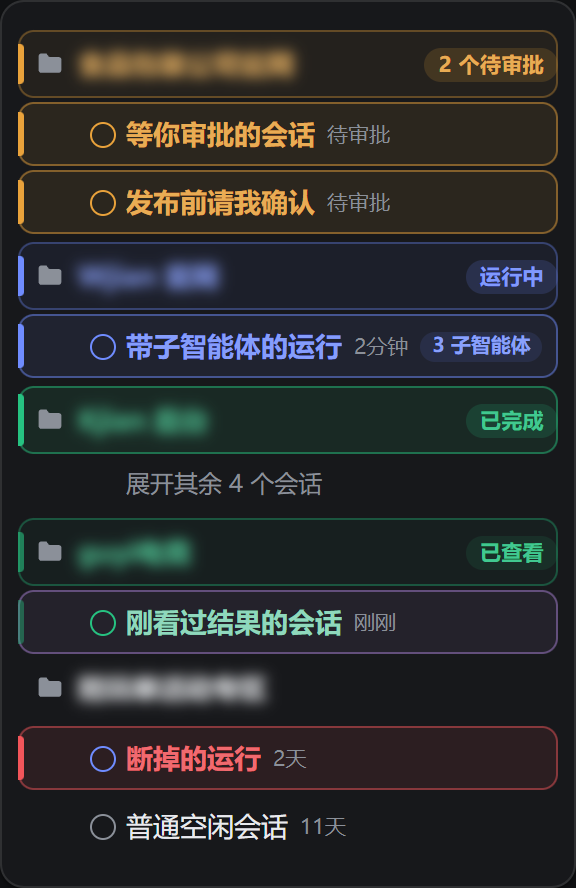
One list, five phases, ranked by urgency: waiting (amber) first, then running (blue, carrying its subagent chip), then finished-unread (green), then seen — the selected row, in the plugin's own violet — and last a run that went quiet (red), marked but deliberately not promoted. The green workspace is holding four sessions behind the official overflow row: the row that reported the completion is no longer on screen, and the header still names the state and still holds its place. Every bar, tint, ring, badge and chip here is the plugin's own CSS, driven by its own paint() over real data-state values. The list contents are a fixture and the workspace names are blurred, because a sidebar's real contents are per-installation; regenerate with node scripts/capture-screenshots.mjs.
If you run more than one agent at a time, the dsh sidebar becomes a wall of look-alike rows. Every workspace header renders identically, every session row renders identically, and the only signal that something is running is a ten-pixel dot you have to hunt for.
The result is a set of real, recurring failures:
| What happens | What it costs you |
|---|---|
| You cannot tell which workspace has an agent mid-task | You open workspaces one by one to check, or you interrupt a session that was already working |
| Busy workspaces drift down the list as you touch others | The thing you actually care about is the thing you have to scroll to find |
| A session finishes and nothing tells you | You wait on a task that already ended, or you miss the moment to review its output |
| The status dot is the only cue, and it is tiny, grey, and low-contrast | You cannot read the sidebar from a step back or on a small display |
Existing themes and skins restyle the whole interface but none of them answer the one question that matters during parallel work: which one is running right now?
It answers two different questions: what is moving right now, and where did the thing I started go. Conflating them is what produced the worst defect in its earlier versions — see "a completion stays findable" below.
Workspaces holding an active session rise to the top of the list, sorted by urgency: waiting on you first, then running, then unopened completions, then ones you have already read. With three workspaces in flight, the first one is always the one blocked on you.
The move is presentational only — your manually dragged workspace order is never rewritten, so when the work stops the list quietly returns to the order you set.
Each session row is coloured by its attention phase, and every colour is the exact token that row's own status dot paints itself with, so a row and its dot can never disagree:
| Phase | Entered when | Colour | Promoted |
|---|---|---|---|
| Waiting | warning: your approval, plan review, or answer | amber | yes, first |
| Running | ongoing, recently active | blue | yes |
| Finished (unread) | done: it finished and you have not opened it | green | yes, held 8 hours |
| Seen | you opened it and read the result | green, faded | yes, while selected, then 15 minutes |
| Interrupted | claims running, silent for over 6 hours | red | no, marked only |
Each marked row gets a solid 3px bar on its leading edge, a tinted surface and ring in the same family, and a weighted, coloured title. Only a live run moves; every other phase is still, because a throbbing red row reads as an alarm rather than a report.
The three "waiting on you" kinds share one amber. They are all the same situation — blocked on the user — and splitting them into three hues would only make the palette something to re-learn. They are told apart by word: the badge shows the official 待审批 / 计划待审 / 待回答 (or Approval / Plan review / Answer) rather than a vague "needs you". Likewise, subagents are not a colour but a count: the Harness renders "3 subagents running" as a hidden label, and the plugin turns it into a small chip on the running row.
The official done means completionUnread — finished, and you have not opened it — and that flag clears the instant you open the session. Read naively, that produces an absurd result: the moment you click the row to read the result, it disappears from the promoted band. The row you are reading jumps away.
So the plugin's rule is: promotion decays, it does not snap.
A reload does not lose it. None of this needs persisting: the Harness already stores whether you looked. After a reload a still-unopened completion is still done and is held by age, and one you opened is idle and stays quiet.
When a session stops running, its row plays one short green settle pulse and then returns to normal. You learn that a task completed without watching it.
The same stylesheet on the default dark theme. Nothing is restated for it and nothing has to be kept in sync, because the plugin defines no colours of its own.
Every colour is read from the active theme's own --dsw-alias-* / --dsw-static-* tokens. Nothing is hardcoded, which means one stylesheet works across the built-in light and dark themes and across community theme packs (Catppuccin, Nord, Dracula, Tokyo Night, Gruvbox, and any other theme that defines the standard token set).
| Role | Token |
|---|---|
Running (the ongoing dot's colour) | --dsw-static-deepseek-450 |
Waiting (the warning dot's colour) | --dsw-alias-state-warn-primary |
Finished / seen (the done dot's colour) | --dsw-alias-state-success-primary |
| Interrupted | --dsw-alias-state-error-primary |
| Selected (its own fifth hue, a violet) | mixed from --bw-running and --bw-interrupted |
| Row title | --dsw-alias-label-primary |
Each phase declares --bw-tone once and every other rule is written against that variable, so the five status weights cannot drift apart. Sharing the dot's tokens is also what keeps the plugin inside the theme's own vocabulary: a theme that retunes a dot retunes the matching highlight with it.
The seen phase is the same green, with --bw-fade set to 0.42 — it is not another state, it is the same completion on its way out.
Transparency is composed with color-mix() against the theme's own surface, so the tint sits correctly on light and dark backgrounds alike. In the default themes the running token resolves to #5686fe on light and a lighter blue on dark, without the plugin knowing either value.
This is what fixed "the selected row looks like a running row". The selected row used to keep the official 6% neutral surface but still draw its ring in the status colour, while that same status colour also tinted the bar and the title — so a row that was both selected and running was blue in all three channels and read as just another running row.
Selection now has its own hue, and it is handled exactly the way the four statuses are: a saturated colour laid down as a pale tint at the same weight (--bw-fill-alpha), with a ring in the same hue. Only the hue differs. The status keeps the leading bar and the title colour, which is what those two were always for:
| Row | Surface | Ring | Leading bar |
|---|---|---|---|
| Running · selected | violet 9.6% | violet | blue |
| Running · not selected | blue 9.6% | blue | blue |
| Idle · selected | violet 9.6% | violet | none |
Selection therefore looks the same whatever the row underneath is doing — running, waiting, finished or plain. Measured: selection resolves to rgb(126,92,187) (a violet), at a distance of 84 from running rgb(77,107,254), 191 from waiting, 163 from finished and 157 from interrupted.
Why a mixed violet? Because the Harness palette has exactly six hue families (amber, blue, deepseek, green, neutral, red), the four statuses already occupy four, and there is no fifth hue to take; --dsw-alias-brand-primary resolves to near-black or near-white, not to a hue. So selection is mixed from two of the theme's own bright tokens (the running blue and the failure red, at roughly 2:1), which lands it on a violet that is by construction none of the four status hues while still following the theme instead of pinning a literal.
To use a different hue, override the two variables — no rule needs to change:
--bw-selection: #d946a8;              /* any hue you like */
--bw-selection-ring: color-mix(in srgb, var(--bw-selection) 52%, transparent);
If the selected row should be louder, raise the 100% multiplier on --bw-fill-alpha in the selection rules; the default deliberately matches the status weight so it cannot out-shout a status.
The fill is deliberately only a backing: the signal is carried by things that have a shape — the 3px solid bar, and the header badge that names the state in words. An earlier version expressed "running" mostly as a blue title, but the official row title is already blue, so that signal did not exist.
dsh plugin --profile web add dsh-plugin-busy-workspace
That is the whole command. It is published on npm, and no build step runs —
lib/ ships built, there are no runtime dependencies, and the only official
package involved is a peer the profile already provides.
Prefer not to go through npm? The same package installs from the repository or from the prebuilt tarball on the release page:
dsh plugin --profile web add github:baifagg/dsh-plugin-busy-workspace
dsh plugin --profile web add https://github.com/baifagg/dsh-plugin-busy-workspace/releases/latest/download/dsh-plugin-busy-workspace.tgz
Either way the bundle has to be listed in that profile's package.json:
{
  "dsh": {
    "profile": {
      "bundles": [
        "...",
        "dsh-plugin-busy-workspace"
      ]
    }
  }
}
dsh plugin add does this for you; if you installed by hand with pnpm add,
edit the list yourself. Then restart the Web GUI and reload the page — the
sidebar picks it up with no further configuration.
Before it imports the plugin, the harness checks the declared harness range (see Compatibility). A version it refuses is skipped and reported; it is never partially loaded.
Settings persist at $DSH_HOME/busy-workspace/settings.json and are served over GET /busy-workspace/api/settings.
{
  "pinBusyWorkspaces": true,
  "highlightRunningSessions": true,
  "highlightBusyWorkspaceHeaders": true,
  "notifyOnCompletion": true,
  "intensity": 0.6
}
| Field | Default | Effect |
|---|---|---|
pinBusyWorkspaces | true | Promote workspaces with an active session, in order of urgency |
highlightRunningSessions | true | Draw the matching bar, tint, and coloured title on a row in any phase |
highlightBusyWorkspaceHeaders | true | Give the header of an active workspace its family's tint, bar, and state badge |
notifyOnCompletion | true | Play the settle pulse when a session stops running |
intensity | 0.6 | Accent strength, 0–1. Scales alpha only; hue always comes from the theme |
unreadHoldMinutes | 480 | How long an unopened completion stays promoted (8 hours). Range 0–10080 |
seenHoldMinutes | 15 | How long a completion stays promoted after you open it and move on. Range 0–1440 |
staleRunMinutes | 360 | Silence after which a run that claims to be running is read as interrupted. Range 30–10080 |
The last three are the retention policy, exposed as settings rather than constants because they encode a working rhythm, not a fact. Set them to 0 and completions leave no trace at all; set unreadHoldMinutes to 10080 and they stay for a week.
The Host half is optional. A composition carrying only the client bundle keeps these defaults, which is a fully working configuration.
The plugin reads data-state from the status dot the Harness already renders on every session row. That attribute is the official contract and carries exactly four values, straight from the Harness's own sessionStatuses / sessionNode derivation and in its own priority order: warning (waiting on you, outranking everything) → ongoing (running) → done (completed, unread) → idle.
Those four states cannot express "I came back for the result", so the plugin keeps its own attention phase on top of them. The only extra information is whether the user has acknowledged the row, and whether the user is currently sitting on it — and neither needs persisting, because the Harness already stores the acknowledgement.
The transitions, which are the whole of assess():
warning → waiting; never age-gated, because it is blocking.ongoing and younger than staleRunMinutes → running; otherwise interrupted (marked red, not promoted).done and younger than unreadHoldMinutes → finished (unread); older, entirely quiet.done → idle — which is exactly what opening a session does — → seen. While that row is also selected, its dwell clock is restarted on every pass, so reading never loses its place; the seenHoldMinutes countdown only begins once the user moves on.Three selector details are load-bearing:
sidebar.session.row.leading seat contributed by another plugin, so the lookup requires the primitive's aria-hidden marker and restricts the value to the four session states. Without that, a foreign element carrying a data-state (the installer's error mark, say) can be misread as the session's status. A session row itself never carries error.子智能体 / subagent(s)), so the chip is localized by construction rather than by the plugin shipping translations.Promotion uses CSS order on a flex list column. The official list is a plain block scroller, so the plugin first marks the parent element of the workspace groups and lets CSS turn that into a flex column; reordering nodes directly would fight React, whereas an order value is a purely presentational hint the renderer never reads back. Ranking rides the same mechanism: groups tagged data-busy-rank 4/3/2/1 receive order: -4/-3/-2/-1, so the most urgent is always first. A list with nothing promoted is left untouched.
A header outlives the rows it speaks for. The official list keeps five idle sessions on screen per workspace and holds the rest behind an overflow row, so a session that finished while you were away can be one of the held ones — and then no visible row can say the workspace is worth opening. Two things cover that:
data-busy-held, and its header stops being a summary: it takes the same fill, the same ring and the same bar weight a marked session row uses, because it is no longer standing in front of anything the user can see. The colour moves onto the folder glyph too, which is the one shape on the row that is not text. A collapsed sub-workspace tree — the official row is a treeitem and sets aria-expanded itself — is treated the same way, for the same reason.workspace:<id> row key, on the same unreadHoldMinutes clock an unread completion is held for, so a completion that arrived while its row was still visible is still announced after the row is taken away. Nothing is invented: a workspace that never reported a phase keeps none, and one that leaves the list takes its memory with it.Interrupted (red) is a derived state. No session-row field reports a failure, so the plugin reads "the dot still says ongoing but the last activity is older than staleRunMinutes" as a run that died, and draws it red rather than continuing to claim it is live. Such a row does not promote its workspace either, so the list never reorders itself for a stale mark from days ago.
Motion respects prefers-reduced-motion: users who ask for less motion keep every state indication and lose only the movement.
npm test runs 59 checks over both halves with no browser and no Harness: settings normalisation on the Host side (including the ranges of the three new durations), the module/selector/styling/runtime contracts on the client side, and the attention model's behaviour.
The strongest group is behavioural: the checks lift the real bodies of assess / ageOf / subagentsOf and friends out of lib/client.js by brace matching, evaluate them, and feed them mutable synthetic rows (a status dot, a relative-time label, a selection, a hidden subagent label) — then walk a row through its whole lifecycle the way a user would. Those assert:
done → idle yields the seen phase rather than disappearing) — the core of this fix;rank = 0 (not promoted), while 5 hours is still running;3mo is never read as minutes;待审批 / Approval);3 子智能体 / 2 subagents);data-state="error" / "failed" is not read as a session state.The checks are not vacuous: mutating the fix away (deleting the done → idle branch) makes exactly those 4 retention checks fail while the other 55 still pass — so they are pinned to the behaviour, not to a restatement of it.
The styling checks assert the invariants stated above — no bare hex outside a token fallback, no border on a marked row, selection drawn from its own family and never from a status tone, motion bound to the running phase alone, reduced motion keeping the states, all five status weights taken from the dot's own tokens, the full set of rank order rules, the badge counting only the phase it names, and the list container not depending on role="tree".
Finally the real paint() runs against a real DOM: six workspaces are laid out in the reverse of their urgency order, two paint passes run (the second after flipping a row from done to idle and selecting it, i.e. simulating the user opening the result), and the result is read back — the rendered order is waiting (-4) → running (-3) → unread (-2) → seen (-1) → the two rank-0 groups keeping DOM order; the seen row's bar measures opacity 0.42 at rgb(18,183,106); the "3 子智能体" chip resolves from the official hidden label; a stale completion's bar and surface are fully transparent; and every row is still 32px tall.
The client half is also exercised in a real Web GUI: the module is loaded through the official __ModuleLoader__ contract, apply() runs against a stub context, and the observer is driven with real data-state="ongoing" → "done" transitions, asserting that the workspace mark, the row mark, and the settle mark are set and cleared in that order. A 200px-wide sidebar is used as a pressure test to confirm the title plus badge do not overflow.
DeepSeek Harness gates a plugin itself, and it does so through
peerDependencies, not through engines.dsh: before importing a plugin it
compares every @deepseek-ai/dsh / @deepseek-ai/dsh-* peer against the running
runtime version with semver.satisfies(range, { includePrerelease: true }). A
plugin that declares no such peer is not checked at all. So this one declares
one, spelled as one branch per release line so that the harness's own check and a
plain semver evaluator agree:
>=0.1.5-rc.1 <0.1.6-0 || >=0.1.6-alpha.1 <0.1.7-0 || >=0.1.7-alpha.1 <0.2.0-0
  || >=0.2.0-alpha.1 <0.2.1-0 || >=0.2.1-alpha.1 <0.3.0-0
| Harness | 0.1.5-rc.1 and later, below 0.3.0 — every release line from 0.1.5 to 0.2.1 is declared. 0.1.0–0.1.4 and 0.3.0+ are refused, loudly, with the profile's skippedBundles entry and the dsh plugin allow-version … command to override it deliberately |
| Enforced from | 0.1.7-rc.1 — earlier builds contain no compatibility check at all, so there the declared range is a statement rather than a gate |
| Verified end-to-end | 0.2.0-rc.2 — loaded and observed in a real Web GUI, both halves byte-identical to this tree |
| Contract-inspected | the status dot's data-state and all seven theme tokens are present in 0.1.5-rc.1, so the floor is a real contract floor and not a guess |
| Verified offline | every declared line — npm test needs neither harness nor browser |
| Declared, not yet exercised live | 0.1.5-rc.*, 0.1.6-alpha.*, 0.1.7-alpha.* / -rc.*, 0.2.0-rc.1, 0.2.1-alpha.* |
| Surface | Web GUI sidebar (sidebar.workspaces) |
| Themes | Any theme defining the standard --dsw-alias-* tokens |
| Conflicts | None known. The plugin owns one style element and one settings file, reads no other plugin's state, and registers no UI seat |
The full mechanism, the contract-by-contract dependency table, what each evidence level does and does not prove, and the procedure for adding a release line are in docs/COMPATIBILITY.md (中文).
If a harness release changes one of the DOM contracts above, the failure mode is
silence rather than breakage — the sidebar simply looks stock. The plugin writes
only its own data-busy-* attributes on existing nodes, never adds, removes or
reorders them, and contains a failed paint pass instead of propagating it.
See CHANGELOG.md. Version 1.1.0 is the revision that replaced the single "busy" state with the five attention phases and the retention policy; 1.0.0 w
侧边栏多列任务看板:卡片交给真实 DSH 智能体会话执行,支持 cron 定时(Host 侧到点执行,关浏览器也生效)。
DSH Web UI 插件与皮肤合集:任务看板、git 图、右侧面板、远程移动端 UI、桌宠、实时 token 统计与皮肤中心。
助手回复内渲染交互式 UI 组件:布局、图表、表单、测验、mermaid、3D 场景与回传事件循环。
