
dsh-web
zhu1090093659/dsh-webDeepSeek Harness(DSH)Web 插件聚合生态包 · 一切皆插件,创意工坊分发(dsh-market.com)

Previous/next session navigation for the DeepSeek Harness UI
Move between DeepSeek Harness sessions with a keystroke.
DeepSeek Harness ships commands for New, Search, Rename, Fork and Archive session, but nothing for "next/previous session". This plugin adds two ordinary configurable commands that walk the session list.
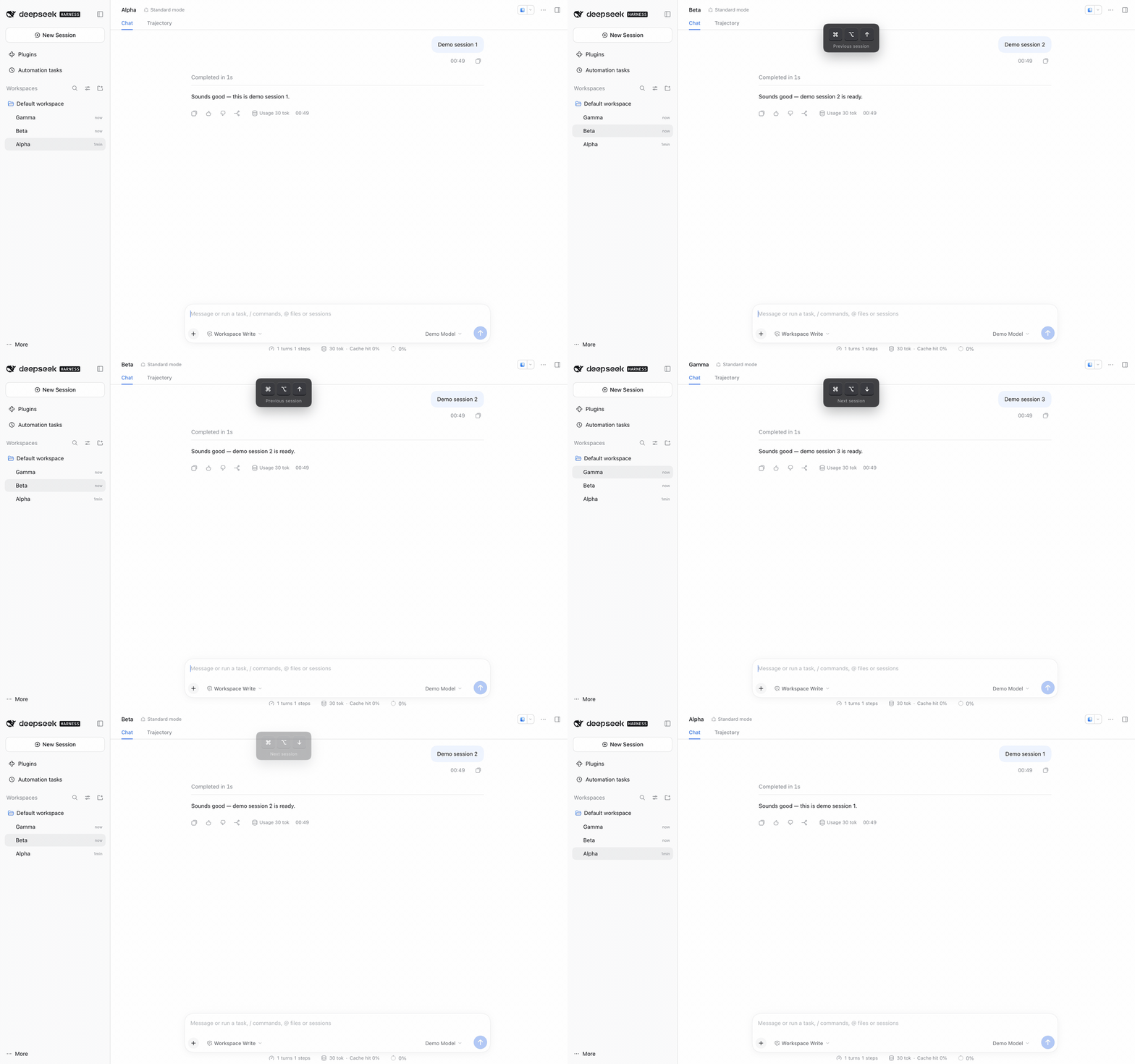
Recorded in a browser tab, where the defaults are ⌘⌥↑ / ⌘⌥↓. In the desktop
app the same commands default to ⌥↑ / ⌥↓.
⌘/ shortcut reference and can be
rebound there like any built-in command.| Platform | Previous | Next |
|---|---|---|
| macOS desktop | ⌥↑ | ⌥↓ |
| Windows desktop | Alt+↑ | Alt+↓ |
| macOS browser tab | ⌘⌥↑ | ⌘⌥↓ |
| Windows browser tab | unbound | unbound |
Plain Option/Alt chords are on the Web reserved list, so macOS browser tabs use
the primary chord instead. Windows browser tabs stay unbound because
Ctrl+Alt+Arrow is claimed by some display drivers; bind any allowed
combination under ⌘/.
Requires DeepSeek Harness with a profile you can add plugins to. The desktop
profile is managed by the Electron app, so use the Desktop-installed dsh
command for it.
Add the package to the profile:
dsh plugin --profile desktop add "github:baggiponte/dsh-session-nav"
From a local clone, link it instead:
dsh plugin --profile desktop add "link:$PWD"
Register the plugin row in the profile's cordis.patch.yml
(~/.dsh/profiles/desktop/cordis.patch.yml):
- insert:
    - id: session-nav
      name: "dsh-session-nav"
Reload the app page (⌘R) or restart the app.
For a web profile, substitute --profile web and edit
~/.dsh/profiles/web/cordis.patch.yml.
The package has no build step: lib/client.js is the browser bundle the Client
Module Loader serves, and lib/index.js is the empty Host companion the Loader
needs to compose the row.
⌘/ → search "session" → click a row and record a new combination.
Clearing it keeps the command and leaves it unbound.REGIONS in lib/client.js to ["page"].neighbour() in lib/client.js.The bundle is a client-side DSH plugin. It registers two commands through
ctx.shortcuts.register(); when one fires it resolves the target session from
the sidebar rows (data-row-key="session:…", falling back to the session
controller ordered by updatedAt) and opens it with
uiWorkspace.openSession().
No host services, no React, no build tooling.
node --test
The tests load the real bundle through a fake __ModuleLoader__ and exercise
registration, ordering, fallback, wrapping, archived filtering, and the
region/modal guards.
MIT
DeepSeek Harness(DSH)Web 插件聚合生态包 · 一切皆插件,创意工坊分发(dsh-market.com)
把回答做成一页可视化 HTML:模型只写简短的 Markdown 草稿,随包附带的 `am` 命令行生成页面,支持流程图、时序图、树、时间线、ER 图、表格和提示框。
在 dsh 里装上这个插件即可,无需登录、注册或填 API Key,就能使用包括 Muse Spark 1.3、MiMo V2.6 在内的前沿模型——完全免费,不限量。 All you do is install this plugin in dsh: no login, no sign-up, no API key — the frontier models are just there, Muse Spark 1.3 and MiMo V2.6 among them. Completely free, with no usage cap.

