
dsh-web
zhu1090093659/dsh-webDeepSeek Harness(DSH)Web 插件聚合生态包 · 一切皆插件,创意工坊分发(dsh-market.com)

Visual annotation plugin for DeepSeek Harness: select elements in local app previews and send structured UI feedback to your agent.
dsh-annotate adds a visual review panel to DeepSeek Harness Desktop and its web client.
Open a local app, click the elements you want changed, leave notes, and send the
whole review to your conversation as structured text.
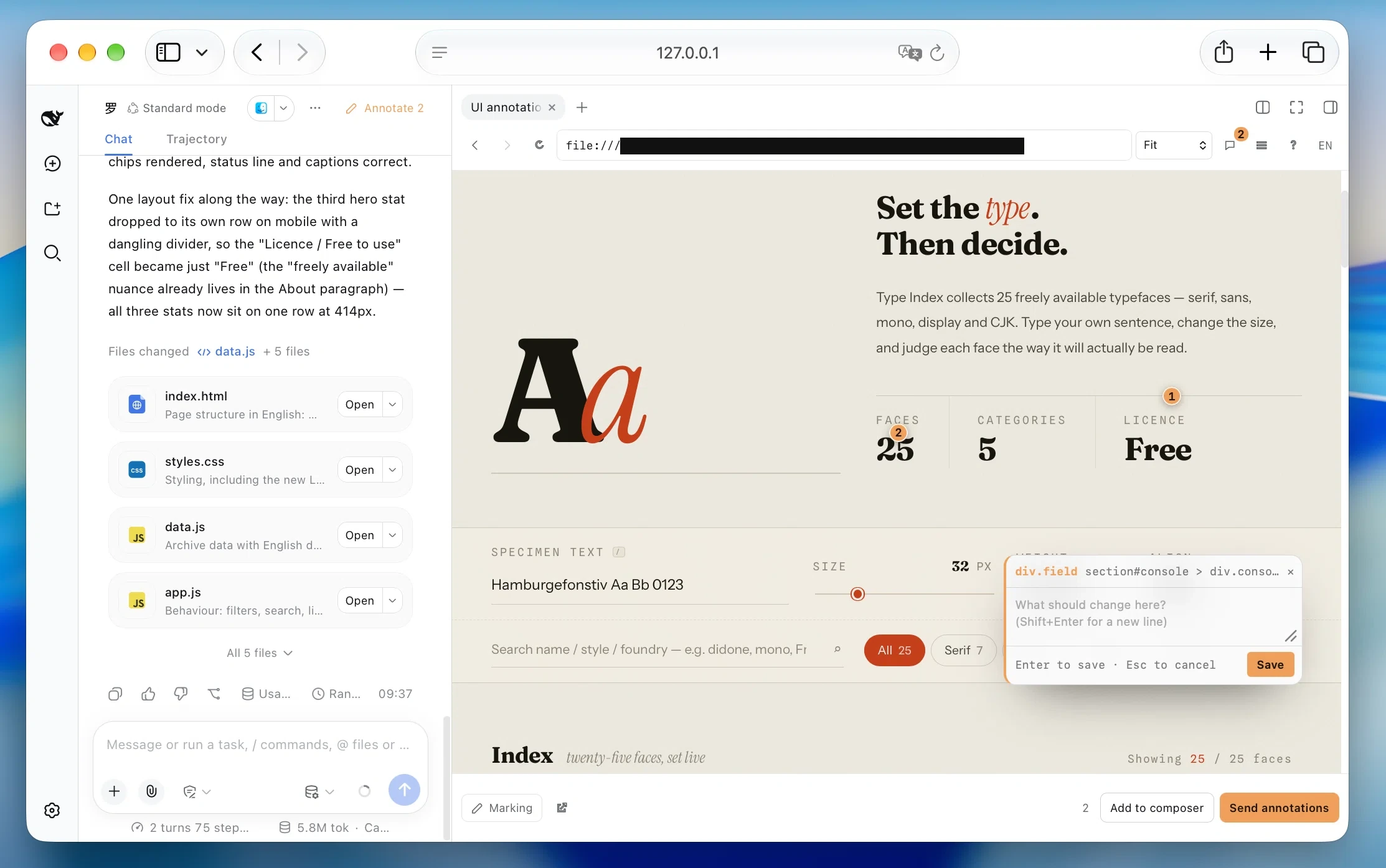
⌘/Ctrl ⇧ B → choose a local app → Mark → click → comment → send
Give a coding agent this prompt:
Read https://github.com/alaliqing/dsh-annotate and install dsh-annotate into the current local Harness profile following its README. Preserve existing configuration and keep the current task running. Report the installed version and explain how to restart after the task finishes.
The commands below install 0.1.15 and can also upgrade an existing install.
Open Desktop once to initialize its profile. It can stay open during installation.
Use its bundled CLI; with the app installed in /Applications:
"/Applications/DeepSeek Harness.app/Contents/Resources/runtime/cli/bin/dsh" plugin --profile desktop add dsh-annotate@0.1.15
Adjust the app path if needed. After the current task finishes, fully quit and
reopen Desktop, then click Annotate or press ⌘/Ctrl⇧B.
With the web CLI, Node.js 20+ and pnpm available, run:
dsh plugin --profile web add dsh-annotate@0.1.15
Replace web with your profile name if needed. After the current task finishes,
restart that profile and refresh the browser, then open Annotate.
If installation fails, the panel is missing after restart, or you are upgrading
0.1.2 or earlier, see installation troubleshooting.
See compatibility for tested versions.
index.html — or a built page under
dist/, build/, out/ or public/ — is offered straight from the
workspace and previewed from its own directory.No screenshot is captured. Mark mode adds a temporary crosshair and overlay, while page and container scrolling stays native. By default, the plugin only discovers servers you already run; process control requires an explicitly configured command.
⌘/Ctrl⇧B or choose Annotations from the right sidebar.| Key | Action |
|---|---|
Enter | Save and continue marking |
Shift+Enter | Insert a newline |
Esc | Close the card and leave marking mode; keep actual changes |
⌘/Ctrl + click | Save and send the batch |
Annotations and drafts are stored by Harness conversation and full app URL, so routes restore independently and conversations never share notes.
Rows are ordered by how likely they are to be yours: a service whose process was
started inside the conversation's workspace is tagged This project, a port
the workspace names in package.json or a Vite config is tagged Configured
port, then the common-port order follows. Static pages are listed under their
own heading, and when exactly one candidate exists it opens on its own — a
static page only when no server is running at all.
Page annotations · http://127.0.0.1:5173/settings (1)
1. Disable this until the form changes.
   Element: button#save · “Save changes”
Each batch includes the full app URL once. Notes are never truncated; target labels are capped at 64 characters. Computed styles and component chains stay out of the message. If the selector has zero/multiple matches, is invalid or has no recorded match count, the message explicitly asks for verification and adds available semantic, component and geometry hints. No selector is treated as uniquely matched without a captured count of one.
A normal cross-origin iframe does not expose its DOM. Instead of moving the app
onto the Harness origin, dsh-annotate gives each conversation/app pair an
ephemeral loopback origin and injects a small shim and picking overlay.
localhost, 127.0.0.1, and [::1].GET/HEAD only, nothing outside the
workspace, no dotfiles, and a 64 MiB ceiling per file.This is a local development tool, not a browser sandbox. OAuth flows, strict origin allowlists, service workers, restrictive CSP, Shadow DOM internals, cross-origin child frames, and individual canvas objects may need a normal browser or app-specific setup. The full cookie model has only been validated in Chromium.
- id: dsh-annotate
  config:
    detect:
      extraPorts: [4321]
      probeTimeoutMs: 900
      cacheMs: 2000
      staticPorts: false
      staticFiles: false
For 0.1.3 and later, put this override in your active profile's
cordis.patch.yml ($DSH_HOME/profiles/<profile>/cordis.patch.yml, with
DSH_HOME defaulting to ~/.dsh); the bundle supplies the plugin row.
detect.staticPorts: false stops probing the common-port list and leaves only
real listeners; detect.staticFiles: false stops offering the workspace's own
HTML pages. detect.extraPorts adds ports people run on by habit.
The repository also includes dsh-app-bridge
for the narrower case where an app must be mounted at a fixed path on the
Harness origin. It is a reverse proxy, not an annotation UI.
npm ci
npx playwright install chromium
npm run check
npm test
To use an unreleased checkout, install it through dsh plugin so the bundle is
selected in the web profile:
git clone https://github.com/alaliqing/dsh-annotate.git
dsh plugin --profile web add "link:/absolute/path/to/dsh-annotate/packages/dsh-annotate"
The default tests drive the real built client, shim, and overlay in Chromium
against a Harness fixture; no model is called. npm run test:harness separately
checks a packed install in a real, isolated Harness with a local model fixture.
Generated files under packages/dsh-annotate/lib/ are committed and must stay in
sync with their sources.
See CONTRIBUTING.md for repository conventions and SECURITY.md for private vulnerability reporting.
MIT, with third-party attribution in NOTICE.
Independent community plugin; not affiliated with or endorsed by DeepSeek.
DeepSeek Harness(DSH)Web 插件聚合生态包 · 一切皆插件,创意工坊分发(dsh-market.com)
把回答做成一页可视化 HTML:模型只写简短的 Markdown 草稿,随包附带的 `am` 命令行生成页面,支持流程图、时序图、树、时间线、ER 图、表格和提示框。
在 dsh 里装上这个插件即可,无需登录、注册或填 API Key,就能使用包括 Muse Spark 1.3、MiMo V2.6 在内的前沿模型——完全免费,不限量。 All you do is install this plugin in dsh: no login, no sign-up, no API key — the frontier models are just there, Muse Spark 1.3 and MiMo V2.6 among them. Completely free, with no usage cap.

